Welcome Guest ( Log In | Register )

Outline · [ Standard ] · Linear+

 AMD Ryzen /Threadripper OverClocking V1.1, big or small, share your results here...

views
     
yimingwuzere
post Jan 18 2021, 08:26 AM

Enthusiast
*****
Senior Member
990 posts

Joined: Sep 2005
From: Bolehland


Is there any AGESA version requirement to push RAM above 3733?

Using an Asrock Phantom Gaming ITX + 5800X on the latest BIOS, I can get relatively low timings on 3733 but the board always fails to POST at 3800. Doubt it's the RAM sticks as I'm using Crucial Ballistix 3200C16, these should be able to handle anything on Ryzen at 1:1 with IF clock.

This post has been edited by yimingwuzere: Jan 18 2021, 08:27 AM
yimingwuzere
post Jan 21 2021, 07:26 PM

Enthusiast
*****
Senior Member
990 posts

Joined: Sep 2005
From: Bolehland


QUOTE(nrw @ Jan 21 2021, 06:21 PM)
Ah you'd have better asked in AMD Ryzen. Didn't see this here.

Try the latest Beta BIOS and the latest 'final release'.

Lets say you don't touch ram and let it default to 2667/2400 will the PC boot with IF set to 1900?

Basically there could be a few things you could try to do.

You could try different VSoC voltages between 1.075 and 1.125V.
Then since you have an 5800x you'd want to set VDDG CCD to something between 0.950 and 0.975V (if you have 2 ccd's can try adding another 0.05 to the max end but that's irrelevant for your 5800x)
VDDG IOD you'll have to set to 0.950-0.975V (sometimes up to 1.050V can work as a failsave or if ram got a2/b2 pcb (which you do not))
VDDP (unrelated to IF as this is the physical layer from IOD to DDR) should work at 0.900V. Don't set this too high. You can try to adjust this +-0.015 but usually thats not necessary at these RAM speeds.
*
Haven't tried booting with RAM at 2666 JEDEC specs with IF at 1900.

I did try several attempts with the following voltages and very loose timings on 3800:
Vsoc 1.12V
VDDP 1.05V
CCD + IOD 1.05V

Only once did it manage to "boot" into Windows, and crashed shortly after.

3733 so far worked on 1.35V DRAM, 0.9 VDDP, 0.95V CCD+IOD - haven't tried running with lower voltages yet.

Edit: left RAM at 2666 JEDEC specs and tried booting with 1900 IF clock - that worked! Going to try and push RAM to that speeds now.

This post has been edited by yimingwuzere: Jan 21 2021, 07:41 PM
yimingwuzere
post Jan 21 2021, 09:27 PM

Enthusiast
*****
Senior Member
990 posts

Joined: Sep 2005
From: Bolehland


QUOTE(nrw @ Jan 21 2021, 08:00 PM)
make sure work out the voltages you need for your IF to do 1900 stable first.
after that you do ram.

perhaps you didn't set procotd, rtt's, cad's last time? could be the board setting something wrong there on default

ProcODT 32-36.9 should be your range, 32 will do for 99%.
RTT's (nom, wr, park) are 0,0,5 for 2*8GB and 0,3,1 for 2*16GB (with higher frequencies you might wanna try 7,3,1 or 5,3,1 as well.
CAD's all four to 24 (for 0,0,5 or 0,3,1 respectively)... E-Dies are super simple with that.
*
I remembered setting for all these values. Weirdly had stability issues booting Windows then.

I've gonna try Ryzen DRAM Calculator safe 3800 values and tightening voltages down from there.

Edit: results so far.

3733 RAM CL16 @ 1.35V + 1866 IF Clock - passes TM5 anta777 extreme config
2666 RAM + 1900 IF Clock - passes TM5 anta config
2666 RAM + 1933 IF Clock - fails to POST
3800 RAM with DRAM Calc safe timings + 1900 IF Clock - crashes half the time when Windows boots, or reboots shortly after starting TM5
3800 RAM with DRAM Calc safe timings for bad bins + 1900 IF Clock - same as above
3800 RAM with DRAM Calc safe timings for bad bins + 1800 IF Clock - passes TM5 anta config
3800 RAM with DRAM Calc safe timings for bad bins + 1866 IF Clock - passes TM5 anta config

This post has been edited by yimingwuzere: Jan 22 2021, 08:39 AM

yimingwuzere
post Jan 21 2021, 09:30 PM

Enthusiast
*****
Senior Member
990 posts

Joined: Sep 2005
From: Bolehland


QUOTE(nyunyu @ Jan 21 2021, 08:06 PM)
Is it okay to ask if anyone overclock their XLR8 Gaming EPIC-X RGB DDR4 3200MHz? Would love to see your settings.
*
What RAM dies does your RAM kit use, as reported by the Thaiphoon Burner program?
yimingwuzere
post Jan 22 2021, 08:38 AM

Enthusiast
*****
Senior Member
990 posts

Joined: Sep 2005
From: Bolehland


QUOTE(nyunyu @ Jan 22 2021, 04:00 AM)
Its micron memory
*
Try using the safe 3733 values in Ryzen DRAM Calculator for Micron revE, if that works maybe shoot for 3800, then tighten timings and reduce voltages.
yimingwuzere
post Jan 22 2021, 02:08 PM

Enthusiast
*****
Senior Member
990 posts

Joined: Sep 2005
From: Bolehland


QUOTE(nrw @ Jan 22 2021, 10:07 AM)
yimingwuzere
If 3800 ram is working with a lower IF then the problem is not the ram.

So you'd have to see if you can tweak voltages as above so you hit the sweet spot and it might start working.

But tbh... at the rate they release new BIOS' (and each of them can change the voltage required theoretically, happened with zen2 quite a bit) ... just run 3733 1:1:1 call it a day and update BIOS mid 2021 n try again then.

Differences super marginal anyways.
*
I've tried the max values for voltages suggested by Ryzen DRAM Calculator:
Vsoc 1.12V (my mobo won't accept 1.125V)
VDDP 1.05V
CCD + IOD 1.05V

Yup I know the differences is marginal and timings will influence gaming results more anyway, but doesn't hurt to try going for RAM testing - far easier than finding the sweet spot with PBO curve optimizer at a per-core basis.

Speaking of PBO Curve Optimizer, what would be the most reliable way to run a stability test for each core? Cinebench seems to be able to root out errors faster than Prime95 for me if it's very unstable, but Prime95 can cause per-core failures or system restarts after 12+ hours running when it passes an hour of Cinebench MT testing. Cinebench doesn't play well with 1T benchmarks and Core Affinity either.
yimingwuzere
post Jan 22 2021, 03:44 PM

Enthusiast
*****
Senior Member
990 posts

Joined: Sep 2005
From: Bolehland


QUOTE(nrw @ Jan 22 2021, 02:31 PM)
You should really not put too much trust into the ryzen timing'calc'.
It's not a real calculator as such and hence most of the values proposed are quite shitty.

I think I have described that part up there well enough.
More than often less voltage is better for stability.

You will always have a window where everything will be working smooth.
And based on alot variables this can be large, small or simply non existent.
*
Oh I know that calc is only good as a starting point and not the end goal - voltages definitely need to be dropped a bit lower than the suggested values there since it's rather lax, and timings can be tightened further.

Only things I haven't tried yet is adjusting RTTs and CADs - so far only tried 0/3/1 RTT and 60/20/20/24 + all 24 respectively. Will do that once I'm done with work for today.

Edit: 3800 still no dice with coupled IF/uncore/DRAM after tweaking procODT/RTT/DrvStr. What's the likelihood of this being a BIOS issue vs a CPU issue?

This post has been edited by yimingwuzere: Jan 23 2021, 06:32 PM
yimingwuzere
post Jan 31 2021, 12:43 PM

Enthusiast
*****
Senior Member
990 posts

Joined: Sep 2005
From: Bolehland


QUOTE(x800 @ Jan 31 2021, 08:15 AM)
Hi guys,

Just rejoined AMD club after more than a decade lol.

Since I'm on stock cooler, not messing with the cpu freqs, just adjusted the curve optimizer per core. Waiting for my waterblock to arrive hehe

IF wise, I can go only up to 1866Mhz. Tried every VSOC and both VDDG possible ranges and still cant post at 1900Mhz. Prolly have to wait on any new bios updates for my B550i AX.

RAM wise, I'm using 2x16GB of Corsair LPX rev 3.44. Thaiphoon indicated Micron Rev B 16Gb chips and there's no starting point available in the DRAM Calc for the target freq (3733Mhz since my IF can only max at 1866Mhz).

So while keeping the VDIMM at 1.35v, VSOC at 1.1v, both VDDG at 0.95v and VDDP at 0.9v, I did the old skool way. Tighten the each timings to get the lowest possible POST,  MemTest86 1pass to find errors, if get errors than back up one bit, then rinse and repeat for each.

This is what I get, tested via the bootable Memtest86 standard 4 passes.

[attachmentid=10773948]

I guess this good enough? Wondering if I can do something with the resistance stuff (ProcODT & DriveStrengths) to get better primaries, 18-21-17-33 looks weird, but hey it works tongue.gif
*
Your kit looks like single rank, should be marginally easier to clock to 1900.

I managed to get my system to run stable with either 3800 RAM in decoupled mode or 1900 IF clock, but not both together.

My results: https://pictr.com/images/2021/01/29/7egxPj.png
1.36V VDIMM
1.05V VSOC
0.9V VDDP
0.95 VDDG

This post has been edited by yimingwuzere: Jan 31 2021, 12:46 PM
yimingwuzere
post Jan 31 2021, 04:51 PM

Enthusiast
*****
Senior Member
990 posts

Joined: Sep 2005
From: Bolehland


Your 1933fclk results sound exactly like my 1900fclk ones.

I did try 1933 on mine - PC refuses to boot. Going to wait on a new AGESA release for my board to give it another spin - I'm on 1.1.0.0 patch C right now.
yimingwuzere
post Apr 5 2021, 11:50 PM

Enthusiast
*****
Senior Member
990 posts

Joined: Sep 2005
From: Bolehland


What RAM dies does the Klevv Bolt X (not XR) 3200/3600 use? Don't want to end up with AFR/MFR kits if I can, looking for a cheapo option to max out overclocking on Ryzen now that Micron revE dual rank isn't cheap to buy from Amazon anymore.
yimingwuzere
post Apr 7 2021, 12:26 AM

Enthusiast
*****
Senior Member
990 posts

Joined: Sep 2005
From: Bolehland


QUOTE(owikh84 @ Apr 6 2021, 12:12 PM)
Thanks for the links. HWZ seems to imply some 3200 kits can also be AFR/MFR which is what I want to avoid - guess I'll have to target the 3600 kits then.
yimingwuzere
post Aug 9 2021, 04:16 PM

Enthusiast
*****
Senior Member
990 posts

Joined: Sep 2005
From: Bolehland


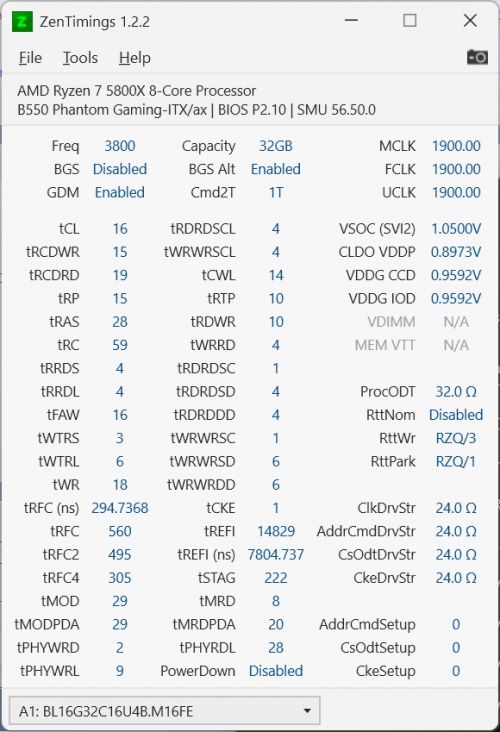
user posted image

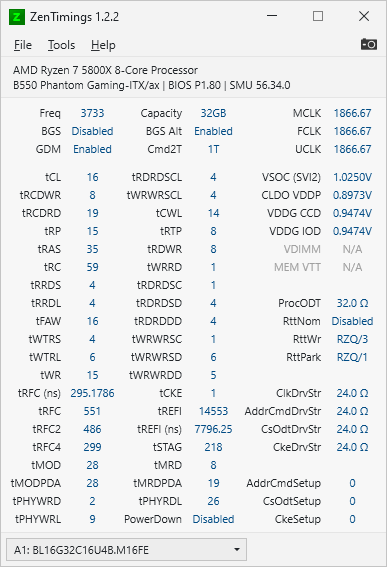
Old OC attempt was stuck at 3733 due to a BIOS issue on the Asrock B550 board I have. I've since updated the BIOS and got these results for 3800. Didn't bother pushing some timings as low as they can go such as tRCDWR.

Old results:
user posted image

Reckon I could push this RAM kit to 4000 at 1:1 MCLK/FCLK without much issue? It's a Crucial 2x16GB DDR4-3200 kit, so it should be dual ranked Micron revE.

This post has been edited by yimingwuzere: Aug 9 2021, 04:24 PM
yimingwuzere
post Aug 19 2021, 01:54 PM

Enthusiast
*****
Senior Member
990 posts

Joined: Sep 2005
From: Bolehland


QUOTE(InFe_eD @ Aug 15 2021, 11:38 PM)
Hi any sifu can recommend me some cheap ram that can be overclocked slightly?
Is there a way to get these samsung micron die in Malaysia?

edit: For ryzen 5 series, looking at 8gb x2, not interested in rgb and bling bling just pure performance thanks
*
Hynix DJR (Klevv Bolt XR would be among the cheapest kits for these, goldfries also tested another cheap DJR kit not too long ago). Only way to get a guaranteed Micron revE is via buying DDR4-3000++ kits from Crucial on Amazon, as far as I'm aware the other kits available here that use revE also mix other RAM dies from different vendors too. Samsung B-die is the best but you'll never find them cheaply.

This post has been edited by yimingwuzere: Aug 19 2021, 01:55 PM


Change to:
| Lo-Fi Version
0.0376sec    0.25    7 queries    GZIP Disabled
Time is now: 3rd December 2025 - 01:30 AM