Welcome Guest ( Log In | Register )

30 Pages « < 19 20 21 22 23 > » Bottom

Outline · [ Standard ] · Linear+

 AMD Ryzen /Threadripper OverClocking V1.1, big or small, share your results here...

views
     
k!nex
post Jul 14 2020, 11:32 PM

Restless stars
*******
Senior Member
3,389 posts

Joined: Mar 2007
From: KL


QUOTE(CAL V @ Jul 9 2020, 06:12 PM)
I tried applying VSoC 1.15v, VDDG 1.05v, VDDP 0.925v. Still doesn't boot.

I did try something I found online to enable LN2 mode under AMD overclocking, and then go back to set 1900 FCLK in bios, everything else auto including ram. It did boot into Windows after some struggle, but in Windows, the fabric clock was fluctuating at around 1200 FCLK only. Unfortunately the guy only mentioned good luck stabilising FCLK from there and nothing else  doh.gif

Maybe I'll just go back and play with 1867 (3733), it was spitting error at 3733 16-16-16-32 @ 1.42v, maybe I'll try bumping up the voltage little by little. Dram calculator suggested up to 1.48v  sweat.gif
*
Dont put vSoC at 1.15V. You put 1.1V also good enough already. You might need to up your VDDP to 1V . Dont use that LN2 mode.
In your BIOS, there is 1 option call UCLK DIV1 MODE, you set UCLK==MEMCLK .
FCLK put 1900Mhz. RAM set to 3800Mhz , but you need to loosen your timings or up your VDIMM. From my experience , if you wanna do CL14 at 3800Mhz with a Samsung B-die, you need 1.5VDIMM and enable GearDownMode. And TRCD I cannot make it fully stable at 14 neither, I can do 15 only for 100% stable.
I think you are overly conservative with your memory voltage.

This post has been edited by k!nex: Jul 14 2020, 11:40 PM
k!nex
post Jul 14 2020, 11:49 PM

Restless stars
*******
Senior Member
3,389 posts

Joined: Mar 2007
From: KL


QUOTE(sHawTY @ Jul 14 2020, 09:29 PM)
Guys, need your help. I just bought G.Skill Trident Z Royal 3600MHz C18 16GB (2x8GB) kits (2 kits for a total of 32GB) and using it with Threadripper 2950x
Unfortunately I can never get it to run stable with the XMP profile, games always crashes

I don't OC my CPU as I'm not an overclocker just want to run everything at stock speed
Definitely not RAM issue because if I install it on my other system with Ryzen 2600X, everything runs just fine

The RAM kits: F4-3600C18D-16GTRG
https://www.gskill.com/product/165/299/1552...35V16GB-(2x8GB)

My motherboard is ASRock Fatal1ty X399 Professional Gaming running latest BIOS v3.80

Any advise? Do you think if I upgrade to 3950X with X570 motherboard it would run stable on the XMP Profile? Was originally saving my money for Ryzen 5000 + DDR5
*
That is Zen + for you. What do you expect Zen + to clock like Zen 2? No way. That is the Zen + memory controller limitation.
If it even boots at 3200Mhz , you should consider yourself lucky already. And you should have bought a 4 memory stick kit and it is guaranteed to work together. You buy 2 piece , 2 piece like that, sometimes they are not of the same silicon quality. Let me give you an example, I have 2 kits of 4400Mhz CL19 RAM, 1 pair of them can do 1.5V 3800Mhz CL14, another pair needs 1.54V to do the same clocks.

This post has been edited by k!nex: Jul 14 2020, 11:52 PM
nrw
post Jul 15 2020, 09:47 AM

Casual
***
Junior Member
398 posts

Joined: Jul 2014


sHawTY send me a snap of the sticker of the 4 sticks.

It might very well be that you will not be able to use these with the XMP setting.
You have to remember you're on Zen+, those max out way earlier compared to Zen2 based chips when it comes to memory frequencies. And there's great variance. The fact that your 2600x is fine with the kits doesn't mean another 2600x will be. Actually your 2600x is already doing great if it really runs all 4 of them stable.

You might get away with adjusting timings or resistances yourself. If not you'll have to drop to a slightly lower frequency.

nrw
post Jul 15 2020, 10:06 AM

Casual
***
Junior Member
398 posts

Joined: Jul 2014


QUOTE(k!nex @ Jul 14 2020, 11:49 PM)
Let me give you an example, I have 2 kits of 4400Mhz CL19 RAM, 1 pair of them can do 1.5V 3800Mhz CL14, another pair needs 1.54V to do the same clocks.
*
Your point is completely right but your example is flawed tongue.gif

Those 4400 kits have great strengths with tCL & tRFC. That's what they were binned for after all.
But then, they often are quite bad when it comes to ras to cas values and tRP.
So if you clock it to a lower frequency but tighten timings at the same time it's obvious that something like this is going to happen. This could happen to you with a 4 DIMM-Kit as well... because they haven't been binned for 3800C14 (with low ras->cas/tRP) but for 4400C19.

Oh n for if u drop tRCDRD and tRP on your kit a bit you might very well be able to get away with 1.45V or less for 3800C14.


sHawTY
post Jul 15 2020, 11:15 AM

Frequent Reporter
********
All Stars
14,908 posts

Joined: Jul 2005

QUOTE(nrw @ Jul 15 2020, 09:47 AM)
sHawTY send me a snap of the sticker of the 4 sticks.
Will do once I'm back at home
QUOTE(nrw @ Jul 15 2020, 09:47 AM)
You might get away with adjusting timings or resistances yourself. If not you'll have to drop to a slightly lower frequency.
I did, now running at 3200MHz @ 16-17-17-34 though still at 1.35 volt, will try to lower the voltage a little bit later
Didn't do much stress test yesterday. Only benchmark using 3DMark/AC Odyssey/Far Cry 5/Far Cry New Dawn/Red Dead Redemption 2/Shadow of the Tomb Raider/Unigine Superposition/Blender so far so good

I don't need tight timings, just want a stable system. But I did try 3200MHz @ 14-14-14-34 @ 1.35 volt yesterday, cannot boot laugh.gif
CAL V
post Jul 15 2020, 09:09 PM

Getting Started
**
Junior Member
277 posts

Joined: Dec 2011


QUOTE(nrw @ Jul 9 2020, 06:28 PM)
sometimes for voltages and stability more is less wink.gif

Try 1.05-1.1V for SOC.
Try VDDG within ranges of  0.95-1.05V (synced meaning iod & ccd)
Try CLDO VDDP in ranges from 0.855 - 1.05V

Once it boots test stability by running aida64 stress cache and streaming a high resolution video at the same time.

If your usb devices/mouse is jerky that will mostly be down to VDDP/VDDG, if your sound is intermittent or fully crashes that'll be either the two above or vSOC.

Good luck. Pretty often if you are willing to spend some time there, you can find a combination of these 3 voltages that will allow your IF to run stable at a higher frequency that auto settings will allow you to.
*
I tried, still 1900 FCLK is impossible on this R5 3600, guess it just doesn’t like it at all, almost instantaneously goes into 07 post code.

I’m currently playing around with 1867 FCLK and 3733Mhz on ram. Don’t have much time to tighten the timings yet.

QUOTE(k!nex @ Jul 14 2020, 11:32 PM)
Dont put vSoC at 1.15V. You put 1.1V also good enough already. You might need to up your VDDP to 1V . Dont use that LN2 mode.
In your BIOS, there is 1 option call  UCLK DIV1 MODE, you set UCLK==MEMCLK .
FCLK put 1900Mhz. RAM set to 3800Mhz , but you need to loosen your timings or up your VDIMM. From my experience , if you wanna do CL14 at 3800Mhz with a Samsung B-die, you need 1.5VDIMM and enable GearDownMode. And TRCD I cannot make it fully stable at 14 neither, I can do 15 only for 100% stable.
I think you are overly conservative with your memory voltage.
*
I tried your method, still couldn’t boot with 1900 FCLK, this cpu just can’t do it I guess. Will play around at 3733 and hopefully bring it to be stable at C14.
nrw
post Jul 15 2020, 11:18 PM

Casual
***
Junior Member
398 posts

Joined: Jul 2014


//fixed memclk (thanks lolzkalvin) and updated with your tested config CAL V, have a shot!

yellow ones are where you can improve (tRC, tRRDL, and tWTRL will only boost your bandwidth a little, tRFC will boost both latency & bandwidth).
light-green ones are those you already have tighter than my initial suggestion. keep them since they are stable.

note that BGS (BankGroupSwap) should be Enabled for SR DIMMS (2*8GB) and disabled for DR DIMMS (2*16GB)
BGS_Alt will always be the opposite of BGS

This post has been edited by nrw: Jul 17 2020, 11:22 PM
CAL V
post Jul 16 2020, 02:06 AM

Getting Started
**
Junior Member
277 posts

Joined: Dec 2011


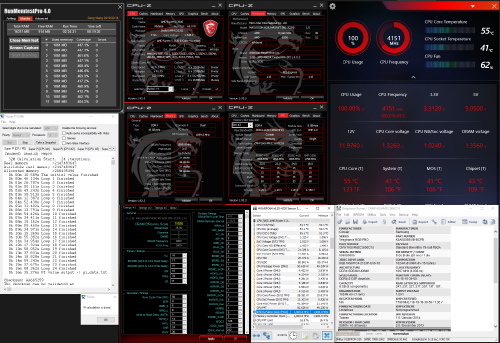
After some tweaking and here's where I am now. HCI memtest 200% stable (late already, I'm going to bed sweat.gif )

MSI X570 Unify | G.Skill Trident Z Neo 3600C16 (B-die) 2x8GB | DDR4-3733 14-15-14-28-1T @ 1.48v | VSOC @ 1.1v | VDDG @ 1.0v | VDDP @ 0.925v
user posted image

Changed to use HCI memtest instead of runmemtest as the version I used just felt a little odd somehow. Per nrw's suggestion before, I could have ran into insufficient memory and caused the memtest coverage to differ significantly. My available system memory in task manager was 14.2GB, running 1200MB*12 memtest definitely blew that.


QUOTE(nrw @ Jul 15 2020, 11:18 PM)
have a shot CAL V
What I got here is somewhat similar to what you have suggested, but I was already running memtest just now. I'll adjust those timings again. 66.3ns is an improvement over 3600C14 last time but still far from good, some got theirs to 61~62ns. Maybe at 1867 fclk instead of 1900 hindered my chance of going that low on latency?

Does clock speed affect the time taken for memtest? Average clock speed was down to 3.8Ghz and temperature got up to 84c. I also tried your method of running aida64 stress cache and playing 4k video on YT simultaneously. The temps spiked to 92c after 2 minutes and kept rising even with 3 SGT1850 blowing full speed at it sweat.gif. Really need to get my custom wc running asap.

This post has been edited by CAL V: Jul 16 2020, 08:37 AM
nrw
post Jul 16 2020, 09:25 AM

Casual
***
Junior Member
398 posts

Joined: Jul 2014


lets start with latency; don't bother too much as those low values you see are done with cpu OC which has a significant impact on latency. a clean system with hardly any background processes can make quite a change, too. some ppl will even use 2+0 ccx mode meaning they will use 2 cores from one ccx hence avoiding latency penalties from using cores from different cores then communicating over the IO die. do all of these together with some crazy ram oc (on air) and you will see values of ~55ns.

n ye clock speed does affect coverage duration.
those temps for stressing cache only,... phew laugh.gif torture

This post has been edited by nrw: Jul 16 2020, 09:29 AM
lolzcalvin
post Jul 17 2020, 07:30 PM

shibe in predicament
******
Senior Member
1,588 posts

Joined: Mar 2014
From: 75°26'11.6"S, 136°16'16.0"E


QUOTE(nrw @ Jul 15 2020, 11:18 PM)
have a shot CAL V
*
hmm MCLK is 1733 for 3733? not the same with FCLK? confused dy..
nrw
post Jul 17 2020, 08:39 PM

Casual
***
Junior Member
398 posts

Joined: Jul 2014


QUOTE(lolzcalvin @ Jul 17 2020, 07:30 PM)
hmm MCLK is 1733 for 3733? not the same with FCLK? confused dy..
*
my mistake obviously, thanks biggrin.gif 3733.

This post has been edited by nrw: Jul 17 2020, 08:42 PM
lolzcalvin
post Jul 17 2020, 09:46 PM

shibe in predicament
******
Senior Member
1,588 posts

Joined: Mar 2014
From: 75°26'11.6"S, 136°16'16.0"E


QUOTE(nrw @ Jul 17 2020, 08:39 PM)
my mistake obviously, thanks biggrin.gif 3733.
*
ehhh jangan, i think memclk is 1866 instead of exactly 3733 biggrin.gif that's why i mentioned should be the same with FCLK..later the RAM tries to boot at 7466MHz.. this time im the one who got confused..mclk is 3733, uclk baru is 1866, sorry nrw boss

This post has been edited by lolzcalvin: Jul 17 2020, 10:31 PM
nrw
post Jul 17 2020, 10:13 PM

Casual
***
Junior Member
398 posts

Joined: Jul 2014


thanks for the input. I edited my excel file.

edit: nah you're fine, no need to strike through, you were right.
I should have either written 3733MT/s MCLK or 1866MHz MCLK laugh.gif

This post has been edited by nrw: Jul 17 2020, 11:20 PM
red-queen
post Jul 19 2020, 01:04 AM

Regular
******
Senior Member
1,310 posts

Joined: Jan 2003


QUOTE(nrw @ Jul 15 2020, 11:18 PM)
//fixed memclk (thanks lolzkalvin) and updated with your tested config CAL V, have a shot!

yellow ones are where you can improve (tRC, tRRDL, and tWTRL will only boost your bandwidth a little, tRFC will boost both latency & bandwidth).
light-green ones are those you already have tighter than my initial suggestion. keep them since they are stable.

note that BGS (BankGroupSwap) should be Enabled for SR DIMMS (2*8GB) and disabled for DR DIMMS (2*16GB)
BGS_Alt will always be the opposite of BGS
*
@nrw can i use this settings? drool.gif drool.gif

user posted image

This post has been edited by red-queen: Jul 19 2020, 01:05 AM
nrw
post Jul 19 2020, 11:15 AM

Casual
***
Junior Member
398 posts

Joined: Jul 2014


QUOTE(red-queen @ Jul 19 2020, 01:04 AM)
@nrw can i use this settings?  drool.gif  drool.gif

user posted image
*
tongue.gif nah ur on relatively tight micron e-die timings for 3733 already
TSah_khoo
post Jul 22 2020, 01:44 PM

- No Action Talk Only -
Group Icon
Elite
8,103 posts

Joined: Jan 2003
From: Tanah Lot @ Dungun, Terengganu.


some fun with value ram with MFR... smile.gif

user posted image

bdie @ kiasi mode runnin 3800 @ 16-17-16

user posted image

This post has been edited by ah_khoo: Jul 25 2020, 01:47 AM
AnGakMan
post Jul 30 2020, 01:44 PM

New Member
*
Junior Member
22 posts

Joined: Dec 2012
From: W.P Labuan


user posted image

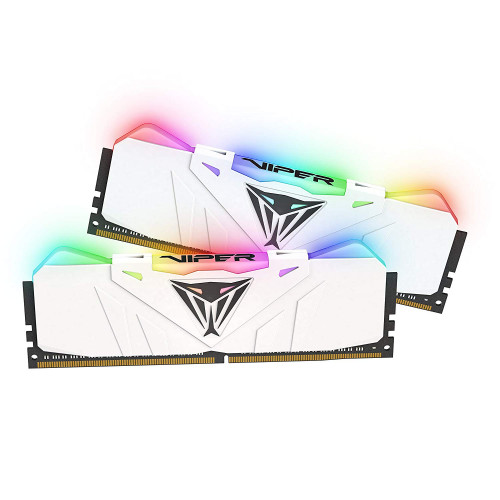
Has anyone tried to overclock Patriot Viper RAM 3200MHZ CL16 ?

I recently bought this for 4 sticks. Wondering how much this ram can goes up and how much able to tighten the timings?

Short specs

Ryzen 5 3600 (stock speed) with Hyper 212X
Asrock b450 steel legend
GTX 1080Ti
Superflower 600w 80+ silver
Bonchi
post Aug 1 2020, 02:25 AM

KittehPowah
******
Senior Member
1,649 posts

Joined: Sep 2008
user posted image
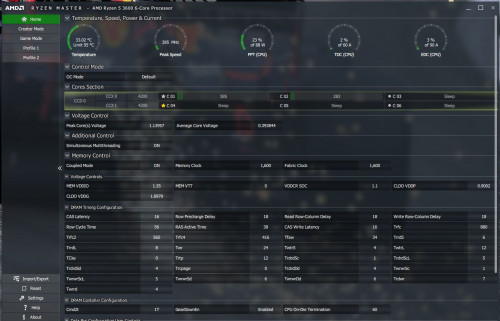
Is the Trfc usually this high? mine's 880. shocking.gif
Ram in question is a t-force vulcan z 32GB 3200mhz CL16 with a micron D9XPF that i cant find much info online.

I got these 2X16GB for RM390 used so i shouldn't complain much, but would like to know more about these ram... or areas where i can improve.

currently it's just on XMP and tweaked the TRC to the rated 56 because auto was 73. aida64 bench latency shows 81ns shocking.gif
TSah_khoo
post Aug 2 2020, 10:47 AM

- No Action Talk Only -
Group Icon
Elite
8,103 posts

Joined: Jan 2003
From: Tanah Lot @ Dungun, Terengganu.


QUOTE(AnGakMan @ Jul 30 2020, 01:44 PM)
user posted image

Has anyone tried to overclock Patriot Viper RAM 3200MHZ CL16 ?

I recently bought this for 4 sticks. Wondering how much this ram can goes up and how much able to tighten the timings?

Short specs

Ryzen 5 3600 (stock speed) with Hyper 212X
Asrock b450 steel legend
GTX 1080Ti
Superflower 600w 80+ silver
*
pls use thaiphoon burner to check what's d chip insude to have better idea what timing to set. ryzen dram calculator will help. should d frequency u want to run is above what calculator can offer, go google. smile.gif

QUOTE(Bonchi @ Aug 1 2020, 02:25 AM)
user posted image
Is the Trfc usually this high? mine's 880.  shocking.gif
Ram in question is a t-force vulcan z 32GB 3200mhz CL16 with a micron D9XPF that i cant find much info online.

I got these 2X16GB for RM390 used so i shouldn't complain much, but would like to know more about these ram... or areas where i can improve.

currently it's just on XMP and tweaked the TRC to the rated 56 because auto was 73. aida64 bench latency shows 81ns  shocking.gif
*
i'd say trfc is way too loose. try 650ns if stable further reduce by like 20/30ns, if not try to increase slowly from 650ns. my 2 cents thou myself not really good in ram efficiency. sweat.gif
Bonchi
post Aug 3 2020, 12:17 AM

KittehPowah
******
Senior Member
1,649 posts

Joined: Sep 2008
QUOTE(ah_khoo @ Aug 2 2020, 10:47 AM)
i'd say trfc is way too loose. try 650ns if stable further reduce by like 20/30ns, if not try to increase slowly from 650ns. my 2 cents thou myself not really good in ram efficiency.  sweat.gif
*
really cant find much info on these micron to know what it is supposed to run at...maybe cuz it's new?
XMP tends to go haywire with the sub timings but i also dont wanna unknowingly overclock this ram too much and face random stability issues... ughhhh.


30 Pages « < 19 20 21 22 23 > » Top
 

Change to:
| Lo-Fi Version
0.0165sec    0.48    6 queries    GZIP Disabled
Time is now: 2nd December 2025 - 01:26 PM