Outline ·
[ Standard ] ·
Linear+
HiMedia Media Player, All about HiMedia V2, New upgrade is out
|
TSOPT
|
 Sep 21 2019, 10:29 PM Sep 21 2019, 10:29 PM
|

|
QUOTE(yanjinowa @ Sep 17 2019, 10:44 AM) Hi, Thanks for the reply. The cable is one side USB, the other printer cable. So the USB is to the Q10pro? By the way, mine is a Macbook. Is there other types of cable that i can use?  |
|
|
|
|
|
AVFAN
|
Sep 21 2019, 11:29 PM
|
|
|
QUOTE(OPT @ Sep 21 2019, 10:29 PM) Hi, Thanks for the reply. The cable is one side USB, the other printer cable. So the USB is to the Q10pro? By the way, mine is a Macbook. Is there other types of cable that i can use? the right cable is usb A (normal, pc side) - usb B (squarish, Q10pro side). |
|
|
|
|
|
azbro
|
Sep 22 2019, 07:59 PM
|
|
|
Any option to add a Dvbt2 to the Q10pro?
I hate adding more device just to view TV123 and those freeTV apps dun work so well when many ppl are viewing at once.
I using Astrogo on the Himedia but no TV123.
Thanks in advance.
|
|
|
|
|
|
AVFAN
|
Sep 22 2019, 11:14 PM
|
|
|
QUOTE(azbro @ Sep 22 2019, 07:59 PM) Any option to add a Dvbt2 to the Q10pro? I hate adding more device just to view TV123 and those freeTV apps dun work so well when many ppl are viewing at once. I using Astrogo on the Himedia but no TV123. Thanks in advance. There are very few devices that can do android and digital tv... diff things. Expensive too. If u must hv digital tv, u gotta buy separate box, and antenna. |
|
|
|
|
|
TSOPT
|
Sep 23 2019, 12:28 AM
|
|
|
QUOTE(AVFAN @ Sep 21 2019, 11:29 PM) the right cable is usb A (normal, pc side) - usb B (squarish, Q10pro side). Thanks. :thumbsup: This post has been edited by OPT: Sep 23 2019, 06:04 AM |
|
|
|
|
|
azbro
|
Sep 23 2019, 06:15 AM
|
|
|
QUOTE(AVFAN @ Sep 22 2019, 11:14 PM) There are very few devices that can do android and digital tv... diff things. Expensive too. If u must hv digital tv, u gotta buy separate box, and antenna. Thanks for the explanation  |
|
|
|
|
|
samowong
|
Sep 23 2019, 11:06 AM
|
Getting Started

|
QUOTE(Jjoottt @ Sep 17 2019, 05:48 AM) Hi, I have a Q10pro. Anyone knows how I could connect my HDD inside the docking bay to my laptop using Q10pro? Which cable can I use? Just to share. I'm currently using the following Orico HDD dock coz it's more convenient. https://www.youtube.com/watch?v=6cVt23o3arg |
|
|
|
|
|
AVFAN
|
Oct 7 2019, 10:24 AM
|
|
|
futeko site down... QUOTE FORUM DOWN
On 3-OCT our entire website was taken down by our hosts due to excessive levels of server CPU activity.
We agreed to temporarily disable our forum whilst more resilient hosting could be found for it.
Our forum will be back as soon as possible. Should be before end 8-OCT.
We apologise for the inconvenience. This post has been edited by AVFAN: Oct 7 2019, 10:24 AM |
|
|
|
|
|
darkearth
|
Oct 7 2019, 10:29 AM
|
Getting Started
|
Hi Guys,
I just came across this section and was wandering what is the best firmware to run on for Q5 Pro ? I am currently running on 2.0.4
|
|
|
|
|
|
AVFAN
|
Oct 7 2019, 10:43 AM
|
|
|
QUOTE(darkearth @ Oct 7 2019, 10:29 AM) Hi Guys, I just came across this section and was wandering what is the best firmware to run on for Q5 Pro ? I am currently running on 2.0.4 the latest for Q5pro should be 2.1.4, like for Q10pro. it's fine on q10pro... but i can't say for q5pro since not using it. |
|
|
|
|
|
darkearth
|
Oct 7 2019, 10:49 AM
|
Getting Started
|
QUOTE(AVFAN @ Oct 7 2019, 10:43 AM) the latest for Q5pro should be 2.1.4, like for Q10pro. it's fine on q10pro... but i can't say for q5pro since not using it. Thanks. Do you know where i can download the update? |
|
|
|
|
|
AVFAN
|
Oct 7 2019, 10:51 AM
|
|
|
QUOTE(darkearth @ Oct 7 2019, 10:49 AM) Thanks. Do you know where i can download the update? futeko.com is a popular site but is down now - see a few posts earlier. there must be alternative sites but i dunno them. |
|
|
|
|
|
darkearth
|
Oct 7 2019, 10:53 AM
|
Getting Started
|
QUOTE(AVFAN @ Oct 7 2019, 10:51 AM) futeko.com is a popular site but is down now - see a few posts earlier. there must be alternative sites but i dunno them. Thanks. I am downloading now from futeko. |
|
|
|
|
|
kskoay
|
Oct 7 2019, 06:46 PM
|
|
|
Guys, I just bought the himedia q10 pro, where can I configure the ycbc444 10bit, ycbc420 10bit etc? I can’t find it in setting... What is hdcp2.2 switch? Need to turn on? 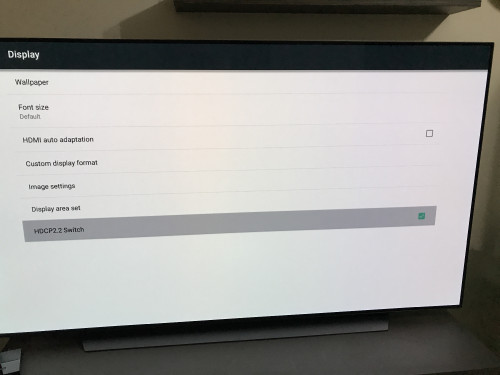 This post has been edited by kskoay: Oct 7 2019, 07:09 PM This post has been edited by kskoay: Oct 7 2019, 07:09 PM |
|
|
|
|
|
Scissorshand
|
Oct 7 2019, 09:04 PM
|
|
|
QUOTE(kskoay @ Oct 7 2019, 06:46 PM) Guys, I just bought the himedia q10 pro, where can I configure the ycbc444 10bit, ycbc420 10bit etc? I can’t find it in setting... What is hdcp2.2 switch? Need to turn on? Go to Display |
|
|
|
|
|
AVFAN
|
Oct 7 2019, 10:04 PM
|
|
|
QUOTE(kskoay @ Oct 7 2019, 06:46 PM) Guys, I just bought the himedia q10 pro, where can I configure the ycbc444 10bit, ycbc420 10bit etc? I can’t find it in setting... setting->advanced->advanced options. |
|
|
|
|
|
kskoay
|
Oct 7 2019, 10:28 PM
|
|
|
QUOTE(AVFAN @ Oct 7 2019, 10:04 PM) setting->advanced->advanced options. Nope....only hdr mode inside there.... 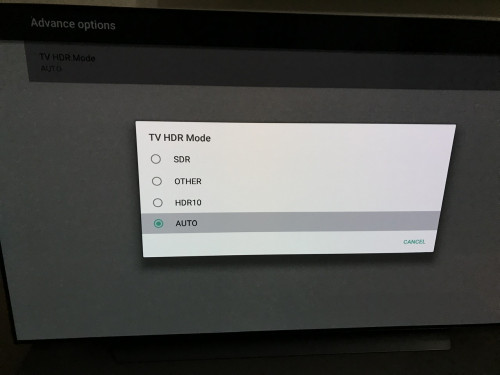 This post has been edited by kskoay: Oct 7 2019, 10:29 PM This post has been edited by kskoay: Oct 7 2019, 10:29 PM |
|
|
|
|
|
AVFAN
|
Oct 7 2019, 10:40 PM
|
|
|
QUOTE(kskoay @ Oct 7 2019, 10:28 PM) Nope....only hdr mode inside there.... your firmware is not latest 2.1.4. |
|
|
|
|
|
kskoay
|
Oct 7 2019, 11:00 PM
|
|
|
QUOTE(AVFAN @ Oct 7 2019, 10:40 PM) your firmware is not latest 2.1.4. Latest firmware 2.1.4....even I try to select update, it prompted the system is up to date... 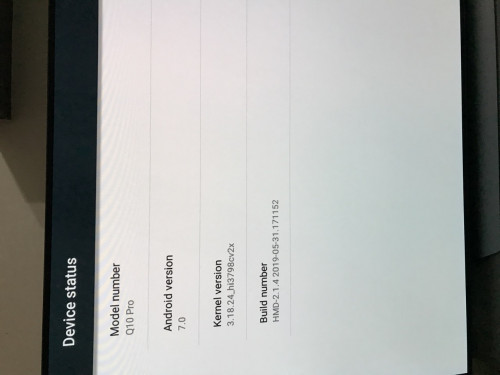 |
|
|
|
|
|
AVFAN
|
Oct 8 2019, 01:27 AM
|
|
|
QUOTE(kskoay @ Oct 7 2019, 11:00 PM) Latest firmware 2.1.4.... Firmware is correct. But strange.... on top of "TV HDR Mode", there should be another option "Video color space & HDMI deep color". Check settings, playback... i set all to auto except spdif to raw. This post has been edited by AVFAN: Oct 8 2019, 01:57 AM |
|
|
|
|



 Quote
Quote



 0.0271sec
 0.58
0.58
 6 queries
 GZIP Disabled