Outline ·
[ Standard ] ·
Linear+
Robot Vacuum Cleaner
|
wenyiwenyi
|
 Mar 15 2020, 05:32 PM Mar 15 2020, 05:32 PM
|
New Member


|
QUOTE(Benefon @ Mar 15 2020, 05:03 PM) Just paste on top of Hepa filter will do. Cut a little bit oversized of sponge, the dust bin case would be holding the sponge right It's a great idea! so my HEPA filter can last for a longer time. haha. Where do u buy the sponge? |
|
|
|
|
|
death_nite
|
Mar 15 2020, 05:37 PM
|
|
|
QUOTE(Benefon @ Mar 8 2020, 09:15 AM) Battery Kong ? Seem like keep changing Another thing , I would like to advise, that Hepa filter at internal dust bin side should apply thin sponge to blocking the dirt get into Hepa filter 😇😇😇 Isnt putting a sponge will reduce suction capability significantly? Somemore it is a robot vacuum. Highest suction rate is just 2000pa. Just asking. |
|
|
|
|
|
idoblu
|
Mar 15 2020, 05:44 PM
|
|
|
QUOTE(wenyiwenyi @ Mar 15 2020, 05:32 PM) It's a great idea! so my HEPA filter can last for a longer time. haha. Where do u buy the sponge? its a stupid idea now your vacuum will have less suction power and may even trigger an error due to block air passage way |
|
|
|
|
|
Benefon
|
Mar 15 2020, 06:03 PM
|
|
|
QUOTE(wenyiwenyi @ Mar 15 2020, 05:32 PM) It's a great idea! so my HEPA filter can last for a longer time. haha. Where do u buy the sponge? Sponge got very thin one. Because my LG homebot comes with sponge |
|
|
|
|
|
vhs1
|
Mar 15 2020, 06:09 PM
|
|
|
I'm using Haier robot. Anyone using it?
|
|
|
|
|
|
Heavenly Superperson
|
May 12 2020, 06:21 PM
|
Getting Started
|
Hi all,
Any of you using T6? My Mi home app is set to China and I believe the S6 will not work for me but the T6 will be ok.
Do I need to trick my phone i.e. change timezone, VPN etc for it to work?
|
|
|
|
|
|
kaizoku30
|
May 12 2020, 06:26 PM
|
Getting Started
|
QUOTE(Heavenly Superperson @ May 12 2020, 06:21 PM) Hi all, Any of you using T6? My Mi home app is set to China and I believe the S6 will not work for me but the T6 will be ok. Do I need to trick my phone i.e. change timezone, VPN etc for it to work? I’m using T6, time zone need to set it to China. Need to do reset if you have not update the firmware for quite long |
|
|
|
|
|
Heavenly Superperson
|
May 12 2020, 06:38 PM
|
Getting Started
|
QUOTE(kaizoku30 @ May 12 2020, 06:26 PM) I’m using T6, time zone need to set it to China. Need to do reset if you have not update the firmware for quite long Oh thanks! Thats quite annoying given other devices (switches, lamp, air purifier) need not be set to china time zone. When you said need to reset if firmware hasnt been updated, what do you mean? |
|
|
|
|
|
kaizoku30
|
May 12 2020, 06:41 PM
|
Getting Started
|
QUOTE(Heavenly Superperson @ May 12 2020, 06:38 PM) Oh thanks! Thats quite annoying given other devices (switches, lamp, air purifier) need not be set to china time zone. When you said need to reset if firmware hasnt been updated, what do you mean? If you update your vacuum firmware, sometimes, it will detect you using outside of China, then you need to reset the vacuum to make it work again. Doesn’t happen every time thou |
|
|
|
|
|
Heavenly Superperson
|
May 12 2020, 06:48 PM
|
Getting Started
|
QUOTE(kaizoku30 @ May 12 2020, 06:41 PM) If you update your vacuum firmware, sometimes, it will detect you using outside of China, then you need to reset the vacuum to make it work again. Doesn’t happen every time thou Hmm thats not very ideal. If so would S6 works for Mi home app if the region is set to China? When I tap to add device button it isnt listed: 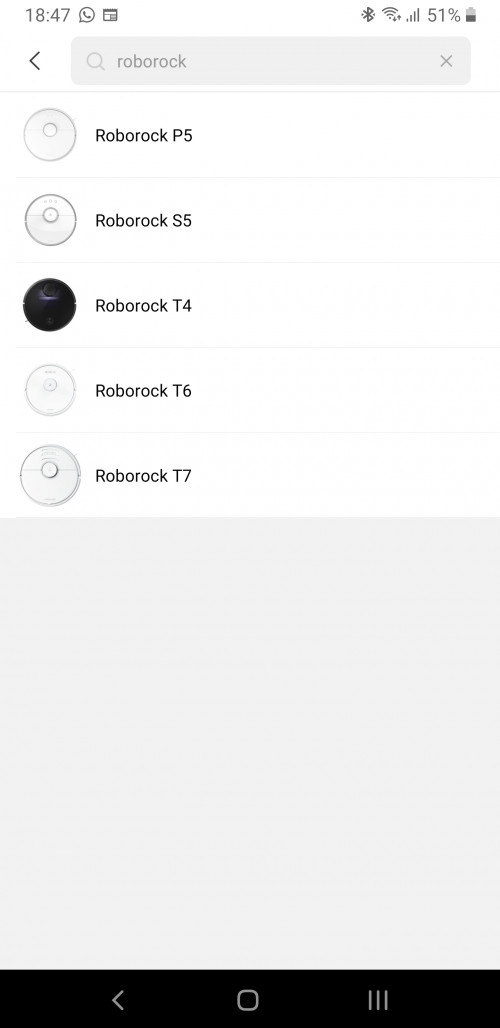 |
|
|
|
|
|
Heavenly Superperson
|
May 12 2020, 06:48 PM
|
Getting Started
|
.
This post has been edited by Heavenly Superperson: May 12 2020, 06:49 PM
|
|
|
|
|
|
kaizoku30
|
May 12 2020, 06:57 PM
|
Getting Started
|
QUOTE(Heavenly Superperson @ May 12 2020, 06:48 PM) Hmm thats not very ideal. If so would S6 works for Mi home app if the region is set to China? When I tap to add device button it isnt listed: Not sure. My advise is, if you already have existing China region xiaomi IOT product, then get the China version, otherwise global version all the way |
|
|
|
|
|
peace4ever
|
May 20 2020, 12:31 PM
|
Getting Started
|
Hi guys I am interested in robot vacuum cleaner but unable to decide which one to buy, my budget is below RM2k, btw i am living in a small apartment
1. roborock s5, s5 max, s6
2. ECOVACS DEEBOT Ozmo 920, 930, 950
3. Proscenic M7, M7 Pro
preferable to have a good mopping function, can suggest me other models as well, thanks all!
This post has been edited by peace4ever: May 20 2020, 12:34 PM
|
|
|
|
|
|
idoblu
|
May 20 2020, 12:36 PM
|
|
|
QUOTE(peace4ever @ May 20 2020, 12:31 PM) Hi guys I am interested in robot vacuum cleaner but unable to decide which one to buy, my budget is below RM2k, btw i am living in a small apartment 1. roborock s5, s5 max, s6 2. ECOVACS DEEBOT Ozmo 920, 930, 950 3. Proscenic M7, M7 Pro preferable to have a good mopping function, can suggest me other models as well, thanks all! Roborock S6 MaxV |
|
|
|
|
|
cawan
|
May 20 2020, 01:02 PM
|
|
|
just 1 month with Roborock S5 Max.
omg the usage, apps control, electric mopping, customization room, autosuction on carpet, customization no mop area, no go area.. crazy with so much assists with this!
recomend to buy with scanning / lidar. mapping entire house.
|
|
|
|
|
|
chaostan
|
May 20 2020, 06:06 PM
|
|
|
Anyone using IROVA brand..Is it OK ?
|
|
|
|
|
|
Ethan
|
May 25 2020, 02:36 PM
|
|
|
iRobot Roomba ftw.  |
|
|
|
|
|
davidman82
|
May 28 2020, 10:40 PM
|
|
|
HELLO everyone , i bought a XIAOMI ROBOT VACUUM CLEANER WIT MOP and just found out it is CHINA VERSIOn, cant connect with MIJIA app, is there any other way to do it?
|
|
|
|
|
|
idoblu
|
May 29 2020, 02:49 AM
|
|
|
QUOTE(davidman82 @ May 28 2020, 10:40 PM) HELLO everyone , i bought a XIAOMI ROBOT VACUUM CLEANER WIT MOP and just found out it is CHINA VERSIOn, cant connect with MIJIA app, is there any other way to do it? Which model? |
|
|
|
|
|
davidman82
|
May 29 2020, 04:09 PM
|
|
|
QUOTE(idoblu @ May 29 2020, 02:49 AM) THE one i bought it is XIAOMI LSD VACUUM CLEANER with mop |
|
|
|
|



 Quote
Quote







 0.0244sec
 0.51
0.51
 6 queries
 GZIP Disabled