

looks like a good deal overall , if you don't mind warranty issue !
good sharing !
How to buy cheap ASUS RT-AC68U router, come have a look
How to buy cheap ASUS RT-AC68U router, come have a look
|
|
 Aug 30 2018, 09:39 PM Aug 30 2018, 09:39 PM
Return to original view | Post
#1
|
 
Junior Member
380 posts Joined: Jul 2014 
|
looks like a good deal overall , if you don't mind warranty issue !
good sharing ! |
|
|
|
|
|
Sep 24 2018, 09:40 PM
Return to original view | Post
#2
|
|
Junior Member
380 posts Joined: Jul 2014
|
QUOTE(junclj @ Sep 24 2018, 08:30 PM) I was placed order for a RT-AC86U. Guys, better fast! China is public holiday for today because today is Mooncake festival/Mid-Autumn festival. So better place order now, then they will ship out by tomorrow. It may take 1 to 2 days to arrive into the Guangzhou collecting station then only forward to Malaysia in the next following week. lol .... i guess it's too late ~ if can't reach forwarder in time , gotto wait another weekNext full week is public holiday for China. From 1st Oct 2018 until 7th Oct 2018 which is China National Days. Better order fast now!  hahahaha ~ |
|
|
Sep 24 2018, 10:50 PM
Return to original view | Post
#3
|
|
Junior Member
380 posts Joined: Jul 2014
|
QUOTE(stasio @ Sep 24 2018, 10:46 PM) Bro, go for Asus Blue Cave..and you have local support. still loves antenna series hahahahIs only RM800+.  middle with a hole  |
|
|
Sep 24 2018, 11:02 PM
Return to original view | Post
#4
|
|
Junior Member
380 posts Joined: Jul 2014
|
QUOTE(stasio @ Sep 24 2018, 10:53 PM) Haha...at least no need 2 additional fans....... still waiting for someone to review it , might add on later if budget is available ... RM820 on shopee and lazada....  Better then AC68U and very close to AC86U. meanwhile just wait and see someone show some unifi screen on asus store review ... hahahaha wonder if anyone will do that  |
|
|
Sep 24 2018, 11:15 PM
Return to original view | Post
#5
|
|
Junior Member
380 posts Joined: Jul 2014
|
QUOTE(stasio @ Sep 24 2018, 11:08 PM) kiv ,  |
|
|
Sep 25 2018, 09:40 PM
Return to original view | Post
#6
|
|
Junior Member
380 posts Joined: Jul 2014
|
tot buy from taobao got free usb fan ?
hahahaha ~ |
|
|
|
|
|
Sep 25 2018, 09:45 PM
Return to original view | Post
#7
|
|
Junior Member
380 posts Joined: Jul 2014
|
QUOTE(jhleo1 @ Sep 25 2018, 09:42 PM) Please check yourself in taobao first and don't just assumed. not free ?  
|
|
|
Sep 26 2018, 05:19 PM
Return to original view | Post
#8
|
|
Junior Member
380 posts Joined: Jul 2014
|
QUOTE(junclj @ Sep 26 2018, 01:45 PM) hi, guys. RT-AC68U and RT-AC86U have the same voltage of 19v 1.75a 33w but this morning I was noticed that, the RT-AC86U is using 5.5*2.5mm but RT-AC68U is using 4.0*1.35MM great share ....https://www.ebay.com/itm/Genuine-Original-A...G8AAOSwt5hbo5JT Therefore, I guess I was bought the wrong size AC adapter for my RT-AC86U. I am now changed my plan to buy a universal socket for eg. LDNIO SC3604.  |
|
|
Oct 1 2018, 06:39 PM
Return to original view | Post
#9
|
|
Junior Member
380 posts Joined: Jul 2014
|
QUOTE(junclj @ Oct 1 2018, 12:06 PM) China is having a long public holidays start from today until 7th Oct. However, I was asked the customer service just now, my router was pending for delivery out because they are off for duty from 29th Sept until 2nd Oct 2018. My router will resume ship out at 3rd Oct 2018. china side should be fast , only our side a bit slow (sometimes) |
|
|
Oct 4 2018, 04:05 PM
Return to original view | Post
#10
|
|
Junior Member
380 posts Joined: Jul 2014
|
QUOTE(junclj @ Oct 3 2018, 10:14 AM) Only 5 channel options to choose or just leave it in Auto mode. I was left "Enabled smart connect", everything in auto no manual option to choose. go under Wireless > Professional tab , on the last column , REGION set to ASIA ( default is China )[attachmentid=10052845] you should have 9 channels not 5 ( default for China ) always always , check the region for wireless or router settings |
|
|
Oct 5 2018, 09:16 AM
Return to original view | Post
#11
|
|
Junior Member
380 posts Joined: Jul 2014
|
QUOTE(sygoh3 @ Oct 5 2018, 08:24 AM) Hi all sifus, u can use manual setting , then do your setup on LAN pagesI just bought a AC86U from taobao, i connect the LAN1 from BTU to WAN connection at my AC86U, select the PPPoe connection and key in Unifi account and password but after go to main page it shown not connected. I saw several post, the Quick Internet Setup (QIS) page from my ASUS 86U is different with other people, » Click to show Spoiler - click again to hide... « it do not have an option to choose ISP profile. Is there any setting wrong? Other ppl post have the below page » Click to show Spoiler - click again to hide... « 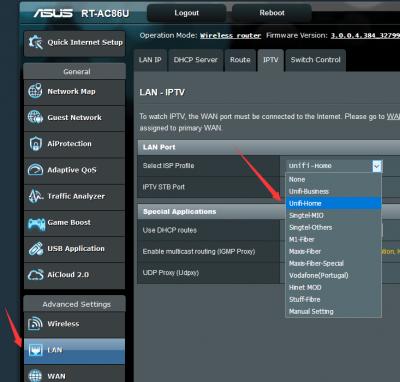
|
|
|
Oct 6 2018, 08:06 AM
Return to original view | Post
#12
|
|
Junior Member
380 posts Joined: Jul 2014
|
QUOTE(sygoh3 @ Oct 6 2018, 12:04 AM) Thanks for the guidance. The router able to connect now. The response and latest for this router is really amazing. enjoy your new piece of toy !start to try the feature one by one ~ |
|
|
Nov 4 2018, 09:32 PM
Return to original view | Post
#13
|
|
Junior Member
380 posts Joined: Jul 2014
|
could be updating on seller's side for 1111 .... offer offer and offer , happy buying for all ....
|
| Change to: |  0.0519sec 0.0519sec
 0.70 0.70
 7 queries 7 queries
 GZIP Disabled GZIP Disabled
Time is now: 5th December 2025 - 08:07 PM |
 Quote
Quote