
Welcome Guest ( Log In | Register )

91 Pages « < 16 17 18 19 20 > » Bottom

Outline · [ Standard ] · Linear+

 How to buy cheap ASUS RT-AC68U router, come have a look

views
     
sheemmet
post Oct 5 2018, 09:16 AM

Casual
***
Junior Member
380 posts

Joined: Jul 2014
QUOTE(sygoh3 @ Oct 5 2018, 08:24 AM)
Hi all sifus,

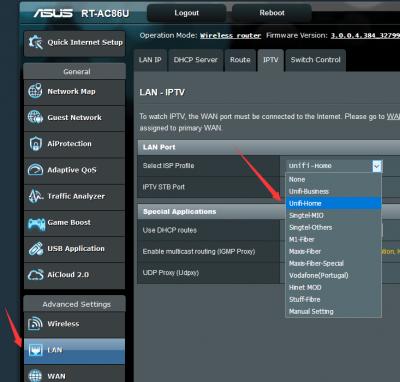
I just bought a AC86U from taobao, i connect the LAN1 from BTU to WAN connection at my AC86U, select the PPPoe connection and key in Unifi account and password but after go to main page it shown not connected.

I saw several post, the Quick Internet Setup (QIS) page from my ASUS 86U is different with other people,
» Click to show Spoiler - click again to hide... «

it do not have an option to choose ISP profile. Is there any setting wrong?

Other ppl post have the below page
» Click to show Spoiler - click again to hide... «
*
u can use manual setting , then do your setup on LAN pages
Attached Image
junclj
post Oct 5 2018, 09:39 AM

Look at all my stars!!
*******
Senior Member
2,348 posts

Joined: Apr 2008


QUOTE(sygoh3 @ Oct 5 2018, 08:24 AM)
Hi all sifus,

I just bought a AC86U from taobao, i connect the LAN1 from BTU to WAN connection at my AC86U, select the PPPoe connection and key in Unifi account and password but after go to main page it shown not connected.

I saw several post, the Quick Internet Setup (QIS) page from my ASUS 86U is different with other people,
[attachmentid=10055495]
it do not have an option to choose ISP profile. Is there any setting wrong?

Other ppl post have the below page
[attachmentid=10055496]
*
Hi, you need to skip the wizard to set manually. I was done that for my China set too. And most importantly is, after you login with your Unifi account and password. You have to go to IPTV settings then switch to Unifi-Home manually.

This post has been edited by junclj: Oct 5 2018, 09:39 AM
crusher
post Oct 5 2018, 01:40 PM

Regular
******
Senior Member
1,345 posts

Joined: Jun 2006


Edited wrong post

This post has been edited by crusher: Oct 5 2018, 01:43 PM
Ryo83
post Oct 5 2018, 09:16 PM

Getting Started
**
Junior Member
137 posts

Joined: May 2009


QUOTE(junclj @ Oct 2 2018, 11:00 PM)
I was just received my Asus RT-AC86U today. So surprised for the speed performance. Just can describe my old RT-AC55UHP really can't fight with this beast.
It was my first time to use that powerful router. OK, for those guy who are using RT-AC55UHP here. Indeed, this router (RT-AC55UHP) only can reach maximum 300~320mbps on wired. My Unifi package is 500mbps turbo. Yes, this is about your router problem but not Unifi problem. So for those user here, if you are still using RT-AC55UHP and your home have any fiber broadband connection with more than 300mbps speed. Please upgrade your router as soon as possible. This is my advice.

One more thing I like to confirm in here, this router RT-AC86U (China Version) is using the same DC adapter with RT-AC68U. So you guys can buy the size 4.4*1.35mm from shopee, lazada or lelong.

This is my new router, RT-AC86U.
[attachmentid=10052527]

[attachmentid=10052529]

[attachmentid=10052531]

[attachmentid=10052533]

[attachmentid=10052537]

This is official Asus firmware, I did not flash to Merlin custom firmware. Fully support Unifi without problem.
[attachmentid=10052558]

[attachmentid=10052563]

Speedtest Result on Wifi
[attachmentid=10052538]

Speedtest Result on LAN connection
[attachmentid=10052539]

Speedtest Result on LAN connection with my old Asus RT-AC55UHP
[attachmentid=10052546]
*
Tq for ur info.
sygoh3
post Oct 6 2018, 12:04 AM

Getting Started
**
Junior Member
98 posts

Joined: May 2011
QUOTE(sheemmet @ Oct 5 2018, 09:16 AM)
u can use manual setting , then do your setup on LAN pages
Attached Image
*
QUOTE(junclj @ Oct 5 2018, 09:39 AM)
Hi, you need to skip the wizard to set manually. I was done that for my China set too. And most importantly is, after you login with your Unifi account and password. You have to go to IPTV settings then switch to Unifi-Home manually.
*
Thanks for the guidance. The router able to connect now. The response and latest for this router is really amazing.
sheemmet
post Oct 6 2018, 08:06 AM

Casual
***
Junior Member
380 posts

Joined: Jul 2014
QUOTE(sygoh3 @ Oct 6 2018, 12:04 AM)
Thanks for the guidance. The router able to connect now. The response and latest for this router is really amazing.
*
enjoy your new piece of toy !
start to try the feature one by one ~ rclxms.gif
emy_xvidia
post Oct 6 2018, 07:15 PM

Look at all my stars!!
*******
Senior Member
2,735 posts

Joined: Mar 2006
From: Malaysia - Swindon Town
2 Asus AC86U working in tandem with each other, with fans. One normal connection and the other is VPN-one. Thank God for Taobao. biggrin.gif

Btw I can get around 100Mbps with ExpressVPN on TIME300 connection. Not bad at all.

» Click to show Spoiler - click again to hide... «


sgpdsmss
post Oct 6 2018, 10:43 PM

Regular
******
Senior Member
1,704 posts

Joined: Jan 2005
QUOTE(emy_xvidia @ Oct 6 2018, 07:15 PM)
2 Asus AC86U working in tandem with each other, with fans. One normal connection and the other is VPN-one. Thank God for Taobao.  biggrin.gif

Btw I can get around 100Mbps with ExpressVPN on TIME300 connection. Not bad at all.

» Click to show Spoiler - click again to hide... «

*
good performance ?
emy_xvidia
post Oct 6 2018, 11:08 PM

Look at all my stars!!
*******
Senior Member
2,735 posts

Joined: Mar 2006
From: Malaysia - Swindon Town
QUOTE(sgpdsmss @ Oct 6 2018, 10:43 PM)
good performance ?
*
Way better than my old AC-87U in terms of VPN speed.
thunderbird
post Oct 6 2018, 11:46 PM

SO what?
******
Senior Member
1,811 posts

Joined: Jan 2003
From: KL


thanks for sharing all.

Looks like taobao is a good deal even though RMA is a bit troublesome, but with this price tag, definitely no harm to try because of Asus reliability.

Just got my unifi "turboed" 2 days ago, and need to upgrade my router, currently using Asus old router N12B1.
sHawTY
post Oct 7 2018, 12:33 AM

Frequent Reporter
********
All Stars
14,909 posts

Joined: Jul 2005

QUOTE(junclj @ Sep 26 2018, 01:45 PM)
hi, guys. RT-AC68U and RT-AC86U have the same voltage of 19v 1.75a 33w but this morning I was noticed that, the RT-AC86U is using 5.5*2.5mm but RT-AC68U is using 4.0*1.35MM
1. RT-AC68U is actually using the same AC adaptor as the RT-AC86U. I know because I have both of them
2. Why waste so much time looking around eBay and Taobao for the AC adaptor when you can just buy one from Lazada?
https://www.lazada.com.my/products/asus-19v...s265886000.html
3. I'm using the same exact AC adaptor in the link above on my RT-AC68U and it has been working fine since the last 7 months (original AC adaptor is dead)
sgpdsmss
post Oct 7 2018, 05:55 AM

Regular
******
Senior Member
1,704 posts

Joined: Jan 2005
QUOTE(emy_xvidia @ Oct 6 2018, 11:08 PM)
Way better than my old AC-87U in terms of VPN speed.
*
others ? like 2.4g WIFI range ..5g range better ?

win AC68U a lot ?

thanks ..
junclj
post Oct 7 2018, 07:58 AM

Look at all my stars!!
*******
Senior Member
2,348 posts

Joined: Apr 2008


QUOTE(sHawTY @ Oct 7 2018, 12:33 AM)
1. RT-AC68U is actually using the same AC adaptor as the RT-AC86U. I know because I have both of them
2. Why waste so much time looking around eBay and Taobao for the AC adaptor when you can just buy one from Lazada?
https://www.lazada.com.my/products/asus-19v...s265886000.html
3. I'm using the same exact AC adaptor in the link above on my RT-AC68U and it has been working fine since the last 7 months (original AC adaptor is dead)
*
Because I was asked in here before but nobody can answer to me. That's why I do research myself. Need to double confirm before to proceed order this adapter.
jhleo1
post Oct 7 2018, 08:34 AM

Look at all my stars!!
*******
Senior Member
4,382 posts

Joined: Jan 2003
Original output is 1.75A but Lazada is 3.42A. Ok one?

QUOTE(sHawTY @ Oct 7 2018, 12:33 AM)
1. RT-AC68U is actually using the same AC adaptor as the RT-AC86U. I know because I have both of them
2. Why waste so much time looking around eBay and Taobao for the AC adaptor when you can just buy one from Lazada?
https://www.lazada.com.my/products/asus-19v...s265886000.html
3. I'm using the same exact AC adaptor in the link above on my RT-AC68U and it has been working fine since the last 7 months (original AC adaptor is dead)
*
sHawTY
post Oct 7 2018, 08:52 AM

Frequent Reporter
********
All Stars
14,909 posts

Joined: Jul 2005

QUOTE(jhleo1 @ Oct 7 2018, 08:34 AM)
Original output is 1.75A but Lazada is 3.42A. Ok one?
Yes it’s safe
joebloggs1888
post Oct 7 2018, 10:47 AM

New Member
*
Junior Member
24 posts

Joined: Sep 2005
From: Across the sea


QUOTE(junclj @ Oct 7 2018, 07:58 AM)
Because I was asked in here before but nobody can answer to me. That's why I do research myself. Need to double confirm before to proceed order this adapter.
*
Lots of seller in Lazada selling 19v 1.75a adapter, just search for it. One seller:

https://www.lazada.com.my/products/asus-viv...s622642374.html
emy_xvidia
post Oct 7 2018, 12:27 PM

Look at all my stars!!
*******
Senior Member
2,735 posts

Joined: Mar 2006
From: Malaysia - Swindon Town
QUOTE(sgpdsmss @ Oct 7 2018, 05:55 AM)
others ? like 2.4g WIFI range ..5g range better ?

win AC68U a lot ?

thanks ..
*
Can't test out the range since my unit is just a SOHO unit however you can check out somebody doing a review on it in the Review section of this forum. Or you can read detailed user review of it on the SNBforum.

I don't have any experience using the AC68U but the improved and upgraded CPU in the AC86U is a night and day difference than my old AC87U. This thing is fast. And cheap thanks to Taobao. Imagine 2 units of this from the greedy Asus My. I saved more than 50% easily. Warranty wise if you're really unlucky that is, just need to send back to Asus China. A hassle but not that hard to do.


thunderbird
post Oct 7 2018, 01:12 PM

SO what?
******
Senior Member
1,811 posts

Joined: Jan 2003
From: KL


hello, for 86U owner,

i have one question, can the router be configured to shut down during certain time and boot up again certain time?

For example, 1am to 8am, i need it to be off and 8am onwards, turn on again

Thanks
enduser
post Oct 7 2018, 01:54 PM

Regular
******
Senior Member
1,280 posts

Joined: Jan 2003
QUOTE(thunderbird @ Oct 7 2018, 01:12 PM)
hello, for 86U owner,

i have one question, can the router be configured to shut down during certain time and boot up again certain time?

For example, 1am to 8am, i need it to be off and 8am onwards, turn on again

Thanks
*
This function can also been done by using smart socket, more easier to do

Refer here
https://forum.lowyat.net/topic/4353588

https://forum.lowyat.net/topic/3554748/+4220#bottom


thunderbird
post Oct 7 2018, 01:56 PM

SO what?
******
Senior Member
1,811 posts

Joined: Jan 2003
From: KL


QUOTE(enduser @ Oct 7 2018, 01:54 PM)
This function can also been done by using smart socket, more easier to do

Refer here
https://forum.lowyat.net/topic/4353588

https://forum.lowyat.net/topic/3554748/+4220#bottom
*
thanks, i have smart socket actually, never thought to use it at the first place.

91 Pages « < 16 17 18 19 20 > » Top
 

Change to:
| Lo-Fi Version
0.0321sec    0.32    6 queries    GZIP Disabled
Time is now: 10th December 2025 - 03:11 AM