Welcome Guest ( Log In | Register )

Bump Topic Topic Closed RSS Feed

Outline · [ Standard ] · Linear+

Virus/Malware Someone please help., IE keeps on closing down.

views
     
TSGuenhwyvar
post May 21 2007, 01:07 AM, updated 19y ago

Might be on tilt. Might be, I don't care.
******
Senior Member
1,672 posts

Joined: Jan 2003

Please help me guys, My friend's pc has got this problem. It says IE needs to shutdown and stuff. (thus the page is NOT RESPONDING) Thanks for the help guys (in advance) Here's the hijacklog of it notworthy.gif

Logfile of HijackThis v1.99.1
Scan saved at 1:03:16 AM, on 5/21/2007
Platform: Windows XP SP1 (WinNT 5.01.2600)
MSIE: Internet Explorer v6.00 SP1 (6.00.2800.1106)

Running processes:
C:\WINDOWS\System32\smss.exe
C:\WINDOWS\system32\winlogon.exe
C:\WINDOWS\system32\services.exe
C:\WINDOWS\system32\lsass.exe
C:\WINDOWS\system32\svchost.exe
C:\WINDOWS\System32\svchost.exe
C:\WINDOWS\Explorer.EXE
C:\WINDOWS\system32\spoolsv.exe
c:\program files\mcafee.com\agent\mcdetect.exe
c:\PROGRA~1\mcafee.com\vso\mcshield.exe
c:\PROGRA~1\mcafee.com\agent\mctskshd.exe
c:\PROGRA~1\mcafee.com\vso\OasClnt.exe
c:\program files\mcafee.com\vso\mcvsshld.exe
c:\program files\mcafee.com\agent\mcagent.exe
c:\progra~1\mcafee.com\vso\mcvsescn.exe
C:\WINDOWS\System32\VTTimer.exe
C:\Program Files\Java\jre1.6.0_01\bin\jusched.exe
C:\PROGRA~1\McAfee.com\PERSON~1\MpfTray.exe
C:\PROGRA~1\McAfee.com\PERSON~1\MPFSERVICE.exe
C:\Program Files\Analog Devices\SoundMAX\SMAgent.exe
C:\PROGRA~1\McAfee.com\PERSON~1\MpfAgent.exe
C:\Program Files\MSN Messenger\msnmsgr.exe
c:\progra~1\mcafee.com\vso\mcvsftsn.exe
C:\Program Files\MSN Messenger\usnsvc.exe
C:\WINDOWS\System32\wuauclt.exe
C:\Program Files\foobar2000\foobar2000.exe
C:\Program Files\Internet Explorer\iexplore.exe
C:\Program Files\WinRAR\WinRAR.exe
C:\DOCUME~1\Duncan\LOCALS~1\Temp\Rar$EX00.515\HijackThis.exe

R0 - HKCU\Software\Microsoft\Internet Explorer\Main,Start Page = http://www.yahoo.com/
O2 - BHO: SSVHelper Class - {761497BB-D6F0-462C-B6EB-D4DAF1D92D43} - C:\Program Files\Java\jre1.6.0_01\bin\ssv.dll
O2 - BHO: (no name) - {7E853D72-626A-48EC-A868-BA8D5E23E045} - (no file)
O3 - Toolbar: &Radio - {8E718888-423F-11D2-876E-00A0C9082467} - C:\WINDOWS\System32\msdxm.ocx
O3 - Toolbar: McAfee VirusScan - {BA52B914-B692-46c4-B683-905236F6F655} - c:\progra~1\mcafee.com\vso\mcvsshl.dll
O4 - HKLM\..\Run: [VTTimer] VTTimer.exe
O4 - HKLM\..\Run: [MCAgentExe] c:\PROGRA~1\mcafee.com\agent\mcagent.exe
O4 - HKLM\..\Run: [MCUpdateExe] c:\PROGRA~1\mcafee.com\agent\mcupdate.exe
O4 - HKLM\..\Run: [SunJavaUpdateSched] "C:\Program Files\Java\jre1.6.0_01\bin\jusched.exe"
O4 - HKLM\..\Run: [VSOCheckTask] "C:\PROGRA~1\McAfee.com\VSO\mcmnhdlr.exe" /checktask
O4 - HKLM\..\Run: [VirusScan Online] C:\Program Files\McAfee.com\VSO\mcvsshld.exe
O4 - HKLM\..\Run: [OASClnt] C:\Program Files\McAfee.com\VSO\oasclnt.exe
O4 - HKLM\..\Run: [MPFExe] C:\PROGRA~1\McAfee.com\PERSON~1\MpfTray.exe
O4 - HKLM\..\Run: [mstds.exe] c:\windows\system32\mstds.exe
O4 - HKLM\..\Run: [QuickTime Task] "C:\Program Files\QuickTime\qttask.exe" -atboottime
O9 - Extra button: (no name) - {08B0E5C0-4FCB-11CF-AAA5-00401C608501} - C:\Program Files\Java\jre1.6.0_01\bin\ssv.dll
O9 - Extra 'Tools' menuitem: Sun Java Console - {08B0E5C0-4FCB-11CF-AAA5-00401C608501} - C:\Program Files\Java\jre1.6.0_01\bin\ssv.dll
O9 - Extra button: PartyPoker.com - {B7FE5D70-9AA2-40F1-9C6B-12A255F085E1} - C:\Program Files\PartyPoker\PartyPoker.exe (file missing)
O9 - Extra 'Tools' menuitem: PartyPoker.com - {B7FE5D70-9AA2-40F1-9C6B-12A255F085E1} - C:\Program Files\PartyPoker\PartyPoker.exe (file missing)
O16 - DPF: {B9B2EE1A-E314-4338-A305-BE845EACB112} (CyberStock 250) - http://219.93.0.130/webecos/control/cswx.cab
O16 - DPF: {BCC0FF27-31D9-4614-A68E-C18E1ADA4389} (DwnldGroupMgr Class) - http://download.mcafee.com/molbin/shared/m...,26/mcgdmgr.cab
O17 - HKLM\System\CCS\Services\Tcpip\..\{FCCB2A4B-75D8-4C2F-98F6-F0B75E92B681}: NameServer = 202.188.13.3 202.188.1.5
O18 - Protocol: livecall - {828030A1-22C1-4009-854F-8E305202313F} - C:\PROGRA~1\MSNMES~1\MSGRAP~1.DLL
O18 - Protocol: msnim - {828030A1-22C1-4009-854F-8E305202313F} - C:\PROGRA~1\MSNMES~1\MSGRAP~1.DLL
O23 - Service: McAfee WSC Integration (McDetect.exe) - McAfee, Inc - c:\program files\mcafee.com\agent\mcdetect.exe
O23 - Service: McAfee.com McShield (McShield) - McAfee Inc. - c:\PROGRA~1\mcafee.com\vso\mcshield.exe
O23 - Service: McAfee Task Scheduler (McTskshd.exe) - McAfee, Inc - c:\PROGRA~1\mcafee.com\agent\mctskshd.exe
O23 - Service: McAfee SecurityCenter Update Manager (mcupdmgr.exe) - McAfee, Inc - C:\PROGRA~1\McAfee.com\Agent\mcupdmgr.exe
O23 - Service: McAfee Personal Firewall Service (MpfService) - McAfee Corporation - C:\PROGRA~1\McAfee.com\PERSON~1\MPFSERVICE.exe
O23 - Service: SoundMAX Agent Service (SoundMAX Agent Service (default)) - Analog Devices, Inc. - C:\Program Files\Analog Devices\SoundMAX\SMAgent.exe

This post has been edited by Guenhwyvar: May 21 2007, 08:49 AM
SUSradical85
post May 21 2007, 04:15 AM

lalala~~
****
Senior Member
625 posts

Joined: Oct 2005


syamxp: remove the virus enough la, why format? u really should read this

http://forum.lowyat.net/index.php?showtopi...dpost&p=9097553
WingKalimdor
post May 21 2007, 07:20 AM

Mirai-Chan
******
Senior Member
1,801 posts

Joined: Sep 2006
From: Shibuya, Japan

QUOTE(aMer @ May 21 2007, 04:27 AM)
erkk..i just posted items need to fix in Guenhwyvar's hijackthis log..where the f*ck has that post gone?

mod, why you deleted it?
If you don't know anything don't post. You only restore all registry to default but the malware still exist in his/her system.

This post has been edited by Sempurna: May 21 2007, 11:34 AM
TSGuenhwyvar
post May 21 2007, 08:43 AM

Might be on tilt. Might be, I don't care.
******
Senior Member
1,672 posts

Joined: Jan 2003

So guys any suggestion? unsure.gif Thanks.
TSGuenhwyvar
post May 21 2007, 08:53 AM

Might be on tilt. Might be, I don't care.
******
Senior Member
1,672 posts

Joined: Jan 2003

Guys, chill don't start to flame each other. I just need someone to help me with this. smile.gif
TSGuenhwyvar
post May 21 2007, 09:27 AM

Might be on tilt. Might be, I don't care.
******
Senior Member
1,672 posts

Joined: Jan 2003


Okay... I am trying it now. Thanks

This post has been edited by Sempurna: May 21 2007, 11:29 AM
michaelconan
post May 21 2007, 09:51 AM

Casual
***
Junior Member
315 posts

Joined: Jun 2005


Erm, i think u can try few ways:
1st use disk cleanup or ccleaner, clear all those cookies and possible hijacks that appear in your cache
2ndly use both antispyware by lavasoft and spybot, use antispyware 1st to clear one time then onli use spybot to check, clean, then only immunize.

After that restart com.. biggrin.gif
TSGuenhwyvar
post May 21 2007, 10:25 AM

Might be on tilt. Might be, I don't care.
******
Senior Member
1,672 posts

Joined: Jan 2003

Okay.... now here's my latest hijacklog.

Logfile of HijackThis v1.99.1
Scan saved at 10:20:42 AM, on 5/21/2007
Platform: Windows XP SP1 (WinNT 5.01.2600)
MSIE: Internet Explorer v6.00 SP1 (6.00.2800.1106)

Running processes:
C:\WINDOWS\System32\smss.exe
C:\WINDOWS\system32\winlogon.exe
C:\WINDOWS\system32\services.exe
C:\WINDOWS\system32\lsass.exe
C:\WINDOWS\system32\svchost.exe
C:\WINDOWS\System32\svchost.exe
C:\WINDOWS\Explorer.EXE
C:\WINDOWS\system32\spoolsv.exe
c:\program files\mcafee.com\agent\mcdetect.exe
c:\PROGRA~1\mcafee.com\vso\mcshield.exe
c:\PROGRA~1\mcafee.com\agent\mctskshd.exe
c:\PROGRA~1\mcafee.com\vso\OasClnt.exe
c:\program files\mcafee.com\vso\mcvsshld.exe
C:\WINDOWS\System32\VTTimer.exe
C:\PROGRA~1\mcafee.com\agent\mcagent.exe
C:\Program Files\Java\jre1.6.0_01\bin\jusched.exe
C:\PROGRA~1\McAfee.com\PERSON~1\MpfTray.exe
c:\progra~1\mcafee.com\vso\mcvsescn.exe
C:\PROGRA~1\McAfee.com\PERSON~1\MPFSERVICE.exe
C:\Program Files\Analog Devices\SoundMAX\SMAgent.exe
C:\PROGRA~1\McAfee.com\PERSON~1\MpfAgent.exe
C:\WINDOWS\System32\wuauclt.exe
C:\Program Files\MSN Messenger\msnmsgr.exe
c:\progra~1\mcafee.com\vso\mcvsftsn.exe
C:\Program Files\MSN Messenger\usnsvc.exe
C:\Program Files\Internet Explorer\iexplore.exe
C:\Program Files\Spybot - Search & Destroy\SpybotSD.exe
C:\Program Files\HijackThis.exe
C:\Program Files\Mozilla Firefox\firefox.exe

R0 - HKCU\Software\Microsoft\Internet Explorer\Main,Start Page = http://www.yahoo.com/
O2 - BHO: (no name) - {53707962-6F74-2D53-2644-206D7942484F} - C:\PROGRA~1\SPYBOT~1\SDHelper.dll
O2 - BHO: SSVHelper Class - {761497BB-D6F0-462C-B6EB-D4DAF1D92D43} - C:\Program Files\Java\jre1.6.0_01\bin\ssv.dll
O3 - Toolbar: &Radio - {8E718888-423F-11D2-876E-00A0C9082467} - C:\WINDOWS\System32\msdxm.ocx
O3 - Toolbar: McAfee VirusScan - {BA52B914-B692-46c4-B683-905236F6F655} - c:\progra~1\mcafee.com\vso\mcvsshl.dll
O4 - HKLM\..\Run: [VTTimer] VTTimer.exe
O4 - HKLM\..\Run: [MCAgentExe] c:\PROGRA~1\mcafee.com\agent\mcagent.exe
O4 - HKLM\..\Run: [MCUpdateExe] C:\PROGRA~1\mcafee.com\agent\mcupdate.exe
O4 - HKLM\..\Run: [SunJavaUpdateSched] "C:\Program Files\Java\jre1.6.0_01\bin\jusched.exe"
O4 - HKLM\..\Run: [VSOCheckTask] "C:\PROGRA~1\McAfee.com\VSO\mcmnhdlr.exe" /checktask
O4 - HKLM\..\Run: [VirusScan Online] C:\Program Files\McAfee.com\VSO\mcvsshld.exe
O4 - HKLM\..\Run: [OASClnt] C:\Program Files\McAfee.com\VSO\oasclnt.exe
O4 - HKLM\..\Run: [MPFExe] C:\PROGRA~1\McAfee.com\PERSON~1\MpfTray.exe
O4 - HKLM\..\Run: [QuickTime Task] "C:\Program Files\QuickTime\qttask.exe" -atboottime
O9 - Extra button: (no name) - {08B0E5C0-4FCB-11CF-AAA5-00401C608501} - C:\Program Files\Java\jre1.6.0_01\bin\ssv.dll
O9 - Extra 'Tools' menuitem: Sun Java Console - {08B0E5C0-4FCB-11CF-AAA5-00401C608501} - C:\Program Files\Java\jre1.6.0_01\bin\ssv.dll
O16 - DPF: {B9B2EE1A-E314-4338-A305-BE845EACB112} (CyberStock 250) - http://219.93.0.130/webecos/control/cswx.cab
O16 - DPF: {BCC0FF27-31D9-4614-A68E-C18E1ADA4389} (DwnldGroupMgr Class) - http://download.mcafee.com/molbin/shared/m...,26/mcgdmgr.cab
O17 - HKLM\System\CCS\Services\Tcpip\..\{FCCB2A4B-75D8-4C2F-98F6-F0B75E92B681}: NameServer = 202.188.13.3 202.188.1.5
O18 - Protocol: livecall - {828030A1-22C1-4009-854F-8E305202313F} - C:\PROGRA~1\MSNMES~1\MSGRAP~1.DLL
O18 - Protocol: msnim - {828030A1-22C1-4009-854F-8E305202313F} - C:\PROGRA~1\MSNMES~1\MSGRAP~1.DLL
O23 - Service: McAfee WSC Integration (McDetect.exe) - McAfee, Inc - c:\program files\mcafee.com\agent\mcdetect.exe
O23 - Service: McAfee.com McShield (McShield) - McAfee Inc. - c:\PROGRA~1\mcafee.com\vso\mcshield.exe
O23 - Service: McAfee Task Scheduler (McTskshd.exe) - McAfee, Inc - c:\PROGRA~1\mcafee.com\agent\mctskshd.exe
O23 - Service: McAfee SecurityCenter Update Manager (mcupdmgr.exe) - McAfee, Inc - C:\PROGRA~1\McAfee.com\Agent\mcupdmgr.exe
O23 - Service: McAfee Personal Firewall Service (MpfService) - McAfee Corporation - C:\PROGRA~1\McAfee.com\PERSON~1\MPFSERVICE.exe
O23 - Service: SoundMAX Agent Service (SoundMAX Agent Service (default)) - Analog Devices, Inc. - C:\Program Files\Analog Devices\SoundMAX\SMAgent.exe

So is it still infected spyware or anything? Thanks guys.

Latest Update : Guys, the problem is still happening. Brother Sempurna please look into this matter. Thanks a lot guys. notworthy.gif

This post has been edited by Guenhwyvar: May 21 2007, 10:45 AM
Sempurna
post May 21 2007, 11:33 AM

Look at all my stars!!
Group Icon
VIP
3,022 posts

Joined: Jul 2006
From: KL


Thread cleansed of unproductive and confusing posts. Apologies to all.


@Guenhwyvar,

Your initial log showed that HJT was in a .rar folder. Please unzip it and place it on your desktop. Where is HijackThis.exe on your system at the moment?

Please download ComboFix by sUBs:

NOTE: In the event you already have ComboFix, this is a new version that I need you to download.
  • Save it to your desktop.
  • Double-click combofix.exe and follow the prompts.
  • When finished, it shall produce a log for you. Copy and paste the contents of the log in your next reply.

CAUTION: Do not mouse-click ComboFix's window while it is running. That may cause it to stall.


NEXT:

Please reboot your computer normally into Windows, and then please post the ComboFix log and a new HijackThis log.


TSGuenhwyvar
post May 21 2007, 02:22 PM

Might be on tilt. Might be, I don't care.
******
Senior Member
1,672 posts

Joined: Jan 2003

Hi there there Sempurna. Here's it's log.

"Duncan" - 2007-05-21 14:12:15 Service Pack 1
ComboFix 07-05.21.6.V - Running from: "C:\Program Files\Mozilla Firefox\"

((((((((((((((((((((((((((((((( Files Created from 2007-04-05 to 2007-05-21 ))))))))))))))))))))))))))))))))))


2007-05-21 09:36 <DIR> d-------- C:\DOCUME~1\ALLUSE~1\APPLIC~1\Spybot - Search & Destroy
2007-05-21 09:28 <DIR> d-------- C:\Program Files\backups
2007-05-21 09:02 218,112 --a------ C:\Program Files\HijackThis.exe
2007-05-21 00:41 1,156 --a------ C:\WINDOWS\mozver.dat
2007-05-21 00:33 0 --a------ C:\WINDOWS\nsreg.dat


(((((((((((((((((((((((((((((((((((((((((((((((( Find3M Report )))))))))))))))))))))))))))))))))))))))))))))))))))))

2007-05-21 02:18:46 -------- d-----w C:\Program Files\DC++
2007-05-20 17:16:21 -------- d-----w C:\DOCUME~1\Duncan\APPLIC~1\foobar2000
2007-05-20 16:24:14 -------- d-----w C:\DOCUME~1\Duncan\APPLIC~1\Azureus
2007-05-20 16:20:45 -------- d-----w C:\Program Files\DivX
2007-02-24 08:32:18 260,096 ----a-w C:\WINDOWS\system32\mstask.dll
2007-02-24 08:32:18 172,544 ----a-w C:\WINDOWS\system32\schedsvc.dll
2007-02-24 08:32:18 10,752 ----a-w C:\WINDOWS\system32\mstinit.exe


(((((((((((((((((((((((((((((((((((((((((( Reg Loading Points ))))))))))))))))))))))))))))))))))))))))))))))))


*Note* empty entries & legit default entries are not shown

[HKEY_LOCAL_MACHINE\SOFTWARE\Microsoft\Windows\CurrentVersion\Explorer\Browser Helper Objects]
{53707962-6F74-2D53-2644-206D7942484F}=C:\PROGRA~1\SPYBOT~1\SDHelper.dll [2005-05-31 01:04]
{761497BB-D6F0-462C-B6EB-D4DAF1D92D43}=C:\Program Files\Java\jre1.6.0_01\bin\ssv.dll [2007-03-14 03:43]

[HKEY_LOCAL_MACHINE\SOFTWARE\Microsoft\Windows\CurrentVersion\Run]
"VTTimer"="VTTimer.exe" [2004-01-15 20:33 C:\WINDOWS\system32\VTTimer.exe]
"MCAgentExe"="c:\PROGRA~1\mcafee.com\agent\mcagent.exe" [2005-09-22 18:29]
"MCUpdateExe"="c:\PROGRA~1\mcafee.com\agent\mcupdate.exe" [2006-01-11 12:05]
"SunJavaUpdateSched"="C:\Program Files\Java\jre1.6.0_01\bin\jusched.exe" [2007-03-14 03:43]
"VSOCheckTask"="C:\PROGRA~1\McAfee.com\VSO\mcmnhdlr.exe" [2005-07-08 18:18]
"VirusScan Online"="C:\Program Files\McAfee.com\VSO\mcvsshld.exe" [2005-08-10 12:49]
"OASClnt"="C:\Program Files\McAfee.com\VSO\oasclnt.exe" [2005-08-11 22:02]
"MPFExe"="C:\PROGRA~1\McAfee.com\PERSON~1\MpfTray.exe" [2005-04-05 14:41]
"QuickTime Task"="C:\Program Files\QuickTime\qttask.exe" []

*Newly Created Service* -PROCEXP90


~ ~ ~ ~ ~ ~ ~ ~ Hijackthis Backups ~ ~ ~ ~ ~ ~ ~ ~ ~ ~ ~

backup-20070521-092840-762
O4 - HKLM\..\Run: [mstds.exe] c:\windows\system32\mstds.exe

backup-20070521-092840-100
O2 - BHO: (no name) - {7E853D72-626A-48EC-A868-BA8D5E23E045} - (no file)
********************************************************************

catchme 0.3.660 W2K/XP/Vista - userland rootkit detector by Gmer, http://www.gmer.net
Rootkit scan 2007-05-21 14:13:34
Windows 5.1.2600 Service Pack 1 NTFS

scanning hidden processes ...

scanning hidden autostart entries ...

scanning hidden files ...

scan completed successfully
hidden files: 0

And here's the hijackthis log.
Logfile of HijackThis v1.99.1
Scan saved at 2:21:30 PM, on 5/21/2007
Platform: Windows XP SP1 (WinNT 5.01.2600)
MSIE: Internet Explorer v6.00 SP1 (6.00.2800.1106)

Running processes:
C:\WINDOWS\System32\smss.exe
C:\WINDOWS\system32\winlogon.exe
C:\WINDOWS\system32\services.exe
C:\WINDOWS\system32\lsass.exe
C:\WINDOWS\system32\svchost.exe
C:\WINDOWS\System32\svchost.exe
C:\WINDOWS\Explorer.EXE
C:\WINDOWS\system32\spoolsv.exe
C:\WINDOWS\System32\VTTimer.exe
C:\PROGRA~1\mcafee.com\agent\mcagent.exe
C:\Program Files\Java\jre1.6.0_01\bin\jusched.exe
C:\Program Files\McAfee.com\VSO\mcvsshld.exe
C:\Program Files\McAfee.com\VSO\oasclnt.exe
C:\PROGRA~1\McAfee.com\PERSON~1\MpfTray.exe
c:\progra~1\mcafee.com\vso\mcvsescn.exe
C:\PROGRA~1\McAfee.com\PERSON~1\MpfAgent.exe
c:\program files\mcafee.com\agent\mcdetect.exe
c:\PROGRA~1\mcafee.com\vso\mcshield.exe
c:\PROGRA~1\mcafee.com\agent\mctskshd.exe
C:\PROGRA~1\McAfee.com\PERSON~1\MPFSERVICE.exe
C:\Program Files\Analog Devices\SoundMAX\SMAgent.exe
C:\WINDOWS\System32\wuauclt.exe
C:\Program Files\Internet Explorer\iexplore.exe
C:\WINDOWS\system32\NOTEPAD.EXE
C:\Program Files\HijackThis.exe

R0 - HKCU\Software\Microsoft\Internet Explorer\Main,Start Page = http://www.yahoo.com/
O2 - BHO: (no name) - {53707962-6F74-2D53-2644-206D7942484F} - C:\PROGRA~1\SPYBOT~1\SDHelper.dll
O2 - BHO: SSVHelper Class - {761497BB-D6F0-462C-B6EB-D4DAF1D92D43} - C:\Program Files\Java\jre1.6.0_01\bin\ssv.dll
O3 - Toolbar: &Radio - {8E718888-423F-11D2-876E-00A0C9082467} - C:\WINDOWS\System32\msdxm.ocx
O3 - Toolbar: McAfee VirusScan - {BA52B914-B692-46c4-B683-905236F6F655} - c:\progra~1\mcafee.com\vso\mcvsshl.dll
O4 - HKLM\..\Run: [VTTimer] VTTimer.exe
O4 - HKLM\..\Run: [MCAgentExe] c:\PROGRA~1\mcafee.com\agent\mcagent.exe
O4 - HKLM\..\Run: [MCUpdateExe] C:\PROGRA~1\mcafee.com\agent\mcupdate.exe
O4 - HKLM\..\Run: [SunJavaUpdateSched] "C:\Program Files\Java\jre1.6.0_01\bin\jusched.exe"
O4 - HKLM\..\Run: [VSOCheckTask] "C:\PROGRA~1\McAfee.com\VSO\mcmnhdlr.exe" /checktask
O4 - HKLM\..\Run: [VirusScan Online] C:\Program Files\McAfee.com\VSO\mcvsshld.exe
O4 - HKLM\..\Run: [OASClnt] C:\Program Files\McAfee.com\VSO\oasclnt.exe
O4 - HKLM\..\Run: [MPFExe] C:\PROGRA~1\McAfee.com\PERSON~1\MpfTray.exe
O4 - HKLM\..\Run: [QuickTime Task] "C:\Program Files\QuickTime\qttask.exe" -atboottime
O9 - Extra button: (no name) - {08B0E5C0-4FCB-11CF-AAA5-00401C608501} - C:\Program Files\Java\jre1.6.0_01\bin\ssv.dll
O9 - Extra 'Tools' menuitem: Sun Java Console - {08B0E5C0-4FCB-11CF-AAA5-00401C608501} - C:\Program Files\Java\jre1.6.0_01\bin\ssv.dll
O16 - DPF: {B9B2EE1A-E314-4338-A305-BE845EACB112} (CyberStock 250) - http://219.93.0.130/webecos/control/cswx.cab
O16 - DPF: {BCC0FF27-31D9-4614-A68E-C18E1ADA4389} (DwnldGroupMgr Class) - http://download.mcafee.com/molbin/shared/m...,26/mcgdmgr.cab
O17 - HKLM\System\CCS\Services\Tcpip\..\{FCCB2A4B-75D8-4C2F-98F6-F0B75E92B681}: NameServer = 202.188.13.3 202.188.1.5
O18 - Protocol: livecall - {828030A1-22C1-4009-854F-8E305202313F} - C:\PROGRA~1\MSNMES~1\MSGRAP~1.DLL
O18 - Protocol: msnim - {828030A1-22C1-4009-854F-8E305202313F} - C:\PROGRA~1\MSNMES~1\MSGRAP~1.DLL
O23 - Service: McAfee WSC Integration (McDetect.exe) - McAfee, Inc - c:\program files\mcafee.com\agent\mcdetect.exe
O23 - Service: McAfee.com McShield (McShield) - McAfee Inc. - c:\PROGRA~1\mcafee.com\vso\mcshield.exe
O23 - Service: McAfee Task Scheduler (McTskshd.exe) - McAfee, Inc - c:\PROGRA~1\mcafee.com\agent\mctskshd.exe
O23 - Service: McAfee SecurityCenter Update Manager (mcupdmgr.exe) - McAfee, Inc - C:\PROGRA~1\McAfee.com\Agent\mcupdmgr.exe
O23 - Service: McAfee Personal Firewall Service (MpfService) - McAfee Corporation - C:\PROGRA~1\McAfee.com\PERSON~1\MPFSERVICE.exe
O23 - Service: SoundMAX Agent Service (SoundMAX Agent Service (default)) - Analog Devices, Inc. - C:\Program Files\Analog Devices\SoundMAX\SMAgent.exe


Sempurna
post May 21 2007, 02:40 PM

Look at all my stars!!
Group Icon
VIP
3,022 posts

Joined: Jul 2006
From: KL


Is that all in the ComboFix log? It appears to be incomplete.
TSGuenhwyvar
post May 21 2007, 02:42 PM

Might be on tilt. Might be, I don't care.
******
Senior Member
1,672 posts

Joined: Jan 2003

Here is it again. smile.gif


"Duncan" - 2007-05-21 14:12:15 Service Pack 1
ComboFix 07-05.21.6.V - Running from: "C:\Program Files\Mozilla Firefox\"

((((((((((((((((((((((((((((((( Files Created from 2007-04-05 to 2007-05-21 ))))))))))))))))))))))))))))))))))


2007-05-21 09:36 <DIR> d-------- C:\DOCUME~1\ALLUSE~1\APPLIC~1\Spybot - Search & Destroy
2007-05-21 09:28 <DIR> d-------- C:\Program Files\backups
2007-05-21 09:02 218,112 --a------ C:\Program Files\HijackThis.exe
2007-05-21 00:41 1,156 --a------ C:\WINDOWS\mozver.dat
2007-05-21 00:33 0 --a------ C:\WINDOWS\nsreg.dat


(((((((((((((((((((((((((((((((((((((((((((((((( Find3M Report )))))))))))))))))))))))))))))))))))))))))))))))))))))

2007-05-21 02:18:46 -------- d-----w C:\Program Files\DC++
2007-05-20 17:16:21 -------- d-----w C:\DOCUME~1\Duncan\APPLIC~1\foobar2000
2007-05-20 16:24:14 -------- d-----w C:\DOCUME~1\Duncan\APPLIC~1\Azureus
2007-05-20 16:20:45 -------- d-----w C:\Program Files\DivX
2007-02-24 08:32:18 260,096 ----a-w C:\WINDOWS\system32\mstask.dll
2007-02-24 08:32:18 172,544 ----a-w C:\WINDOWS\system32\schedsvc.dll
2007-02-24 08:32:18 10,752 ----a-w C:\WINDOWS\system32\mstinit.exe


(((((((((((((((((((((((((((((((((((((((((( Reg Loading Points ))))))))))))))))))))))))))))))))))))))))))))))))


*Note* empty entries & legit default entries are not shown

[HKEY_LOCAL_MACHINE\SOFTWARE\Microsoft\Windows\CurrentVersion\Explorer\Browser Helper Objects]
{53707962-6F74-2D53-2644-206D7942484F}=C:\PROGRA~1\SPYBOT~1\SDHelper.dll [2005-05-31 01:04]
{761497BB-D6F0-462C-B6EB-D4DAF1D92D43}=C:\Program Files\Java\jre1.6.0_01\bin\ssv.dll [2007-03-14 03:43]

[HKEY_LOCAL_MACHINE\SOFTWARE\Microsoft\Windows\CurrentVersion\Run]
"VTTimer"="VTTimer.exe" [2004-01-15 20:33 C:\WINDOWS\system32\VTTimer.exe]
"MCAgentExe"="c:\PROGRA~1\mcafee.com\agent\mcagent.exe" [2005-09-22 18:29]
"MCUpdateExe"="c:\PROGRA~1\mcafee.com\agent\mcupdate.exe" [2006-01-11 12:05]
"SunJavaUpdateSched"="C:\Program Files\Java\jre1.6.0_01\bin\jusched.exe" [2007-03-14 03:43]
"VSOCheckTask"="C:\PROGRA~1\McAfee.com\VSO\mcmnhdlr.exe" [2005-07-08 18:18]
"VirusScan Online"="C:\Program Files\McAfee.com\VSO\mcvsshld.exe" [2005-08-10 12:49]
"OASClnt"="C:\Program Files\McAfee.com\VSO\oasclnt.exe" [2005-08-11 22:02]
"MPFExe"="C:\PROGRA~1\McAfee.com\PERSON~1\MpfTray.exe" [2005-04-05 14:41]
"QuickTime Task"="C:\Program Files\QuickTime\qttask.exe" []

*Newly Created Service* -PROCEXP90


~ ~ ~ ~ ~ ~ ~ ~ Hijackthis Backups ~ ~ ~ ~ ~ ~ ~ ~ ~ ~ ~

backup-20070521-092840-762
O4 - HKLM\..\Run: [mstds.exe] c:\windows\system32\mstds.exe

backup-20070521-092840-100
O2 - BHO: (no name) - {7E853D72-626A-48EC-A868-BA8D5E23E045} - (no file)
********************************************************************

catchme 0.3.660 W2K/XP/Vista - userland rootkit detector by Gmer, http://www.gmer.net
Rootkit scan 2007-05-21 14:13:34
Windows 5.1.2600 Service Pack 1 NTFS

scanning hidden processes ...

scanning hidden autostart entries ...

scanning hidden files ...

scan completed successfully
hidden files: 0


********************************************************************

Completion time: 2007-05-21 14:13:55

--- E O F ---
Sempurna
post May 21 2007, 02:44 PM

Look at all my stars!!
Group Icon
VIP
3,022 posts

Joined: Jul 2006
From: KL


It doesn't look like ComboFix ran successfully.

Delete your current copy, then delete the C:\ComboFix folder, download a new copy, and run it again, please.
TSGuenhwyvar
post May 21 2007, 02:45 PM

Might be on tilt. Might be, I don't care.
******
Senior Member
1,672 posts

Joined: Jan 2003

QUOTE(Sempurna @ May 21 2007, 02:44 PM)
It doesn't look like ComboFix ran successfully.

Delete your current copy, then delete the C:\ComboFix folder, download a new copy, and run it again, please.
*
Ok brother doing it now. smile.gif
Sempurna
post May 21 2007, 02:50 PM

Look at all my stars!!
Group Icon
VIP
3,022 posts

Joined: Jul 2006
From: KL


Okey-dokey... smile.gif
TSGuenhwyvar
post May 21 2007, 02:52 PM

Might be on tilt. Might be, I don't care.
******
Senior Member
1,672 posts

Joined: Jan 2003

Ok here's the result.

"Duncan" - 2007-05-21 14:51:18 Service Pack 1
ComboFix 07-05.21.6.V - Running from: "C:\Documents and Settings\Duncan\Desktop\"

/wow section - STAGE #3

(((((((((((((((((((((((((((((((((((((((((((( Other Deletions )))))))))))))))))))))))))))))))))))))))))))))))))


C:\DOCUME~1\Duncan\Desktop\internet.lnk


((((((((((((((((((((((((((((((( Files Created from 2007-04-05 to 2007-05-21 ))))))))))))))))))))))))))))))))))


2007-05-21 14:13 49,152 --a------ C:\WINDOWS\nircmd.exe
2007-05-21 09:36 <DIR> d-------- C:\DOCUME~1\ALLUSE~1\APPLIC~1\Spybot - Search & Destroy
2007-05-21 09:28 <DIR> d-------- C:\Program Files\backups
2007-05-21 09:02 218,112 --a------ C:\Program Files\HijackThis.exe
2007-05-21 00:41 1,156 --a------ C:\WINDOWS\mozver.dat
2007-05-21 00:33 0 --a------ C:\WINDOWS\nsreg.dat


(((((((((((((((((((((((((((((((((((((((((((((((( Find3M Report )))))))))))))))))))))))))))))))))))))))))))))))))))))

2007-05-21 06:49:45 -------- d-----w C:\DOCUME~1\Duncan\APPLIC~1\foobar2000
2007-05-21 06:49:39 -------- d-----w C:\Program Files\DC++
2007-05-20 16:24:14 -------- d-----w C:\DOCUME~1\Duncan\APPLIC~1\Azureus
2007-05-20 16:20:45 -------- d-----w C:\Program Files\DivX
2007-02-24 08:32:18 260,096 ----a-w C:\WINDOWS\system32\mstask.dll
2007-02-24 08:32:18 172,544 ----a-w C:\WINDOWS\system32\schedsvc.dll
2007-02-24 08:32:18 10,752 ----a-w C:\WINDOWS\system32\mstinit.exe


(((((((((((((((((((((((((((((((((((((((((( Reg Loading Points ))))))))))))))))))))))))))))))))))))))))))))))))


*Note* empty entries & legit default entries are not shown

[HKEY_LOCAL_MACHINE\SOFTWARE\Microsoft\Windows\CurrentVersion\Explorer\Browser Helper Objects]
{53707962-6F74-2D53-2644-206D7942484F}=C:\PROGRA~1\SPYBOT~1\SDHelper.dll [2005-05-31 01:04]
{761497BB-D6F0-462C-B6EB-D4DAF1D92D43}=C:\Program Files\Java\jre1.6.0_01\bin\ssv.dll [2007-03-14 03:43]

[HKEY_LOCAL_MACHINE\SOFTWARE\Microsoft\Windows\CurrentVersion\Run]
"VTTimer"="VTTimer.exe" [2004-01-15 20:33 C:\WINDOWS\system32\VTTimer.exe]
"MCAgentExe"="c:\PROGRA~1\mcafee.com\agent\mcagent.exe" [2005-09-22 18:29]
"MCUpdateExe"="C:\PROGRA~1\mcafee.com\agent\mcupdate.exe" [2006-01-11 12:05]
"SunJavaUpdateSched"="C:\Program Files\Java\jre1.6.0_01\bin\jusched.exe" [2007-03-14 03:43]
"VSOCheckTask"="C:\PROGRA~1\McAfee.com\VSO\mcmnhdlr.exe" [2005-07-08 18:18]
"VirusScan Online"="C:\Program Files\McAfee.com\VSO\mcvsshld.exe" [2005-08-10 12:49]
"OASClnt"="C:\Program Files\McAfee.com\VSO\oasclnt.exe" [2005-08-11 22:02]
"MPFExe"="C:\PROGRA~1\McAfee.com\PERSON~1\MpfTray.exe" [2005-04-05 14:41]
"QuickTime Task"="C:\Program Files\QuickTime\qttask.exe" []


~ ~ ~ ~ ~ ~ ~ ~ Hijackthis Backups ~ ~ ~ ~ ~ ~ ~ ~ ~ ~ ~

backup-20070521-092840-762
O4 - HKLM\..\Run: [mstds.exe] c:\windows\system32\mstds.exe

backup-20070521-092840-100
O2 - BHO: (no name) - {7E853D72-626A-48EC-A868-BA8D5E23E045} - (no file)
********************************************************************

catchme 0.3.660 W2K/XP/Vista - userland rootkit detector by Gmer, http://www.gmer.net
Rootkit scan 2007-05-21 14:51:53
Windows 5.1.2600 Service Pack 1 NTFS

scanning hidden processes ...

scanning hidden autostart entries ...

scanning hidden files ...

scan completed successfully
hidden files: 0


********************************************************************

Completion time: 2007-05-21 14:52:09
C:\ComboFix-quarantined-files.txt ... 2007-05-21 14:52

--- E O F ---
Sempurna
post May 21 2007, 02:55 PM

Look at all my stars!!
Group Icon
VIP
3,022 posts

Joined: Jul 2006
From: KL


Logs appear to be clean. smile.gif

Delete this FILE (if found):

c:\windows\system32\mstds.exe


NEXT:

Please download CCleaner (freeware) and save it to your desktop:
  1. Run the CCleaner installer.
  2. During installation process, please UNCHECK "Add CCleaner Yahoo! Toolbar".
  3. Once installed, run CCleaner and click the "Windows" tab.
  4. Select the following:
    • Check everything under the "Internet Explorer" section.
    • Check everything under the "Windows Explorer" section.
    • Check everything under the "System" section.
    • Check ONLY "Old Prefetch data" under the "Advanced" section.
  5. Then, click the "Applications" tab:
    • UNCHECK everything there.
  6. Next, click the "Options" button in the left pane, then click the "Advanced" button:
    • UNCHECK : "Only delete files in Windows Temp folders older than 48 hours".
  7. Next, click the "Cleaner" button in the left pane, then click the "Run Cleaner" button (bottom right), click "OK" at the prompt.
  8. When done, please exit CCleaner.

CAUTION: Please do NOT use the "Issues" button in the left pane. This is a built-in registry cleaner. If you don't know how to use it, you may cause irreparable damage to your system.


NEXT:

Let's run an online scan to make sure we're not leaving anything behind.

Please do an online scan with F-Secure Online Scanner using Internet Explorer (this online scanner only works with IE):
  • Start by clicking the "Start scanning" button at the bottom of the page.
  • When prompted, choose to install the software.
  • After the software has installed, click "Accept".
  • Click "Custom Scan" and check the option for "Scan inside archives", then click "Start".
  • The necessary scanner components and databases will then be downloaded, and the scan will then start automatically. Please be patient as this scan will take a while to complete.
  • If any infections are found then once the scan has finished the "Cleaning" screen will be displayed. Click the "Automatic cleaning (recommended)" button.
  • It could be possible that your firewall gives an alert - allow it, because that's a connection you establish to submit infected files to F-Secure.
  • After cleaning has finished, then the "Finish" screen will be displayed. Click the "Show Report" button.
  • In order to post the report, press CTRL + A on your keyboard to highlight all the text. Then copy and paste that information into this thread, along with a new HijackThis log.

Note for Internet Explorer 7 users: If at any time you have trouble with the "Accept" button of the license, click on the "Zoom" tool located at the bottom right of the IE window and set the zoom to 75 %. Once the license has been accepted, reset to 100%.

How are things running now?


TSGuenhwyvar
post May 21 2007, 03:22 PM

Might be on tilt. Might be, I don't care.
******
Senior Member
1,672 posts

Joined: Jan 2003

Yo... bro Sempurna

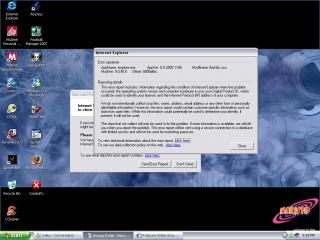
Was running the F scanner, then this poped up. Here's a screen shot of it.(not sure whether it's useful but I'll just post it up) laugh.gif So I guess I'll continue the scanner.

This post has been edited by Guenhwyvar: May 21 2007, 03:23 PM


Attached thumbnail(s)
Attached Image
Sempurna
post May 21 2007, 03:31 PM

Look at all my stars!!
Group Icon
VIP
3,022 posts

Joined: Jul 2006
From: KL


Ahh, I see. Uninstall your Macromedia Flash Player. See if the problem persists.

If the problem goes away, then it was due to a corrupt flash player install. Reinstall and see if the problem persists.

In the meantime, continue with the F-Secure scan to make sure that your system is free from of malware.


TSGuenhwyvar
post May 21 2007, 03:40 PM

Might be on tilt. Might be, I don't care.
******
Senior Member
1,672 posts

Joined: Jan 2003

QUOTE(Sempurna @ May 21 2007, 03:31 PM)
Ahh, I see. Uninstall your Macromedia Flash Player. See if the problem persists.

If the problem goes away, then it was due to a corrupt flash player install. Reinstall and see if the problem persists.

In the meantime, continue with the F-Secure scan to make sure that your system is free from of malware.
*
Ok removed it already but still scanning. smile.gif


Added on May 21, 2007, 4:37 pmDamn... I accidentally clicked Finish button. So no report. Anyway.... here's my hijacklog.

Logfile of HijackThis v1.99.1
Scan saved at 4:36:21 PM, on 5/21/2007
Platform: Windows XP SP1 (WinNT 5.01.2600)
MSIE: Internet Explorer v6.00 SP1 (6.00.2800.1106)

Running processes:
C:\WINDOWS\System32\smss.exe
C:\WINDOWS\system32\winlogon.exe
C:\WINDOWS\system32\services.exe
C:\WINDOWS\system32\lsass.exe
C:\WINDOWS\system32\svchost.exe
C:\WINDOWS\System32\svchost.exe
C:\WINDOWS\system32\spoolsv.exe
C:\WINDOWS\System32\VTTimer.exe
C:\PROGRA~1\mcafee.com\agent\mcagent.exe
C:\Program Files\Java\jre1.6.0_01\bin\jusched.exe
C:\Program Files\McAfee.com\VSO\mcvsshld.exe
C:\Program Files\McAfee.com\VSO\oasclnt.exe
C:\PROGRA~1\McAfee.com\PERSON~1\MpfTray.exe
c:\progra~1\mcafee.com\vso\mcvsescn.exe
C:\PROGRA~1\McAfee.com\PERSON~1\MpfAgent.exe
c:\program files\mcafee.com\agent\mcdetect.exe
c:\PROGRA~1\mcafee.com\vso\mcshield.exe
c:\PROGRA~1\mcafee.com\agent\mctskshd.exe
C:\PROGRA~1\McAfee.com\PERSON~1\MPFSERVICE.exe
C:\Program Files\Analog Devices\SoundMAX\SMAgent.exe
C:\WINDOWS\System32\wuauclt.exe
c:\progra~1\mcafee.com\vso\mcvsftsn.exe
C:\Program Files\MSN Messenger\usnsvc.exe
C:\WINDOWS\explorer.exe
C:\Program Files\MSN Messenger\msnmsgr.exe
C:\WINDOWS\System32\svchost.exe
C:\Program Files\Mozilla Firefox\firefox.exe
C:\Program Files\foobar2000\foobar2000.exe
C:\Program Files\HijackThis.exe

R0 - HKCU\Software\Microsoft\Internet Explorer\Main,Start Page = http://www.yahoo.com/
O2 - BHO: (no name) - {53707962-6F74-2D53-2644-206D7942484F} - C:\PROGRA~1\SPYBOT~1\SDHelper.dll
O2 - BHO: SSVHelper Class - {761497BB-D6F0-462C-B6EB-D4DAF1D92D43} - C:\Program Files\Java\jre1.6.0_01\bin\ssv.dll
O3 - Toolbar: &Radio - {8E718888-423F-11D2-876E-00A0C9082467} - C:\WINDOWS\System32\msdxm.ocx
O3 - Toolbar: McAfee VirusScan - {BA52B914-B692-46c4-B683-905236F6F655} - c:\progra~1\mcafee.com\vso\mcvsshl.dll
O4 - HKLM\..\Run: [VTTimer] VTTimer.exe
O4 - HKLM\..\Run: [MCAgentExe] c:\PROGRA~1\mcafee.com\agent\mcagent.exe
O4 - HKLM\..\Run: [MCUpdateExe] C:\PROGRA~1\mcafee.com\agent\mcupdate.exe
O4 - HKLM\..\Run: [SunJavaUpdateSched] "C:\Program Files\Java\jre1.6.0_01\bin\jusched.exe"
O4 - HKLM\..\Run: [VSOCheckTask] "C:\PROGRA~1\McAfee.com\VSO\mcmnhdlr.exe" /checktask
O4 - HKLM\..\Run: [VirusScan Online] C:\Program Files\McAfee.com\VSO\mcvsshld.exe
O4 - HKLM\..\Run: [OASClnt] C:\Program Files\McAfee.com\VSO\oasclnt.exe
O4 - HKLM\..\Run: [MPFExe] C:\PROGRA~1\McAfee.com\PERSON~1\MpfTray.exe
O4 - HKLM\..\Run: [QuickTime Task] "C:\Program Files\QuickTime\qttask.exe" -atboottime
O9 - Extra button: (no name) - {08B0E5C0-4FCB-11CF-AAA5-00401C608501} - C:\Program Files\Java\jre1.6.0_01\bin\ssv.dll
O9 - Extra 'Tools' menuitem: Sun Java Console - {08B0E5C0-4FCB-11CF-AAA5-00401C608501} - C:\Program Files\Java\jre1.6.0_01\bin\ssv.dll
O16 - DPF: {0B79F48A-E8D6-11DB-9283-E25056D89593} (F-Secure Online Scanner 3.1) - http://support.f-secure.com/ols/fscax.cab
O16 - DPF: {B9B2EE1A-E314-4338-A305-BE845EACB112} (CyberStock 250) - http://219.93.0.130/webecos/control/cswx.cab
O16 - DPF: {BCC0FF27-31D9-4614-A68E-C18E1ADA4389} (DwnldGroupMgr Class) - http://download.mcafee.com/molbin/shared/m...,26/mcgdmgr.cab
O17 - HKLM\System\CCS\Services\Tcpip\..\{FCCB2A4B-75D8-4C2F-98F6-F0B75E92B681}: NameServer = 202.188.13.3 202.188.1.5
O18 - Protocol: livecall - {828030A1-22C1-4009-854F-8E305202313F} - C:\PROGRA~1\MSNMES~1\MSGRAP~1.DLL
O18 - Protocol: msnim - {828030A1-22C1-4009-854F-8E305202313F} - C:\PROGRA~1\MSNMES~1\MSGRAP~1.DLL
O23 - Service: McAfee WSC Integration (McDetect.exe) - McAfee, Inc - c:\program files\mcafee.com\agent\mcdetect.exe
O23 - Service: McAfee.com McShield (McShield) - McAfee Inc. - c:\PROGRA~1\mcafee.com\vso\mcshield.exe
O23 - Service: McAfee Task Scheduler (McTskshd.exe) - McAfee, Inc - c:\PROGRA~1\mcafee.com\agent\mctskshd.exe
O23 - Service: McAfee SecurityCenter Update Manager (mcupdmgr.exe) - McAfee, Inc - C:\PROGRA~1\McAfee.com\Agent\mcupdmgr.exe
O23 - Service: McAfee Personal Firewall Service (MpfService) - McAfee Corporation - C:\PROGRA~1\McAfee.com\PERSON~1\MPFSERVICE.exe
O23 - Service: SoundMAX Agent Service (SoundMAX Agent Service (default)) - Analog Devices, Inc. - C:\Program Files\Analog Devices\SoundMAX\SMAgent.exe


Added on May 21, 2007, 4:42 pmSo far so good. Thanks bro Sempurna for your time and effort. notworthy.gif

This post has been edited by Guenhwyvar: May 21 2007, 04:42 PM
Sempurna
post May 21 2007, 04:51 PM

Look at all my stars!!
Group Icon
VIP
3,022 posts

Joined: Jul 2006
From: KL


I take it the F-Secure scan came out clean? smile.gif

Everything looks great --- your HijackThis log appears to be clean. smile.gif

Please take some time reading this list; it is full of great tools and utilities to help you understand how you got infected and how to keep from getting infected again.
  • Windows Updates (a must!)
    It is very important to make sure that both Internet Explorer and Windows are kept current with the latest critical security patches from Microsoft. You can either click on the link above and bookmark the updates page, or open Internet Explorer, then go to the Tools menu -> Windows Update, and follow the online instructions from there. Your current versions are out-of-date. I cannot stress enough how important this is.

  • Firewall (a must!)
    It is definitely a must have. Some good FREE versions are Comodo, Outpost, or ZoneAlarm.
    Note: You must only use 1 (one) firewall at a time because if you have 2 or more firewalls running at the same time, they will conflict with each other and make your security less reliable. Please also remember to turn off Windows Firewall once you have installed a new firewall.

  • Also make sure to run your antivirus software regularly, and to keep it up-to-date.

  • SpywareBlaster
    This is a great FREE prevention tool to keep nasties from installing on your system.
    Tutorial: How to use!

  • IE-SPYAD
    This FREE tool puts over 5000 sites in your IE Restricted Zone so you'll be protected when you visit innocent-looking sites that aren't actually innocent at all.
    Tutorial: How to use!

  • Spybot - Search & Destroy
    This is a very powerful FREE tool that can search for and annihilate nasties that make it onto your system. Please also remember to enable Spybot's "Immunize" and "TeaTimer" features for realtime protection.
    Tutorial: How to use!

  • Ad-Aware SE
    This is another very powerful FREE tool that searches for and kills nasties that infect your system. Ad-Aware SE and Spybot Search & Destroy compliment each other very well.
    Tutorial: How to use!

  • AVG Anti-Spyware
    This is an excellent FREE scanner to look for trojans and other nasties that might be residing in your system.
    User Manual: How to use!

  • SUPERAntiSpyware
    This is another excellent FREE scanner to look for nasties that might be lurking in your system. SUPERAntiSpyware and AVG Anti-Spyware compliment each other very well.
    Quick Guide: How to use!

Please also read Tony Klein's excellent article How I got Infected in the First Place and this CastleCops article Malware Prevention: Prevent Re-infection.

Hopefully this should take care of your problems! Good luck! biggrin.gif


TSGuenhwyvar
post May 21 2007, 05:00 PM

Might be on tilt. Might be, I don't care.
******
Senior Member
1,672 posts

Joined: Jan 2003

Not clean actually, there was something called " Alexa" Okay thanks once again. thumbup.gif

This post has been edited by Guenhwyvar: May 21 2007, 05:03 PM
Sempurna
post May 21 2007, 05:06 PM

Look at all my stars!!
Group Icon
VIP
3,022 posts

Joined: Jul 2006
From: KL


You're most welcome. smile.gif

Alexa is adware. Nothing too bad, then. smile.gif

This post has been edited by Sempurna: May 21 2007, 05:07 PM

Topic ClosedOptions
 

Change to:
| Lo-Fi Version
0.0800sec    0.34    6 queries    GZIP Disabled
Time is now: 3rd December 2025 - 06:06 AM