

 May 20 2007, 01:50 PM


QUOTE(nles @ May 20 2007, 01:27 PM)
I'm handling a tournament.
One post is not enough to fit in all the infos and photos. I remember there's number of photos limited to a single post.
Now the forum, if I press add reply it will automatically attach to the previous post right?
How do I get #1-5 post reserve for my use?
I dare not to experiment on it, later the topic go to a waste.

Here you go One post is not enough to fit in all the infos and photos. I remember there's number of photos limited to a single post.
Now the forum, if I press add reply it will automatically attach to the previous post right?
How do I get #1-5 post reserve for my use?
I dare not to experiment on it, later the topic go to a waste.

» Click to show Spoiler - click again to hide... «
QUOTE(Joshua_0718 @ May 20 2007, 01:45 PM)
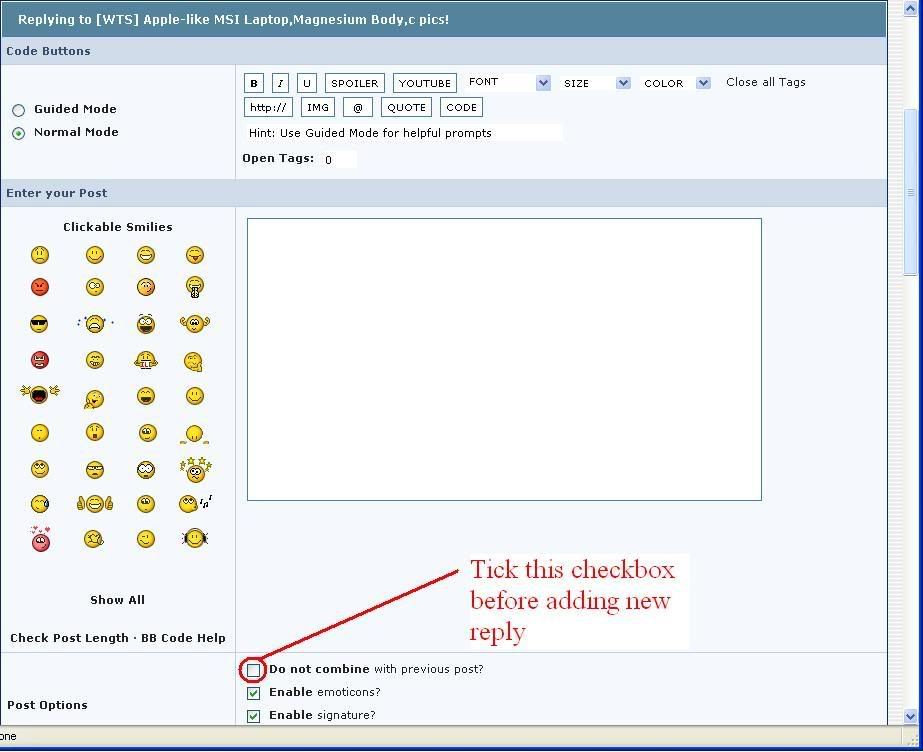
I just found out the 'do not combine post' option has been removed. Mmm....
It's still there. You will only see it when the last reply is by you. In other words, when you post more than one replies straight.This post has been edited by vikingw2k: May 20 2007, 01:53 PM
 Quote
Quote


 0.0152sec
 0.43
0.43
 6 queries
 GZIP Disabled