Welcome Guest ( Log In | Register )

Bump Topic Topic Closed RSS Feed

Outline · [ Standard ] · Linear+

 [WTA] Nikon D5000 destroying all my sd cards, After use, cannot delete files

views
     
TSn8210
post Jun 4 2018, 05:02 PM, updated 8y ago

Look at all my stars!!
*******
Senior Member
2,678 posts

Joined: Mar 2005


If I insert a new sd card into my D5000, it will work fine. But once I take it out and insert into my pc, i can copy the photos but i cannot delete anything in the sd card. There is this new file created named "Nikon001.dsc". I cannot format or anything. Windows or any partition software will tell me the card is locked. I insert other sd cards into it, and all become the same, can no longer format or delete with pc. Only 1 card, I can still delete files using the camera. Other cards, cannot delete at all, using camera or pc.

HELP... what happened? Damaged N5000 card slot?
ch@ich@i
post Jun 4 2018, 05:11 PM

Casual
***
Junior Member
330 posts

Joined: Nov 2007
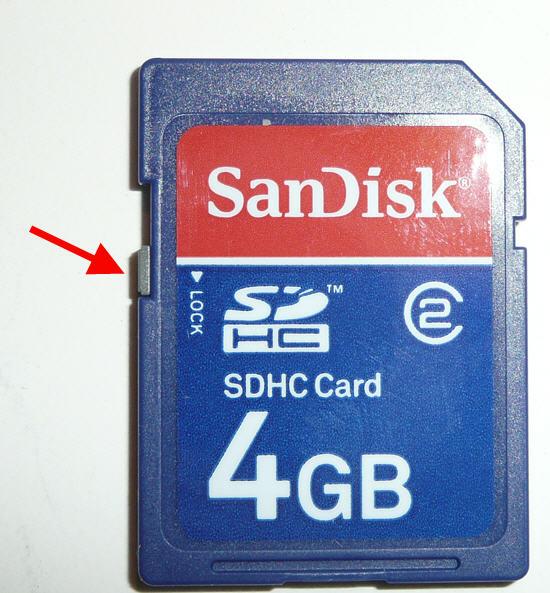
does your card has this lock? based on the picture shown. try unlock it and delete/format again.

user posted image
TrialGone
post Jun 4 2018, 05:43 PM

On my way
****
Junior Member
603 posts

Joined: Sep 2017
Is your sd card genuine? There are cases fake sd card damage after use.

This post has been edited by TrialGone: Jun 4 2018, 05:43 PM
TSn8210
post Jun 4 2018, 06:08 PM

Look at all my stars!!
*******
Senior Member
2,678 posts

Joined: Mar 2005


It is unlocked. Have been using for years and suddenly now all my cards have this "NIKON001.DSC" file. Tried the following cards:
- 8GB, have used for years, now cannot delete on camera or pc, cannot detect on camera.. it says no sd card inserted
-2GB, old card but hardly use. I can snap pictures, can delete with camera, but cannot delete from pc, also have the weird nikon001.dsc file in it
-1GB, new card, just took out from casing, same as 2GB... I tested on pc first before using on camera. I can copy, paste, delete using pc. But after insert into camera, snap some pictures, then cannot use on pc already. Can read with pc, cannot delete or format. It says card is write protected.

All the cards above are not physically locked on the side.
incubus_skj
post Jun 4 2018, 06:10 PM

oh mai gotto
******
Senior Member
1,750 posts

Joined: Feb 2009


some cameras have file protect function that makes the files all cannot be deleted from the computer

check your camera settings if got any function like "file protect / write protect" and turn it off. you should be able to delete them after that
Everdying
post Jun 4 2018, 06:14 PM

Two is One and One is None.
Group Icon
Staff
30,735 posts

Joined: Jan 2003
try format the card in the camera.
but it is weird that u cannot format the card in the computer...sure its not the reader problem?
TSn8210
post Jun 4 2018, 07:38 PM

Look at all my stars!!
*******
Senior Member
2,678 posts

Joined: Mar 2005


I know it isn't the card reader because I can format other cards. Unfortunately I don't have 2 card readers.

Attached are the examples: In both pictures you can see the default delete function is faded in grey instead of red colour. Tried using cmd also the same. Tried easeus partition master, cannot delete or format. Using easeus is even weirder. I can format it but after you refresh, everything is back in place. I mean it will show the format process went from 0 to 100% but once you refresh, all the deleted files are back. So far, 8GB card is totally out. But I can still format or delete the 2Gb and 1Gb with the camera. But now both these cards will not work in other places.


Attached thumbnail(s)
Attached Image Attached Image
OOtaii
post Jun 4 2018, 09:44 PM

On my way
****
Junior Member
576 posts

Joined: Feb 2016
I had same issue b4..
unable to delete/write on to my SD card from PC (happened to all SD cards).. but able to do that using my lap top.
not sure why..
TrialGone
post Jun 4 2018, 10:00 PM

On my way
****
Junior Member
603 posts

Joined: Sep 2017
You guys don't find it weird TS has 1Gb and 2Gb card? Do they still sell those? Old card could have corrupted. Did you test it with at least a new 16Gb card?

Btw, simple google shows that nikon001.dsc is a folder created in camera. Pretty much any camera does that.

This post has been edited by TrialGone: Jun 4 2018, 10:02 PM
Everdying
post Jun 4 2018, 10:20 PM

Two is One and One is None.
Group Icon
Staff
30,735 posts

Joined: Jan 2003
are u by any chance using the nikon software?
if so, try uninstalling and just use default windows drivers...plug camera straight into computer...then see if u can do what u want.

fireballs
post Jun 4 2018, 10:27 PM

10101
*******
Senior Member
5,650 posts

Joined: Mar 2012
The card cannot be formatted because your PC is still reading/hanging onto the DSC file.. it's a description file. Just ignore it.

You should be able to format the card by using your camera built in function.

Else, use Windows disk management, unmounted then format.

You can also use lock hunter to see who is locking the file, maNually close it. Likely it's some antivirus

TSn8210
post Jun 5 2018, 10:36 AM

Look at all my stars!!
*******
Senior Member
2,678 posts

Joined: Mar 2005


QUOTE(fireballs @ Jun 4 2018, 10:27 PM)
The card cannot be formatted because your PC is still reading/hanging onto the DSC file..  it's a description file. Just ignore it.

You should be able to format the card by using your camera built in function.

Else, use Windows disk management, unmounted then format.

You can also use lock hunter to see who is locking the file, maNually close it. Likely it's some antivirus
*
The 8GB card is now totally undetectable in camera. Only can detect on pc, but using lock hunter shows nothing is locking it, but still, can't delete. Will try windows disk management later, need to google it first.

The 1GB and 2GB were not bought recently. 2GB have used it for few times then keep in drawer when I got my 8GB. 1GB never used in packaging until today. I did test it out on pc, with copy paste delete format before inserting into camera.


Attached thumbnail(s)
Attached Image
fireballs
post Jun 5 2018, 10:45 AM

10101
*******
Senior Member
5,650 posts

Joined: Mar 2012
Kay sound silly... U format the 8gb as fat or NTFS.
Does your camera got low level formatter?

There is another tool for formatting as. Saved me once.
https://gbatemp.net/threads/panasonic-sdfor...ter-3-0.216500/
TSn8210
post Jun 5 2018, 10:57 AM

Look at all my stars!!
*******
Senior Member
2,678 posts

Joined: Mar 2005


QUOTE(fireballs @ Jun 5 2018, 10:45 AM)
Kay sound silly... U format the 8gb as fat or NTFS.
Does your camera got low level formatter?

There is another tool for formatting as. Saved me once.
https://gbatemp.net/threads/panasonic-sdfor...ter-3-0.216500/
*
FAT32

Camera only hv:
1) delete, or delete all
2) format
3) no memory card: release or lock


Attached thumbnail(s)
Attached Image
TSn8210
post Jun 5 2018, 11:04 AM

Look at all my stars!!
*******
Senior Member
2,678 posts

Joined: Mar 2005


This is the 8GB card which cannot be detected by camera anymore. I can copy out all the pictures inside. Just can't edit, delete or format.

So far, 1Gb, 2GB can use on camera, just can't delete/format with pc.


Attached thumbnail(s)
Attached Image
TSn8210
post Jun 5 2018, 11:19 AM

Look at all my stars!!
*******
Senior Member
2,678 posts

Joined: Mar 2005


The write protect switch is always off/unlock


Attached thumbnail(s)
Attached Image
TSn8210
post Jun 5 2018, 11:31 AM

Look at all my stars!!
*******
Senior Member
2,678 posts

Joined: Mar 2005


And this is the Windows Disk Management result. Cant do anything either.


Attached thumbnail(s)
Attached Image
TrialGone
post Jun 5 2018, 12:50 PM

On my way
****
Junior Member
603 posts

Joined: Sep 2017
Maybe a long shot but.....did u try other card reader? Frankly i still think could be sd card issue than ur camera.
TSn8210
post Jun 5 2018, 12:54 PM

Look at all my stars!!
*******
Senior Member
2,678 posts

Joined: Mar 2005


QUOTE(TrialGone @ Jun 5 2018, 12:50 PM)
Maybe a long shot but.....did u try other card reader? Frankly i still think could be sd card issue than ur camera.
*
Going to... after work bring cards to another pc with a card reader built in. Hopefully it works.
Zot
post Jun 5 2018, 12:58 PM

Look at all my stars!!
*******
Senior Member
7,938 posts

Joined: Mar 2014
QUOTE(n8210 @ Jun 5 2018, 12:54 PM)
Going to... after work bring cards to another pc with a card reader built in. Hopefully it works.
*
This most likely that your files in cards become Read Only. Many people are having same problem. Solution are:

Solution 1:

Start > Run > cmd
type "diskpart" -> runs diskpart.exe from system folder
type "list volume" -> now you see all your connected drives, see which one is the drive
type "select volume #" -> # being the letter of your drive
type "attributes disk clear readonly" -> removing the protection
Then open your SD, you can now edit, delete, move files.

Solution 2:

Plunge this drive or memory card to a computer. (Of course, you should use a card Reader to connect your memory card.)
Click “Start” on the taskbar to open “Run” and type in “regedit”.
Hit “HKEY_LOCAL_MACHINE” to expand “System”.
Find “Current Control Set” in “System” list to click “Control”.
Check whether there is a key named “Storage Device Policies” to change the digit in the “DWORD value” box into "0" and press “OK”. But, if you cannot find the key named “Storage Device Policies”, you are supposed to create a one: right click “Control” to create a new key and name it as “Storage Device Policies”=> right click this new key to open “DWORD Value” and name it as “write protect”=> Double click it to change number.


2 Pages  1 2 >Top
Topic ClosedOptions
 

Change to:
| Lo-Fi Version
0.0160sec    0.59    6 queries    GZIP Disabled
Time is now: 20th December 2025 - 06:58 AM