

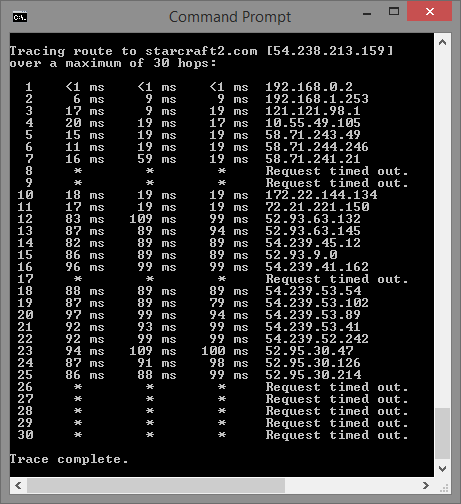
need to troubleshoot some connection problem, having very frequent disconnection issues, what is those request timed out mean in tracert ?
 What is request timed out in tracert mean ?
|
|
 May 13 2018, 07:36 PM, updated 8y ago May 13 2018, 07:36 PM, updated 8y ago
Show posts by this member only | Post
#1
|
 
Senior Member
4,547 posts Joined: Dec 2004 From: Metro Prima, Kuala Lumpur, Malaysia, Earth, Sol  
|
need to troubleshoot some connection problem, having very frequent disconnection issues, what is those request timed out mean in tracert ? |
|
|
May 13 2018, 07:38 PM
Show posts by this member only | Post
#2
|

Senior Member
3,335 posts Joined: Nov 2007 From: Pluto 
|
It means unifi being shit.
|
|
|
May 13 2018, 07:46 PM
Show posts by this member only | Post
#3
|

Senior Member
6,155 posts Joined: Jul 2012 From: Today, 00:01 AM
|
It means your internet died
|
|
|
May 13 2018, 07:49 PM
Show posts by this member only | Post
#4
|

Senior Member
6,733 posts Joined: Jan 2003 From: Zion
|
You need to buy more tracer rounds.
|
|
|
May 13 2018, 08:04 PM
Show posts by this member only | IPv6 | Post
#5
|

Junior Member
297 posts Joined: Jul 2010
|
Ping test je. You don't need to know the next hop ip also. Request time out means unable to reach destination ip, for your case StarCraft la. Likely due to packet drops due to shitty internet connection or StarCraft server got issue
This post has been edited by xchaosdragon: May 13 2018, 08:05 PM |
|
|
May 13 2018, 08:04 PM
Show posts by this member only | Post
#6
|

Senior Member
954 posts Joined: Dec 2006
|
Probably the ping is dropped by the rules on the router.
|
|
|
May 13 2018, 08:06 PM
Show posts by this member only | IPv6 | Post
#7
|

Senior Member
1,883 posts Joined: Jan 2007 From: The Long river ...
|
Your backhaul problem.
|
|
|
May 13 2018, 08:09 PM
Show posts by this member only | Post
#8
|

Senior Member
1,045 posts Joined: Jan 2010 From: land beyond heaven and hell!!
|
some destination disable ping request
|
|
|
May 13 2018, 08:11 PM
Show posts by this member only | IPv6 | Post
#9
|

Junior Member
596 posts Joined: Dec 2010
|
means u din pay unifi bills |
|
|
May 13 2018, 08:12 PM
|
|
Senior Member
4,547 posts Joined: Dec 2004 From: Metro Prima, Kuala Lumpur, Malaysia, Earth, Sol
|
so basically tracert is pinging every single routers in the path until destination ?
|
|
|
May 13 2018, 08:13 PM
|

Junior Member
189 posts Joined: Jan 2009
|
Ur line like shit or the server line like shit.
Seeing ur results both also like shit. |
|
|
May 13 2018, 08:49 PM
|

Senior Member
1,119 posts Joined: Jun 2007
|
use ping...dont use trace rt...trace rt is for tracing IP...
you wanna test connection then use ping |
|
|
May 13 2018, 08:53 PM
|
 
Elite
4,603 posts Joined: Jan 2003 From: PJ
|
For security purposes, icmp replies are usually denied. So one cant map out the IPs of the provider/server.
|
|
|
May 13 2018, 08:54 PM
|

Junior Member
157 posts Joined: Jan 2013
|
QUOTE(xchaosdragon @ May 13 2018, 08:04 PM) Request time out means unable to reach destination ip. Not necessary. |
|
|
May 13 2018, 08:56 PM
|
|
Junior Member
157 posts Joined: Jan 2013
|
When I conduct interview this is my fav question.
What's tracert is for Why get request time out. |
|
|
May 13 2018, 08:58 PM
|
|
Senior Member
5,909 posts Joined: Jan 2006 From: 06.02.58.44.23.08.03
|
QUOTE(narf03 @ May 13 2018, 07:36 PM) need to troubleshoot some connection problem, having very frequent disconnection issues, what is those request timed out mean in tracert ?  This post has been edited by maxizanc: May 13 2018, 08:59 PM |
|
|
May 13 2018, 09:08 PM
|

Senior Member
1,774 posts Joined: Nov 2007 From: Planet Earth
|
Could be starcraft 2 server-side problem since 192.xxx to 58.xxx trace no issue. You can try IP lookup on those request timeout IPs to see the timeout occur at which IPs. If can reach those IPs intermittently, can try ping it to check lac and connection stable or not.
This post has been edited by samftrmd: May 13 2018, 09:09 PM |
|
|
May 13 2018, 09:11 PM
|
|
Senior Member
1,774 posts Joined: Nov 2007 From: Planet Earth
|
QUOTE(Chaud @ May 13 2018, 08:49 PM) use ping...dont use trace rt...trace rt is for tracing IP... tracert is useful too to find out at which IP it starts to fail. If it fail @ US side, you call screamyx also no use.you wanna test connection then use ping |
|
|
May 13 2018, 09:13 PM
Show posts by this member only | IPv6 | Post
#19
|
|
Senior Member
954 posts Joined: Dec 2006
|
QUOTE(narf03 @ May 13 2018, 08:12 PM) so basically tracert is pinging every single routers in the path until destination ? It pings with increasing TTLs. Starts with 1 and increases by 1 with each hop.Then it waits for the ICMP Time Exceeded response. |
|
|
May 13 2018, 09:22 PM
|

Senior Member
1,300 posts Joined: Sep 2012
|
QUOTE(~min~ @ May 13 2018, 08:09 PM) some destination disable ping request this. also disconnection issue? clarify la. isp or game only |
|
|
May 14 2018, 10:13 AM
|
|
Junior Member
297 posts Joined: Jul 2010
|
QUOTE(maxizanc @ May 13 2018, 08:58 PM) Correct me if im wrong. Time out in tracert could mean that the node is busy. Or the icmp is busy. Busy because ICMP is given lowest priority. Or the icmp is disabled. So it fail to return the message to the requester but packets stil able to go through the next hop Yes, the node may be busy as it might be under heavy load. The server is incapable of handling the surge of traffic resulting in lost packets, so icmp packets lost is no surprise here.It's not really useful to know the next hop if you cannot find out who does the IP belong to. But from this case, seems like it exited your ISP cloud and to the internet. The 54.xx. may be the gateway to StarCraft server. It might be something happened in between the gateway and the server or the server itself died. Also, did you try to do a ping test? Is it reachable or intermittent? Not sure if your ISP might have block this as well though. Edit: a quick ping test using browser ping tester from.other rgions also shows that the server is unreachable tho This post has been edited by xchaosdragon: May 14 2018, 10:24 AM |
| Bump Topic Add ReplyOptions New Topic |
| Change to: |  0.0196sec 0.0196sec
 0.76 0.76
 5 queries 5 queries
 GZIP Disabled GZIP Disabled
Time is now: 14th December 2025 - 11:42 AM |
 Quote
Quote