Welcome Guest ( Log In | Register )

Bump Topic Topic Closed RSS Feed

Outline · [ Standard ] · Linear+

Streamyx The Unofficial Streamyx 4Mbps Users Club V1, Combo RM 160 Per Month *Updated Info*

views
     
SeanWong
post Jul 29 2009, 03:32 PM

Getting Started
**
Junior Member
88 posts

Joined: May 2008
From: Cheras, Subang Jaya & Bdr Kinrara


err...a newcomer to upgrade to 4mbps broadband.

The technician came to my house just now and test the connection. My result on SNR is 23.2 db and attenuation is 18.7 db, so he said it is good to get 4Mbps. Then he upgrade it and told me it need 48 hours to truly activate and achieve the desired speed. He just use about 15 mins and said all done.

My question is...i thought he need to bring a new modem/router in order to cater for 4Mbps broadband? like that one call Rigel brand (some sort like that). But he just said my current TM Billion ADSL modem/router is more than enough and not neccessary to change it.

And then is that what he said is true? just 48 hours can achieve the desired speed? i expect there will be a lot of trouble since i browse through all the previous post here lot of ppl complain about efficiency of TM during upgrading process.

Hmm..or maybe i need to wait after 48 hours then only can judge whether they have deliver their promise or not?

P/S: sorry for noob question as i really dumb in this kind of technical stuff.. sweat.gif

This post has been edited by SeanWong: Jul 29 2009, 03:36 PM
SeanWong
post Jul 29 2009, 05:34 PM

Getting Started
**
Junior Member
88 posts

Joined: May 2008
From: Cheras, Subang Jaya & Bdr Kinrara


QUOTE(prasys @ Jul 29 2009, 05:10 PM)
It takes 24-48 hours for you to be upgraded to 4Mbps at least. Next it will take a week or two before you're allocated 218.x.x.x IP range.

Any ADSL modem would work - you dont have to buy a new modem.

So you better wait 24-48 hours. It took them ~48-50hrs for them to activate 4Mbps. The jumpering was done instantly , I was capped at 4Mbps , but my account upgrading thingy took like 48 hours. A week later I was given 218.111 IP range
*
thanks for enlighthen notworthy.gif

just wanna ask, is that necessary i need to get the ip 218.111? or is it compulsory will get this ip when upgrade to 4Mbps broadband?

becoz for me i don't care which ip i've been allocate to. As long as i was always capped at 4Mbps and it's consistent then i am the happy man already nod.gif
SeanWong
post Jul 29 2009, 05:44 PM

Getting Started
**
Junior Member
88 posts

Joined: May 2008
From: Cheras, Subang Jaya & Bdr Kinrara


QUOTE(prasys @ Jul 29 2009, 05:38 PM)
Yes, eventually you'll be in that IP Range
*
oh i see.

then i think what i need to do now is praying the upgrading status and allocation of 218 ip done accordingly without much delay. But when i read all those previous post with regards to the problems faced by other forum members, it really made me worry.. sweat.gif
SeanWong
post Jul 31 2009, 05:49 PM

Getting Started
**
Junior Member
88 posts

Joined: May 2008
From: Cheras, Subang Jaya & Bdr Kinrara


Ok i have call premier CS this morning again and request to be allocate with 218 ip and it's done within 30 mins.

Below are the speedtest, all sifu here pls check whether is it normal? Is that the latency a bit high? coz last time my previous package the ping is around 20-25ms only (KL), how come after 4Mbps it's even higher?

user posted image
user posted image
user posted image
user posted image
user posted image
user posted image
SeanWong
post Jul 31 2009, 06:01 PM

Getting Started
**
Junior Member
88 posts

Joined: May 2008
From: Cheras, Subang Jaya & Bdr Kinrara


QUOTE(fabianz03 @ Jul 31 2009, 05:55 PM)
^ all of your pings and speed are normal.
But for 1Mbps users like me, I'm crawling for that speed.  drool.gif
*
oh ok thanks for advise bro.

maybe i worry too much sweat.gif

SeanWong
post Jul 31 2009, 10:09 PM

Getting Started
**
Junior Member
88 posts

Joined: May 2008
From: Cheras, Subang Jaya & Bdr Kinrara


QUOTE(Acrisius @ Jul 31 2009, 07:28 PM)
SeanWong, your pings were consider quite high,

*
ya i also think so. Any tips to reduce it bro?
SeanWong
post Aug 1 2009, 08:16 AM

Getting Started
**
Junior Member
88 posts

Joined: May 2008
From: Cheras, Subang Jaya & Bdr Kinrara


QUOTE(Acrisius @ Aug 1 2009, 02:16 AM)
You may try to change the DNS server.
Put 202.188.1.5 as primary and see got any different or not.
*
er....how to change? sorry kinda noob in this kind of technical stuff rclxub.gif
SeanWong
post Aug 1 2009, 08:32 AM

Getting Started
**
Junior Member
88 posts

Joined: May 2008
From: Cheras, Subang Jaya & Bdr Kinrara


QUOTE(fabianz03 @ Aug 1 2009, 08:19 AM)
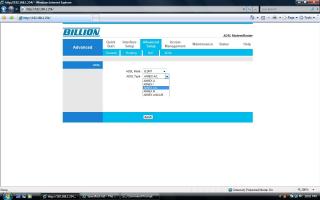
People say changing the modulation to G.DMT gives you better line quality.
*
how? minds to explain in more details bro?
SeanWong
post Aug 4 2009, 01:45 PM

Getting Started
**
Junior Member
88 posts

Joined: May 2008
From: Cheras, Subang Jaya & Bdr Kinrara


my speedtest result as at today (location: Cheras, ip: 218.111.23.xx):-

user posted image
user posted image
user posted image
user posted image

any bro here can recommend how to lower my latency, apart from assigning 202.188.0.132 at primary dns inside my modem (i try b4 nothing improvement).

Thanks!

This post has been edited by SeanWong: Aug 4 2009, 01:46 PM
SeanWong
post Aug 4 2009, 02:09 PM

Getting Started
**
Junior Member
88 posts

Joined: May 2008
From: Cheras, Subang Jaya & Bdr Kinrara


QUOTE(MX510 @ Aug 4 2009, 01:58 PM)
Try opendns :-)
*
any risk for that? just curious hmm.gif
SeanWong
post Aug 6 2009, 10:41 PM

Getting Started
**
Junior Member
88 posts

Joined: May 2008
From: Cheras, Subang Jaya & Bdr Kinrara


QUOTE(Acrisius @ Aug 1 2009, 02:16 AM)
You may try to change the DNS server.
Put 202.188.1.5 as primary and see got any different or not.
*
Just wanna ask is that my modem status is correct?

Attached Image

QUOTE(fabianz03 @ Aug 1 2009, 08:19 AM)
People say changing the modulation to G.DMT gives you better line quality.
*
ya i already change it. But which ADSL type to be choose?

Attached Image

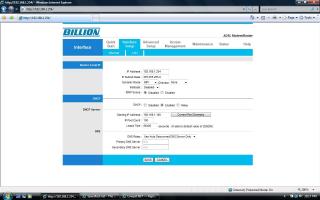
QUOTE(vchenv @ Aug 1 2009, 10:15 AM)
You can change the settings at the modem configuration page (http://192.168.1.1 for Linksys). Then, you can change the DSL modulation as well as the primary DNS. smile.gif
*
Is that insert the primary & secondary DNS in this screen?

Attached Image

Sorry i'm really dont know how to configure my modem, need any sifu help here notworthy.gif

This post has been edited by SeanWong: Aug 7 2009, 11:03 AM
SeanWong
post Aug 18 2009, 03:09 PM

Getting Started
**
Junior Member
88 posts

Joined: May 2008
From: Cheras, Subang Jaya & Bdr Kinrara


When i lodge several complains to their premier CS team, i remember one guy told me all those premium ip 218 range are allocate to 4Mbps & 2Mbps users as well...

though i don't know whether he just simply bluff me or not..
SeanWong
post Aug 18 2009, 03:29 PM

Getting Started
**
Junior Member
88 posts

Joined: May 2008
From: Cheras, Subang Jaya & Bdr Kinrara


Look like it is either your premier CS, or my premier CS team is lying on the allocation of 218 ip on 2Mbps users...

Whatever it is, my connection speed still drop drastically between 8pm - 12am everyday, and i believe that i already become well known amongst their premier CS team, coz i call them almost everyday...

still they blame on recent APCN2 faulty that caused the congestion during peak hours usage...really fed up...

This post has been edited by SeanWong: Aug 18 2009, 03:30 PM
SeanWong
post Aug 24 2009, 02:35 PM

Getting Started
**
Junior Member
88 posts

Joined: May 2008
From: Cheras, Subang Jaya & Bdr Kinrara


My speedtest result yesterday

user posted image

Look normal? I'm using 4Mbps package and this is not even 50% of my subscribed speed..EVERYDAY during peak hours this is my average d/l speed..

Already file complain to them and the problem still persists almost a month..sad.gif
SeanWong
post Aug 24 2009, 02:57 PM

Getting Started
**
Junior Member
88 posts

Joined: May 2008
From: Cheras, Subang Jaya & Bdr Kinrara


but strangely it only happens during those so-called "peak hours" - weekdays from 8pm - 12am and whole weekend..

As a working adult, i can only use my internet access/ online gaming after 6pm, and during weekend. Then this is the period where i'm encounter slow connection speed..

As usual TM ppl said it is congestion during peak hours usage, due to recent APCN2 faulty, where they have to re-route 4Mbps port with others subscribers..but man i'm paying RM160 every month and this is what i 've been deserved?

filed a dozen complain to them but yet to yield any solution from them..looks like i need to personally go to their office and meet their head to highlight my frustration, instead of calling/ email them..
SeanWong
post Aug 25 2009, 12:59 PM

Getting Started
**
Junior Member
88 posts

Joined: May 2008
From: Cheras, Subang Jaya & Bdr Kinrara


MX510 always getting full speed dry.gif

i never see him being affected by whatsoever upgrading/maintenance/cable fault/conflicker worm/etc.. from TM huh.gif
SeanWong
post Aug 25 2009, 01:22 PM

Getting Started
**
Junior Member
88 posts

Joined: May 2008
From: Cheras, Subang Jaya & Bdr Kinrara


QUOTE(MX510 @ Aug 25 2009, 01:11 PM)
Heh brother don't say like that lah hehe, i am not affected because my 4 Mbps is direct to the exchange, special case, hehehe
*
Well i'm just kidding whistling.gif i was too jealous on your consistent speed all the time tongue.gif

Arggg...what i hope is just a stable and consistent speed from TM, at least 70% of my subscribed speed at 90% of the time...man am i asking too much? doh.gif
SeanWong
post Sep 7 2009, 10:06 AM

Getting Started
**
Junior Member
88 posts

Joined: May 2008
From: Cheras, Subang Jaya & Bdr Kinrara


lol brilliant mad.gif

a 4Mbps user with this kind of connection speed.

user posted image

Do you all still want to upgrade to 4Mbps "narrowband"? WTF to F***ing Streamyx??? vmad.gif It has been f***ing slow like this since end of July..
SeanWong
post Sep 7 2009, 04:23 PM

Getting Started
**
Junior Member
88 posts

Joined: May 2008
From: Cheras, Subang Jaya & Bdr Kinrara


QUOTE(shermeister @ Sep 7 2009, 03:54 PM)
Hmmm.. I already lodged a complaint with mcmc as well as streamyx. Seems most of us connected to the wangsa maju B-RAS are experiencing these problems. Local speed already this slow, what do you expect from international sites?

Definitely slow local speed got nothing to do with APCN 2 right TMNUT?

this shows something is DEFINITELY wrong with TM's own routing/backbone/equipment/FUP and not admitting it cause in the end of the day, rebates need to be given out losing more customers due to tm's own F**K up fair usage policy..

So giving your loyal 4mb customer a speed of 0.1 - 0.3 mbps is fair to you TMNUT? and yet you boasting about HSBB ? bullcrap tmnut...
*
At least i know not only me (a 4Mbps user) experience this issue. I also lodge my complaint to MCMC and CFM as well but until todate (1 month +) nothing has been resolved...

Ya i never paid late every month and nor do i act as a heavy downloader (i'm not downloading stuff 24/7)...I just want to have fast browsing net and a consistent online gaming, am i asking too much? This is what i deserve, as a loyal 4Mbps user, to get a speed of 0.1 - 0.4 Mbps EVERYDAY?

What else can i do? Cancel TM subscription and move to others?

EDIT: Today i personally go to TMPoint, bring along my speedtest result and bang table with the manager..you know how he response? in front of me he pick up the telephone and call to 100, and pass me the phone ask me to talk to the officer...WTF? he's just doing the same thing like me..then what's the point i approach TMPoint? i can also call 100 at my home...he's not even help me to streamline the procedure by having internal communication with TM technical staff, which i believe can expedite the process...

Pathetic just pathetic...


Added on September 7, 2009, 8:27 pmone of the TM staff called me just now and told me they are performing migration of server for wangsamaju exchange there and expected to be complete by early of October..then he claims all the slow connection issue will be resolved..and also rebate of money will be done accordingly.

Another one month to bear with the lousy connection, WTF !@#$%

This post has been edited by SeanWong: Sep 7 2009, 08:27 PM

SeanWong
post Sep 7 2009, 09:12 PM

Getting Started
**
Junior Member
88 posts

Joined: May 2008
From: Cheras, Subang Jaya & Bdr Kinrara


i stay at cheras. And my port is connected to wangsamaju exchange.

2 Pages  1 2 >Top
Topic ClosedOptions
 

Change to:
| Lo-Fi Version
0.0467sec    0.82    7 queries    GZIP Disabled
Time is now: 9th December 2025 - 11:58 PM