Welcome Guest ( Log In | Register )

Outline · [ Standard ] · Linear+

 ILLEGEAR Onyx Discussion Thread V1, Illegear's first Bazel-less Notebook

views
     
k!nex
post Apr 16 2019, 12:32 PM

Restless stars
*******
Senior Member
3,389 posts

Joined: Mar 2007
From: KL


QUOTE(AZIM@ILLEGEAR @ Mar 26 2019, 07:25 PM)
Yes, the Onyx keyboard switches are interchangeable, same goes to the keycaps smile.gif
*
Hi Azim , is it possible to change Onyx keycaps to Selenite keycaps ? Are they interchangeable. I still like the keycaps shape of the Selenite .
k!nex
post Apr 16 2019, 03:13 PM

Restless stars
*******
Senior Member
3,389 posts

Joined: Mar 2007
From: KL


QUOTE(AZIM@ILLEGEAR @ Apr 16 2019, 01:04 PM)
Hi k!nex, I'm afraid the keycaps on the Selenite is not interchangeable with the Onyx because of the difference in the keycap dimensions. Nevertheless, we shall announce it officially once the octagon version of the Onyx keycaps (CAP 3) is released soon smile.gif
*
Owh... So there is actually a plan to release the octagon keycaps. Any tentative pricing. I need to start saving already. Learnt from Rosmah on tabiat menabung. biggrin.gif
Is it end-user replaceable or do I need to send my unit over for you guys to do it ?


k!nex
post Apr 16 2019, 03:22 PM

Restless stars
*******
Senior Member
3,389 posts

Joined: Mar 2007
From: KL


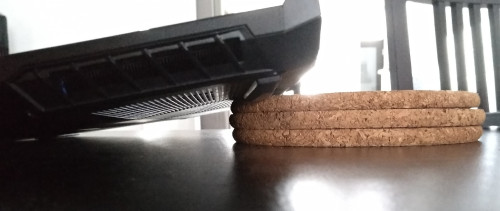
Btw, I have tried numerous ways for cooling. I think the main problem is the rubber feet at the bottom of the notebook is not tall enough. That hinders airflow . I did an experiment by comparing the placement of the notebook. Put on the desk like usual and tilt the rear by 1.5cm like that by putting a small book between the 2 fans inlet. There is a significant drop in temperature when i run benchmarks. I think those notebook coolers dont work that well because the fans are not powerful enough, it is only drawing power from USB port , 5V 500mA max.
k!nex
post Apr 20 2019, 12:13 PM

Restless stars
*******
Senior Member
3,389 posts

Joined: Mar 2007
From: KL


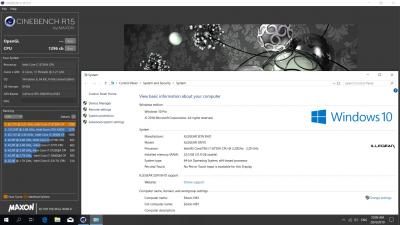
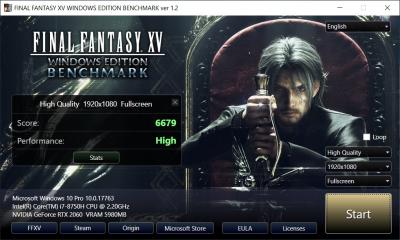
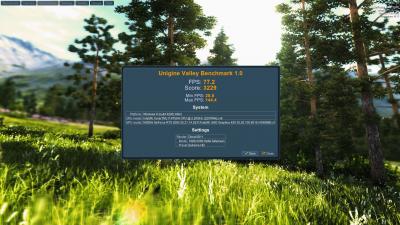
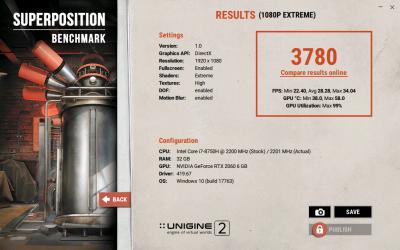
Here are some figures for performance numbers for my slightly tweaked Onyx RTX 2060.

Cinebench R15 scores:

» Click to show Spoiler - click again to hide... «


Firestrike Benchmark:
» Click to show Spoiler - click again to hide... «


Final Fantasy XV Benchmark :

» Click to show Spoiler - click again to hide... «


Unigine Valley Extreme HD :

» Click to show Spoiler - click again to hide... «


Superposition Benchmark 1080p Extreme

» Click to show Spoiler - click again to hide... «


Power Limit for i7 8750H during idle in HWinfo64 :
» Click to show Spoiler - click again to hide... «


Stress test for ROG Realbench ( ambient temp 25C) :

CPU
» Click to show Spoiler - click again to hide... «


GPU
» Click to show Spoiler - click again to hide... «


For the CPU side, I can confirm that the Power Limit is dynamic. It can change depending on temperature. CPU will start throttling at 95C

This post has been edited by k!nex: May 2 2019, 08:51 PM

k!nex
post Apr 20 2019, 09:14 PM

Restless stars
*******
Senior Member
3,389 posts

Joined: Mar 2007
From: KL


QUOTE(mcloudteo @ Apr 20 2019, 01:37 PM)
by using book?  sweat.gif

sorry as i mentioned it look more organize on the cooler pad maybe it not important to you but it's for me.  tongue.gif

but I curious how both of these method will affect the temperature of the laptop hence i did the test just now  devil.gif

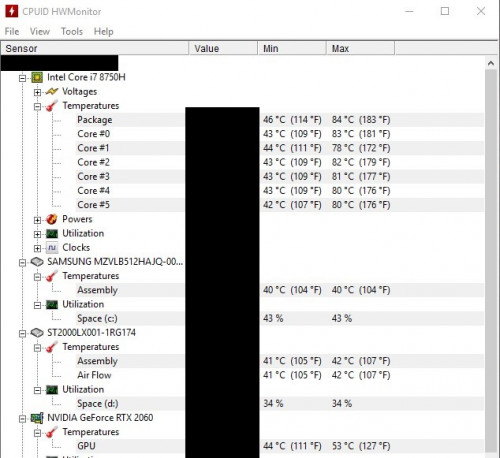
both test using intel xtu with 5 minutes stress test on cpu
First test tilt the rear putting something in between the 2 fans inlet like what k!nex did.

user posted image

user posted image
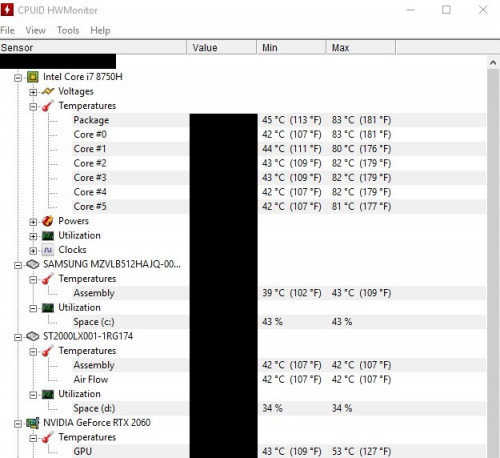
Second test put on cooler pad without fan.

user posted image
I re-run 3 times to make sure the result is consistent as you can see above the result of both method are the same judging from the max recorded value, even the temperature of other component other than cpu.

anyway the test just out of curiosity it's not a professional test of any sort.  laugh.gif
*
There is 1 thing you forgot to do . If you want apples to apples comparison, you should max out both fans before you do a stress test for temps.
k!nex
post Apr 25 2019, 06:48 PM

Restless stars
*******
Senior Member
3,389 posts

Joined: Mar 2007
From: KL


QUOTE(tch23 @ Apr 25 2019, 08:21 AM)
Hmm, noticed that there are no 144hz screen option for onyx lite currently. And big different between 60hz and 144hz?
*
Depend on wat game you play . For RPG games, i will say not much benefit. I prefer higher quality image instead. However if you are CS:GO or FIFA kaki , then there is a significant difference in gaming experience. The screen animation feels alot smoother and no screen tearing when actions are fast.
But then if you only opt for a gtx1050, i think 60hz is good enough. The GPU not very powerful Save you some money for more storage or RAM.
k!nex
post May 12 2019, 01:22 PM

Restless stars
*******
Senior Member
3,389 posts

Joined: Mar 2007
From: KL


QUOTE(Star_knight79 @ May 8 2019, 06:39 PM)
I'm eyeing on the new Onyx

with 9750H and 2070 Max-Q.

Not sure if the heat management is alright? For those who has been using this laptop for a year, do you like this notebook?

Any serious unsolved issue?

I would appreciate any realistic comment. Thank you.
*
If I were you, I just buy the Selenite if you want an RTX 2070 which is not Max-Q variant. RTX Max-Q variants are a rip off by Nvidia. It is not that much faster than RTX 2060. Very minimal improvement for a whole lot of money.
k!nex
post May 13 2019, 12:40 PM

Restless stars
*******
Senior Member
3,389 posts

Joined: Mar 2007
From: KL


QUOTE(Star_knight79 @ May 13 2019, 10:37 AM)
Thanks k!nex. I agreed. After doing some research, I think RTX 2060 is of better value for money. I don't like Selenite due to its size and bulkiness. I don't do a lot of gaming, but I would like to do more on content creation like Adobe illustrator, video editing. (I'm not sure how much will an RTX 2060 help in video rendering). In fact, Asus Zenbook Pro 15 is also on my list. But I don't quite like it mainly due to its bulkiness and thick display bezel.
*
For content creators the Selenite is definitely better. 15 inch is a tad too small for video editing which is what i feel. 17 inch screen in a 15 inch chassis is really nice. You should go to their showroom and view yourself . Better temps than Onyx also bcoz of 1 extra heatpipe. I can get 14.9k firestrike overall score with an RTX2060 Onyx , the RTX2070 Max-Q wont do much difference than mine. Thats why not worth the extra money.
Asus notebook if you buy the Scar II or Zephyrus is good, the rest like meh.. plus you have to be aware of their shit quality aftersales service. I had nightmare with their service center at lowyat plaza last time. I will never buy another Asus notebook or phone.

This post has been edited by k!nex: May 13 2019, 12:44 PM
k!nex
post May 13 2019, 06:43 PM

Restless stars
*******
Senior Member
3,389 posts

Joined: Mar 2007
From: KL


QUOTE(SkyBlue® @ May 13 2019, 12:51 PM)
Kinex, you using selenite?? I’m still hunting for a gaming/photo edit laptop. Is selentite good?
*
Nah. Onyx RTX2060 with i7 8750h . I abit regret going for Onyx because the 17 inch screen look so much better for gaming. Plus quite abit better temps. Plus Selenite support Windows Hello face authentication. Onyx dont hv this. Both models no fingerprint reader.

You read ZM Fong's review. I think quite similar to wat i find. The only thing i dont like about Selenite is the all plastic chassis. Onyx whole chassis is metal except the bottom cover.
k!nex
post May 13 2019, 07:04 PM

Restless stars
*******
Senior Member
3,389 posts

Joined: Mar 2007
From: KL


QUOTE(Star_knight79 @ May 13 2019, 01:39 PM)
Yep. I would rather use the money to upgrade RAM. But I still don't like Selenite. Too bulky for me. I need to carry it around. Haha....anyway, thanks for your advice.

Asus Zephyrus model is slim and slick. GTX 1070 model also dropped its price. But many complain both model are running very hot, with Zephyrus slightly better in heat management. Anyway, I think running such a powerful hardware in a small notebook casing is very challenging when dealing with heat management issue. Even Onyx suffers the same fate I suppose.

I heard many people mentioned about the bad aftersales service of Asus and Huawei. How did it affect you? Warranty claim?
*
Yea.. upgrade RAM is good especially when you are content creator. Or opt for a bigger nvme ssd since they are dirt cheap these days.

I prefer the older Zephyrus since the RTX version has only 1 RAM slot, another 8GB soldered onto the motherboard. I really hate this. Throughout my 10 years working in IT industry , i had so many RAM failures. If soldered RAM kaput, i have to change whole motherboard which is ridiculously expensive. I like its innovative cooling solution though.

Most thin and light laptops like Onyx and Zephyrus has ways to cut power to the CPU to reduce heat and fan noise. The Onyx has office mode which will cut max tdp to 35W if you think the fan is too noisy. If you max out both GPU and CPU running AVX instruction set, the Onyx will hit upwards of 95C on the CPU. Gaming is no issue at all though, it has good temps.

A few years ago i had an Asus A42JC laptop. Motherboard kaput after a year. Sent back for warranty. Took 2 months only come back. Got scratches some more when return to me. I was so pissed and never ever buy an Asus laptop .


k!nex
post May 13 2019, 08:58 PM

Restless stars
*******
Senior Member
3,389 posts

Joined: Mar 2007
From: KL


QUOTE(ZM Fong @ May 13 2019, 07:27 PM)
Personally I also like Selenite more. I prefer 17 inch (must have thin bezels) and it has better cooling. I don't think the plastic build is a big issue since the chassis is sturdy. Onyx is also good, but 15 inch thin and light don't have much cooling room.

Hmm what do you work?

Personally I don't like Office mode even though it has customizable fan curve which might help to reduce fan noise. IMO the more effective method is reduce clock speed (not disable turbo) with undervolt (or turn down PL1? never tried that before though, probably won't work)

Asus warranty...don't want to comment on this anymore
*
Maybe its only me. But the feel of touching a metal chassis does feel more premium to me since these things are not cheap at all. But then i like the Selenite keycap. It looks unique.

I am an IT innovation and technology analyst in education line. The office mode is good to watch movie or just Youtube. I get much better battery life ( 30% battery bar drop per hour at 1080p Youtube with 128mV underclock). That is with a touch of a button. That button is max fan for the GTX Onyx but Office/Gaming mode for RTX Onyx. I know you can fiddle around with XTU but how many clicks do you need to set it. Undervolt do work concurrent with office mode. Plus you have to be aware that starting version 6.5 ,XTU will not work with locked CPU like 8750H or 9750H.

This post has been edited by k!nex: May 13 2019, 09:05 PM
k!nex
post Jun 15 2019, 07:36 PM

Restless stars
*******
Senior Member
3,389 posts

Joined: Mar 2007
From: KL


Any Illegear rep can tell me whether it is okay for me to upgrade Win10 to version 1903. I'm running on 1809 now with no issues but I'm looking forward to upgrade to 1903.
I am afraid the Illegear Control Center wouldn't work or some other weird stuffs happening due to bios not compatible and stuffs.
Onyx 8th gen i7+RTX2060 user here.

This post has been edited by k!nex: Jun 15 2019, 07:37 PM
k!nex
post Jun 15 2019, 08:18 PM

Restless stars
*******
Senior Member
3,389 posts

Joined: Mar 2007
From: KL


QUOTE(pluginbaby @ Jun 15 2019, 08:03 PM)
8750H+rtx2060 onyx user here as well. So far things seems to be normal. Even throttlestop and msi afterburn works as usual as well. Not sure bout XTU though as I've stopped using it since moving to throttlestop.
*
Anything weird about wifi you encountered ? I heard a lot of users who migrated to 1903 having issues with intermittent wifi disconnection.
k!nex
post Jul 4 2019, 02:29 AM

Restless stars
*******
Senior Member
3,389 posts

Joined: Mar 2007
From: KL


Need some help here. I recently updated windows 10 to version 1903. Everything is working properly except the audio. I tried to uninstall and re-download the realtek audio driver from illegear website ( audio_realtek_4_66). Not working. No sound although driver installed. No exclamation mark on device manager on the Realtek Audio too. The only way sound is working is when i uninstalled realtek audio from control panel. However if this is the case, Sound Blaster Connect App shows "Your audio device cannot be detected" . Onyx 8750h+rtx2060 user here

Update : I manage to get Realtek drivers install and working properly using built-in Windows troubleshoot. However, Sound Blaster Connect is broken now . So I uninstall it. Currently I am unable to reinstall the exe file downloaded from the website. It just doesn't appear in program files or my Start Menu after I install.

This post has been edited by k!nex: Jul 4 2019, 03:33 AM


Change to:
| Lo-Fi Version
0.0485sec    0.73    7 queries    GZIP Disabled
Time is now: 4th December 2025 - 02:10 PM