

QUOTE(Eiraku @ Jun 3 2018, 09:34 PM)
Yep, if it's the Aero 15/15x V7 (aka last year's non CFL-H model), then its the same exact panel the Onyx uses.

Eiraku. Is there any difference on SRGB n Adobe RGB percentage on onyx 60hz n 144hz display?ILLEGEAR Onyx Discussion Thread V1, Illegear's first Bazel-less Notebook
|
|
 Jun 4 2018, 09:48 PM Jun 4 2018, 09:48 PM
Return to original view | Post
#1
|
 
Newbie
2 posts Joined: Oct 2011  
|
QUOTE(Eiraku @ Jun 3 2018, 09:34 PM) Yep, if it's the Aero 15/15x V7 (aka last year's non CFL-H model), then its the same exact panel the Onyx uses. Eiraku. Is there any difference on SRGB n Adobe RGB percentage on onyx 60hz n 144hz display? |
|
|
|
|
|
Jun 4 2018, 09:49 PM
Return to original view | Post
#2
|
|
Newbie
2 posts Joined: Oct 2011
|
Can someone explain what is the function of colour calibration? Instead of change the display to warm and yellowish-like colour mode? I expect this calibration will improve the colour accuracy on the display especially for photo editing purpose.
|
|
|
Feb 24 2019, 08:37 PM
Return to original view | Post
#3
|
|
Newbie
2 posts Joined: Oct 2011
|
QUOTE(ZM Fong @ Feb 24 2019, 09:26 PM) A bit high, if you need help in undervolting, PM me ZM Fong, i'm a new user of onyx too. t junction is just a max limit, you should keep CPU and GPU under 80C (my preference, CPU has higher tolerance though) I have a same problem on the thermal for this RTX 2070 model. Bfore undervolting CPU, during gaming even at the lowest setting n lowest resolution, temp reaches 98% in 5 minutes of gaming. But now after undervolting the CPU to -146.5 offset it just reduced to 90%. For GPU, i don't know whether it can be done by using Throttlestop also or not. Appreciate if you can help me on this. |
|
|
Feb 24 2019, 09:25 PM
Return to original view | Post
#4
|
|
Newbie
2 posts Joined: Oct 2011
|
QUOTE(ZM Fong @ Feb 24 2019, 10:00 PM) Don't just look at temp, clock speed also important Not yet. can it be done by using Throttlestop as well?Have you try undervolting GPU? Clock speed still maintain 3900++ to 4094 at max. What do you used to undervolting the GPU. This post has been edited by azwn: Feb 24 2019, 09:38 PM |
|
|
Feb 24 2019, 09:54 PM
Return to original view | Post
#5
|
|
Newbie
2 posts Joined: Oct 2011
|
QUOTE(ZM Fong @ Feb 24 2019, 10:47 PM) cannot, need to use software that can OC GPU like MSI Afterburner Oh ok. Thanks a lot. I will try it first.guide here: https://www.reddit.com/r/nvidia/comments/6e...ive_you_a_free/ (might be a bit confusing so if you need advice just ask) Btw do I need to underclocking the CPU as well? I don't think it needa a full power of CPU to give the best gaming performance. |
|
|
Feb 25 2019, 09:53 PM
Return to original view | Post
#6
|
|
Newbie
2 posts Joined: Oct 2011
|
QUOTE(Prince J @ Feb 25 2019, 11:48 AM) Hi azwn and wookp, Can i have your EC and BIOS version? Press F2 to access to BIOS and screenshot to me. 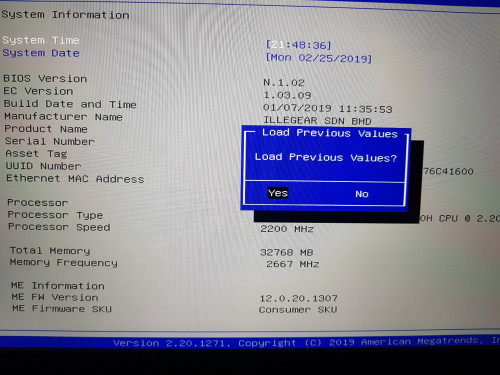 Here my bios n EC number. Please check whether this is the latest one or not. |
|
|
|
|
|
Mar 24 2019, 03:52 PM
Return to original view | Post
#7
|
|
Newbie
2 posts Joined: Oct 2011
|
QUOTE(pluginbaby @ Mar 23 2019, 02:56 PM) I disabled my turbo boost due to this. It is just too hot for me Instead of disabled turbo boost, its better to just limit the core clock at 3.2ghz on all core by using throttlestop. So far still capable to run all the demanding games without any performance drop in gaming. Temperature will maintain at 60-70 deg as well.. |
|
|
Mar 24 2019, 03:54 PM
Return to original view | Post
#8
|
|
Newbie
2 posts Joined: Oct 2011
|
QUOTE(hshern95 @ Mar 23 2019, 02:48 PM) just get my unit yesterday. Thats normal for me as well. I dont know how the others unit performed. What spec do you have ? Rtx 2070?When doing web browsing, the CPU and GPU temp is maintained 40 ~ 50 deg C. I tried to play pubg, and found that the CPU temp goes to 95deg C with enabling turbo boost. Is this temp consider as normal ??? |
|
|
Mar 24 2019, 06:07 PM
Return to original view | Post
#9
|
|
Newbie
2 posts Joined: Oct 2011
|
QUOTE(hshern95 @ Mar 24 2019, 06:15 PM) I did undervolt the CPU via ThrottleStop. But when I run some stress test in XTU, the 'Current Limit Throttling' keep lights up, and then the CPU utilization keep bouncing up and down. Im not sure whether XTU can be run with throttlestop undervolting. Im just monitor from the Rivatuner/MSI Afterburner reading during the gaming.. At max, it will only go up to 3.2ghz. Don't you have this issue? Can you share your FIVR throttlestop setting? |
|
|
Mar 24 2019, 06:10 PM
Return to original view | Post
#10
|
|
Newbie
2 posts Joined: Oct 2011
|
QUOTE(mcloudteo @ Mar 24 2019, 06:46 PM) switch to game mode press the button beside the power button will solve this. I believed that the power button will only pull the fan curve at a full speed. There is no difference for the performance wise except for the temp. |
|
|
Mar 24 2019, 07:18 PM
Return to original view | Post
#11
|
|
Newbie
2 posts Joined: Oct 2011
|
QUOTE(hshern95 @ Mar 24 2019, 07:22 PM) I saw someone claimed that it can run on XTU with throttlestop undervolting. Ok try it first. For me, i think undervolt will not affecting Unfortunately, I already removed throttlestop in my laptop. I just watched youtube and configured it. the temp at all on this rtx onyx. Based on all of my testing, undervolt will only slow down the heating rate to 95 deg. To get the actual low temp, u will just need to reduce the core clock. |
|
|
Mar 24 2019, 09:06 PM
Return to original view | Post
#12
|
|
Newbie
2 posts Joined: Oct 2011
|
QUOTE(pluginbaby @ Mar 24 2019, 08:32 PM) Eh bro. Did u say u run Throttlestop + XTU at the same time on your laptop previously? After u removed one of it, still crashes? Oh ok. But how much core clock do you get with that non boost core setting eh? Have you try cinebench r15? How's the score?That button actually toggles between game mode and office mode. But sometime it boosts up the fan. I'm not sure how it was triggered When in game mode, TDP is set higher and you can see your GPU do boosting. In office mode, max clock is lower. Well this is from my observation though on onyx8750h+rtx2060. And true, limiting max clock is a good way too. Just that I prefer using XTU for now which only has normal non boost core multiplier settings. This post has been edited by azwn: Mar 24 2019, 09:06 PM |
|
|
May 11 2019, 09:31 PM
Return to original view | IPv6 | Post
#13
|
|
Newbie
2 posts Joined: Oct 2011
|
QUOTE(AZIM@ILLEGEAR @ May 11 2019, 12:06 PM) Hi pluginbaby, kindly note that Onyx with RTX GPUs are using a different version for the Gaming Center and for your model, the v2.0.1.4 is indeed the latest version for your system (RTX2060) 3 Azim. Can you share the sound blaster installer for rtx 2070? |
| Change to: |  0.0470sec 0.0470sec
 0.62 0.62
 7 queries 7 queries
 GZIP Disabled GZIP Disabled
Time is now: 11th December 2025 - 12:38 PM |
 Quote
Quote