

QUOTE(wonglokat @ Oct 7 2018, 09:55 PM)
Y530's 57/36

Y530 has optional 300 nits 72% NTSC 60Hz/144Hz so...ILLEGEAR Onyx Discussion Thread V1, Illegear's first Bazel-less Notebook
|
|
 Oct 15 2018, 10:29 PM Oct 15 2018, 10:29 PM
Return to original view | IPv6 | Post
#1
|
 
Senior Member
8,240 posts Joined: Apr 2017 
|
QUOTE(wonglokat @ Oct 7 2018, 09:55 PM) Y530's 57/36 Y530 has optional 300 nits 72% NTSC 60Hz/144Hz so... |
|
|
|
|
|
Oct 24 2018, 12:04 PM
Return to original view | Post
#2
|
|
Senior Member
8,240 posts Joined: Apr 2017
|
QUOTE(michealelsie @ Oct 24 2018, 10:41 AM) However, I noticed one flaw which is the track pad. I hold my finger on the trackpad without moving, the cursor on the desktop keep "dancing around". I asked the sales representative whom replied that it might be driver not fully installed. Driver problemAlso, they did mentioned about loud fan noise and also crazy hot button on the top part of the laptop after gaming some times. TongFang barebones have loud fan noise under load, nevertheless it can keep the internals cool. I'll still prefer this rather than silent fans+higher temps |
|
|
Nov 6 2018, 06:15 PM
Return to original view | Post
#3
|
|
Senior Member
8,240 posts Joined: Apr 2017
|
QUOTE(michealelsie @ Nov 6 2018, 05:44 PM) Anyone using this monster? I’m so boring and lonely hahahahahahaha This model is very new from TongFang - GK7CN5S/6SGuess not much people using, although I can see some resellers in other countries are starting to sell it |
|
|
Nov 15 2018, 10:19 PM
Return to original view | Post
#4
|
|
Senior Member
8,240 posts Joined: Apr 2017
|
QUOTE(nyunyu @ Nov 15 2018, 09:44 PM) Anyone on Onyx can test the turbo boost? The proc should be able to boost up to 4.1Ghz but no matter how I stress the cpu, I can't see it even reach 4.1Ghz. I ran Aida64 and couldn't see it goes past 2.3Ghz Try undervolt and set Speedshift to 1 via Throttlestop. Have you tested the CPU with games? |
|
|
Dec 23 2018, 03:29 PM
Return to original view | IPv6 | Post
#5
|
|
Senior Member
8,240 posts Joined: Apr 2017
|
QUOTE(cts0418 @ Dec 23 2018, 02:49 PM) Hi guys, did anyone of u experience issue with the blue switch whereby sometimes the clicky feel and sound will gone? And when u click it hard for few times the feel and sound will be back. Currently I'm expericing this in my A key Sometimes the key actuation is like that. I tried before |
|
|
Jan 10 2019, 04:53 PM
Return to original view | Post
#6
|
|
Senior Member
8,240 posts Joined: Apr 2017
|
QUOTE(kyLL @ Jan 10 2019, 06:15 AM) So far it looks like TongFang GK5 (Onyx) and GK7 (Selenite) have RTX upgrade |
|
|
|
|
|
Feb 24 2019, 07:01 PM
Return to original view | IPv6 | Post
#7
|
|
Senior Member
8,240 posts Joined: Apr 2017
|
QUOTE(wookp @ Feb 24 2019, 06:52 PM) Reporting in as a new Onyx user. Got it with a RTX2060 and a 8750H. This baby packs quite a bit of heat eh? My processors registers up a max of 99 deg C and GC is at 85 deg C. The rest of you seeing the same numbers? What kind of load?Try undervolt CPU+GPU, also ramp up fan speed (modify fan curve) Does it have TG paste applied |
|
|
Feb 24 2019, 08:26 PM
Return to original view | IPv6 | Post
#8
|
|
Senior Member
8,240 posts Joined: Apr 2017
|
QUOTE(wookp @ Feb 24 2019, 08:04 PM) First thing before doing all those, are the temperatures too high? I read somewhere that 8750H has a t junc of 100 deg. A bit high, if you need help in undervolting, PM met junction is just a max limit, you should keep CPU and GPU under 80C (my preference, CPU has higher tolerance though) |
|
|
Feb 24 2019, 09:00 PM
Return to original view | IPv6 | Post
#9
|
|
Senior Member
8,240 posts Joined: Apr 2017
|
QUOTE(azwn @ Feb 24 2019, 08:37 PM) ZM Fong, i'm a new user of onyx too. Don't just look at temp, clock speed also importantI have a same problem on the thermal for this RTX 2070 model. Bfore undervolting CPU, during gaming even at the lowest setting n lowest resolution, temp reaches 98% in 5 minutes of gaming. But now after undervolting the CPU to -146.5 offset it just reduced to 90%. For GPU, i don't know whether it can be done by using Throttlestop also or not. Appreciate if you can help me on this. Have you try undervolting GPU? |
|
|
Feb 24 2019, 09:47 PM
Return to original view | IPv6 | Post
#10
|
|
Senior Member
8,240 posts Joined: Apr 2017
|
QUOTE(azwn @ Feb 24 2019, 09:25 PM) Not yet. can it be done by using Throttlestop as well? cannot, need to use software that can OC GPU like MSI AfterburnerClock speed still maintain 3900++ to 4094 at max. What do you used to undervolting the GPU. guide here: https://www.reddit.com/r/nvidia/comments/6e...ive_you_a_free/ (might be a bit confusing so if you need advice just ask) |
|
|
Feb 25 2019, 07:49 AM
Return to original view | IPv6 | Post
#11
|
|
Senior Member
8,240 posts Joined: Apr 2017
|
QUOTE(azwn @ Feb 24 2019, 09:54 PM) Oh ok. Thanks a lot. I will try it first. You can do that also, but don't disable turbo boostBtw do I need to underclocking the CPU as well? I don't think it needa a full power of CPU to give the best gaming performance. |
|
|
Feb 25 2019, 07:49 AM
Return to original view | IPv6 | Post
#12
|
|
Senior Member
8,240 posts Joined: Apr 2017
|
QUOTE(wookp @ Feb 24 2019, 10:50 PM) Btw, it does have TG applied. Hence i was wondering if these temps are normal. Haven't tried undervolting both CPU or GPU before though. Any guidelines? A bit high imohttps://www.notebookcheck.net/How-to-Lower-...7.213140.0.html https://www.reddit.com/r/nvidia/comments/6e...ive_you_a_free/ |
|
|
Mar 9 2019, 02:58 PM
Return to original view | IPv6 | Post
#13
|
|
Senior Member
8,240 posts Joined: Apr 2017
|
QUOTE(pluginbaby @ Mar 8 2019, 02:42 PM) Onyx 1060 vs Onyx 2060, which GPU is lesser power demanding eh? I couldn't find any comparison of power draw of 1060 mobile vs 2060 mobile. Both consumes about the same power (2060N is heavily throttled, lower clock speed compared to desktop counterpart)Anyone able to comment? I don't play AAA games but I'm just curious of how power efficient is rtx2060 mobile. Gonna try undervolting when I get my onyx2060 soon to see how much it can drop down the temps I don't think you can undervolt RTX GPU in Onyx |
|
|
|
|
|
Apr 16 2019, 04:25 PM
Return to original view | Post
#14
|
|
Senior Member
8,240 posts Joined: Apr 2017
|
QUOTE(k!nex @ Apr 16 2019, 03:22 PM) Btw, I have tried numerous ways for cooling. I think the main problem is the rubber feet at the bottom of the notebook is not tall enough. That hinders airflow . I did an experiment by comparing the placement of the notebook. Put on the desk like usual and tilt the rear by 1.5cm like that by putting a small book between the 2 fans inlet. There is a significant drop in temperature when i run benchmarks. I think those notebook coolers dont work that well because the fans are not powerful enough, it is only drawing power from USB port , 5V 500mA max. That's exactly what I always recommend others to do instead of buying cooling pad...free yet effective method, applies to all laptops |
|
|
Apr 19 2019, 11:50 PM
Return to original view | IPv6 | Post
#15
|
|
Senior Member
8,240 posts Joined: Apr 2017
|
QUOTE(mcloudteo @ Apr 19 2019, 08:09 PM) I do exactly the same though I'm using the cooler pad but never use the fan just to lift up the laptop Does the cooling pad has enough airflow on the bottom of the laptop or not. Many cheap cooling pads suck in airflow, relying the weak fans which did nothing. I tried one CM before, that one sucks The cool thing about using the cooler pad is i can put on my lap and it look more organize as well sorry I'm OCD  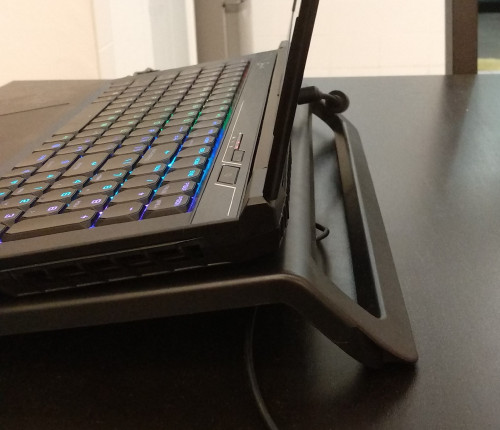 |
|
|
Apr 20 2019, 11:08 AM
Return to original view | IPv6 | Post
#16
|
|
Senior Member
8,240 posts Joined: Apr 2017
|
QUOTE(mcloudteo @ Apr 20 2019, 07:37 AM) I'm not using the fan..... Then you might just want to lift up the back by a bit to enable more airflow. The cooling pad might block some airflow |
|
|
Apr 20 2019, 03:14 PM
Return to original view | IPv6 | Post
#17
|
|
Senior Member
8,240 posts Joined: Apr 2017
|
QUOTE(mcloudteo @ Apr 20 2019, 01:37 PM) snip Agree that cooling pad looks more organized. Thanks for the testing. I guess it depends on the cooling pad model. My CM Notepal X-Slim II does have slightly worse result compared to putting book at the back (with fans). Still think that cooling pad isn't the best way to decrease tempsThis post has been edited by ZM Fong: Apr 20 2019, 03:14 PM |
|
|
Apr 25 2019, 12:23 PM
Return to original view | Post
#18
|
|
Senior Member
8,240 posts Joined: Apr 2017
|
QUOTE(tch23 @ Apr 25 2019, 08:21 AM) And big different between 60hz and 144hz? For fast paced games, yes |
|
|
May 1 2019, 01:45 PM
Return to original view | IPv6 | Post
#19
|
|
Senior Member
8,240 posts Joined: Apr 2017
|
QUOTE(pluginbaby @ May 1 2019, 11:37 AM) Anyone bought decals or stickers for their Onyx? I found some on taobao but my Chinese is so bad that I'm worried I order the wrong one haha Why not apply by yourself |
|
|
May 5 2019, 09:02 AM
Return to original view | IPv6 | Post
#20
|
|
Senior Member
8,240 posts Joined: Apr 2017
|
QUOTE(hshern95 @ May 5 2019, 02:07 AM) Hi, I found that my Onyx runs hot while gaming i7-8750H? If yes then you must undervolt since the chip itself runs hotIs it considered as normal as the CPU temperature goes to nearly 90ish or more than that while playing dota2? I just bought my Onyx 1month ago.. think that the thermal paste still new and workable. |
| Change to: |  0.0510sec 0.0510sec
 0.76 0.76
 7 queries 7 queries
 GZIP Disabled GZIP Disabled
Time is now: 2nd December 2025 - 11:24 AM |
 Quote
Quote