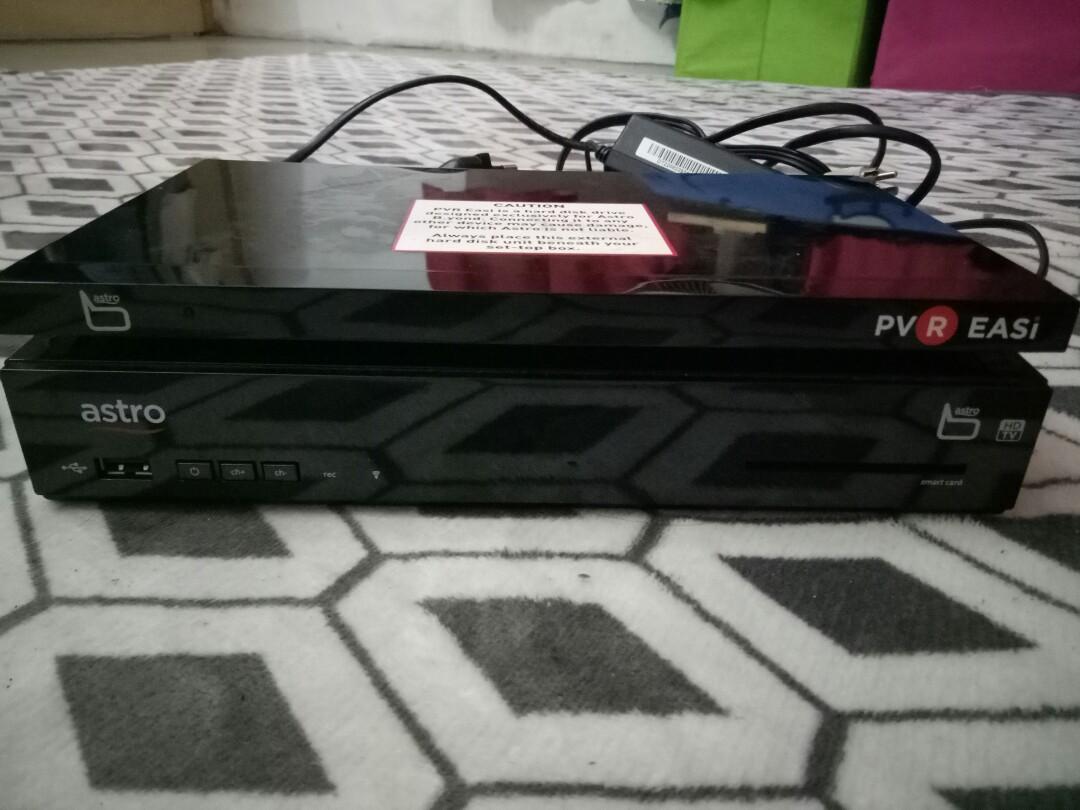
Once you switched to Njoi, you can't use PVR functions anymore, and you can no longer watch your previously recorded programmes. They will disable it for your account.
Alternatively, you can consider cancel all Astro packages you have, then remain Astro Family pack + Dynasty pack = Total RM81.95/month
Do note that this does not include HD service.
-----------
What you're seeing on TVB Classic channel now (as shown on picture below), is called
windowboxed. Nothing gonna do with Ultra Box or your TV problem. As usual, it is Astro's own problem.
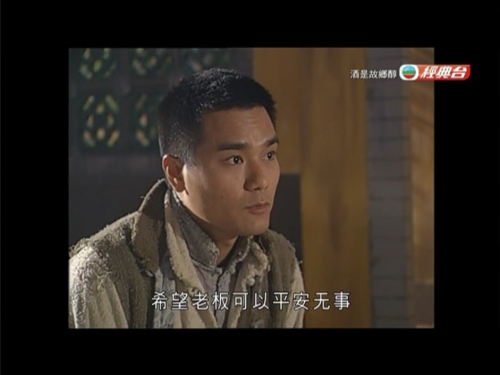
This is how it looks like on 4:3 TV (old, big and fat CRT TV)
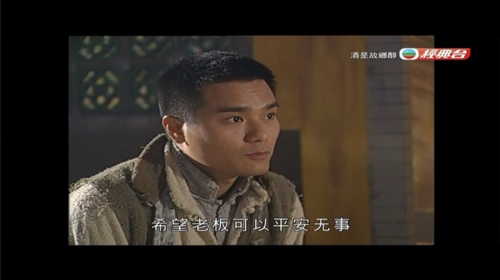
This is how it looks like on 16:9 TV (flat screen TV, HD TV, UHD TVs like what you see today)
Don't contact Astro customer service and tell them about this windowbox, black bars, this and that...
They'll just tell you to use Astro remote control, press the aspect ratio button and make sure it's "Fit to screen", change to "LB Expand", make sure the TV Size is "16:9".
Still doesn't solve the issue? If you talk somemore, they'll arrange a technician to visit to your house to check, and charge you RM65 technical service fee. This is so Astro.
Basically, it's a waste of time. Relating irrelevant stuff. Be a smart consumer. Don't do that. :thumbsup:
So how come channels like TVB Classic, Asian Action Channel (ch327), TVB Classic Movies (ch328) has this windowboxed problem? Here's why:
Firstly, there's this 2 common and basic aspect ratio used for TVs, which is 4:3 (pronounce as "four-by-three") and 16:9 (pronounce as "sixteen-by-nine").
| Aspect ratio | How does picture shape look like? | Where is it commonly seen and used? |
| 4:3 | Square shape, like old CRT TVs | Old TV shows in SD quality |
| 16:9 | Rectangular, or widescreen, just like the HD or UHD TV you see today | Today's TV shows in HD or UHD quality |
*4:3's "square" shape size are not to be confused with "Square" or "1:1" size as what you commonly see in photo sharing platforms like Instagram.So far understand?
However, as channels are moving towards HD broadcasting, they have to transmit it in 16:9. So when it comes to displaying 4:3 content, there's some technical conflict that many people not aware of (in harsher words, lazy to bother).
1) The actual channel from channel provider is in 16:9 aspect ratio (presumably in HD), which looks like this:
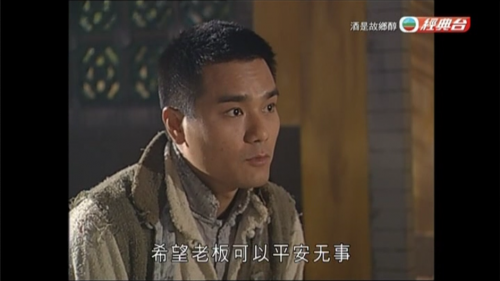
Because TVB Classic now broadcasts in native 16:9 aspect ratio, but because old TV shows (HK series) are in 4:3 aspect ratio, the channel provider (TVB) puts a letterbox (black bars) on left and right sides, so that the shape won't be stretched and distorted like below:
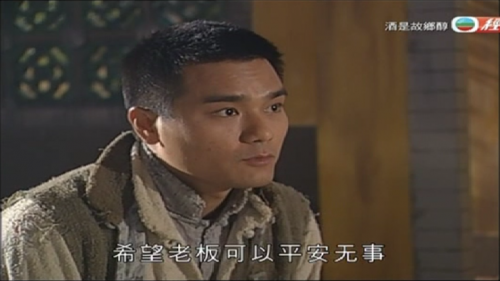
*Simulated image of how it looks like if there's no letterbox used when showing a 4:3 shows on a 16:9 TV screen.
You like what you see? Well, some people don't mind as long it's "fit my entire 16:9 TV screen", even if the picture will turn out fat, huge and out of shape.
2) So now you know the channel provider transmits the channel in 16:9, but Astro did not change any display aspect ratio settings from their broadcasting side.
Either they lazy, or they don't care, or they think is no big deal, so why bother? Or they think it's normal because it's "4:3".

"They don't know about it" is not a good reason lor. Work in technical/broadcasting sector don't know about these? What are they doing? Sit down and wait for salary to come in?
So by default, when the channel or content is in 16:9, a letterbox (black bars on top and bottom) will appear.
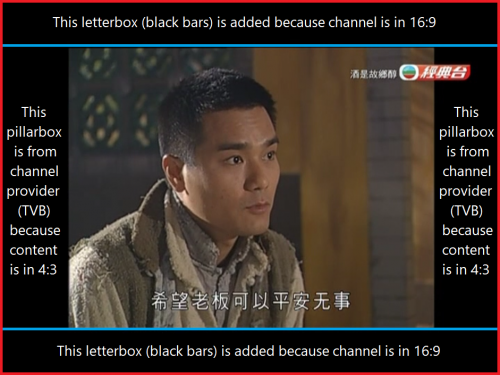 Letterbox + pillarbox = windowboxed
 (result as shown on first pic above)
Astro still uses 4:3 aspect ratio on all SD channels, except Disney Junior, which is so far I know, the only SD channel on Astro in native 16:9 aspect ratio.
More than half of all Astro customers are already using HD TV (16:9), so continue using 4:3 format isn't practical anymore.
What Astro can do?> Just because it's SD, that doesn't mean they cannot use 16:9. Astro should stop using excuse that SD must only be in 4:3, especially when customer service agents in technical department advising the customers.
> It's fine if they want to continue transmit the video in 4:3, but they should not add letterbox or centre cut on a 16:9 content by any means just to make it look nice on 4:3 TV, especially Astro own slot in/in-house ads such as Astro SuperSport ads, Astro First/Best movies ads.
> Remove the letterbox added by themselves on channels like TVB Classic, Asian Action Channel, TVB Classic Movies.
> If that channel provider transmits the SD channel in 4:3 but letterbox is added by channel provider, Astro can remove it themselves before transmitting to viewers.
>
SD channels that is supposed to be in 16:9, should seen as 16:9 on viewer's screen, including Astro Go.
Does Astro aware about this? Oh yes, they aware about it. Been months ago, they say they'll do something about it. Until now, same only.
Am I surprised or disappointed? Nope. Why? Because I get used to it already.Sometimes it's just a matter of changing settings from their side, things that doesn't cost them money, but they got many other bigger things to attend to, so they won't bother this kind of suggestion because for them it's just a minor issue.
Thanks for the detailed explanation.
This is exactly the problem i am referring to. It is Super irritating. Now the actual picture shown on the tv is probably just 50% given the extra black boxes.
I think it is an excuse for Astro. I know service provider such as Starhub in lion city they do not broadcast the old content in this manner even now.
The SD content is already Low in resolution and blurry, with the size cut to half now it is even smaller to view. I cannot even see the actor face clearly.
I won’t even keep the basic family pack or other add-on package. I would rather just terminate it and switch to njoi and just watch xinghe alone for rm20.
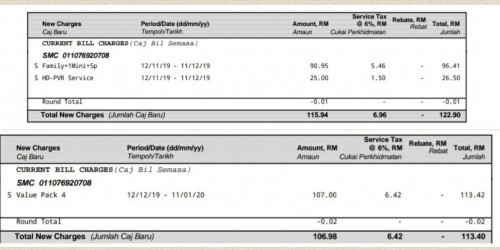
My current pack is family pack + jade pack + PVR function = RM113++. I can save this money for better good.


 Dec 14 2019, 11:54 AM


 Quote
Quote








 0.6637sec
 0.51
0.51
 7 queries
 GZIP Disabled