QUOTE(weareblahs @ Feb 11 2023, 11:48 PM)
Actually, it's more difficult than the other box. After you turned on, you have to select a "profile", then you will be brought to the home screen. After you're in the home screen, you can just press the channel number to watch the channel itself.
Yes, and it's called "Plug and Play mode". Astro actually offers a package with this configuration if I remember clearly. I'm using it via a 300Mbps connection and it is actually smooth and stable, and it automatically changes to HD after you switched to that channel for 10-15 seconds (yes, that is "adaptive", which means that the channel has multiple resolutions - Astro selects the lowest ones then automatically switches to the highest one according to your Internet connection).
Thank you for responding to my query.
I guess it shouldn't be too hard, as said it is needed to select the profile and it will reach to Home screen, from there can just press channel number to watch the TV shows.
I will setup as just 1 profile for my mother to select and go on with it.
QUOTE(joshhd @ Feb 12 2023, 12:33 AM)
- Does Astro Ulti Box perform the same as the old time Astro where you turn on the TV, the show comes right away and only need to press channel number to switch channel?Short answer is No. You will be greeted with this page when you wake up your Ulti or Ultra Box.
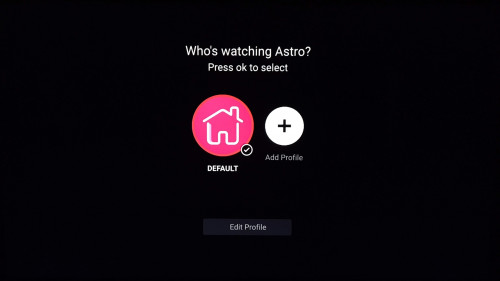
Once you select the profile, although the previously watched TV channel will be played in the background (you can hear the audio), but the On Demand home page will occupy your entire TV screen first.
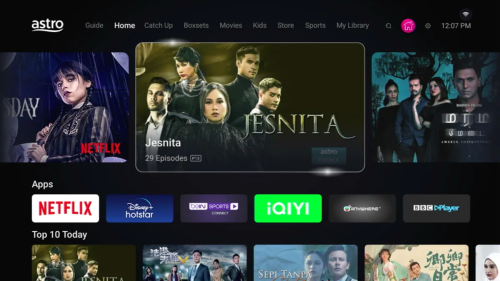
Photo source:
https://www.lowyat.net/2022/290964/astro-ul...yi-tvb-bbc-app/From this point, you can press whatever channel number, then it will switches to that TV channel.
As of Feb 2023, as long your Ulti or Ultra Box is connected to the Internet, there is no option for you to "straightaway appear the TV channel as you wake up the Astro box without going through profile selection and On Demand page".
Therefore the only workaround for now is, you disable the WiFi function or disconnect LAN cable on your Ulti or Ultra Box.
Whenever the Ulti or Ultra box is not connected to the Internet, you won't be able to use Internet-required features like cloud recording, On Demand, Play from Start...
And also, you can only watch TV channels through satellite dish, so Astro's Plug & Play mode definitely won't work.
- Possible for us to run the Ulti Box entirely on Internet connection without satellite cable/dish? Technically, yes you can.
Thank you for responding to my query.
As for better and cleaner cable management, we will just go ahead and hook the device up with LAN cable and let it run from there. 30-80Mbps speed at living room that should be sufficient to do the job to run TV shows.


 Feb 11 2023, 07:54 PM


 Quote
Quote


 0.0424sec
 0.31
0.31
 7 queries
 GZIP Disabled