Welcome Guest ( Log In | Register )

1081 Pages « < 738 739 740 741 742 > » Bottom

Outline · [ Standard ] · Linear+

 Astro Version 13A, All about Astro Malaysia offerings

views
     
joshhd
post Nov 30 2022, 10:53 PM

Look at all my stars!!
*******
Senior Member
7,795 posts

Joined: Dec 2014
From: Malaysia


Anyone here notice there's a lip-sync issue on Channel 805?

The video appears few hundred milliseconds late compared to the audio.
Especially during studio interview, I notice the host's talking lips doesn't match with the audio.

When I tune to channel 825, the audio is fine (both Stereo and Dolby). No lip sync issue. hmm.gif
joshhd
post Nov 30 2022, 11:02 PM

Look at all my stars!!
*******
Senior Member
7,795 posts

Joined: Dec 2014
From: Malaysia


QUOTE(hyalbert @ Nov 30 2022, 09:32 PM)
Legacy Super Pack 3 subscriber but did not change to Ultra Box last year because my Plasma TV was not HDCP compliant but decided not to change the TV as it was still in good working condition. I have now decided to buy a 4K TV and called up CS to change to Ultra Box. Requested to maintain the legacy pack subscription but CS was unable to accede, so switched to a new package. Currently using satellite dish and PVR. May I ask what are the factors to consider for using the satellite cable connection or the Plug and Play for the Ultra Box.
*

Long story short, since you're already on Satellite, then just stay on Satellite even when you upgrade to Ultra Box. Don't need to think about changing to Plug & Play.

Satellite one is still much more reliable than Plug & Play.

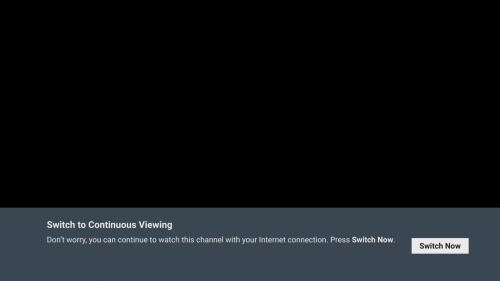
For Ultra/Ulti Box, you can temporary switch from satellite to Internet streaming whenever there's no satellite signal, so you can still continue watching Astro TV channels even during bad weather.
user posted image

On the other hand, the only best scenarios you can consider Plug & Play is, you hate Astro satellite dish because it looks awful at your balcony, or because you stay in an apartment/condo that doesn't allow individual satellite dish installation, or your apartment/condo doesn't have centralise dish working.
NewB-MX
post Dec 2 2022, 12:58 AM

Getting Started
**
Junior Member
87 posts

Joined: Sep 2011
QUOTE(joshhd @ Nov 30 2022, 10:53 PM)
Anyone here notice there's a lip-sync issue on Channel 805?

The video appears few hundred milliseconds late compared to the audio.
Especially during studio interview, I notice the host's talking lips doesn't match with the audio.

When I tune to channel 825, the audio is fine (both Stereo and Dolby). No lip sync issue. hmm.gif
*
Yes, I noticed that too. I think it was the same for EPL matches earlier whenever it was in 4K.
yongtjunkit
post Dec 2 2022, 10:36 PM

Look at all my stars!!
*******
Senior Member
2,516 posts

Joined: Mar 2016
Hi, just wondering, if I’m on legacy Astro package and were to relocate, do I need to switch to the new package?
cdspins
post Dec 3 2022, 08:51 AM

Look at all my stars!!
*******
Senior Member
2,714 posts

Joined: May 2008


QUOTE(yongtjunkit @ Dec 2 2022, 10:36 PM)
Hi, just wondering, if I’m on legacy Astro package and were to relocate, do I need to switch to the new package?
*
Do you need any service from Astro to help with your relocation? If no need... then just signed in at the astro account online and change address.
yongtjunkit
post Dec 3 2022, 10:44 AM

Look at all my stars!!
*******
Senior Member
2,516 posts

Joined: Mar 2016
QUOTE(cdspins @ Dec 3 2022, 08:51 AM)
Do you need any service from Astro to help with your relocation? If no need... then just signed in at the astro account online and change address.
*
The destination house already have a satellite dish with universal LNB(not meant for PVR box) sweat.gif
joshhd
post Dec 4 2022, 01:26 PM

Look at all my stars!!
*******
Senior Member
7,795 posts

Joined: Dec 2014
From: Malaysia


QUOTE(yongtjunkit @ Dec 2 2022, 10:36 PM)
Hi, just wondering, if I’m on legacy Astro package and were to relocate, do I need to switch to the new package?
*

Nope, it is optional to switch to the new packs. But of course, the CS agent will try to upsell you the new packs as you contact them.
QUOTE(yongtjunkit @ Dec 3 2022, 10:44 AM)
The destination house already have a satellite dish with universal LNB(not meant for PVR box) sweat.gif
*

Tell them you want to relocate, and the new address already has a satellite dish but it is not DCSS. Then they'll do the necessary arrangements.

On the other note:
If you are currently using Astro IPTV (Multicast), then you will lose access to IPTV Multicast service as you relocate to the new house, hence you'll be converted to either Satellite (applies to any Astro box models) or Plug & Play user (Ulti/Ultra Box only) in the process.
yongtjunkit
post Dec 4 2022, 02:09 PM

Look at all my stars!!
*******
Senior Member
2,516 posts

Joined: Mar 2016
QUOTE(joshhd @ Dec 4 2022, 01:26 PM)
Nope, it is optional to switch to the new packs. But of course, the CS agent will try to upsell you the new packs as you contact them.
Tell them you want to relocate, and the new address already has a satellite dish but it is not DCSS. Then they'll do the necessary arrangements.

On the other note:
If you are currently using Astro IPTV (Multicast), then you will lose access to IPTV Multicast service as you relocate to the new house, hence you'll be converted to either Satellite (applies to any Astro box models) or Plug & Play user (Ulti/Ultra Box only) in the process.
*
I see, if I were to submit a request for relocation on the Self service web portal is it any better or is it better to contact CS? sweat.gif


This post has been edited by yongtjunkit: Dec 4 2022, 04:34 PM
joshhd
post Dec 4 2022, 07:31 PM

Look at all my stars!!
*******
Senior Member
7,795 posts

Joined: Dec 2014
From: Malaysia


QUOTE(yongtjunkit @ Dec 4 2022, 02:09 PM)
I see, if I were to submit a request for relocation on the Self service web portal is it any better or is it better to contact CS?  sweat.gif
*

I think it's the same 🤷
feed2doorsmhbm
post Dec 4 2022, 11:55 PM

Getting Started
**
Junior Member
253 posts

Joined: Nov 2019


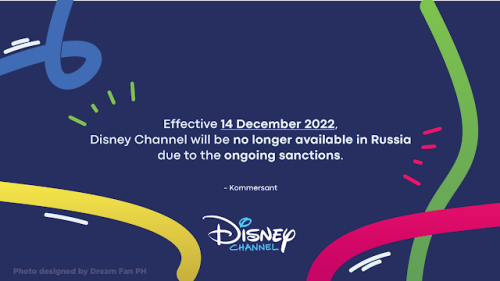
Disney Channel Russia will close soon in this final month
user posted image

This post has been edited by feed2doorsmhbm: Dec 4 2022, 11:55 PM
joshhd
post Dec 5 2022, 02:19 PM

Look at all my stars!!
*******
Senior Member
7,795 posts

Joined: Dec 2014
From: Malaysia


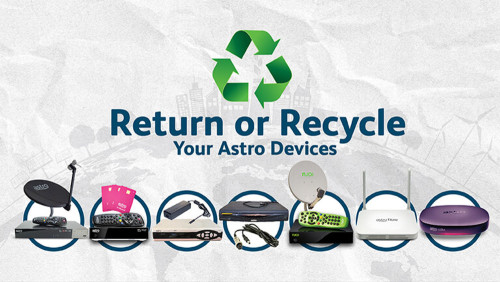
Return or Recycle Your Astro Devices
user posted image
https://promotions.astro.com.my/details/return-recycle
» Click to show Spoiler - click again to hide... «

hyalbert
post Dec 6 2022, 02:24 PM

New Member
*
Junior Member
31 posts

Joined: Oct 2008


Astro installer came yesterday to replace PVR with Ultra Box but did not change the LNB Universal type to DCSS type. He informed that he was not supplied the DCSS to change at the satellite dish. Upon installation, my TV could receive the UHD transmission with HDR at channel 805 and the installer maintained that there is no need to change the LNB. He asked me to contact Astro CS if I still want to change to the DCSS LNB.

I then called CS and was informed that Ultra Box and 4KTV which is HDCP 2.2 compliant are only required to receive UHD transmission. I told her that would be the requirements for Plug and Play installation but as my case involved the satellite dish why no LNB change but she replied not necessary for the LNB change as my TV was already receiving the 805 transmission.

However later on in the day when reading the Ultra Box Installation Guide (the installer left it inside the carton box during his installation) I found out on Page 17 on Satellite Antenna Connection where the DCSS is specifically mentioned.

So why did the installer and CS staff still maintain no need to change LNB to DCSS? I give the benefit to the installer that he was not provided with the DCSS as it was not difficult for him to get to the satellite dish at my house as it was installed at the balcony area on the first floor and he could just sit there to change the LNB.

I have since written to wecare@Astro on this matter.

Like to check whether any of you have recently changed to the Ultra Box using satellite connection and was the the LNB changed ?

Also what are the problems if the LNB is not changed to DCSS type using the Ultra Box ?


PRSXFENG
post Dec 7 2022, 02:47 PM

Look at all my stars!!
*******
Senior Member
2,608 posts

Joined: Nov 2020


QUOTE(hyalbert @ Dec 6 2022, 02:24 PM)
Astro installer came yesterday to replace PVR with Ultra Box but did not change the LNB Universal type to DCSS type. He informed that he was not supplied the DCSS to change at the satellite dish. Upon installation, my TV could receive the UHD transmission with HDR at channel 805 and the installer maintained that there is no need to change the LNB. He asked me to contact Astro CS if I still want to change to the DCSS LNB.

I then called CS and was informed that Ultra Box and 4KTV which is HDCP 2.2 compliant are only required to receive UHD transmission. I told her that would be the requirements for Plug and Play installation but as my case involved the satellite dish why no LNB change but she replied not necessary for the LNB change as my TV was already receiving the 805 transmission.

However later on in the day when reading the Ultra Box Installation Guide (the installer left it inside the carton box during his installation) I found out on Page 17 on Satellite Antenna Connection where the DCSS is specifically mentioned.

So why did the installer and CS staff still maintain no need to change LNB to DCSS? I give the benefit to the installer that he was not provided with the DCSS as it was not difficult for him to get to the satellite dish at my house as it was installed at the balcony area on the first floor and he could just sit there to change the LNB.

I have since written to wecare@Astro on this matter.

Like to check whether any of you have recently changed to the Ultra Box using satellite connection and was the the LNB changed ?

Also what are the problems if the LNB is not changed to DCSS type using the Ultra Box ?
*
For the last one
Refer to this post for info
https://forum.lowyat.net/index.php?showtopi...ost&p=104033619
abangcosta P
post Dec 8 2022, 08:58 AM

New Member
*
Probation
8 posts

Joined: Feb 2020
From: Johor, Malaysia


QUOTE(hyalbert @ Dec 6 2022, 02:24 PM)
Astro installer came yesterday to replace PVR with Ultra Box but did not change the LNB Universal type to DCSS type. He informed that he was not supplied the DCSS to change at the satellite dish. Upon installation, my TV could receive the UHD transmission with HDR at channel 805 and the installer maintained that there is no need to change the LNB. He asked me to contact Astro CS if I still want to change to the DCSS LNB.

I then called CS and was informed that Ultra Box and 4KTV which is HDCP 2.2 compliant are only required to receive UHD transmission. I told her that would be the requirements for Plug and Play installation but as my case involved the satellite dish why no LNB change but she replied not necessary for the LNB change as my TV was already receiving the 805 transmission.

However later on in the day when reading the Ultra Box Installation Guide (the installer left it inside the carton box during his installation) I found out on Page 17 on Satellite Antenna Connection where the DCSS is specifically mentioned.

So why did the installer and CS staff still maintain no need to change LNB to DCSS? I give the benefit to the installer that he was not provided with the DCSS as it was not difficult for him to get to the satellite dish at my house as it was installed at the balcony area on the first floor and he could just sit there to change the LNB.

I have since written to wecare@Astro on this matter.

Like to check whether any of you have recently changed to the Ultra Box using satellite connection and was the the LNB changed ?

Also what are the problems if the LNB is not changed to DCSS type using the Ultra Box ?
*
I believe there is need to change the satellite dish LNB to DCSS if you want to view UHD via satellite.
Aside from emailing to Astro, maybe you can also report to MCMC like I've done before.
Seems like the MCMC card have been very effective as Astro CS called me immediately after they received the report lol.
joshhd
post Dec 8 2022, 01:16 PM

Look at all my stars!!
*******
Senior Member
7,795 posts

Joined: Dec 2014
From: Malaysia


QUOTE(hyalbert @ Dec 6 2022, 02:24 PM)
Astro installer came yesterday to replace PVR with Ultra Box but did not change the LNB Universal type to DCSS type. He informed that he was not supplied the DCSS to change at the satellite dish. Upon installation, my TV could receive the UHD transmission with HDR at channel 805 and the installer maintained that there is no need to change the LNB. He asked me to contact Astro CS if I still want to change to the DCSS LNB.

I then called CS and was informed that Ultra Box and 4KTV which is HDCP 2.2 compliant are only required to receive UHD transmission. I told her that would be the requirements for Plug and Play installation but as my case involved the satellite dish why no LNB change but she replied not necessary for the LNB change as my TV was already receiving the 805 transmission.

However later on in the day when reading the Ultra Box Installation Guide (the installer left it inside the carton box during his installation) I found out on Page 17 on Satellite Antenna Connection where the DCSS is specifically mentioned.

So why did the installer and CS staff still maintain no need to change LNB to DCSS? I give the benefit to the installer that he was not provided with the DCSS as it was not difficult for him to get to the satellite dish at my house as it was installed at the balcony area on the first floor and he could just sit there to change the LNB.

I have since written to wecare@Astro on this matter.

Like to check whether any of you have recently changed to the Ultra Box using satellite connection and was the the LNB changed ?

Also what are the problems if the LNB is not changed to DCSS type using the Ultra Box ?
*

So what you trying to say is, you are able to view channel 805 even when you are using the normal Universal LNB?

You press home>Settings>Satellite Settings>LNB Setup.
Did you see "Universal" as part of the drop down menus for Input Source?

In the meantime, I'll try go dig around for more info on this...
QUOTE(abangcosta @ Dec 8 2022, 08:58 AM)
I believe there is need to change the satellite dish LNB to DCSS if you want to view UHD via satellite.
Aside from emailing to Astro, maybe you can also report to MCMC like I've done before.
Seems like the MCMC card have been very effective as Astro CS called me immediately after they received the report lol.
*

Wait... Don't so fast go to MCMC first... See what they say on wecare email reply first.
hyalbert
post Dec 8 2022, 01:38 PM

New Member
*
Junior Member
31 posts

Joined: Oct 2008


QUOTE(joshhd @ Dec 8 2022, 01:16 PM)
So what you trying to say is, you are able to view channel 805 even when you are using the normal Universal LNB?


Yes

You press home>Settings>Satellite Settings>LNB Setup.
Did you see "Universal" as part of the drop down menus for Input Source?


Yes

In the meantime, I'll try go dig around for more info on this...
Wait... Don't so fast go to MCMC first... See what they say on wecare email reply first.
*
joshhd
post Dec 10 2022, 11:01 PM

Look at all my stars!!
*******
Senior Member
7,795 posts

Joined: Dec 2014
From: Malaysia


QUOTE(hyalbert @ Dec 6 2022, 02:24 PM)
Astro installer came yesterday to replace PVR with Ultra Box but did not change the LNB Universal type to DCSS type. He informed that he was not supplied the DCSS to change at the satellite dish. Upon installation, my TV could receive the UHD transmission with HDR at channel 805 and the installer maintained that there is no need to change the LNB. He asked me to contact Astro CS if I still want to change to the DCSS LNB.

I then called CS and was informed that Ultra Box and 4KTV which is HDCP 2.2 compliant are only required to receive UHD transmission. I told her that would be the requirements for Plug and Play installation but as my case involved the satellite dish why no LNB change but she replied not necessary for the LNB change as my TV was already receiving the 805 transmission.

However later on in the day when reading the Ultra Box Installation Guide (the installer left it inside the carton box during his installation) I found out on Page 17 on Satellite Antenna Connection where the DCSS is specifically mentioned.

So why did the installer and CS staff still maintain no need to change LNB to DCSS? I give the benefit to the installer that he was not provided with the DCSS as it was not difficult for him to get to the satellite dish at my house as it was installed at the balcony area on the first floor and he could just sit there to change the LNB.

I have since written to wecare@Astro on this matter.

Like to check whether any of you have recently changed to the Ultra Box using satellite connection and was the the LNB changed ?

Also what are the problems if the LNB is not changed to DCSS type using the Ultra Box ?
*
QUOTE(PRSXFENG @ Dec 7 2022, 02:47 PM)
For the last one
Refer to this post for info
https://forum.lowyat.net/index.php?showtopi...ost&p=104033619
*

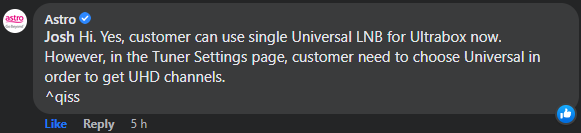
DCSS LNB is no longer mandatory for Ultra Box installations?
Since the official launch of Ultra Box in 2019, it's been a known fact that you need DCSS LNB to receive 4K UHD channels. If you're not using one, then the installers are supposed to use or replace to the DCSS LNB on your Astro satellite dish (except for those who've been using SatCR LNB prior to this).
But I'm not sure since exactly when, but it appears that Astro has been quietly change this rule, and now saying that the usage of DCSS LNB are no longer mandatory for Ultra Box, and you can continue using your existing conventional Universal LNB to receive 4K UHD channels. And that, I was so surprised... shocking.gif shocking.gif shocking.gif
user posted image

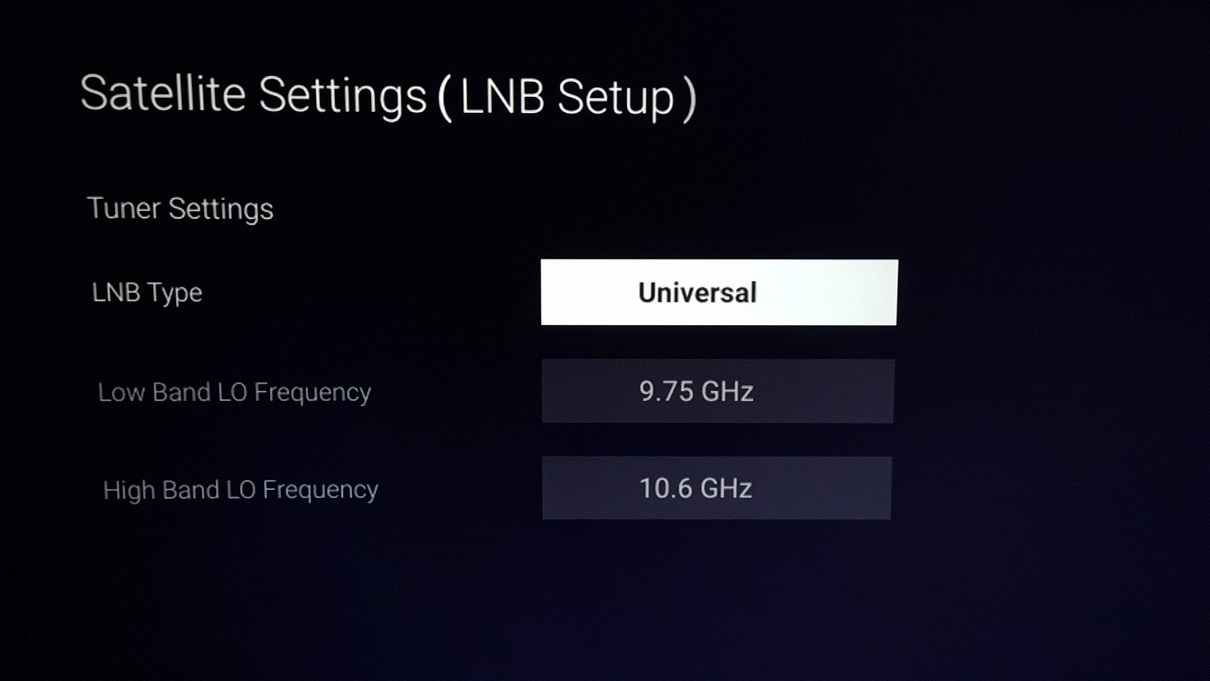
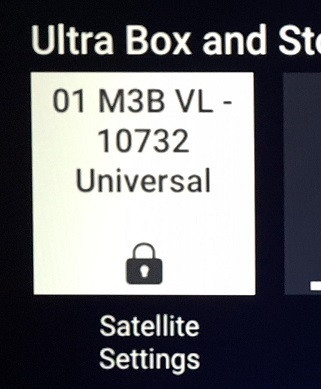
Tbh I find it hard to believe, until when I go through the Satellite Settings on my Ultra Box, and I notice that "Universal" option has appeared as part of the "LNB Type" option, which is something that I never ever see before on Ultra Box... shocking.gif
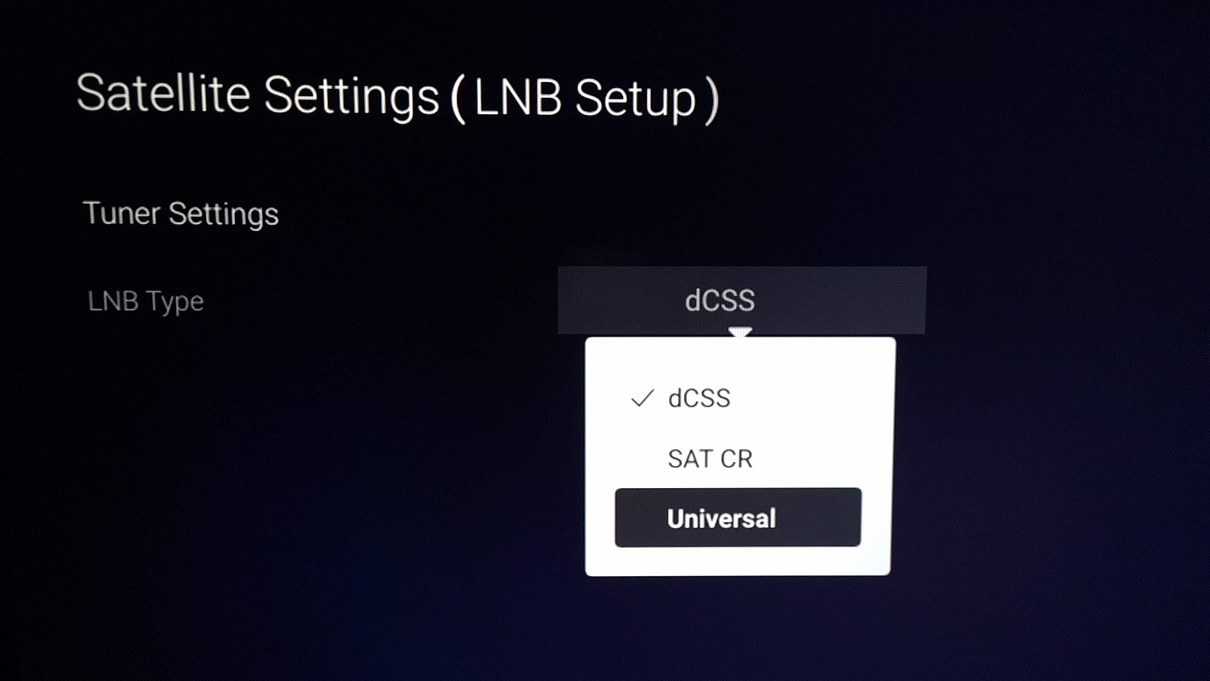
user posted image

user posted image
Yes, you saw that correctly. Pictures you see above is from Astro Ultra Box, not Ulti Box ya.

Earlier, I tried to swap my Astro dish's LNB to my old Universal LNB (which I've kept it for spare), and upon selecting "Universal" as LNB Type, and I can confirm that I am able to receive UHD channel 805 like normal, and no SCNA message whatsoever... nod.gif biggrin.gif
user posted image

So far I don't see this information being updated on Astro's support webpages (if you do, let me know), so I assume that this is a "secret" that they don't want too many people to know yet. sweat.gif
Anyway, I find this a very good news to majority of the users and installers out there, considering the technical difficulties in using DCSS LNB for some customers is now a thing of the past.
I've been digging some info from reliable sources, and I've been told that Astro will still continue using DCSS LNB in certain installation situations, especially for those who have Multiroom boxes (2 or more Astro boxes) at home.
» Click to show Spoiler - click again to hide... «

Scenarios above applies for individual Astro satellite dish installations only (e.g. Astro dish install at your balcony, rooftop,...)
I believe for those who stay in apartment/condos/buildings that uses centralised dish, most likely you still won't be able to receive UHD channels on your Ultra Box even when you change the LNB Setup settings to "Universal".
So, it's either you continue persuade your building management to upgrade to DCSS LNB system, or install own Astro dish at the balcony (if your building management allows), or you'll just have to opt for Ultra Box Plug & Play instead.

This post has been edited by joshhd: Dec 10 2022, 11:06 PM

dattebayo
post Dec 10 2022, 11:53 PM

Look at all my stars!!
*******
Senior Member
5,366 posts

Joined: Aug 2005

why Nord VPN unable to bypass location restriction for Astro Go

roaming on Msian telco can do the trick but data is limited

want to use hotel wifi + VPN but Astro Go is too smart to detect it? How come

want to watch World Cup

This post has been edited by dattebayo: Dec 11 2022, 12:00 AM
hyalbert
post Dec 11 2022, 12:49 PM

New Member
*
Junior Member
31 posts

Joined: Oct 2008


[quote=joshhd,Dec 10 2022, 11:01 PM]

Hi Joshhd, many thanks for your feedback.

Meantime, Astro CS has reverted with a holding reply, quoted as follows:


We apologise for the inconvenience caused. We have forwarded your inquiry pertaining to the DCSS installation to our installation team. Kindly allow us to revert the findings to you within 3 to 5 working days.[I]


Yes, regarding the Satellite Settings (LNB Setup) it is set to Universal for my Ultra Box.


But the Ultra Box Installation Guide clearly states in "Step 5 -Tuner Settings" that the LNB Type is selected as DCSS.


By continuing to use the Universal type, is there any impact on the overall optimal performance of the Ultra Box relating to UHD and Dolby Atmos/ DTS output?


joshhd
post Dec 11 2022, 01:09 PM

Look at all my stars!!
*******
Senior Member
7,795 posts

Joined: Dec 2014
From: Malaysia


QUOTE(dattebayo @ Dec 10 2022, 11:53 PM)
why Nord VPN unable to bypass location restriction for Astro Go

roaming on Msian telco can do the trick but data is limited

want to use hotel wifi + VPN but Astro Go is too smart to detect it? How come

want to watch World Cup
*

why Nord VPN unable to bypass location restriction for Astro Go
Ermm, why do you think Astro can't be smart enough to detect that there will be people out there using some kinds of VPN or proxy to bypass geolocation?

If you're not in Malaysia, then you're out of luck laa...

This post has been edited by joshhd: Dec 11 2022, 01:10 PM

1081 Pages « < 738 739 740 741 742 > » Top
 

Change to:
| Lo-Fi Version
0.0328sec    0.26    6 queries    GZIP Disabled
Time is now: 8th December 2025 - 07:33 AM