

QUOTE(olygopoly @ Dec 25 2018, 03:47 PM)
how to get this offer ?

Open samaung member, benefitSamsung Samsung Galaxy S9/S9+ Discussion Thread V2
|
|
 Dec 25 2018, 03:50 PM Dec 25 2018, 03:50 PM
Return to original view | IPv6 | Post
#21
|
 
All Stars
12,039 posts Joined: Oct 2017  
|
QUOTE(olygopoly @ Dec 25 2018, 03:47 PM) how to get this offer ? Open samaung member, benefit |
|
|
|
|
|
Jan 9 2019, 04:19 PM
Return to original view | IPv6 | Post
#22
|
|
All Stars
12,039 posts Joined: Oct 2017
|
Samsung posted android pie update on samsung member
|
|
|
Jan 9 2019, 05:16 PM
Return to original view | IPv6 | Post
#23
|
|
All Stars
12,039 posts Joined: Oct 2017
|
QUOTE(shahjo @ Jan 9 2019, 05:09 PM) so based on the list, should be within this month. Different storage? All model name also 960F.but i wonder what's with the repetitive of the model name for s9,s9+ and note 9?  My cheap tablet also can upgrade, tab a 2017 |
|
|
Jan 12 2019, 11:17 PM
Return to original view | Post
#24
|
|
All Stars
12,039 posts Joined: Oct 2017
|
Off topic, does any way to block User manual on Setting?
I was frequenly wrong tap User manual, and it open browser |
|
|
Jan 13 2019, 06:17 PM
Return to original view | IPv6 | Post
#25
|
|
All Stars
12,039 posts Joined: Oct 2017
|
QUOTE(matmoto5125 @ Jan 13 2019, 05:38 PM) After updated to Pie, I noticed: Clock not called wrong side1. Slower fingerprint unlock. 2. Shittier picture in Auto mode. 3. All icons and fonts seems bigger eventhough set zoom at smallest. 4. Some apps can't recognize fingerprint at all. Case in point Kaspersky App Lock. 5. Slower camera shutter speed in Auto mode. 6. Uglier default lock screen clock. 7. Video stabilization can't be turn on regardless of video resolution. 8. Clock at the status bar up top now bigger/taller and on the wrong side (left instead of Oreo's right). I have cleared cache partition right after update. |
|
|
Jan 14 2019, 12:08 PM
Return to original view | Post
#26
|
|
All Stars
12,039 posts Joined: Oct 2017
|
QUOTE(Erza Scarlet @ Jan 14 2019, 09:38 AM) Clock icon gonna show current time Already like that since android 6.0 on samsung |
|
|
|
|
|
Jan 16 2019, 10:58 AM
Return to original view | IPv6 | Post
#27
|
|
All Stars
12,039 posts Joined: Oct 2017
|
QUOTE(olygopoly @ Jan 16 2019, 10:25 AM) Hi. how to know that we are on fast charge. like huawei they have a double lighting indicator for super charge and normal charge. but hows for s9/s9+ No different on iconBut will show on notification and lock screen Using normal charge no notification, lock screen just show charging |
|
|
Jan 20 2019, 10:25 AM
Return to original view | IPv6 | Post
#28
|
|
All Stars
12,039 posts Joined: Oct 2017
|
QUOTE(olygopoly @ Jan 20 2019, 12:14 AM) WTA where to see the media like pictures and video send and receive in WhatsApp. Where is it being store. Cannot find it in gallery Go to this path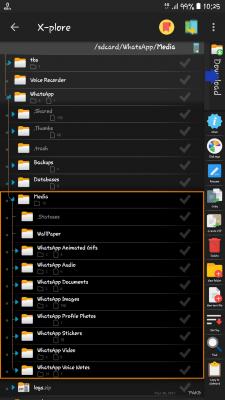
|
|
|
Jan 20 2019, 12:54 PM
Return to original view | Post
#29
|
|
All Stars
12,039 posts Joined: Oct 2017
|
QUOTE(olygopoly @ Jan 20 2019, 12:46 PM) I assume we can see it in the gallery. My P20 will have the folder in gallery app media that we recevied can see in gallery, media that we sent cannot |
|
|
Jan 21 2019, 11:48 AM
Return to original view | IPv6 | Post
#30
|
|
All Stars
12,039 posts Joined: Oct 2017
|
QUOTE(latte36 @ Jan 21 2019, 11:43 AM) Im getting ads in between my samsung browser even with adblock That is a part of forum, no ads, ask 7 |
|
|
Feb 10 2019, 10:43 PM
Return to original view | Post
#31
|
|
All Stars
12,039 posts Joined: Oct 2017
|
QUOTE(olygopoly @ Feb 10 2019, 10:08 PM) Unfortunately it doesn't appear. I've change portrait landscape many times still only 3 navigation icon bar. Any extra settings need to set Sorry i did not own S9Do you try on auto rotate see for that icon, if no off auto rotate |
|
|
Feb 10 2019, 11:19 PM
Return to original view | Post
#32
|
|
All Stars
12,039 posts Joined: Oct 2017
|
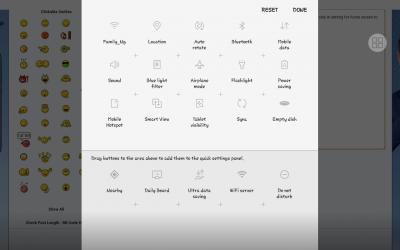
QUOTE(olygopoly @ Feb 10 2019, 10:52 PM) usually we have auto rotate at the drop down notification quick toggle in android like my p20 pro. but i dont find it in s9 only in setting for home screen to remain potrait. Samsung no built in screen record,But in game tool have it for record game This is my samsung tab android 8.1.0, do you try reorder button to drag icon? Maybe is hidden 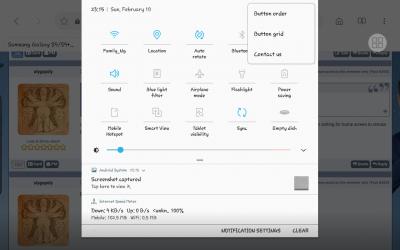
|
|
|
Feb 10 2019, 11:37 PM
Return to original view | Post
#33
|
|
All Stars
12,039 posts Joined: Oct 2017
|
QUOTE(olygopoly @ Feb 10 2019, 11:30 PM) How to reorder icon in navigation drop down toggle in android 9. Mine is in android 9 UI one and couldn't see the pencil to edit toggle Do you notice there is 3 dot on upper right, as my screenshot,Then order button? |
|
|
|
|
|
Feb 10 2019, 11:47 PM
Return to original view | Post
#34
|
|
All Stars
12,039 posts Joined: Oct 2017
|
QUOTE(olygopoly @ Feb 10 2019, 11:38 PM) Oh ok. Got it that. It's the button order right. Yeah manage to see it and set to portrait. Thanks https://www.sammobile.com/2018/12/11/androi...e-toggle-switchRead here about new rotate on Pie |
|
|
Feb 11 2019, 12:09 AM
Return to original view | Post
#35
|
|
All Stars
12,039 posts Joined: Oct 2017
|
QUOTE(olygopoly @ Feb 10 2019, 11:57 PM) Weird mine don't have the little icon to toggle in navigation bar I was not able to check now, waiting my tablet update to pie |
|
|
Feb 11 2019, 06:29 PM
Return to original view | IPv6 | Post
#36
|
|
All Stars
12,039 posts Joined: Oct 2017
|
QUOTE(adamhzm90 @ Feb 11 2019, 06:13 PM) Guys. What? Oreo?My s9+ is still on android oreo and no update available. Why eh Sorry, wrong read This post has been edited by PJng: Feb 11 2019, 06:42 PM |
|
|
Feb 21 2019, 01:46 PM
Return to original view | IPv6 | Post
#37
|
|
All Stars
12,039 posts Joined: Oct 2017
|
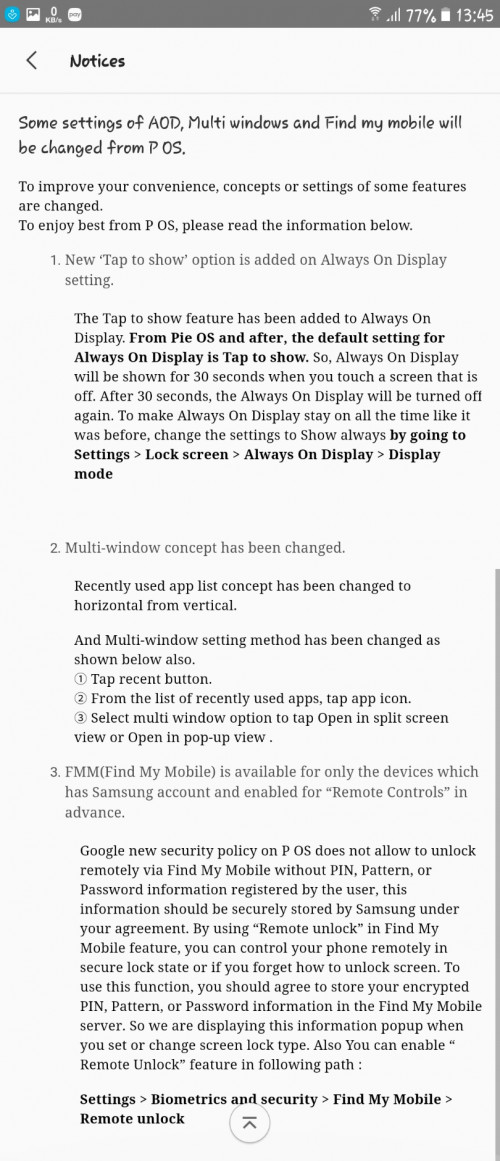
Notice on samsung member
 |
|
|
Mar 30 2019, 10:47 AM
Return to original view | IPv6 | Post
#38
|
|
All Stars
12,039 posts Joined: Oct 2017
|
QUOTE(solsekuin44 @ Mar 29 2019, 04:43 PM) Does it fix the camera photo quality? What oreo?I haven't updated to oreo |
|
|
Apr 10 2019, 01:21 PM
Return to original view | IPv6 | Post
#39
|
|
All Stars
12,039 posts Joined: Oct 2017
|
QUOTE(freakenstein @ Apr 6 2019, 09:55 PM) Download YouTube vanced. There's even night mode for it too. Does it replace stock youtube?As i read it say need uninstall youtube first |
|
|
Apr 24 2019, 01:59 PM
Return to original view | IPv6 | Post
#40
|
|
All Stars
12,039 posts Joined: Oct 2017
|
QUOTE(Sib @ Apr 23 2019, 10:13 AM) don't think so,need to download separate app for that. fyi, samsung internet browser had built in qr code scanner btw QUOTE(silverwave @ Apr 23 2019, 10:28 AM) how to use the built in scanner? I found a step by step in the internet but it's the older version OS and i can't find the same option in the latest OS. Latest version of samsung internet remove some functionQR reader Video asst, that can pop up video in PIP |
| Change to: |  0.0814sec 0.0814sec
 0.43 0.43
 7 queries 7 queries
 GZIP Disabled GZIP Disabled
Time is now: 10th December 2025 - 11:08 AM |
 Quote
Quote