Welcome Guest ( Log In | Register )

Bump Topic Topic Closed RSS Feed

Outline · [ Standard ] · Linear+

 Official LYN nVIDIA 8 series thread V2

views
     
iZuDeeN
post Jul 24 2007, 07:37 PM

Look at all my stars!!
*******
Senior Member
3,466 posts

Joined: Jan 2003
From: PJ, Malaysia
my recommendation...

install 1 exhaust fan next to the gfx card...

its cheap....

it will not reduce your idle temp...but will surely will drop your load temp...


currently 8800GTS OC @ 612/2016, temp hardly reach 68dC at load.... @ 60% fan load
iZuDeeN
post Jul 24 2007, 07:56 PM

Look at all my stars!!
*******
Senior Member
3,466 posts

Joined: Jan 2003
From: PJ, Malaysia
erm...

its just a normal blower fan....

i took it out from my pentium 1 (166mhz) machine... bought the fan in 1998

to be honest, the air exhaust from this fan is MORE HOT & VOLUME than the standard comes with gts

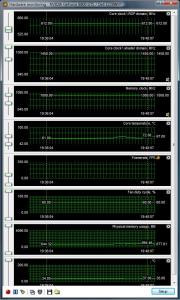
attached is the screenshot after 3dmark06... max at 72dC...but usually at 68dC at load


Added on July 24, 2007, 8:21 pmuser posted image

This post has been edited by iZuDeeN: Jul 24 2007, 08:21 PM


Attached thumbnail(s)
Attached Image
iZuDeeN
post Jul 25 2007, 09:05 AM

Look at all my stars!!
*******
Senior Member
3,466 posts

Joined: Jan 2003
From: PJ, Malaysia
QUOTE(Someonesim @ Jul 25 2007, 01:50 AM)
You talk about the old pnetium 4 fan , is REALLY horrible , my housemate using P4 system and the i can heard the sound at my own room .
Anyway is the 8600GTS 256bit 512MB version available ? nVidia had confirmed it .
My most expectation are on the REAL performance grade graphic card ( ets 8700 ) with 64 steam processor or 80 steam processor product .
*
haha...

im those unlucky guy who still uses Prescott...

yupe... the fan noise is VERY LOUD....

5x noisier than the standard 8800 fan ...


iZuDeeN
post Jul 25 2007, 10:39 AM

Look at all my stars!!
*******
Senior Member
3,466 posts

Joined: Jan 2003
From: PJ, Malaysia
like this


Ext Fan -- Empty Slot -- 8800 fan

Make sure there's a distance as the Ext fan will suck all the air out while the gfx card is sucking air in...

if its too near it will cause a vacuum, (air cancle out) ...

and you wont see significant difference at idle load...
iZuDeeN
post Jul 27 2007, 05:12 PM

Look at all my stars!!
*******
Senior Member
3,466 posts

Joined: Jan 2003
From: PJ, Malaysia
i have this prob...

using 8800gts 320mb (611/2016) with P4 3.0Ghz @ 3.7 GHz (880FSB) with 2GB DDRII (533Mhz)

playing BF2142 managed to get framerate sustain >40fps with 4xAA

but the sceen abit 'stall' every 3 seconds or so...

Is it RAM or not enough processing power?
iZuDeeN
post Jul 27 2007, 08:14 PM

Look at all my stars!!
*******
Senior Member
3,466 posts

Joined: Jan 2003
From: PJ, Malaysia
QUOTE(stevenlee @ Jul 27 2007, 07:16 PM)
wah lau ur mem clock on par with GTX  sweat.gif
*
i don't think its that high as this card (msi oc) already running at 1800 stock

anyway i've added exhaust fan underneath the card.... idle @ 60dC and load @ 68dC, max at 72dC with fan @60%

you can see the temp I posted a few pages back after 3dmark06 bench

QUOTE(sniper69 @ Jul 27 2007, 07:20 PM)
IMO, it's not because of the hardware, it's the driver, izudeen, mind show us your Direct3D settings on nTune? are you turning on the vsync?
*
im on the laptop right now...will post it later tonight/tomm

QUOTE(ben3003 @ Jul 27 2007, 07:57 PM)
oh, i dunno, but stalling is not low framerate prob.. the framerate is over 40fps and there shouldnt be stalling prob so often...

Btw, x2600xt ddr4 or xfx 8600gt xxx, which once is a better grab? 2molo wanna go lowyat buy oleidi..
*
so u recommend to turn vsync on? in the driver or game?

QUOTE(LExus65 @ Jul 27 2007, 07:58 PM)
try to lower ur core speed, mine was having some problem too at 625:2000......... but once i lower back to 600:2000 problem solve.....

but now back to old problem again when i play caesarIV at high details, memory of 320mb not sufficient hehe........ so lagging on the display part at high speed game mode.......
*
i'll try lower down and see any difference... but i doubt it change anything bcoz, at 611 the temp hardly reach 70dC...


Added on July 27, 2007, 8:16 pmedit :

its not really stall, just that i can see its not smooth.......

forgot to add... using 22" Dell...

do you guys think it got to do with monitor response time?

This post has been edited by iZuDeeN: Jul 27 2007, 08:16 PM

iZuDeeN
post Jul 28 2007, 11:58 AM

Look at all my stars!!
*******
Senior Member
3,466 posts

Joined: Jan 2003
From: PJ, Malaysia
QUOTE(weikai_ng @ Jul 28 2007, 11:05 AM)
It seems like i need to do some works on my cooling system, changing the heat sink on graphic card is kinda costly for me... Is there any other solution for it? Note: I don't wanna open my side panel..
*
just install additional exhaust fan...


anyway,i've found the main problem of stutter...

its not the gfx problem or driver issue...

i just need to force vsync on in the driver............


iZuDeeN
post Jul 29 2007, 09:26 AM

Look at all my stars!!
*******
Senior Member
3,466 posts

Joined: Jan 2003
From: PJ, Malaysia
ok...problem not solved

still got stutter ..................

sad.gif

will update to patch 162 today
iZuDeeN
post Jul 29 2007, 03:43 PM

Look at all my stars!!
*******
Senior Member
3,466 posts

Joined: Jan 2003
From: PJ, Malaysia
QUOTE(stevenlee @ Jul 29 2007, 10:36 AM)
easy ...buy a new one  laugh.gif
*
what u mean buy a new one?

it seems that its a 'common' problem with 8800 series even with high spec

http://www.google.com/search?q=8800+stutte...ie7&rlz=1I7GGLJ
iZuDeeN
post Aug 6 2007, 09:10 PM

Look at all my stars!!
*******
Senior Member
3,466 posts

Joined: Jan 2003
From: PJ, Malaysia
shawty, please use the default setting when bench..

that way its much accurate to compare results
iZuDeeN
post Aug 12 2007, 01:39 PM

Look at all my stars!!
*******
Senior Member
3,466 posts

Joined: Jan 2003
From: PJ, Malaysia
what do you guys use to replace the stock thermal pad in the 8800 (for the RAM)?

I only have AS5...

iZuDeeN
post Aug 12 2007, 02:35 PM

Look at all my stars!!
*******
Senior Member
3,466 posts

Joined: Jan 2003
From: PJ, Malaysia
i wonder why they put so much tim in the stock cooler


pic stolen from the web (not mine)

user posted image
iZuDeeN
post Aug 13 2007, 07:04 PM

Look at all my stars!!
*******
Senior Member
3,466 posts

Joined: Jan 2003
From: PJ, Malaysia
i recommend you mod a bit...

use a cheaper psu just to power the GFX card

meaning use an external PSU to power up the gfx card

at least you can save yourself few bucks
iZuDeeN
post Aug 13 2007, 08:49 PM

Look at all my stars!!
*******
Senior Member
3,466 posts

Joined: Jan 2003
From: PJ, Malaysia
450w already enough to power 8800gts

but for gtx, you need 500w, 550 recommended
iZuDeeN
post Aug 14 2007, 09:46 AM

Look at all my stars!!
*******
Senior Member
3,466 posts

Joined: Jan 2003
From: PJ, Malaysia
QUOTE(mADmAN @ Aug 13 2007, 08:54 PM)
not enough ler 450w. ive tried with my CM Real Power 450w ACLX.

cant take load for too long...after awhile the monitor goes kuku and then no picture liao.

even 3D Mark 05 oso only got 8k with my 8800GTS.

after my personal experience i seriously would NOT recommend anything lower than 500w
*
enough lerr...

im using a P4 3.0 @ 3.6GHz & 8800GTS (570/1800) @ 630/2016 no prob...

AcBEL I power 450watt
iZuDeeN
post Aug 14 2007, 05:08 PM

Look at all my stars!!
*******
Senior Member
3,466 posts

Joined: Jan 2003
From: PJ, Malaysia
QUOTE(RokXIII @ Aug 14 2007, 04:36 PM)
i would like to ask that, if i'm using tape cleaner to clean my proc IHS, will it bring any damage to the processor? icon_question.gif
*
tape cleaner content is mosly isoproply alcohol..

thus shouldnt be an issue....


fyi... alcohol is best use to clean metal surface and its variation (not glass,acrylic, plastic)
iZuDeeN
post Aug 18 2007, 12:36 AM

Look at all my stars!!
*******
Senior Member
3,466 posts

Joined: Jan 2003
From: PJ, Malaysia
QUOTE(Irresistible @ Aug 17 2007, 07:08 PM)

Added on August 17, 2007, 7:08 pm
Bcoz if I wan to use 8800, I need to change my PSU... thats not COST EFFECTIVE
The only way to console myself is to find a card better than 8800 & can fit wit my PSU... 9 series seems to fit in..

And my Acbel PSU is 1.5 month  old only, got LED color, I really like the look !!

Any GOOD Graphic card can recommend for PSU 450W? (not going  to change PSU la) notworthy.gif
Budget : RM900-1200 for the card.... 
            Ati card ?? But, I don't wan the card TOO HOT !!
*
if you have the dough just buy it... no need to give reasons...

as i said previously, im using msi 8800gts oc with acbel i power 450watt..

furthermore, i oc-ing the proc and futher oc the gfx card.....till now no prob

even powering 2 sata + 1 dvd writer + 6 fans...

iZuDeeN
post Aug 20 2007, 05:25 PM

Look at all my stars!!
*******
Senior Member
3,466 posts

Joined: Jan 2003
From: PJ, Malaysia
QUOTE(Clavicus @ Aug 20 2007, 09:27 AM)
What do you guys use to OC? I used NTune but doesnt seem stable to me.  ohmy.gif
*
Search for RivaTuner
iZuDeeN
post Aug 20 2007, 08:27 PM

Look at all my stars!!
*******
Senior Member
3,466 posts

Joined: Jan 2003
From: PJ, Malaysia
quck Q..

does the sli bridge comes together with the mobo?

might want to upgrade to penryn by end of the year...after bonus time biggrin.gif
iZuDeeN
post Aug 27 2007, 04:12 PM

Look at all my stars!!
*******
Senior Member
3,466 posts

Joined: Jan 2003
From: PJ, Malaysia
QUOTE(tanghm @ Aug 27 2007, 03:00 PM)
Go ahead and pick 100 8800GTS cards. I'm pretty sure if there is no 100% manual fan speed overwrite via 3rd party software, all cards runs at 70'C++ idle temperature.
*
wrong and wrong and wrong...

running 8800gts (621/2016) with 'idle' at 65dC (fan at default 60%)

note there is technically no 2d mode for vista, hence the 'idle' mode is actually running at speed above

2 Pages  1 2 >Top
Topic ClosedOptions
 

Change to:
| Lo-Fi Version
0.0224sec    0.29    7 queries    GZIP Disabled
Time is now: 7th December 2025 - 05:04 PM