Outline ·
[ Standard ] ·
Linear+
Time-of-day clock stopped, Time-of-day clock stopped,can't start PC
|
TSVinsNg
|
 Mar 31 2018, 06:25 PM, updated 8y ago Mar 31 2018, 06:25 PM, updated 8y ago
|
New Member


|
Hi everyone, my friend forgets her bios password for her Dell Inspiron 640m notebook, so I took out the CMOS battery and put aside for 2 days. Now, when I turn on the notebook, bios password screen no longer appear but a black screen with "Time-of-day clock stopped" instead. I still can't enter Windows and bios. I already replaced a new CMOS battery but the problem is still persist. Anyone faced this problem before? Any solution? Attached thumbnail(s)

|
|
|
|
|
|
tampinmy
|
Mar 31 2018, 06:28 PM
|
Getting Started
|
You would have solved the issue if you typed the same thing in google instead of here
|
|
|
|
|
|
TSVinsNg
|
Mar 31 2018, 06:47 PM
|
New Member
|
QUOTE(tampinmy @ Mar 31 2018, 06:28 PM) You would have solved the issue if you typed the same thing in google instead of here Most of the solutions that I saw is to replace the CMOS battery. But it doesn't work for me. |
|
|
|
|
|
sHawTY
|
Mar 31 2018, 07:31 PM
|
|
|
"Time-of-day clock stopped" only means 2 things:
1. The CMOS battery is dead - But since you already change the battery, skip to number 2
2. The clock chip is faulty - You need to replace the motherboard - Not advisable. That laptop is very old. Better get a new laptop instead
|
|
|
|
|
|
ihavenoidea
|
Mar 31 2018, 07:57 PM
|
|
|
See the battery contact got oxidize or not, the previous battery was old maybe the contact is not the cleanest.
Also try rebooting it a few times and hope the onboard diagnostic detects it.
|
|
|
|
|
|
TSVinsNg
|
Mar 31 2018, 09:05 PM
|
New Member
|
QUOTE(ihavenoidea @ Mar 31 2018, 07:57 PM) See the battery contact got oxidize or not, the previous battery was old maybe the contact is not the cleanest. Also try rebooting it a few times and hope the onboard diagnostic detects it. Nope, the battery contact doesn't oxidize. Reboot many times already, and tried to turn it on for few hours but it still the same. |
|
|
|
|
|
netmatrix
|
Mar 31 2018, 09:34 PM
|
|
|
On your second picture i see a white ribbon cable that doesn't seem to be inserted properly. Could you insert it back and see it it works? The copper colored section on the ribbon cable is snot supposed to be exposed like that.
|
|
|
|
|
|
TSVinsNg
|
Mar 31 2018, 11:07 PM
|
New Member
|
QUOTE(netmatrix @ Mar 31 2018, 09:34 PM) On your second picture i see a white ribbon cable that doesn't seem to be inserted properly. Could you insert it back and see it it works? The copper colored section on the ribbon cable is snot supposed to be exposed like that. I know, I already used the sellotape to stick it, still same. 😂 |
|
|
|
|
|
netmatrix
|
Mar 31 2018, 11:10 PM
|
|
|
QUOTE(VinsNg @ Mar 31 2018, 11:07 PM) I know, I already used the sellotape to stick it, still same. 😂 Aiyoo.... where got use one cellotape? You need to push the left and right levers to release the ribbon. 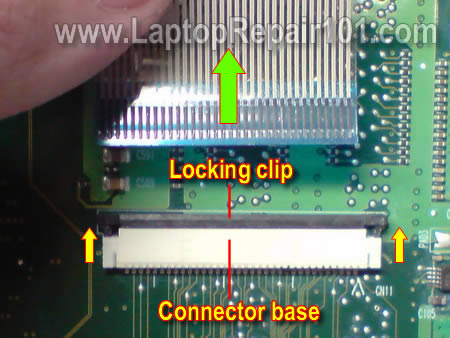 Then slot the cable inside the connector until the copper part not so exposed and then push the left and right lever to lock it. This may not cause your problem, but it does not hurt to try out. |
|
|
|
|
|
1depp1
|
Apr 3 2018, 09:59 AM
|
|
|
I am sorry for the issue bruh, but imo, better buy a used laptop or a new one and just transfer your drive which contains your OS to the new one.
|
|
|
|
|



 Quote
Quote


 0.0145sec
 0.52
0.52
 6 queries
 GZIP Disabled