Outline ·
[ Standard ] ·
Linear+
Huawei Huawei P20 and P20 Pro
|
rocktank
|
 Jun 18 2018, 08:31 PM Jun 18 2018, 08:31 PM
|
Getting Started


|
QUOTE(fkinmeng @ Jun 18 2018, 02:35 PM) food pictures: [attachmentid=9864271] [attachmentid=9864275] For me 2nd pic is not blurry, either it was taken with large aperture or too close to the object. Try turn off the AI and just shoot it with photo mode. And for the 1st pic, it was focused to the rice, can see the rice is clear and sharp while the other blurry This post has been edited by rocktank: Jun 18 2018, 08:35 PM |
|
|
|
|
|
rocktank
|
Jun 18 2018, 10:52 PM
|
Getting Started
|
QUOTE(fkinmeng @ Jun 18 2018, 09:30 PM) Ok thanks, might consider that even though it's only fast charging. Ya now i turn off AI, but should i turn off 4D predictive focus too? I'm not sure about the 4D predictive focus mode, maybe you can give it a try. Actually this quite often happen while snapping with phone camera, you can see the focus already moved to the object which is brighter ( for example the white object such as rice......) |
|
|
|
|
|
rocktank
|
Aug 8 2018, 09:35 AM
|
Getting Started
|
UAG plasma series selling at 119 at Lazada, so far the cheapest, anyone got the case cheaper than that?
|
|
|
|
|
|
rocktank
|
Aug 8 2018, 02:34 PM
|
Getting Started
|
QUOTE(fkinmeng @ Aug 8 2018, 02:02 PM) Use voucher can go even lower. I don't see any voucher, any hints? |
|
|
|
|
|
rocktank
|
Aug 8 2018, 05:42 PM
|
Getting Started
|
QUOTE(fkinmeng @ Aug 8 2018, 03:35 PM) Thanks mate!! |
|
|
|
|
|
rocktank
|
Aug 30 2018, 04:03 PM
|
Getting Started
|
Dunno why this keep on pop up? Anyone know how to turn it off? Attached thumbnail(s)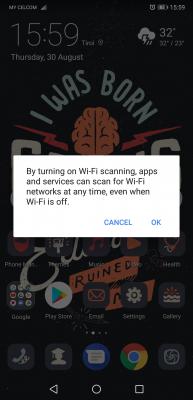
|
|
|
|
|
|
rocktank
|
Aug 30 2018, 04:23 PM
|
Getting Started
|
QUOTE(aurion @ Aug 30 2018, 04:14 PM) Have no idea. I thought it was malware, I backed up the phone, restore to factory default, then never came back I see, I give it a try later, thanks. |
|
|
|
|
|
rocktank
|
Aug 30 2018, 04:33 PM
|
Getting Started
|
QUOTE(fkinmeng @ Aug 30 2018, 04:25 PM) It's under location setting, press the top right 3 buttons, then enter scan settings. Thanks, it's work!! Normally we keep WiFi scanning on or off? How about the Bluetooth scanning?? |
|
|
|
|
|
rocktank
|
Aug 30 2018, 04:54 PM
|
Getting Started
|
QUOTE(fkinmeng @ Aug 30 2018, 04:40 PM) Just off it unless it's really necessary. So far i never face any issue also even when it's off. I shut it off, left the Bluetooth scanning running, but it will turn it off automatically, and the msg still keep popping up.... |
|
|
|
|



 Quote
Quote
 0.1332sec
 0.69
0.69
 7 queries
 GZIP Disabled