Outline ·
[ Standard ] ·
Linear+
Unifi Official TM UniFi High Speed Broadband Thread V33, Enjoy Your UniFi
|
AVFAN
|
 Apr 22 2018, 06:42 PM Apr 22 2018, 06:42 PM
|

|
QUOTE(Elvin7 @ Apr 22 2018, 02:44 PM) I set my 2.4G and 5G WiFi SSID with the same name. It become xxx 2.4G/5G. May I know how do I know the connection is 2.4 or 5G? if device is single band, u see only one network, no choice. if device is dual band, u will see 2 networks, pick one. the 5ghz will be displayed as yr networkname_5G. |
|
|
|
|
|
BlueWind
|
Apr 22 2018, 09:40 PM
|
|
|
Just got the upgrade to 100mbps yesterday. They brought Archer C1200. I'm going to use it for one week and very likely to switch back to my Asus router.
|
|
|
|
|
|
fruitie
|
Apr 22 2018, 09:43 PM
|
Rise and Shine

|
QUOTE(BlueWind @ Apr 22 2018, 09:40 PM) Just got the upgrade to 100mbps yesterday. They brought Archer C1200. I'm going to use it for one week and very likely to switch back to my Asus router. I asked them not to open for my case but the guy said for procedure he needs to, tried and slower than my Huawei WS880, he asked me to continue using my own router. I got to keep the router.  |
|
|
|
|
|
XPS
|
Apr 22 2018, 10:38 PM
|
|
|
QUOTE(christina1 @ Apr 22 2018, 11:19 AM) With this Merlin update will the warranty be void? No. ASUS is aware of Merlin and providing the source codes for the modifications. Some code are closed meaning Merlin use them without the ability to make changes. |
|
|
|
|
|
XPS
|
Apr 22 2018, 10:40 PM
|
|
|
QUOTE(AVFAN @ Apr 22 2018, 06:42 PM) if device is single band, u see only one network, no choice. if device is dual band, u will see 2 networks, pick one. the 5ghz will be displayed as yr networkname_5G. You can also set a single SSID and let the client decide 2.4 GHz or 5 GHz although in practice you want separate SSID to steer clients towards 5 GHz |
|
|
|
|
|
fkinmeng
|
Apr 22 2018, 11:35 PM
|
|
|
QUOTE(BlueWind @ Apr 22 2018, 09:40 PM) Just got the upgrade to 100mbps yesterday. They brought Archer C1200. I'm going to use it for one week and very likely to switch back to my Asus router. save your time and dont use C1200, it suxs. |
|
|
|
|
|
christina1
|
Apr 22 2018, 11:38 PM
|
|
|
QUOTE(fkinmeng @ Apr 22 2018, 11:35 PM) save your time and dont use C1200, it suxs. According to Unifi installer this router is OK it's how you handle it. He also told me is good as my Asus 87U..  |
|
|
|
|
|
XPS
|
Apr 22 2018, 11:56 PM
|
|
|
QUOTE(christina1 @ Apr 22 2018, 11:38 PM) According to Unifi installer this router is OK it's how you handle it. He also told me is good as my Asus 87U.. The "original" D-Link DIR615 from the early Unifi days is heaps better than the C1200. Ok qualify a bit here. With the wifi turned off and separate high end APs bridged to it. DIR-615 suffers from weak wifi (given its 2009 design and technology then) and only 2.4GHz band only and this is where the APs come in. The second reason is the compact case will heat up if the wifi chip is under heavy loads. Otherwise it runs for months without a reboot. C1200 is pale in comparison. The amount of issues reported here on the C1200 and endless reboots points to issues around this router. On the AC87U be aware that it is the only ASUS router with a separate firmware for the 5GHz radio. Think its wifi radio chips are from different vendors. ASUS is reported having no plans for firmware updates to say AiMesh other than security fixes for the AC87U. |
|
|
|
|
|
christina1
|
Apr 23 2018, 12:21 AM
|
|
|
QUOTE(XPS @ Apr 22 2018, 11:56 PM) The "original" D-Link DIR615 from the early Unifi days is heaps better than the C1200. Ok qualify a bit here. With the wifi turned off and separate high end APs bridged to it. DIR-615 suffers from weak wifi (given its 2009 design and technology then) and only 2.4GHz band only and this is where the APs come in. The second reason is the compact case will heat up if the wifi chip is under heavy loads. Otherwise it runs for months without a reboot. C1200 is pale in comparison. The amount of issues reported here on the C1200 and endless reboots points to issues around this router. On the AC87U be aware that it is the only ASUS router with a separate firmware for the 5GHz radio. Think its wifi radio chips are from different vendors. ASUS is reported having no plans for firmware updates to say AiMesh other than security fixes for the AC87U. That means Asus rt-ac87u is not recommended router for users that are looking for router? So far using it its OK not sure is the same par with Asus 68U or Asus 86U. |
|
|
|
|
|
XPS
|
Apr 23 2018, 12:38 AM
|
|
|
QUOTE(christina1 @ Apr 23 2018, 12:21 AM) That means Asus rt-ac87u is not recommended router for users that are looking for router? So far using it its OK not sure is the same par with Asus 68U or Asus 86U. AC87U is not going to get new features update as its unique design makes it a challenge. Therefore not recommended. AC86U > AC87U > AC68U AC86U is probably the best ASUS has now. The GT-AC5300 is supposed to be better specs however if you do not need tri-band the AC86U is a clear winner. GT-AC5300 is not Merlin supported. |
|
|
|
|
|
syncomp
|
Apr 23 2018, 01:18 AM
|
|
|
Does anybody experiences bill spike this month? I just got my Bil dated 21 April. Normally I would have been charges RM 198. This month RM 367. Attached thumbnail(s)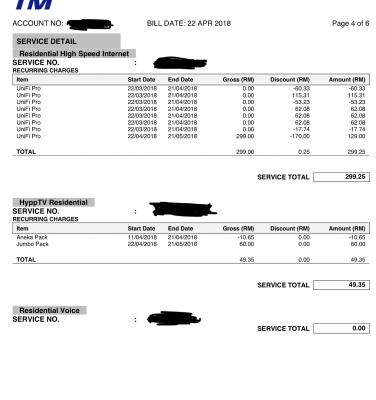
|
|
|
|
|
|
soonwai
|
Apr 23 2018, 03:27 AM
|
|
|
QUOTE(Elvin7 @ Apr 22 2018, 02:44 PM) I set my 2.4G and 5G WiFi SSID with the same name. It become xxx 2.4G/5G. May I know how do I know the connection is 2.4 or 5G? If same name, on some computers, you can option click on the wifi icon and it should give more info on the wifi ssid that you're connected to, including the speed and frequency.  On an iPhone, you'll have to use an app such as Network Analyzer Lite (free) to look at the BSSID of the connected wifi in order to discern whether it's 2.4 or 5GHz. They will have different BSSIDs, often offset by 1. This post has been edited by soonwai: Apr 23 2018, 03:41 AM |
|
|
|
|
|
MGM
|
Apr 23 2018, 05:55 AM
|
|
|
QUOTE(syncomp @ Apr 23 2018, 01:18 AM) Does anybody experiences bill spike this month? I just got my Bil dated 21 April. Normally I would have been charges RM 198. This month RM 367. Did u have a change of plan or pack while still in contract? This post has been edited by MGM: Apr 23 2018, 05:56 AM |
|
|
|
|
|
anip94
|
Apr 23 2018, 11:24 AM
|
Getting Started

|
did anyone with 10mbps package notice small speed bump in download? i noticed my torrent speed sometimes spike up to 1.8mb usually before this 1.2mb was max speed
|
|
|
|
|
|
hafiez
|
Apr 23 2018, 11:37 AM
|
|
|
QUOTE(anip94 @ Apr 23 2018, 11:24 AM) did anyone with 10mbps package notice small speed bump in download? i noticed my torrent speed sometimes spike up to 1.8mb usually before this 1.2mb was max speed benda pelik jangan tegur |
|
|
|
|
|
Max2006
|
Apr 23 2018, 12:36 PM
|
|
|
Hi guys. For anyone who still receive amount RM40 for old Hypp TV Ruby Pack 2 package on their bill, the amount won't be automatically changed to RM30 eventhough your package already upgraded to RM30 Ruby Plus. You have to go to TM point and ask them to rectify it.
Thanks to the advice from one of the LYN forumers here, I already did it last month. My latest bill came today and yes. My Ruby Pack 2 changed to Ruby plus and the amount is RM30 now. No extra downgrade charge or any hanky panky on the Internet package fee.
This post has been edited by Max2006: Apr 23 2018, 12:36 PM
|
|
|
|
|
|
OKLY
|
Apr 23 2018, 01:42 PM
|
The Penguin Vader
|
How can one safely spoil the HyppTV box and make it look like a natural death? Been wanting to replace the very first gen HyppTV decoder to the latest one.  |
|
|
|
|
|
azuansyah
|
Apr 23 2018, 02:57 PM
|
New Member
|
just asking brapa lama dia ambik masa nak repiar cable fiber yg putus underground? tak boleh ker dia tari cable baru? last time masa pasang, diorang yg tarik cable fiber dari kotak tm to my house underground.....
|
|
|
|
|
|
JohnLai
|
Apr 23 2018, 03:14 PM
|
|
|
Hmmm? Did tm remove the unifi coverage map from its website?
|
|
|
|
|
|
AVFAN
|
Apr 23 2018, 03:44 PM
|
|
|
QUOTE(azuansyah @ Apr 23 2018, 02:57 PM) just asking brapa lama dia ambik masa nak repiar cable fiber yg putus underground? tak boleh ker dia tari cable baru? last time masa pasang, diorang yg tarik cable fiber dari kotak tm to my house underground..... if putus... repair can be done for outer protective core, they can use a "bridge". but the fiber inside has to be completely replaced. contractor has equipment to pull new fiber while keep the outer, repair it. if mostly running along drains and not too much in the ground... 2-3 hours job. |
|
|
|
|



 Quote
Quote









 0.0449sec
 0.42
0.42
 6 queries
 GZIP Disabled