

the customer support said restoration is in progress on their facebook page
Unifi Official TM UniFi High Speed Broadband Thread V33, Enjoy Your UniFi
Unifi Official TM UniFi High Speed Broadband Thread V33, Enjoy Your UniFi
|
|
 Apr 18 2018, 05:43 PM Apr 18 2018, 05:43 PM
|
 
Senior Member
2,903 posts Joined: Nov 2004  
|
the customer support said restoration is in progress on their facebook page
|
|
|
|
|
|
Apr 18 2018, 05:45 PM
|

Junior Member
111 posts Joined: Apr 2012
|
QUOTE(ahpek26 @ Apr 18 2018, 05:40 PM) Affected Im stuck with 42.xx eventhough restarted million times115.134.*.* 60.49.*.* 175.142.*.* 42.188.*.* Not affected 210.187.*.* 60.54.*.* 124.82.*.* 118.100.*.* So, if you can change and get the unaffected ip address then lucky you. Else you need to use a proxy or vpn to get better routing. Seems so dejavu, remember three years ago my house can't stream twitch with unifi 20Mbps but office can no problem. Turns out office ip address is 118.100.*.* and house is not so go figure. TM routing is so garbage ugh.  |
|
|
Apr 18 2018, 05:46 PM
|

Senior Member
1,501 posts Joined: Oct 2004 From: ISA Detention Room -Port Valdez- 
|
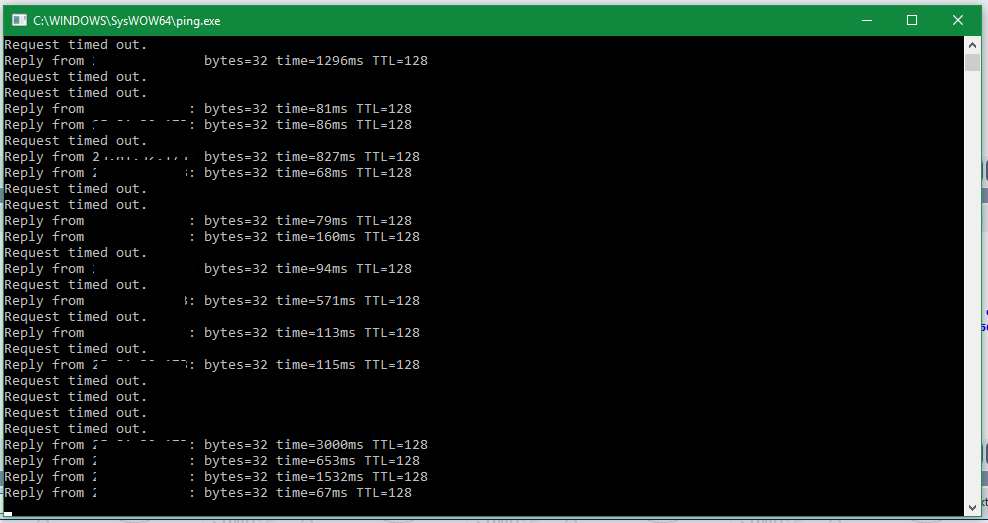
on unifi mobile & digi now, having issue connecting to my remote pc at office from home
  |
|
|
Apr 18 2018, 05:49 PM
|

Junior Member
51 posts Joined: Nov 2009 From: pattaya
|
I think it's fixed now, at least for me.. better check your connection back guys.
|
|
|
Apr 18 2018, 05:49 PM
|

Senior Member
5,714 posts Joined: Mar 2007
|
QUOTE(ahpek26 @ Apr 18 2018, 05:40 PM) Affected I am on 124.13.*.* and I am affected by this as well. Who knows what’s happening anyway,115.134.*.* 60.49.*.* 175.142.*.* 42.188.*.* Not affected 210.187.*.* 60.54.*.* 124.82.*.* 118.100.*.* So, if you can change and get the unaffected ip address then lucky you. Else you need to use a proxy or vpn to get better routing. Seems so dejavu, remember three years ago my house can't stream twitch with unifi 20Mbps but office can no problem. Turns out office ip address is 118.100.*.* and house is not so go figure. TM routing is so garbage ugh. QUOTE(Cyru$ @ Apr 18 2018, 05:43 PM) Yo I get what you mean dude, from your posts on this thread, but I do see results on the same router on my friend's Time 300mbps in his apartment upwards of 10Mb/s though. Sorry to hear that. Hope it will improve for you, but if it doesn’t, at least you know what to get to improve your situation.So I am like what is happening rn, is it a router issue or a ISP issue?? thought I might find out with users around here, am I the only one having this problem. But yea, definitely will consider your suggestions man. Thanks Right, so I guess I might have to observe for a few more days. |
|
|
Apr 18 2018, 05:50 PM
|

Junior Member
94 posts Joined: Jul 2005
|
On Unifi 50MB, 42.* ip range. Some international sites are reachable, though slow. Others are very slow, and will often time out or just partially load. Also, it seems that Twitter is having its own issues right now, so may not be due to this current problem.
It seems I'm stuck with the 42.* range (I'm in Ampang). No amount of shutting down and restarting will give me something else. Of course, this change all came about thanks to recent "upgrading exercises" by Unifi. |
|
|
|
|
|
Apr 18 2018, 05:50 PM
|

Senior Member
1,389 posts Joined: Feb 2006 From: Southern Region
|
QUOTE(ahpek26 @ Apr 18 2018, 05:40 PM) Affected Currently on 175.138.x, internet still find, download and torrent still get good speed. 115.134.*.* 60.49.*.* 175.142.*.* 42.188.*.* Not affected 210.187.*.* 60.54.*.* 124.82.*.* 118.100.*.* So, if you can change and get the unaffected ip address then lucky you. Else you need to use a proxy or vpn to get better routing. Seems so dejavu, remember three years ago my house can't stream twitch with unifi 20Mbps but office can no problem. Turns out office ip address is 118.100.*.* and house is not so go figure. TM routing is so garbage ugh. Melaka area. |
|
|
Apr 18 2018, 05:50 PM
|
|
Junior Member
111 posts Joined: Apr 2012
|
QUOTE(44dacrybaby @ Apr 18 2018, 05:48 PM) anyone having issues with online game+twitch? i cannot watch twitch today. twitch, twitter, lazada, etc not working for meyoutube, facebook and few others seems to be working fine |
|
|
Apr 18 2018, 05:55 PM
|

Junior Member
475 posts Joined: Apr 2007
|
QUOTE(Isky @ Apr 18 2018, 05:50 PM) On Unifi 50MB, 42.* ip range. Some international sites are reachable, though slow. Others are very slow, and will often time out or just partially load. Also, it seems that Twitter is having its own issues right now, so may not be due to this current problem. Nah it's just TM garbage routing on that ip address range. Using 118.*.*.* at my office twitter loads just fine, no problem.It seems I'm stuck with the 42.* range (I'm in Ampang). No amount of shutting down and restarting will give me something else. Of course, this change all came about thanks to recent "upgrading exercises" by Unifi. |
|
|
Apr 18 2018, 05:55 PM
|
|
Junior Member
475 posts Joined: Apr 2007
|
**Double post
This post has been edited by ahpek26: Apr 18 2018, 05:55 PM |
|
|
Apr 18 2018, 05:56 PM
|
|
Junior Member
94 posts Joined: Jul 2005
|
QUOTE(44dacrybaby @ Apr 18 2018, 05:51 PM) same. Twitter mine can load but slow. twitch cannot at all. Twitch wasn't loading for me earlier, but loading now. Lazada not loading. Twitter is really slow, and sometimes not loading (they have their own issues right now, apparently). A lot of other intl sites still slow or not loading.Youtube / Google is fine. On 42.* ip range, Ampang. 50MB. |
|
|
Apr 18 2018, 05:58 PM
|

All Stars
11,458 posts Joined: Oct 2007 From: KL
|
QUOTE(ahpek26 @ Apr 18 2018, 05:40 PM) Affected I'm only seeing probs with 42.153.48.56. AS38322 (210... 115... 175... 60... AS4788 all ok for me.)115.134.*.* 60.49.*.* 175.142.*.* 42.188.*.* Not affected 210.187.*.* 60.54.*.* 124.82.*.* 118.100.*.* So, if you can change and get the unaffected ip address then lucky you. Else you need to use a proxy or vpn to get better routing. Seems so dejavu, remember three years ago my house can't stream twitch with unifi 20Mbps but office can no problem. Turns out office ip address is 118.100.*.* and house is not so go figure. TM routing is so garbage ugh.  Could be a BGP problem, all those things missing in the middle but I don't know how to troubleshoot that. Or just problem with Webe'S AS to TM. |
|
|
Apr 18 2018, 06:02 PM
|
|
Senior Member
2,903 posts Joined: Nov 2004
|
QUOTE(SilentVampire @ Apr 18 2018, 05:49 PM) I am on 124.13.*.* and I am affected by this as well. Who knows what’s happening anyway, because ip address not really matter anymore unlike last timeSorry to hear that. Hope it will improve for you, but if it doesn’t, at least you know what to get to improve your situation. |
|
|
|
|
|
Apr 18 2018, 06:05 PM
|
|
Junior Member
475 posts Joined: Apr 2007
|
QUOTE(soonwai @ Apr 18 2018, 05:58 PM) I'm only seeing probs with 42.153.48.56. AS38322 (210... 115... 175... 60... AS4788 all ok for me.) It's missing because TM and their infinite wisdom decided to block trace route from their customer. Jeez, I wonder why? Is it to hide their incompetent when user decides to self troubleshoot? Nah...Could be a BGP problem, all those things missing in the middle but I don't know how to troubleshoot that. Or just problem with Webe'S AS to TM. Seems like same ip range has different routing but who cares, not like you can pick and choose the good from the bad ones. QUOTE(tvcat @ Apr 18 2018, 06:02 PM) because ip address not really matter anymore unlike last time I wish. 2018 and we're still taking about ip range with good or bad routing, like the old streamyx days. What a sad country with sad "broadband", new shiny technology (fiber) from old copper cable but quality is still the same, junk.This post has been edited by ahpek26: Apr 18 2018, 06:07 PM |
|
|
Apr 18 2018, 06:08 PM
|
|
Senior Member
2,903 posts Joined: Nov 2004
|
QUOTE(ahpek26 @ Apr 18 2018, 06:05 PM) It's missing because TM and their infinite wisdom decided to block trace route from their customer. Jeez, I wonder why? Is it to hide their incompetent when user decides to self troubleshoot? Nah... i thought they only block the one from Windows? I'm not sure about Linux/macSeems like same ip range has different routing but who cares, not like you can pick and choose the good from the bad ones. anyway if your router support it then can trace in router, work pretty well |
|
|
Apr 18 2018, 06:09 PM
|
|
Senior Member
2,903 posts Joined: Nov 2004
|
QUOTE(ahpek26 @ Apr 18 2018, 06:05 PM) It's missing because TM and their infinite wisdom decided to block trace route from their customer. Jeez, I wonder why? Is it to hide their incompetent when user decides to self troubleshoot? Nah... hmm...my experience with unifi is quite goodSeems like same ip range has different routing but who cares, not like you can pick and choose the good from the bad ones. I wish. 2018 and we're still taking about ip range with good or bad routing, like the old streamyx days. What a sad country with sad "broadband", new shiny technology (fiber) from old copper cable but quality is still the same, junk. |
|
|
Apr 18 2018, 06:09 PM
|

Newbie
6 posts Joined: Jan 2016
|
unifi garbage still too slow on overseas website
|
|
|
Apr 18 2018, 06:13 PM
|

Junior Member
382 posts Joined: Nov 2005
|
QUOTE(tvcat @ Apr 18 2018, 05:43 PM) the customer support said restoration is in progress on their facebook page Can link their FB page? |
|
|
Apr 18 2018, 06:14 PM
|

Senior Member
561 posts Joined: Jul 2015
|
QUOTE(Cyru$ @ Apr 18 2018, 05:21 PM) Got my 100mbps installed on Monday 16/4/18. No problems. I'm using the TM supplied C1200 router...I am wondering is the speed getting throttled over at TM or it's the problem with the router. Anyone getting these sort of speeds? Check your global upload setting. 10kB/s? This post has been edited by biloxee: Apr 18 2018, 09:13 PM |
|
|
Apr 18 2018, 06:14 PM
|
|
Junior Member
475 posts Joined: Apr 2007
|
QUOTE(tvcat @ Apr 18 2018, 06:09 PM) hmm...my experience with unifi is quite good Mine too. In fact I got a huge discount recently so it's even better but it's a far cry from a real broadband service in terms of speed, price and reliability from other countries. Not like I can blame you or anyone else since they wouldn't know what cheap and fast internet is like since you can't get it here and I doubt most people can live abroad and experience it first hand.But seeing as old problems (ip ranges with routing and speed issues) and solutions (changing ip that's not affected) is still relevant today (2018) then I guess we haven't improved much from the dinosaur streamyx age huh. |
|
Topic ClosedOptions
|
| Change to: |  0.0424sec 0.0424sec
 0.30 0.30
 6 queries 6 queries
 GZIP Disabled GZIP Disabled
Time is now: 7th December 2025 - 05:04 PM |
 Quote
Quote