Welcome Guest ( Log In | Register )

39 Pages « < 34 35 36 37 38 > » Bottom

Outline · [ Standard ] · Linear+

 CELCOM home wifi broadband

views
     
edge81
post Aug 10 2019, 12:22 PM

New Member
*
Junior Member
48 posts

Joined: May 2005


QUOTE(daigoking @ Aug 9 2019, 11:30 PM)
Question: after 2 year contract finished, modem belongs to us or need return back to Celcom? In tnc seem write down need return to Celcom if terminated after contract complete
*
Over at the Huawei B618 v2 thread, they have shared the screenshot PDF of Celcom Home Wireless TnC from the earlier batch, which states modem belongs to us after contract over. I will keep this and hope Celcom honours this when I should terminate.

This post has been edited by edge81: Aug 10 2019, 12:22 PM
daigoking P
post Aug 10 2019, 03:15 PM

New Member
*
Probation
32 posts

Joined: Jun 2019
QUOTE(edge81 @ Aug 10 2019, 12:22 PM)
Over at the Huawei B618 v2 thread, they have shared the screenshot PDF of Celcom Home Wireless TnC from the earlier batch, which states modem belongs to us after contract over. I will keep this and hope Celcom honours this when I should terminate.
*
I just signed a Celcom home wireless back. The staff told me modem will belongs to us. He said he verified with Celcom staff and confirmed that. Hope his word can be trusted.
daigoking P
post Aug 10 2019, 09:49 PM

New Member
*
Probation
32 posts

Joined: Jun 2019
user posted image

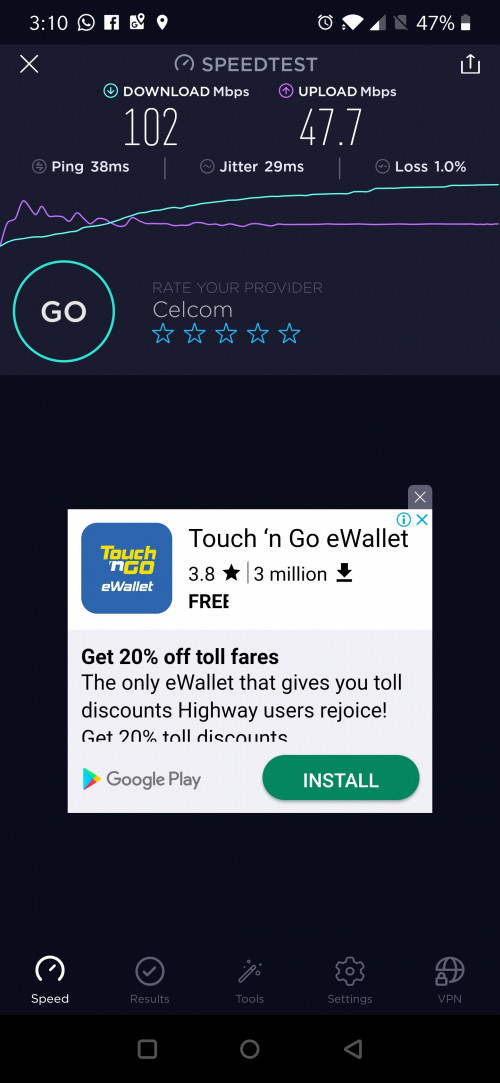
This speed still ok? A bit surprised me. As my original using Maxis 4G broadband and I though 30Mbps is the best at my area already. But Celcom can go up to 100Mbps...wow

Let me try few more test first. Hope Celcom won't let me disappointed
edge81
post Aug 11 2019, 07:09 PM

New Member
*
Junior Member
48 posts

Joined: May 2005


QUOTE(daigoking @ Aug 10 2019, 09:49 PM)

This speed still ok? A bit surprised me. As my original using Maxis 4G broadband and I though 30Mbps is the best at my area already. But Celcom can go up to 100Mbps...wow

Let me try few more test first. Hope Celcom won't let me disappointed
*
i believe the good speed also due to the Huawei B618 modem. It is supposedly one of the best 4G modem out there.
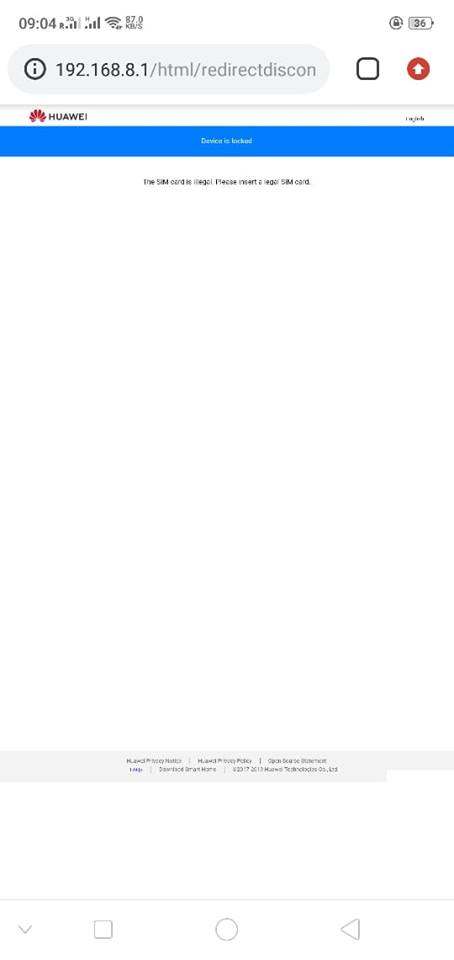
Unfortunately as the forumers mentioned, new batch from Celcom is SIM locked. If it were unlocked and you tried a Maxis SIM in it, I think you would see pretty good speed as well.

CutieCompact
post Aug 13 2019, 11:43 AM

Music Is My Soul
****
Senior Member
573 posts

Joined: Jan 2003
From: Malaysia
QUOTE(coolguy_0925 @ Aug 1 2019, 09:54 PM)
Anyone using Celcom Home Fibre and how's the quality?

- Speed (meet advertised speed)
- Stability (any downtime)
- Customer support (Downtime to uptime interval)
- Modem / Router (Brand, model)

Saw now it is available nationwide for 30Mbps @ RM80 so kind of tempted to jump to save some money...
*
Modem/Router is the Huawei HG 253s V2. When they just started launching about a year or two ago.
Now seem to be using the TPlink router Archer VR500V
as someone post it before
https://forum.lowyat.net/topic/4764524/all

Seem to be their router is pretty locked, so not much settings you can change.
And if you want to use your own router, it's hard to find any tutorial about how to set up Celcom Fibre, unlike TM Unifi a lot of tutorial in the internet how to setup your own router.

This post has been edited by CutieCompact: Aug 13 2019, 12:00 PM
bougie_44
post Sep 4 2019, 07:40 PM

New Member
*
Newbie
27 posts

Joined: Mar 2018
QUOTE(edge81 @ Aug 11 2019, 07:09 PM)
i believe the good speed also due to the Huawei B618 modem. It is supposedly one of the best 4G modem out there.
Unfortunately as the forumers mentioned, new batch from Celcom is SIM locked. If it were unlocked and you tried a Maxis SIM in it, I think you would see pretty good speed as well.
*
You can unlock Huawei sim / network lock here they give you the code but not cheap https://unlockmysim.com/unlock-phone/unlock-huawei/

1.Insert a non-supported SIM card into the Turbo Hub.
Connect your computer to the Turbo Hub via Ethernet cable.
Go to http://192.168.1.1 using a web browser.
Enter the password (default password: admin).
Click Login.
Type the unlock code.
Click Apply.
The Turbo Hub will reboot and will be unlocked.

This post has been edited by bougie_44: Sep 4 2019, 07:44 PM
iRwIN85
post Sep 5 2019, 10:13 AM

Getting Started
**
Junior Member
58 posts

Joined: Jan 2010


QUOTE(bougie_44 @ Sep 4 2019, 07:40 PM)
You can unlock Huawei sim / network lock here they give you the code but not cheap https://unlockmysim.com/unlock-phone/unlock-huawei/

1.Insert a non-supported SIM card into the Turbo Hub.
Connect your computer to the Turbo Hub via Ethernet cable.
Go to http://192.168.1.1 using a web browser.
Enter the password (default password: admin).
Click Login.
Type the unlock code.
Click Apply.
The Turbo Hub will reboot and will be unlocked.
*
If permanent lock can unlock using this method ? hmm.gif
blackrs
post Sep 9 2019, 12:25 PM

Getting Started
**
Junior Member
172 posts

Joined: Jul 2011
Anyone terminate the plan recently? Do we need to return back the modem?
syahpian
post Sep 10 2019, 02:14 AM

Enthusiast
*****
Junior Member
813 posts

Joined: Jul 2008
From: Kota Kinabalu <-> Kuala Lumpur


QUOTE(iRwIN85 @ Sep 5 2019, 10:13 AM)
If permanent lock can unlock using this method ? hmm.gif
*
permanent lock cannot, as it only show your sim is illegal error

» Click to show Spoiler - click again to hide... «

wind424
post Sep 14 2019, 02:07 PM

New Member
*
Junior Member
31 posts

Joined: Feb 2011
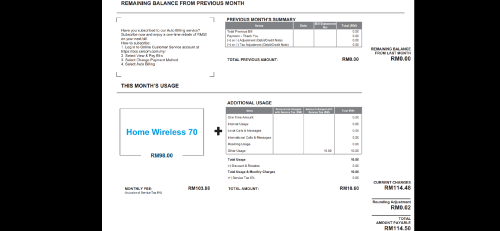
Got my first bill this month, I've subscribed to Monthly RM70 plan, however the bill charge RM98+RM10 stamp fee, anyone face this sort of issue before?

user posted image
yslysl
post Sep 15 2019, 03:14 PM

Casual
***
Junior Member
313 posts

Joined: Aug 2009


100Mbps - RM 120
cheapest 100Mbps for landed ?
syahpian
post Sep 19 2019, 08:01 PM

Enthusiast
*****
Junior Member
813 posts

Joined: Jul 2008
From: Kota Kinabalu <-> Kuala Lumpur


just want to ask, can i suspended my celcom plan for certain time?
blackrs
post Sep 21 2019, 11:37 AM

Getting Started
**
Junior Member
172 posts

Joined: Jul 2011
Just terminate my home wireless, even when you subsribe when old tnc period, you have to return modem. Garden, Taman Segar branch same. Even raise to manager question also same.
TSvisualfoley
post Sep 22 2019, 10:12 AM

On my way
****
Senior Member
565 posts

Joined: Jul 2007


QUOTE(blackrs @ Sep 21 2019, 11:37 AM)
Just terminate my home wireless, even when you subsribe when old tnc period, you have to return modem. Garden, Taman Segar branch same. Even raise to manager question also same.
*
they ddnt ask me to do that.. i still have the modem
blackrs
post Sep 22 2019, 03:47 PM

Getting Started
**
Junior Member
172 posts

Joined: Jul 2011
QUOTE(visualfoley @ Sep 22 2019, 10:12 AM)
they ddnt ask me to do that.. i still have the modem
*
Hmm, when you do the termination? Maybe the new policy now apply across all blue cube
TSvisualfoley
post Sep 23 2019, 05:16 PM

On my way
****
Senior Member
565 posts

Joined: Jul 2007


QUOTE(blackrs @ Sep 22 2019, 03:47 PM)
Hmm, when you do the termination? Maybe the new policy now apply across all blue cube
*
it was long time ago. matter fact, im the first person who use it. aha
tzychun79
post Sep 26 2019, 05:48 PM

Getting Started
**
Junior Member
137 posts

Joined: May 2014


QUOTE(syahpian @ Jul 29 2019, 06:26 PM)
user posted image

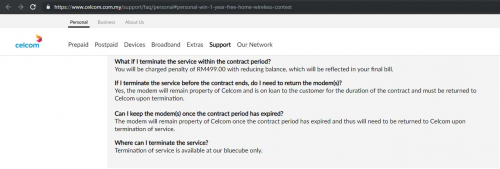
new tnc?  hmm.gif  hmm.gif
*
May i know what is it meant for reducing balance?
diaBoliQu3
post Oct 6 2019, 12:23 PM

☆ Untitled ☆
*******
Senior Member
5,631 posts

Joined: Aug 2011
From: ☆ Kuching ☆


Guys, so is it true that Celcom broadband coverage is not the same with Celcom mobile 4G coverage? Thinking of sub to Celcom broadband but my location is not in the broadband coverage.
jsnhoh
post Oct 6 2019, 02:54 PM

Vinc
******
Senior Member
1,021 posts

Joined: Jun 2013
QUOTE(diaBoliQu3 @ Oct 6 2019, 12:23 PM)
Guys, so is it true that Celcom broadband coverage is not the same with Celcom mobile 4G coverage? Thinking of sub to Celcom broadband but my location is not in the broadband coverage.
*
They had 30 days trial period. Why not apply one and test it first?
hitokiribatousai
post Oct 6 2019, 05:45 PM

New Member
*
Junior Member
27 posts

Joined: Sep 2008
Hi guys, did we need to inform cs to reset location, each time we bring the router to other place. Let see next weekend gonna bring this router blk kampung?

Or it will automatically detect u at new location? No issue with lock home address?

Thank you.

39 Pages « < 34 35 36 37 38 > » Top
 

Change to:
| Lo-Fi Version
0.0282sec    0.71    6 queries    GZIP Disabled
Time is now: 10th December 2025 - 01:53 AM