Thanks for response. I am located at Ipoh garden area.
I will likely purchase this plan as it is better than Stimx ... running at 4mb max !!
CELCOM home wifi broadband
CELCOM home wifi broadband
|
|
 May 4 2019, 10:13 PM May 4 2019, 10:13 PM
|
 
Junior Member
393 posts Joined: Nov 2006 
|
Thanks for response. I am located at Ipoh garden area.
I will likely purchase this plan as it is better than Stimx ... running at 4mb max !! |
|
|
|
|
|
May 6 2019, 02:29 PM
|
|
Senior Member
700 posts Joined: Apr 2006 
|
QUOTE(alucard1983 @ Apr 30 2019, 11:49 PM) Using it for a about 1 week + now at 2 different location , using the RM100 package. My findings That's mean it work at any area with Celcom network, am I right? Will not locked in 1 area.....1. speed varies (1 house in bangsar south is consistent at 20mbps++, 2nd house at jalan pudu consistent at 80bmps++ minimum) 2. easy to use except today, it had red light at the MODE section. I believe by changing the DNS at admin section fixed this ( some say this drops the speed as the dns im using is public google dns) . That may be true at before this at the pudu house its at 100 mbps but after dns change is bout 80-90++ mbps. For me the speed is good enough. 3. Im using it to give internet to 2 laptops, 1 tv, 2 handphones. All no problems. 4. I checked the usage details thru celcom life app - tho the app seems buggy and I feel its not really updating the usage in real time. 5. about 2 hours of 4k youtube usage on my 55inch led tv, took out around 22GB from video walla. current summary- its something i think ill keep since the portability is very useful when i travel as most times when im in hotel and in house internet sucks to even watch netflix. Im just evaluating now on should i upgrade to the rm150 with 1TB video walla. Needs to further abuse/stress test the service in the next 2 weeks to draw a conclusion  |
|
|
May 7 2019, 05:44 PM
|
|
Junior Member
393 posts Joined: Nov 2006
|
If we reset the modem, do we need to reconfigure the settings again or just bring back to Celcom to reset the modem.
I opened the complaint to them when my speed was running 4 to 8MB, as compared the 1st time usage/ 40 to 50MB. After the reboot their port, the speed is much better, averaging around 14 to 16MB. Any advise? |
|
|
May 8 2019, 12:34 AM
|

Junior Member
55 posts Joined: Jun 2014
|
QUOTE(KronenZerg @ May 7 2019, 05:44 PM) If we reset the modem, do we need to reconfigure the settings again or just bring back to Celcom to reset the modem. Didn't expected Celcom signal is so weak in Ipoh Garden area... I opened the complaint to them when my speed was running 4 to 8MB, as compared the 1st time usage/ 40 to 50MB. After the reboot their port, the speed is much better, averaging around 14 to 16MB. Any advise?  Basically, you just need to reconfigure the settings by yourself, for example WIFI password, login name + password.... |
|
|
May 8 2019, 10:13 AM
|
|
Junior Member
393 posts Joined: Nov 2006
|
QUOTE(ocm1984 @ May 8 2019, 12:34 AM) Didn't expected Celcom signal is so weak in Ipoh Garden area... Yeah bro .. i didnt expect that either. As i said, when i switch on the first time and use it for several days, the signal was 40plus. Suddenly, it dropped to 4 to 8 only. Basically, you just need to reconfigure the settings by yourself, for example WIFI password, login name + password.... I have changed the password, etc .. how does that help to improve it? I am thinking of resetting the modem but not sure if the configurations will out since it is from Celcom. |
|
|
May 8 2019, 08:46 PM
|
|
Newbie
21 posts Joined: Jan 2015
|
Guys, I have subscribed for a month and received an email on the billing, its however, I can't register to the online portal or any services be ause it send the TAC to the WiFi number, how do you guys solve this? Idk how to pay the bill
|
|
|
|
|
|
May 9 2019, 03:36 AM
|

Senior Member
3,363 posts Joined: Sep 2005 
|
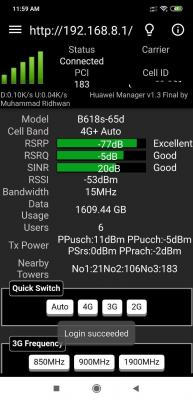
QUOTE(ocm1984 @ May 4 2019, 10:54 AM) Mind to share which location in Ipoh? if using android phone install a huawei apps called hmanager look around. it's used to pair with b618, 22d ver modem when idle it wont connect as 4G+, or it wont run 4G+ as priority due to firmware issue. if using the apps u can force it to 4g+, when forcing call wont works. call only work when is in auto mode. meanwhile u also can monitor, see which band is good. b3, b7 or b3+b7. do a compare.During my trial period in March 2019, I hardly can get 4G+ connection. Mostly was 4G connection. When I am officially using it since last month, I manage to get 4G+ connection. Download speed: 70-100 Mbps Upload speed: 30-50 Mbps Maybe you can call Celcom call centre, ask the agent to reset the network My Area: Bercham, Ipoh QUOTE(KronenZerg @ May 7 2019, 05:44 PM) If we reset the modem, do we need to reconfigure the settings again or just bring back to Celcom to reset the modem. reset no need reconfigure..only wifi pass, web ui pass. rest is auto.I opened the complaint to them when my speed was running 4 to 8MB, as compared the 1st time usage/ 40 to 50MB. After the reboot their port, the speed is much better, averaging around 14 to 16MB. Any advise? hmanager apps » Click to show Spoiler - click again to hide... « signal strength 
to know u get a good spot in in door/good coverage or not. RSRP <100dbm (lower better) , SINR >0dbm higher betteR) both also will directly effect your speed if it's weak. seing 3, 4 or 5 bar signal u only know roughly signal strength. This post has been edited by alexchew_2020: May 9 2019, 03:39 AM |
|
|
May 9 2019, 10:43 AM
|
|
Newbie
21 posts Joined: Jan 2015
|
Hmmm , guys for the video valaha, it doesnt matter whether i watch youtube or astrogo with apps or website right?i am still wondering why my data usage is more than video valaha usage
|
|
|
May 9 2019, 07:17 PM
|

Junior Member
298 posts Joined: Mar 2011
|
QUOTE(SnowHenkin @ May 8 2019, 08:46 PM) Guys, I have subscribed for a month and received an email on the billing, its however, I can't register to the online portal or any services be ause it send the TAC to the WiFi number, how do you guys solve this? Idk how to pay the bill u can contact their live chat agent.they will help u with the OCS account. |
|
|
May 9 2019, 08:48 PM
|
|
Junior Member
393 posts Joined: Nov 2006
|
[quote=alexchew_2020,May 9 2019, 03:36 AM]if using android phone install a huawei apps called hmanager look around. it's used to pair with b618, 22d ver modem when idle it wont connect as 4G+, or it wont run 4G+ as priority due to firmware issue. if using the apps u can force it to 4g+, when forcing call wont works. call only work when is in auto mode. meanwhile u also can monitor, see which band is good. b3, b7 or b3+b7. do a compare.
reset no need reconfigure..only wifi pass, web ui pass. rest is auto. hmanager apps » Click to show Spoiler - click again to hide... « signal strength
to know u get a good spot in in door/good coverage or not. RSRP <100dbm (lower better) , SINR >0dbm higher betteR) both also will directly effect your speed if it's weak. seing 3, 4 or 5 bar signal u only know roughly signal strength. [/q My answers to your response = < wifi pass on my devices or the HW modem? If it is HW modem, it is given when i purchase it and it is located underneath it. What is the web UI password?> < Thanks for sharing > < Thanks for sharing > <The modem is showing full bar and blue dot at the bottom. This is indicating good coverage. What puzzles me is that, initial use was showing good speed but recently dropped down. Maybe the area is now congested. This is what the Celcom service group replied back> This post has been edited by KronenZerg: May 9 2019, 08:50 PM |
|
|
May 10 2019, 12:57 AM
|
|
Senior Member
3,363 posts Joined: Sep 2005
|
[quote=KronenZerg,May 9 2019, 08:48 PM]
[quote=alexchew_2020,May 9 2019, 03:36 AM]if using android phone install a huawei apps called hmanager look around. it's used to pair with b618, 22d ver modem when idle it wont connect as 4G+, or it wont run 4G+ as priority due to firmware issue. if using the apps u can force it to 4g+, when forcing call wont works. call only work when is in auto mode. meanwhile u also can monitor, see which band is good. b3, b7 or b3+b7. do a compare. reset no need reconfigure..only wifi pass, web ui pass. rest is auto. hmanager apps » Click to show Spoiler - click again to hide... « signal strength
to know u get a good spot in in door/good coverage or not. RSRP <100dbm (lower better) , SINR >0dbm higher betteR) both also will directly effect your speed if it's weak. seing 3, 4 or 5 bar signal u only know roughly signal strength. [/q My answers to your response = < wifi pass on my devices or the HW modem? If it is HW modem, it is given when i purchase it and it is located underneath it. What is the web UI password?> < Thanks for sharing > < Thanks for sharing > <The modem is showing full bar and blue dot at the bottom. This is indicating good coverage. What puzzles me is that, initial use was showing good speed but recently dropped down. Maybe the area is now congested. This is what the Celcom service group replied back> [/quote] web ui password, if default modem is username admin, pass is admin. could be congested. hence is a try for congested area. lock band is just another method only u connect to the band which is not congested. example like b3, b7 or b3+b7. either one..using hmanager apps. the modem indicate led light just for display. actual good signal or not good your modem spot in indoor refer reading of rsrp n sinr. |
|
|
May 10 2019, 07:50 AM
|
|
Junior Member
393 posts Joined: Nov 2006
|
QUOTE(alexchew_2020 @ May 10 2019, 12:57 AM) web ui password, if default modem is username admin, pass is admin. Thank you for your explanation. I will try it out later and lock at the mentioned bandwidth.could be congested. hence is a try for congested area. lock band is just another method only u connect to the band which is not congested. example like b3, b7 or b3+b7. either one..using hmanager apps. the modem indicate led light just for display. actual good signal or not good your modem spot in indoor refer reading of rsrp n sinr. |
|
|
May 10 2019, 10:40 PM
|
|
Junior Member
393 posts Joined: Nov 2006
|
QUOTE(visualfoley @ Mar 25 2018, 08:45 PM) after i adjust my netflix settings.. thank to @ocgassa this is the speed now.. I downloaded the app on my android box but i cannot log in, kept saying wrong password .. eventhough i typed admin/ admin.plus the picture is way too good now.. aha.. [attachmentid=9690205] Any idea which error i made? |
|
|
|
|
|
May 11 2019, 11:09 PM
|
|
Senior Member
3,363 posts Joined: Sep 2005
|
QUOTE(KronenZerg @ May 10 2019, 10:40 PM) I downloaded the app on my android box but i cannot log in, kept saying wrong password .. eventhough i typed admin/ admin. hmanager apps? is buggy abit..clear cache and redo... if default gateway ip is still the same, and modem web ui log in is correct user name n password.Any idea which error i made? |
|
|
May 12 2019, 02:37 PM
|
|
Junior Member
160 posts Joined: Aug 2010 From: Ipoh
|
QUOTE(KronenZerg @ May 7 2019, 05:44 PM) If we reset the modem, do we need to reconfigure the settings again or just bring back to Celcom to reset the modem. I live at Station 18, Pengkalan area. Last month Celcom agent call me up and said Celcom has added a new antenna around my home and I could enjoy there service now. So without any doubt I subscribed the service immediately and terminated my Streamyx 8Mbps which also cost me more then Celcom. I know that wireless broadband is not going to be stable and the speed usually depend on how many active users in the area. Anyway what I wanted is just to be able to stream 4K content on my TV. And it does works very well with Celcom Home Wireless Broadband.I opened the complaint to them when my speed was running 4 to 8MB, as compared the 1st time usage/ 40 to 50MB. After the reboot their port, the speed is much better, averaging around 14 to 16MB. Any advise? My speed here at Pengkalan are very decent,  Over the month there was some up and down on speed but most of the time are very decent.  Maybe Ipoh Garden area are too pack with Celcom users. Hope Celcom will add more antenna and your speed will became better. Best regard. This post has been edited by myandylai: May 12 2019, 02:41 PM |
|
|
May 12 2019, 11:17 PM
|
|
Junior Member
393 posts Joined: Nov 2006
|
QUOTE(myandylai @ May 12 2019, 02:37 PM) I live at Station 18, Pengkalan area. Last month Celcom agent call me up and said Celcom has added a new antenna around my home and I could enjoy there service now. So without any doubt I subscribed the service immediately and terminated my Streamyx 8Mbps which also cost me more then Celcom. I know that wireless broadband is not going to be stable and the speed usually depend on how many active users in the area. Anyway what I wanted is just to be able to stream 4K content on my TV. And it does works very well with Celcom Home Wireless Broadband. Thanks for sharing the information. Celcom did call me up and said my signal is from Pantai hospital antenna, which is why congested. New antenna near Kintacity would be up by end of q3 this year.My speed here at Pengkalan are very decent, Over the month there was some up and down on speed but most of the time are very decent. Maybe Ipoh Garden area are too pack with Celcom users. Hope Celcom will add more antenna and your speed will became better. Best regard. Guess I have to wait for it. |
|
|
May 21 2019, 09:29 AM
|
|
Junior Member
393 posts Joined: Nov 2006
|
I noticed the modem is giving 2 different signal, one is normal and other is 5G.
I tried both signal and both giving same speed, which is still ard 10MB to 15MB. Is there any different between both? |
|
|
Jun 6 2019, 11:36 PM
Show posts by this member only | IPv6 | Post
#678
|
|
Junior Member
298 posts Joined: Mar 2011
|
hi.. i am thinking to resubscribe the celcom home wireless plan becoz my first batch modem was locked after 2 months i terminated this plan..
so i need to ask a question to all sifus here.. can i use this sim anywhere or must use in one place? coz last time during i terminate it, the staff there told me can use it anywhere already.. but just need to confirm with u guys first. thsnks |
|
|
Jun 8 2019, 07:55 PM
|
|
Junior Member
453 posts Joined: Jan 2016
|
QUOTE(Jeffreynsx @ Jul 17 2018, 09:39 AM) Better upgraded to TM Unifi Turbo next month. Not worth to spend $$ to wireless broadband. QUOTE(ChuanHong @ Jul 17 2018, 09:52 AM) if able to have fibre broadband service is the best for better & stable connection.. but somehow i believe people will go for wireless broadband are due to lack of service in the location.. Hahahaahahah.example, my condo building due to newly CCC recently and still waiting to TM to connect unifi services into the building.. collecting demand from owners but somehow not everyone going to subscribe it yet.. i will prefer 10mbps averagely will do.. but celcom wireless broadband seem offer more than the speed.. hopefully the connection is stable and do as it is. I think the unifi team is sleeping everyday. I already waited for 3 months to install my unifi fiber but until now still no port. What on earth is this?! My area is also high demand for fiber internet and is located in PJ! Seems like one unifi port would take TM millions of $$ to build.  Now, I ended up with this stupid LOCKED celcom home wifi broadband. Such a BS. Anyone tried Unifi Bebas with unlimited network? Heard it's RM80 per month only but speed capped at 8mbps https://unifi.com.my/personal/mobile/bebas#bebas-download |
|
|
Jun 8 2019, 08:14 PM
|

Senior Member
4,412 posts Joined: Jan 2013
|
QUOTE(xiaobaiwm @ Jun 8 2019, 07:55 PM) Hahahaahahah. the port issue definitely is some pain for someone.. too bad.. new house or just move to the area? normally new house then should be UNIFI and port ready. too bad and u have to try out wireless options.. i heard most ppl use digi 150 plan before.. unlimited quota for tethering..I think the unifi team is sleeping everyday. I already waited for 3 months to install my unifi fiber but until now still no port. What on earth is this?! My area is also high demand for fiber internet and is located in PJ! Seems like one unifi port would take TM millions of $$ to build. Now, I ended up with this stupid LOCKED celcom home wifi broadband. Such a BS. Anyone tried Unifi Bebas with unlimited network? Heard it's RM80 per month only but speed capped at 8mbps https://unifi.com.my/personal/mobile/bebas#bebas-download |
| Change to: |  0.0221sec 0.0221sec
 0.78 0.78
 6 queries 6 queries
 GZIP Disabled GZIP Disabled
Time is now: 9th December 2025 - 11:57 PM |
 Quote
Quote