

 Waiting for the 9th Gen release to finish my upgrade

This post has been edited by Steve Lum: Oct 16 2018, 08:44 PM
NVIDIA GeForce Community V19, RTX 5000 unveiled
|
|
 Oct 16 2018, 03:53 PM Oct 16 2018, 03:53 PM
Return to original view | Post
#1
|
 
Senior Member
709 posts Joined: Apr 2012 From: Damansara  
|
My 3D Mark score. GPU probably bottlenecked by my 5 years old CPU, although overclocked to 4.4Ghz
Waiting for the 9th Gen release to finish my upgrade This post has been edited by Steve Lum: Oct 16 2018, 08:44 PM |
|
|
|
|
|
Oct 16 2018, 07:46 PM
Return to original view | Post
#2
|
|
Senior Member
709 posts Joined: Apr 2012 From: Damansara
|
QUOTE(arslow @ Oct 16 2018, 07:22 PM) 9900k? Or some skylake x refresh cpu? 9900K will do just fine for me. Reckon those X-series are too expensive for me   |
|
|
Nov 14 2018, 12:10 AM
Return to original view | Post
#3
|
|
Senior Member
709 posts Joined: Apr 2012 From: Damansara
|
I did make an email enquiry to Gigabyte in regards to the compatibility of the card with an EKWB waterblock. And it seems like they're discouraging us from watercooling and mentions that "It May Void Warranty Terms", but keyword- "may"? I have googled matters like these and apparently few customers' card's warranty voided just from taking their card apart and repasting
 But yeah, does anyone know if EKWB waterblock is compatible with Gigabyte RTX 2080ti Gaming OC? It's pretty much the same with Windforce but its not listed in EKWB site But yeah, does anyone know if EKWB waterblock is compatible with Gigabyte RTX 2080ti Gaming OC? It's pretty much the same with Windforce but its not listed in EKWB siteThis post has been edited by Steve Lum: Nov 14 2018, 12:12 AM Attached thumbnail(s) 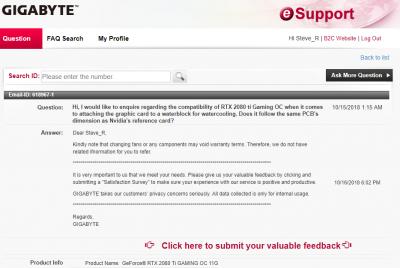
|
|
|
Dec 6 2018, 01:00 PM
Return to original view | Post
#4
|
|
Senior Member
709 posts Joined: Apr 2012 From: Damansara
|
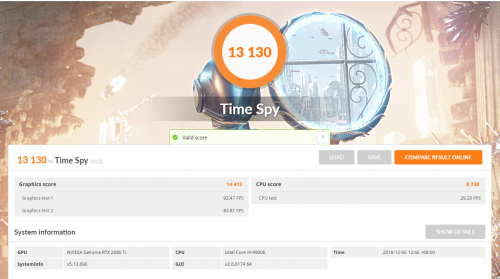
Finally upgraded my CPU from i7-3770k to i9-9900k. From the graphics score, there's only around 3 fps differences. Does it mean that bottlenecks is quite minimal even with a 3770k?
  |
|
|
Dec 8 2018, 11:53 PM
Return to original view | Post
#5
|
|
Senior Member
709 posts Joined: Apr 2012 From: Damansara
|
QUOTE(edmund_yung @ Dec 8 2018, 10:43 AM) The graphic benchmark only stress the GPU, so your new CPU will have minimal effects on it. So in this case - YES. Well, that would make more sense, considering it shows nearly 40% bottlenecks from thebottlenecker site. Cheers for that info mate. It's great to know ☺A well optimised game will use both CPU and GPU, so I don’t think your new CPU is such a bad purchase. |
|
|
Dec 17 2018, 11:11 PM
Return to original view | Post
#6
|
|
Senior Member
709 posts Joined: Apr 2012 From: Damansara
|
QUOTE(cstkl1 @ Dec 16 2018, 10:41 PM) z390 vs z370( and z270 and x299) Yeah I'm using Maximus XI Formula and 16GB vengeance pro RAM too. I didn't OC it and it's watercooled with min temp at 31, max temp 65. Not sure what's the problem with it then difference is just native support for usb 3.1 on the pch. thats about it afaik. oc etc shouldnt matter as long the vrm on the mobo can hane it. stock should be no issue.. so his score of 9k.. err thats about the same as 8700k@5ghz  BIOS settings? BIOS settings?This post has been edited by Steve Lum: Dec 17 2018, 11:15 PM |
|
|
|
|
|
Dec 20 2018, 03:21 AM
Return to original view | Post
#7
|
|
Senior Member
709 posts Joined: Apr 2012 From: Damansara
|
QUOTE(cstkl1 @ Dec 17 2018, 11:39 PM) even on stock it should be 4.6ghz on all cored dude.. at thats like min 11-12k oh timespy... You were right! I've decided to play around with the BIOS and enabled XMP and Multi-Core Enhancement, and manage to get it to 11k in timespy. Cheers! try running cinebench.. u should get atleast 204x-206x  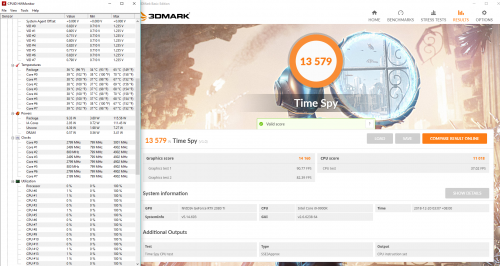 |
|
|
Dec 20 2018, 02:21 PM
Return to original view | Post
#8
|
|
Senior Member
709 posts Joined: Apr 2012 From: Damansara
|
QUOTE(cstkl1 @ Dec 20 2018, 09:02 AM) hmm something seriously off. ohh then I have no idea what's wrong :/ i gave up for now. might look it up next time 9900k default has a all core speed of 4.6ghz no need MCE ( 5ghz all core unstable and hot) 4.6ghz is 12k.. 5ghz is arnd 12.8-13k btw thats a good cpu vid owikh84 cheers for the info mate! |
|
|
Dec 20 2018, 10:33 PM
Return to original view | Post
#9
|
|
Senior Member
709 posts Joined: Apr 2012 From: Damansara
|
QUOTE(nrw @ Dec 20 2018, 03:20 PM) maybe give it a try to update your bios and start off at default settings afterwards. I've done a clean reset on my windows drive prior to that, since I've retain the SDD and HDD including a 1000w PSU from my previous rig. I'll try out with default settings soon. Cheers if that doesn't help a fresh win10 installation should fix it then. |
| Change to: |  0.5097sec 0.5097sec
 0.82 0.82
 7 queries 7 queries
 GZIP Disabled GZIP Disabled
Time is now: 11th December 2025 - 07:01 AM |
 Quote
Quote