Outline ·
[ Standard ] ·
Linear+
NVIDIA GeForce Community V19, RTX 5000 unveiled
|
PJng
|
 Dec 2 2023, 05:54 PM Dec 2 2023, 05:54 PM
|

|
QUOTE(babykids @ Dec 2 2023, 03:24 PM) thanks bro, will check on it. Hope not too thick for my case Any zotac card owner here? Why this red led so annoying, how to turn it off lol 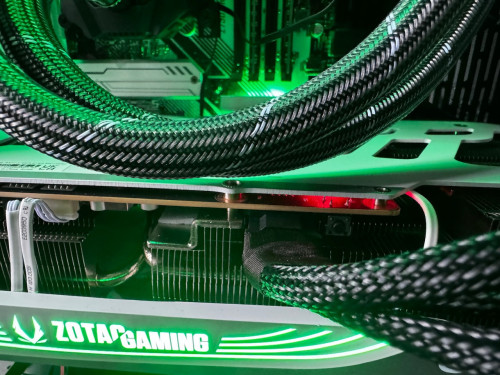 I also want to know how to turn off my colorful red light, branded pc once cover up, cannot see at all, no point red light keep on |
|
|
|
|
|
PJng
|
Dec 2 2023, 07:13 PM
|
|
|
QUOTE(TristanX @ Dec 2 2023, 07:12 PM) Try BIOS settings. Maybe LED or RGB something. Never seen Colorful BIOS. I can disable it on Gigabyte board. I mean the GPU, I installed on HP PC |
|
|
|
|
|
PJng
|
Dec 7 2023, 05:10 PM
|
|
|
|
|
|
|
|
|
PJng
|
Dec 7 2023, 05:26 PM
|
|
|
QUOTE(Rei7 @ Dec 7 2023, 05:23 PM) Driver issue, did you update the latest driver already? I didn't have this issue but on your 3rd link, in the thread some poster have linked it to https://www.nvidia.com/en-us/geforce/forums...released-82223/ which shows that it's a known issue. now on 546.29 still got same issue, most noticeable when playing youtube, main browser is edge so is chomium based trying screenshot but pasted cannot see such pattern This post has been edited by PJng: Dec 7 2023, 05:27 PM |
|
|
|
|
|
PJng
|
Dec 7 2023, 09:26 PM
|
|
|
QUOTE(LiQuID2 @ Dec 7 2023, 09:22 PM) can la..i not hardcore gamer that why i buy 3060 12GB few month ago, even not turning all high preset, 4060 downgraded 8GB |
|
|
|
|
|
PJng
|
Dec 7 2023, 09:59 PM
|
|
|
QUOTE(LiQuID2 @ Dec 7 2023, 09:53 PM) Is the ram really important? that one, i not really test it and sure, but some game even 1080 can use over 8GB VRAM now |
|
|
|
|
|
PJng
|
Dec 8 2023, 05:32 PM
|
|
|
QUOTE(babylon52281 @ Dec 8 2023, 09:20 AM) Have you tried DDU and roll forward to latest driver? Test with Unigine Valley see if still got issue. Have you tried DDU and roll back to earlier driver? Test with Unigine Valley see if still got issue. Have you tried reflash the firmware? Make sure its the exact one for ur GPU model. Test with Unigine Valley see if still got issue. If yes for all, likely its a hardware problem, if see Northwestrepair vids it could be a VRAM or core problem. Post 289, seem need wait for latest update, canary channel say fix that |
|
|
|
|
|
PJng
|
Dec 10 2023, 07:28 PM
|
|
|
QUOTE(hafiez @ Dec 10 2023, 07:22 PM) i did some test by disabling the hardware accelerator for edge nad it stops the problem. But running edge without hardware accelerator will degrade your browsing performance. So i just turn it back on and ignore the problem.😂 If playing game got such issue can say GPU problem, but weird only browser After google search seem not GPU, so just wait windows update |
|
|
|
|
|
PJng
|
Dec 16 2023, 11:14 PM
|
|
|
goodbye GTX 16 series https://videocardz.com/newz/the-end-of-gtx-...nued-in-q1-20241630 just release last year also discontinue |
|
|
|
|
|
PJng
|
Dec 29 2023, 11:20 PM
|
|
|
RTX3050 6GB, maybe first RTX below 1k, how low price will be currently 8GB about 1k, 1.1k https://www.lowyat.net/2023/313588/gigabyte...s-rtx-3050-6gb/ |
|
|
|
|
|
PJng
|
Jan 7 2024, 10:27 PM
|
|
|
QUOTE(defaultname365 @ Jan 7 2024, 12:18 PM) Why don't you link the articles, how are posting images of articles any helpful to those needing more context? That's literally the point of my comment, and yes, we should be happy as this is the first time in a long time Nvidia has "dropped" the prices (Nvidia's "drop" - they would rather release a new series instead of dropping prices) and this is going to affect the entire 40-series line up for the foreseeable future. Just note don hope that guy post any news, all he post screenshot no link to read any content |
|
|
|
|
|
PJng
|
Jan 9 2024, 11:40 AM
|
|
|
No idea why post so many screenshot, is it very hard copy link?
Or phone disabled copy paste link function?
What i suppose to read only title no content
|
|
|
|
|
|
PJng
|
Jan 14 2024, 03:45 PM
|
|
|
look like many thing RMA also get upgrade
just like last year i RMA 75HZ monitor, i get back new monitor 100HZ
btw no heavy user graphic card should last over 5 years right
|
|
|
|
|
|
PJng
|
Jan 23 2024, 06:53 PM
|
|
|
Which is the best to limit game fps? Using nvidia control panel or msi rival tunner?
I using 100hz monitor, some game don have 100fps option, and there is one game vsync look broken, everytime i launch, it always ignore vsync ON, and use in game 60 or 120fps, cause screen tearing if 120fps
|
|
|
|
|
|
PJng
|
Feb 13 2024, 07:10 PM
|
|
|
can atleast post link? how suppose to know what content by title?
or anything we need google search ownself?
|
|
|
|
|
|
PJng
|
Feb 28 2024, 06:34 PM
|
|
|
https://m.youtube.com/watch?si=wf805Q4Uheb3...eature=youtu.beGive up embed youtube, so many code Just know that new RTX3050 6GB no need extra power connect Easy for those old pc and this in low profile
|
|
|
|
|
|
PJng
|
Mar 5 2024, 06:48 PM
|
|
|
QUOTE(babylon52281 @ Mar 5 2024, 06:22 PM) I saw are you using only 2 of the 8pin PCIE adaptor connection to the 12VHPWR to GPU? IINM for 4090 it requires 3 PCIE connection to the adaptor to get the full 600W supply that the 4090 needs. OOT, want to ask you on how does the lazada rm9 for 90 works.. like does it mean for your RM 9000 GPU, you get (rm9 x 100 = rm900) discount?  During sale time, like now 3 3 sale, you need everyday open collect bonus, sometime also got mission to get more Just look for 90 off 9 purple banner Example now i got RM723, max i can use is 723, even you got RM9000 to buy Combine with seller voucher and coin |
|
|
|
|
|
PJng
|
Apr 20 2024, 11:33 PM
|
|
|
how to set that FF benchmark use my monitor refresh rate?
my monitor 100, i set full screen it capped at 60, i set window or borderless it use full power, over 150, 200fps
|
|
|
|
|
|
PJng
|
Apr 22 2024, 11:59 PM
|
|
|
just test for fun only, as many know i using HP desktop add on later with RTX3060 there are 3 scene GPU temp 84C, and usage high battle scene, when cactus running, and ending score screen (but no count in score) QUOTE FINAL FANTASY XIV: Dawntrail Benchmark
Tested on: 21/4/2024 12:59:53
Score: 8779
Average Frame Rate: 57.10191
Minimum Frame Rate: 52
Performance: High
-Easily capable of running the game. Should perform well, even at higher resolutions.
Loading Times by Scene
Scene #1 1.352 sec
Scene #2 2.802 sec
Scene #3 3.228 sec
Scene #4 3.103 sec
Scene #5 1.648 sec
Total Loading Time 12.133 sec
Screen Size: 1920x1080
Screen Mode: Full Screen
DirectX Version: 11
Graphics Presets: Maximum
benchmark auto cap at 60, not i cap
FINAL FANTASY XIV: Dawntrail Benchmark
Tested on: 21/4/2024 23:06:39
Score: 14287
Average Frame Rate: 92.67085
Minimum Frame Rate: 72
Performance: Very High
-Easily capable of running the game. Should perform exceptionally well, even at higher resolutions.
Loading Times by Scene
Scene #1 0.87 sec
Scene #2 2.411 sec
Scene #3 2.681 sec
Scene #4 2.813 sec
Scene #5 1.522 sec
Total Loading Time 10.297 sec
Screen Size: 1920x1080
Screen Mode: Borderless Windowed
DirectX Version: 11
Graphics Presets: Standard (Desktop)
i capped it at 100 using nvidia CP with NVME SSD come with PC |
|
|
|
|
|
PJng
|
Jun 28 2024, 06:06 PM
|
|
|
one of my steam game added FSR 3 (Ratchet & Clank), so i try turn on some graphic shocked VRAM usage even only 1080p » Click to show Spoiler - click again to hide... « use 9GB of VRAM with RT on i limit fps as using HP pc, card will hot if 100fps |
|
|
|
|



 Quote
Quote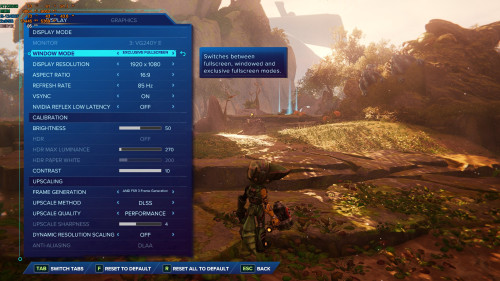

 0.0512sec
 0.35
0.35
 7 queries
 GZIP Disabled