Welcome Guest ( Log In | Register )

Outline · [ Standard ] · Linear+

 NVIDIA GeForce Community V19, RTX 5000 unveiled

views
     
JustCheeze
post Dec 15 2020, 03:11 AM

Getting Started
**
Junior Member
54 posts

Joined: Jul 2020


So 1 more hour of playing 2077 got crash at what I thought was "stable" = 0.875v @ 1905mhz which boost to 1920mhz using the curve method. So now I will move up to 0.9v and hopefully is stable there.

This really confusing now because yesterday I play whole day 2077 with the point method in the wccf video and it never crashed even once.
JustCheeze
post Dec 15 2020, 03:37 AM

Getting Started
**
Junior Member
54 posts

Joined: Jul 2020


QUOTE(kaish529 @ Dec 15 2020, 03:24 AM)
maybe it is the game bugs that caused it to crash? cannot rule out that possibility i think
*
Ya could be also the stupid game is very buggy anyway. But the thing is that after I increase the voltage, the crashing stop.... sweat.gif
JustCheeze
post Dec 15 2020, 01:53 PM

Getting Started
**
Junior Member
54 posts

Joined: Jul 2020


QUOTE(Bonchi @ Dec 15 2020, 10:04 AM)
because that method is having one point stable but the rest all running lower than stock. of course will be more stable but slower than stock lo. Let’s say light game like csgo where the gpu will load around 70% only. you will lose alot of frames.
*
Ya meh? The clocks above the point you click at is same clock what no? So the only diff is the clocks below the point is lower average than the nrw guide. I see what you mean there can be perf difference when the gpu clock down in light area of game, but difference is not that huge pun. Most important is game don't crash.
JustCheeze
post Dec 15 2020, 03:21 PM

Getting Started
**
Junior Member
54 posts

Joined: Jul 2020


QUOTE(nrw @ Dec 15 2020, 02:48 PM)
yesterday I asked you to provide some screen of both curves and the logs from gpu-z so I can tell exactly where (and possibly why) it is crashing.
post this in the curve oc thread and we can discuss.

but if you don't all I can say other than what Bonchi/I told you is that if based on your feeling the cut off point is more stable using another method (and don't mind the loss of performance when clocking down) just do so lah, no one force you.

Oh n yimingwuzere afaik that error correction mostly for ram though  biggrin.gif
But I left that part out on purpose, there's vast differences in cooling of the vram and as long as nvidia doesn't permit the sensors to be read out by consumers there can't be one solution for all cards.
*
Yesterday busy playing to test, didn't log with gpuz and no save screenshot from AB. You all said to go test game, then I go test game lo. rclxub.gif

Actually now look back, no perf difference pun. If 1fps is what you call difference, then I guess ok la nothing to say then.
JustCheeze
post Dec 15 2020, 04:27 PM

Getting Started
**
Junior Member
54 posts

Joined: Jul 2020


QUOTE(nrw @ Dec 15 2020, 03:34 PM)
Post#9439, probably you didn't read as I did not tag you.

If you like your way more that's fine, the difference in most cases is not substantial. The higher your cut off point the more you will be able to tell a difference though.

To be fair I just briefly tested the way you followed once on Turing and results back then confirmed what I said here.
I can test again with my 3080 if I can reach higher clocks (on low voltage points) by setting the curve in a different manner, but I basically just wanted some data first.

Don't worry, if you're happy where you are now just leave it at that.
If you wanna spend more time to tweak you can just take the offer on posting said stuff in the curve oc thread so we can follow up on it n see if there is a 'better' way to do it n others can benefit from the discussion as well.
*
I don't mean offend you if I sounded rude. Your guide has helpmed me understand how this undervolt work on RTX3080.

It is perhaps the game being the issue also, cause CP2077 latest patch is bad. I read a lot of ppl crash even on stock settings, for no reason at all. So I just tested playing 1 whole race of F1 2020 at 1440p 165hz max settings, the 3080 didn't even blink once. It was flat 165fps in game and I see the GPU clock maintain flat 1935mhz boost using your OC curve method. Ya I know F1 is not demanding game but game no crash, super smooth and is stable, I'm happy with that.

I will continue test tonight.


QUOTE(Bonchi @ Dec 15 2020, 04:01 PM)
well to put in perspective. the youtube guide is dragging everything down a couple of hundreds then push one point up to 1920mhz (as example) so when the gpu is on lower utilization, it will be like 100mhz off from stock. meanwhile nrw guide is dragging everything up, overclocking those lower voltage a couple of hundred more.

from my own test..following those youtube (cuz i turn on vsync) my gpu core is only 900mhz @60%utilization...... whilst nrw guide, it’s 1300mhz. The difference is not small.

On the contrary, the peak you get stable with the single point is 1920mhz but nrw guide is only stable at 1905mhz for example... that 15mhz difference will be less than 1fps difference

the youtube guide works well with benchmark on that targets only at one single point but everyday use it will suffer... along with overall effeciency as well which nrw explained.
*
On bolded part, so if we can manage to keep GPU utilization above 90% all the time except in loading screen, then clock speed won't drop right? At least I observe in CP2077 the clockspeed never even dropped once.


QUOTE(kaish529 @ Dec 15 2020, 04:03 PM)
or u can try my method i mentioned before, u just reset the curve to default, find the max point u want and drag that point there. then just make all points to the right flat. this method only oc the max point and the few points before it, so less instability at lower voltages compared to the curve method, and no loss in performance using the single point method where u offset all the lower voltages to lower freq
*
Ok so let's say I want 1920mhz @ 0.875v, I click at 0.875v point and pull it up until it reach 1920mhz while holding shift?

JustCheeze
post Dec 15 2020, 04:57 PM

Getting Started
**
Junior Member
54 posts

Joined: Jul 2020


QUOTE(Bonchi @ Dec 15 2020, 04:35 PM)
yeah cuz cp2077 is maxing out. but if you go launch lighter or older games like dota, csgo, diablo3 etc with much lower graphic intensity, then you will start to notice. especially stutters with the youtube method.

All in all, these are just a way to maximize your undervolt and especially to prevent frame stutters caused by a huge spike on the curve. So id personally advise to try your best to smooth out the curve near the max regardless of which method you use.
*
I see what you mean. Though usually now a days I only play demanding games. Those old games I purposely make them demanding by using DSR and play high framerates.


QUOTE(kaish529 @ Dec 15 2020, 04:38 PM)
no u reset to default curve first, drag only the 0.875v point to 1920, then u see the points at the right side still higher than 1920 u just make that whole part go down using the shift highlight so when u apply the entire part to the right of 0.875v is also 1920.
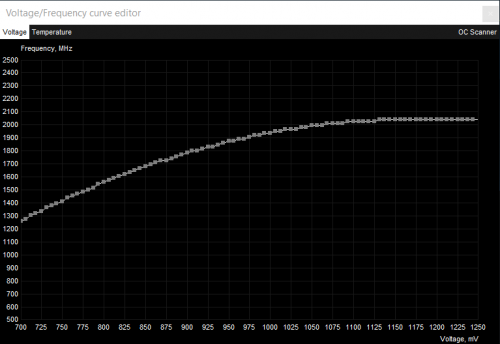
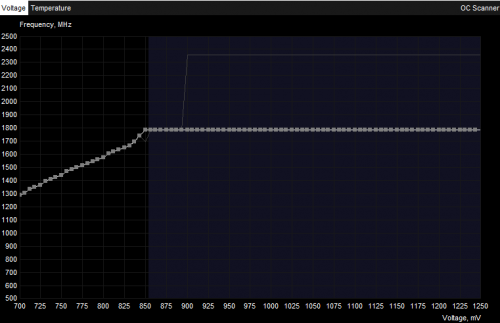
for example here is my default curve
user posted image
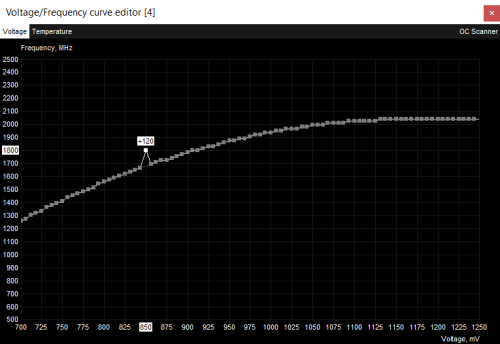
i want my 1800mhz@0.85v, i first drag my 0.85v to 1800
user posted image
then i click apply
user posted image
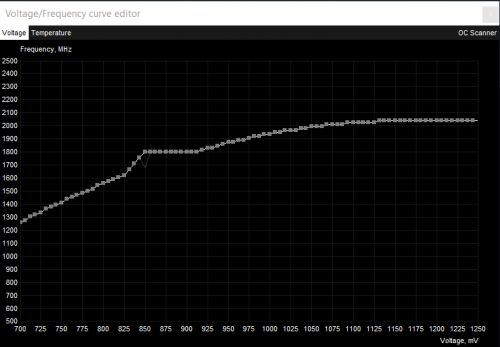
now u see some points to the right of 0.85v still above 1800, so i just shift highlight and drag that whole part down
user posted image
and click apply, then the part will be flat
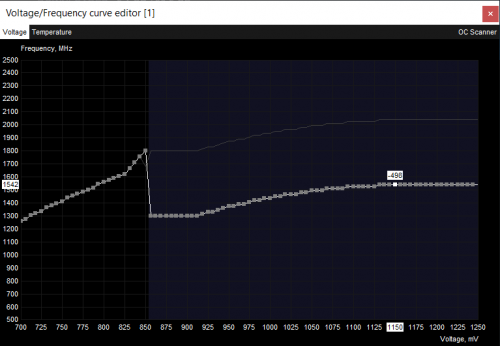
user posted image

do this and compare to the original one point method, u can see the clocks on lower voltages will be diff. that method decreased them compared to stock curve, which is pointless because the stock curve is technically supposed to be 100% stable d
*
This is very helpful!! thumbup.gif thumbup.gif thumbup.gif

I will certainly try out your method today.
JustCheeze
post Dec 15 2020, 05:13 PM

Getting Started
**
Junior Member
54 posts

Joined: Jul 2020


QUOTE(nrw @ Dec 15 2020, 04:59 PM)
1) Confirm that you have sufficient (direct contact cooling) - if you have a 3090 be careful as the temps between front n backside of the pcb is day n night.
2) Keep adding 100 and bench every time until you stop gaining performance (or even lose as error correction kicks in)
3) Go back to the last 'stable' (without performance stagnation or loss) point and take off another 50-100 for safety as other applications might stress it differently.

Don't overdo it in general... as I said ... if Nvidia wanted you to, you'd be able to see the temperature reporting of the 8/12/24 sensors.
Curve OC is pretty safe but I wouldn't say the same thing about VRAM OC. It will clock down at a defined temp but I doubt it's good for long term if its running right below the max.

Personally despite the chips actually being produced for 21GBit/s and the card being on water and +1300 being stable (+1250 on air) ... on my 3080 I just use +500 as a casual setting and even on my performance setting I 'just' went for +1000.
*
Ya you are right. I go from +300, +500, up to +1200 mem OC, only gained 2fps in Metro Exodus and Borderlands 3. That means that is like no difference.

Actually debating to even just leave VRAM speed at stock now because is like useless other than to gain e-peen points on 3dmark?


QUOTE(kaish529 @ Dec 15 2020, 05:00 PM)
reminder though, this is still technically worse than just moving the entire curve. that one has higher risk for instability but potentially less stutters. just pick ur tradeoff
*
Understood will test and report back.

This post has been edited by JustCheeze: Dec 15 2020, 05:16 PM
JustCheeze
post Dec 15 2020, 09:22 PM

Getting Started
**
Junior Member
54 posts

Joined: Jul 2020


QUOTE(keenie @ Dec 15 2020, 08:33 PM)
Guys, just updated 3080 to latest driver. Idle temperature around 28~29c. Are you having the same experience? I was like WOW lol.
*
My idle in non AC room is 35c. Turn on AC can go down to 30c, this is with fan stop.
JustCheeze
post Dec 16 2020, 02:28 AM

Getting Started
**
Junior Member
54 posts

Joined: Jul 2020


So after whole night test, I think I will settle for 1890mhz @ 0.875v + 500mem OC using curve UV/OC. Temp only hit 63c playing CP2077, default TUF fan curve which is cannot hear at all. I think I happy enough for now. Wish could do 1920mhz @ 0.875v, but it is unstable.

What you guys think?

This post has been edited by JustCheeze: Dec 16 2020, 02:29 AM
JustCheeze
post Dec 16 2020, 02:02 PM

Getting Started
**
Junior Member
54 posts

Joined: Jul 2020


QUOTE(Bonchi @ Dec 16 2020, 08:35 AM)
well it’s silicon lottery. but youre basically running FE clocks at such temps is damn good.
*
I can only maintain stable 1920mhz (with boost to 1935mhz) @ 0.912v. But at this voltage the temp go up to 69c, maybe will touch over 70c if don't turn on AC. You said every 10c the card will throttle 15mhz right?
JustCheeze
post Dec 16 2020, 05:35 PM

Getting Started
**
Junior Member
54 posts

Joined: Jul 2020


QUOTE(Bonchi @ Dec 16 2020, 05:04 PM)
yeap that’s correct. so if it goes over 70C it will drop down to 1905.

I thought the tuf should be super low temps. are you on the silent bios?
*
Ya I'm on silent bios. Because if I put on gaming bios, don't know why I can hear the whine from the card.
JustCheeze
post Dec 16 2020, 09:56 PM

Getting Started
**
Junior Member
54 posts

Joined: Jul 2020


QUOTE(Bonchi @ Dec 16 2020, 06:27 PM)
ahhh as i expected. Asus fan sucks lol... I had the same experience as the 2080 strix... their fans will rape your ears the moment it goes above 60% fan speed. or 1.8k rpm
*
I try custom fan curve but too bad Asus card don't work properly with MSI AB right now for fan curve. Example if put 70% fan, the card report as 55%. If put 80%, the card report 65%. rclxub.gif

So is like cannot fine tune fan curve until this bug is fix, don't know is AB's prob or Asus.
JustCheeze
post Dec 17 2020, 01:09 AM

Getting Started
**
Junior Member
54 posts

Joined: Jul 2020


QUOTE(Bonchi @ Dec 17 2020, 12:09 AM)
read about asus tuf has issues with manual fan control at the moment as there’s many complains online as well. just wait for a bios fix i guess. But yeah. asus fans are generally noisy. I would deshroud it but it voids warranty sweat.gif worst is their gpu fan headers are some proprietary 7pin sommore.
*
At least their heatsink is beefy enough no need high fan speed to keep cool.


Change to:
| Lo-Fi Version
0.6808sec    0.87    7 queries    GZIP Disabled
Time is now: 20th December 2025 - 01:10 AM