


How to share folder from windows 10 to windows XP
How to share folder from windows 10 to windows XP
|
|
 Mar 19 2018, 03:45 PM, updated 8y ago Mar 19 2018, 03:45 PM, updated 8y ago
Show posts by this member only | Post
#1
|
 
Junior Member
42 posts Joined: Jun 2008  
|
Hi, anyone know how to shared folder from windows 10 Pro to windows XP Pro? Because it show the file is not accessible, already set allow everyone read and write.
|
|
|
|
|
|
Nov 29 2018, 07:35 PM
Show posts by this member only | Post
#2
|

Senior Member
1,457 posts Joined: Jan 2005 From: Kajang
|
QUOTE(leong134 @ Mar 19 2018, 03:45 PM) Hi, anyone know how to shared folder from windows 10 Pro to windows XP Pro? Because it show the file is not accessible, already set allow everyone read and write. Based on the screenshot, you are trying to access a shared folder from a WinXP computer to a Win10 computer.
 Now I assume that you have done the following in the Win10 computer on the share folder access :- 1) The Security Tab is configured correctly. 2) The Sharing --> Permissions is configured correctly. 3) The Win10 computer have a valid username with password configured. 4) The Firewall --> File & Printer Sharing (IPv4) & (IPv6) is configured correctly. 5) Both computers are in the same network having the same subnet & IP Address. 6) The anti-virus doesn't block the file sharing protocol. If it still doesn't works, try the other way around. Shared the folder from a WinXP computer instead & access to it from a Win10 computer. Hope this helps.  |
|
|
Mar 5 2019, 12:55 AM
Show posts by this member only | Post
#3
|

Senior Member
1,051 posts Joined: Apr 2005 From: Brisbane, QLD, Ostolia 
|
in windows 10 you need to enable SMB1.0, as winxp supports smb1.0 only I think.
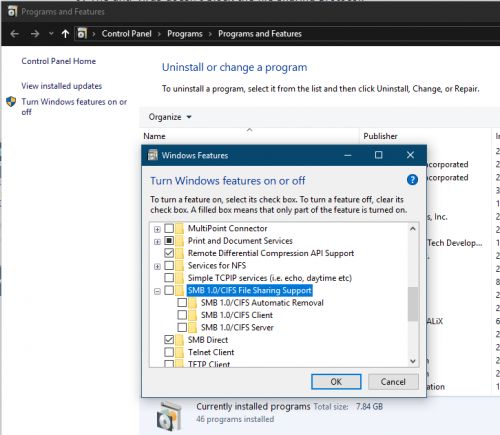 but seriously WinXP and SMB1.0 is very, very unsafe in this age. heck the default XP installation can get viruses from literally just connecting to the net. just install Win10 on old PC lah, or at least Win 7. I've successfully installed Win10 on socket 775 (10 year old) PC. I've moved even my old Win 7 PCs to Win 10 just because it makes zero sense to use Win 7 in 2019 anymore. If you remove Win10 bloats, tukar pakai SSD, it seriously flies, even with DDR2. This post has been edited by C-Fu: Mar 5 2019, 12:58 AM |
|
|
Mar 5 2019, 10:06 AM
Show posts by this member only | Post
#4
|

Junior Member
409 posts Joined: Oct 2018
|
QUOTE(C-Fu @ Mar 5 2019, 12:55 AM) in windows 10 you need to enable SMB1.0, as winxp supports smb1.0 only I think. but if you remove all bloat and strip it clean.. but seriously WinXP and SMB1.0 is very, very unsafe in this age. heck the default XP installation can get viruses from literally just connecting to the net. just install Win10 on old PC lah, or at least Win 7. I've successfully installed Win10 on socket 775 (10 year old) PC. I've moved even my old Win 7 PCs to Win 10 just because it makes zero sense to use Win 7 in 2019 anymore. If you remove Win10 bloats, tukar pakai SSD, it seriously flies, even with DDR2.  would be like barebone only? win 10 thrive on this extra bloat would be like barebone only? win 10 thrive on this extra bloat |
|
|
Mar 5 2019, 11:42 AM
Show posts by this member only | Post
#5
|
|
Senior Member
1,051 posts Joined: Apr 2005 From: Brisbane, QLD, Ostolia
|
QUOTE(bukechi @ Mar 5 2019, 10:06 AM) but if you remove all bloat and strip it clean.. It would, sort of. I mean it depends on how much stripping you wanna do. would be like barebone only? win 10 thrive on this extra bloatbut even "barebones" version of win10 is still miles better than Windows XP. at least you still get updates, can run current apps, better security, better support of hardware, etc. just yesterday I "upgraded" an old PC by replacing the HDD with SSD and it flies wei. I stripped the installation, and on startup it uses 480MB of memory only. But hey, it's your PC, do what you want I still have my own stripped-down version of WinXP ISO that I've made years ago, I think the whole OS is just 120MB, the lowest that I went |
|
|
Mar 22 2019, 02:25 AM
Show posts by this member only | IPv6 | Post
#6
|
|
All Stars
14,674 posts Joined: Sep 2010
|
QUOTE(C-Fu @ Mar 5 2019, 12:55 AM) in windows 10 you need to enable SMB1.0, as winxp supports smb1.0 only I think. The more amazing thing here is Windows 10 actually works on a Socket 775 P4:but seriously WinXP and SMB1.0 is very, very unsafe in this age. heck the default XP installation can get viruses from literally just connecting to the net. just install Win10 on old PC lah, or at least Win 7. I've successfully installed Win10 on socket 775 (10 year old) PC. I've moved even my old Win 7 PCs to Win 10 just because it makes zero sense to use Win 7 in 2019 anymore. If you remove Win10 bloats, tukar pakai SSD, it seriously flies, even with DDR2. Also note that Windows 10 system requirements have barely changed since Vista, which is an OS released 12 years ago  leong34 Since Windows 10 (in light of the infamous WannaCry cryptomalware), SMB V1.0 has been disabled by default, and it is very unsafe to use this feature (due to its security vulnerabilities) This post has been edited by chocobo7779: Mar 22 2019, 02:27 AM |
|
|
|
|
|
Sep 7 2019, 09:17 AM
Show posts by this member only | Post
#7
|

Senior Member
2,348 posts Joined: Apr 2008
|
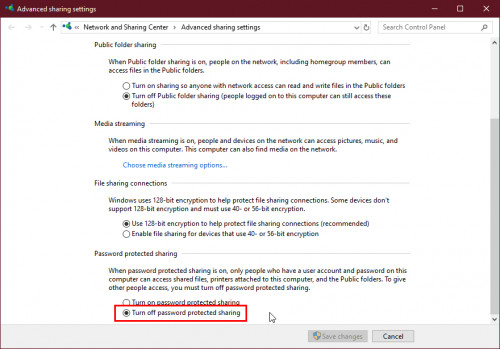
Turn off this option in your Windows 10.
 |
|
|
Jan 31 2020, 09:23 PM
Show posts by this member only | Post
#8
|
|
Junior Member
54 posts Joined: Jan 2020
|
I would suggest you use the SMB1.0 access type to help your Windows 10 share files with Windows XP.
Or just upgrade to Windows 10. It's worth it. |
|
|
Dec 15 2020, 07:30 PM
Show posts by this member only | Post
#9
|
|
Probation
4 posts Joined: Dec 2020
|
You cannot access shared files and folders or browse computers in the workgroup with Windows XP.
I hope this helps! James Cutt |
| Change to: |  0.0183sec 0.0183sec
 0.68 0.68
 6 queries 6 queries
 GZIP Disabled GZIP Disabled
Time is now: 9th December 2025 - 09:40 PM |
 Quote
Quote