Welcome Guest ( Log In | Register )

Bump Topic Topic Closed RSS Feed

Outline · [ Standard ] · Linear+

 [V31] Lowyat.Net Mechanical Keyboard Club

views
     
daymontoh
post Jul 3 2018, 10:22 AM

New Member
*
Newbie
3 posts

Joined: Jan 2016
Greetings all sifu, i couldnt find a dedicated thread for MKB suggestion so here i am.
I am in a dilemma of getting a MKB that cost RM250 or almost double its price RM450.
Some of the easily available model include Cherry MX Board 2.0, IKBC C104 or a Filco Majestouch Ninja, Majestouch Convertible 2.
Also, should i worry about Majestouch Ninja's age since it was released back in 2011?
Is the any shop in klang valley that i could to try out Cherry MX switches? I am visiting late July.

Purpose: Work only. Probably back to gaming in the future? blush.gif
Switches: Cherry MX switches, probably brown as that's what i got from research
Layout: 105 keys
Keycaps: PBT optional as i might get them on aliexpress soon. Budget RM100
Environment: Office, prefer non-backlit and quieter options (no Blue keys)


PS: Pardon me, its been a while since i posted on LYN forum and asking dumb questions like place suggestion coz i am from Sabah.

icon_question.gif

This post has been edited by daymontoh: Jul 3 2018, 10:36 AM
daymontoh
post Jul 3 2018, 12:10 PM

New Member
*
Newbie
3 posts

Joined: Jan 2016
QUOTE(horns @ Jul 3 2018, 11:14 AM)
filco > ikbc. about age, don't worry about it. even if it's a used one, filco's still great.

you can go to lyp or digital mall. there are plenty of demo units. as for switches, it's better that you try out all the common types first. personal experience is more important.

you can use o-rings to make the board relatively quieter.
*
Still deciding whether I should spend 200ish or 400ish on a mkb. I should definitely head down to either place to try them out. Any specific shops that are friendlier? I have an bad impression about lyp being a chaotic place. Haven’t been to digital mall before. As for the quietness I’m less concern, just definitely wont go for blue switch which makes lots of noise.

Thanks for your prompt feedback. You must be using some sort of good mkb. Hahha
daymontoh
post Jul 3 2018, 02:07 PM

New Member
*
Newbie
3 posts

Joined: Jan 2016
QUOTE(horns @ Jul 3 2018, 12:53 PM)
you're welcome. yeah i have some good consumer boards from filco, varmilo and ikbc (plus some not-so-good ones also lol)

if you had a good budget, i suggest you go for something better. mkbs in general are long lasting. there are qualities that are worth the extras that you are paying for imo. however if you're in doubt, it's fine to start with 200ish boards also (ikbc non-led boards should be around that price range)

lyp is not as chaotic as you thought haha

if you don't mind used items, actually mechmarket fb group have some nice pbt cap sets.
*
I just get to know some retailers have stopped selling Filco but i am not sure why. Is it too late to grab them in malaysia now? cry.gif
Did some research on IKBC C104 which fits the RM250 category. Will definitely try that out too. Kind of ruled out Ducky at the moment but we'll see.

Is there any recommended shop or which level should i go at both lyp or digital mall?

Will have a look at mechmarket. Thanks.
daymontoh
post Jul 4 2018, 04:28 PM

New Member
*
Newbie
3 posts

Joined: Jan 2016
QUOTE(Jay Chua CC @ Jul 3 2018, 03:28 PM)
Ultimatezone.
*
They are low in stock, too. Gotta pay them a visit but their operating hours are sweat.gif sweat.gif


QUOTE(horns @ Jul 3 2018, 04:24 PM)
well, you can still get filco online. yes it's a shame that not many appreciate good consumer boards.

ikbc c-series are still one of the better options.

i suggest you visit all shops that have demo units. the main point is to have personal experience with different types of switches.
*
Yes. For now all i can do is do more research online until i am able to try them out irl.

daymontoh
post Jul 10 2018, 03:51 PM

New Member
*
Newbie
3 posts

Joined: Jan 2016
Get to try out a friend's Logitech G613 few days earlier. Surprisingly i dont notice any difference comparing them to my standard membrane keyboard which im using other than the chunky keys. Is this normally what romer-g does? Im glad i didnt make the purchase before trying them out first.
daymontoh
post Jul 11 2018, 01:24 PM

New Member
*
Newbie
3 posts

Joined: Jan 2016
QUOTE(irsyadfy @ Jul 10 2018, 03:53 PM)
i am surprise too  rclxub.gif
*
Surprised as in you've tried romer-g before and doesn't notice the diff or?

QUOTE(horns @ Jul 11 2018, 01:46 AM)
wow. is it the tactile or linear version of romer-g?

right, it's important to try these boards out first.
*
From what i get on the web is that G613 has tactile switches.


On a side note, scored myself a great deal on CM Masterkeys Pro L. Will try them out before buying.
Just get both Red and Brown switches, one each?! doh.gif doh.gif
daymontoh
post Jul 26 2018, 10:17 PM

New Member
*
Newbie
3 posts

Joined: Jan 2016
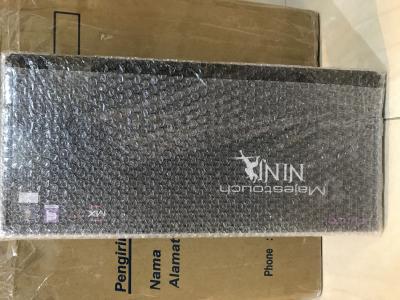
Can’t wait to try it out!
Attached Image
daymontoh
post Jul 27 2018, 09:57 AM

New Member
*
Newbie
3 posts

Joined: Jan 2016
QUOTE(irsyadfy @ Jul 27 2018, 09:26 AM)
FilcoisLove,FilcoisLife
*
Typing this reply on red switches, need some getting used to but definitely loving it so far! biggrin.gif
daymontoh
post Jul 27 2018, 10:30 PM

New Member
*
Newbie
3 posts

Joined: Jan 2016
QUOTE(horns @ Jul 27 2018, 09:22 PM)
sweet. once the break-in period of switches is reached (by typing more hehe), you will feel that they are indeed great smile.gif
*
Realised that the actuation point is very short compared to membrane, I know I shouldn’t compared them but the fact that this is my first mkb I just can’t help. A keystroke is registered just by resting my fingers on the keyboard.
daymontoh
post Jul 28 2018, 07:38 AM

New Member
*
Newbie
3 posts

Joined: Jan 2016
QUOTE(horns @ Jul 27 2018, 10:49 PM)
ok.. maybe the more suitable switches for you is black, not red (too light for you)
*
Hmm will just try my best to adjust my force since i would probably be stuck with it for quite a long time. innocent.gif

QUOTE(x-1o8-x @ Jul 28 2018, 12:05 AM)
you'll get used to it

i've had several misfires when i switched from black to red and now they don't feel too light anymore  biggrin.gif
*
I really hope so.

QUOTE(irsyadfy @ Jul 28 2018, 01:03 AM)
obviously since u need to fully press(bottom out) the keys for membrane.
hence i cant go back to membrane coz im used to not bottom out keys now.
*
Hahha so true. Actually considering the get the o-rings to silence the keys further hmm.gif
daymontoh
post Jul 31 2018, 10:02 AM

New Member
*
Newbie
3 posts

Joined: Jan 2016
QUOTE(horns @ Jul 28 2018, 01:41 PM)
well like our friend here said, you will adjust when you use it long enough smile.gif
*
After 3 days of using it at work it definitely feeling way more awesome.

QUOTE(irsyadfy @ Jul 28 2018, 08:04 PM)
0-rings reduce the travel distance thus reducing the sound of ur kikaps hitting ur kibod.

and most of ppl i saw, disliking o-ring after sometime using it.

i dunno, never tried it myself.
u can try and review here.
*
On second thought travel distance is not need at the moment. Trying to improve my keystroke force switching from membrane.

On a side note, kinda glad that I didnt make the impulse decision on getting a set of RM100ish PBT online after doing more research on keycap material affect on typing feel. How many of you are using wrist rest btw? Other than the aesthetics side of things to "complete" the look, does it actually help reduce strain? Im currently typing feet retracted. Also tried experimenting removing keycap with stabiliser, in my case i picked the right shift and if anything goes wrong I dont use it often sweat.gif It was quite easy to remove but not so much to install if you do it like I did (without removing surrounding keys first beforehand) doh.gif Gained some experience today. Also notice it was lubed? Heard it somewhere that by lubing you could dampen the sound a little? How about "smoothness" as that is what lube means to me. TIA.
daymontoh
post Jul 31 2018, 04:20 PM

New Member
*
Newbie
3 posts

Joined: Jan 2016
QUOTE(horns @ Jul 31 2018, 11:03 AM)
hehe nice smile.gif

er.. why not? with 100ish myr at taobao, you can get a good set of thick pbt already (not pretty, but improve typing feels by a good margin if stock caps are thin abs) i use wristrest. imo it's helpful to me for the way i type. (palms on the wristrest, fingers on the keys)

in general it's not hard to remove caps from costar stabs. you just need practices. yes it's relatively more convenient with cherry style stabs, but costar stabs are much more easier to lube and maintain.

lubing helps make large keys smooth, minimize wire rattles, and dampen noise by a bit.
*
Yes was considering one of those OEM PBT sets from aliexpress. Heard that SA is better with heavier switch, any has experience on this could share?
I will just get a wristrest to try out since its not that expensive. Totally agree, not extremely difficult, just practice. blush.gif

QUOTE(irsyadfy @ Jul 31 2018, 01:44 PM)
It is indeed hard to install when they are kikaps around ur stabilizer key.
the hardest would be "enter" and " right-shift" since 1 is on top of another.
install enter 1st before right shift.
sekian.

but as horns said it, the reason i stay with Filco is the ease of lubing the stabs.
*
I kind of picked the 2nd hardest key on my board
For lubing part, maybe in the near future coz it should be very time consuming especially for newbie like myself.
Will do more research on that.rclxm9.gif


QUOTE(x-1o8-x @ Jul 31 2018, 02:07 PM)
it isn't that hard removing keycaps from the costar stabs tbh, what i did was place the stabs into the keycaps and then 'hook' them onto the metal. but now im with this cherry stabs and i like it more cause of how plug n play it is biggrin.gif
*
Yes that was one out of two most common ways of installing keys with stabiliser. As horns mentioned earlier, all we need is practice. Practice makes perfect. thumbsup.gif

daymontoh
post Aug 1 2018, 03:22 PM

New Member
*
Newbie
3 posts

Joined: Jan 2016
QUOTE(horns @ Jul 31 2018, 05:14 PM)
i'm fine with oem and cherry profiles. sa is too tall for me, and dsa is too flat lol

just take your time to learn about costar stabilizers. it's very easy to maintain because you can disassemble them right away. the lubing process is very simple: take off caps, push wires away from stabilizer housings to detach it (be careful don't bent it), apply lubes on clipping areas that hold wires, wires and wire tips, and inserts. finally put them back together.

again, like you said, practice makes perfect smile.gif
*
Guess I will just have to trial and error on the keycap types. Before knowing different types of keycaps i just simply chose the favourite colour combination which is currently the Dolch now blush.gif
Lubing isnt hard but it takes time and lots of energy to focus coz they are such tiny parts sweat.gif
daymontoh
post Aug 1 2018, 04:15 PM

New Member
*
Newbie
3 posts

Joined: Jan 2016
QUOTE(irsyadfy @ Aug 1 2018, 03:32 PM)
but u can only lube the stem when its hard  brows.gif  brows.gif

it might be tiny, but make sure it is hard.  whistling.gif  jk jk
*
By hard i assume you mean "not smooth" anymore? Or is it some kind of a joke sweat.gif
Serious question here, will lubing brand new mkb dampen sound and "smoothen" the keystroke further?
daymontoh
post Aug 2 2018, 01:11 PM

New Member
*
Newbie
3 posts

Joined: Jan 2016
QUOTE(irsyadfy @ Aug 1 2018, 09:12 PM)
generally it will, but it is depends on the switch and stabs itself.
some stabs come pre-lubed from factory, so lubing it further wont make much diff.
same goes with switches.
*
I see. I will just assume my Filco comes pre-lubed as i dont really have the extra time to do lubing at the moment icon_idea.gif

QUOTE(horns @ Aug 2 2018, 01:51 AM)
just try out different caps (profiles, materials, thickness) it's just part of the process to help you shape a combination of mechanical keyboard components that you prefer.

yes lubing is time-consuming, however the outcomes are worth the efforts smile.gif
*
For the time being, I'm super satisfied with my stock mkb. Hope that in the future i would take out the time and effort to do lubing notworthy.gif
daymontoh
post Aug 4 2018, 08:57 AM

New Member
*
Newbie
3 posts

Joined: Jan 2016
QUOTE(horns @ Aug 4 2018, 05:08 AM)
basic mods that you can do are:
1. lubricate (lube) the sliders and springs of the switches. it makes it smoother and relatively quieter, https://www.youtube.com/watch?v=qSgPKPoFo2k
2. lube the stabilizers, with bandaid mod. those large keys will be relatively nicer to type on and makes less noise (you should check if you're allowed to do this without voiding warranty), https://www.youtube.com/watch?v=cD5Zj-ZgMLA
3. get some nice key caps, especially thick ones;
4. you can also swap the switches to other outemu switch types. (e.g. red, brown, assuming you're using outemu blue now)
5. maybe put a layer of anti-slip mat below the pcb. this helps to reduce pings, and make typing more solid.

i think you should play with the stock configuration for a while first, since you're ok with its current state. doing mods stated above require some time to complete, so just take your time.
*
Thanks for sharing the links. Been searching for a decent youtuber who talks about mkb but all i found was advertisement on products/ spread poison to make you purchase another mkb or smtg. Will have a look during my free time.
Regarding the anti-slip mat, is there any specific type made for kb or just the regular thing?

Topic ClosedOptions
 

Change to:
| Lo-Fi Version
0.0236sec    0.94    7 queries    GZIP Disabled
Time is now: 9th December 2025 - 11:28 PM