

QUOTE(aBg_rOnGak @ Dec 4 2018, 04:07 PM)
It's just I'm not sure build.prop need root to edit or not

need root to change system files broso have to root to enable camera2api
.....//
Xiaomi Xiaomi Redmi Note 5/5 Pro Discussion Thread, Snapdragon 636.
|
|
 Dec 4 2018, 04:21 PM Dec 4 2018, 04:21 PM
Return to original view | Post
#21
|
 
Senior Member
4,858 posts Joined: Jun 2006 From: Tawau, Sabah   
|
QUOTE(aBg_rOnGak @ Dec 4 2018, 04:07 PM) It's just I'm not sure build.prop need root to edit or not need root to change system files broso have to root to enable camera2api .....// |
|
|
|
|
|
Dec 28 2018, 11:40 AM
Return to original view | Post
#22
|
|
Senior Member
4,858 posts Joined: Jun 2006 From: Tawau, Sabah
|
QUOTE(fertzm @ Dec 28 2018, 11:38 AM) hi guys, i just bought note 5 4/64gb, so i just auto sync everything, including import nova launcher setup and update to miui10. the thing is when the phone charging, after screen timeout kicked in, it show blank screen with 'no photos selected' text floating around. i think this is the wallpaper carousel thing that miui have going onbefore this i use redmi 4x running lineage os with nova launcher and i have set up screen saver while charging which i completely forgot how. and i have reset the phone to factory setting. i cannot find setting for this one in note 5 to turn it off or select the photos.. any ideas??  to chang,e just go to themes and select another lockscreen themes |
|
|
Jan 23 2019, 10:38 AM
Return to original view | Post
#23
|
|
Senior Member
4,858 posts Joined: Jun 2006 From: Tawau, Sabah
|
QUOTE(MGM @ Jan 23 2019, 09:42 AM) Help!!! How to recover deleted photos n videos in Redmi Note4? Sorry I know this thread for RN5 but desparate for solution. saved in the phone or SD card?if it is in SD card, then still possible to do data recovery but data recovery is not cheap. thosee free one u get online doesnt work most of the time there are a few data recovery company around |
|
|
Jan 23 2019, 11:20 AM
Return to original view | Post
#24
|
|
Senior Member
4,858 posts Joined: Jun 2006 From: Tawau, Sabah
|
QUOTE(MGM @ Jan 23 2019, 11:18 AM) saved in the phone, didn't use backup of mi cloud or Google photos. pasrah, redha saja lah bro..i dont think the effort to get it back is worth the time and money unless it is money-making pictures lah~ |
|
|
Jan 23 2019, 01:52 PM
Return to original view | Post
#25
|
|
Senior Member
4,858 posts Joined: Jun 2006 From: Tawau, Sabah
|
QUOTE(devilmaycry9 @ Jan 23 2019, 01:33 PM) yes manage to recover bcz after delete immediately recover so no overwrite yet on memory. The downside is having less space; occupied by these temporary files in the recycle bini use f-stop gallery pro version paid around rm10 for lifetime and can opt for how long to retain the deleted media in recycle bin. but it is a good option for local safekeeping; other options is cloud storage |
|
|
Mar 18 2019, 03:19 PM
Return to original view | Post
#26
|
|
Senior Member
4,858 posts Joined: Jun 2006 From: Tawau, Sabah
|
QUOTE(devilmaycry9 @ Mar 17 2019, 11:02 PM) suddenly there is Mi Pay apps.... just dont use it. it doesnt take much spacehow to uninstall this... removing it might crash some system files, who knows it is just a few megabytes right? |
|
|
Jun 10 2019, 01:27 PM
Return to original view | Post
#27
|
|
Senior Member
4,858 posts Joined: Jun 2006 From: Tawau, Sabah
|
QUOTE(MatShadow @ Jun 10 2019, 12:49 PM) Anyone have any idea why mine not Android 9? if you are happy then stay with 10.2.2 broNote 5, local unit. Yet to update...afraid got issues later. Currently happily on 10.2.2. Should I or not? 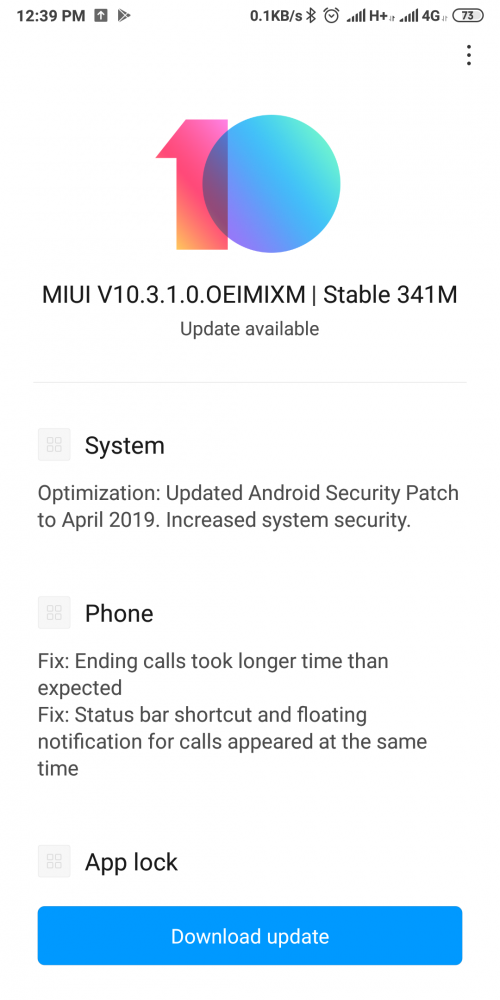 no harm doing that i also have a friend still using Miui9 doesnt want to go Miui10 because he is afraid of performance and battery life degrade but who am i to pursue him to upgrade as long as he is happy, being left behind doesnt matter cheers! |
|
|
May 21 2020, 02:56 PM
Return to original view | IPv6 | Post
#28
|
|
Senior Member
4,858 posts Joined: Jun 2006 From: Tawau, Sabah
|
QUOTE(nightzstar @ May 20 2020, 07:28 PM) Whoa this is good. Thanks for sharing. follow the one i share on 1st page. safer data.it will partition ur sdcard into 2 part, 1 for the apps another 1 u can use for ur data i.e use 20-80% meaning 20% for apps install so if u use 128gb it will be around 25gb for the apps and the rest u can use for data backup for pics taken, etc so u wont lose data using the windows pc method works for me for some time since i bought 128gb then now i sort of dont need dat workaround anymore |
| Change to: |  0.0197sec 0.0197sec
 0.53 0.53
 7 queries 7 queries
 GZIP Disabled GZIP Disabled
Time is now: 10th December 2025 - 04:31 PM |
 Quote
Quote