Welcome Guest ( Log In | Register )

Outline · [ Standard ] · Linear+

Xiaomi Xiaomi Redmi Note 5/5 Pro Discussion Thread, Snapdragon 636.

views
     
MGM
post Jan 23 2019, 04:15 PM

10k Club
********
All Stars
18,416 posts

Joined: Oct 2010
QUOTE(devilmaycry9 @ Jan 23 2019, 01:33 PM)
yes manage to recover bcz after delete immediately recover so no overwrite yet on memory.
i use f-stop gallery pro version paid around rm10 for lifetime and can opt for how long to retain the deleted media in recycle bin.
*
Immediately after deleted I switched off wifi and mobile data to avoid incoming msg/mail/whatsapp. For Pandora(now named as Disk Drill, free version can recover 500MB only ) and needs to install on Windows PC.

To connect RN4 via USB and used as an external drive:
Do I need to root my RN4?
Do I need to enable USB Debugging on RN4?

This post has been edited by MGM: Jan 25 2019, 04:00 PM
MGM
post Jan 24 2019, 06:47 AM

10k Club
********
All Stars
18,416 posts

Joined: Oct 2010
QUOTE(freddy manson @ Jan 23 2019, 11:20 AM)
pasrah, redha saja lah bro..
i dont think the effort to get it back is worth the time and money
unless it is money-making pictures lah~
*
QUOTE(devilmaycry9 @ Jan 23 2019, 12:00 PM)
last time i use pandora recovery... it is trial for a week iinm
*
QUOTE(MGM @ Jan 23 2019, 04:15 PM)
Immediately after deleted I switched off wifi and mobile data to avoid incoming msg/mail/whatsapp. For Pandora(now named as Disk Drill, free version can recover 500MB only ) and needs to install on Windows PC.

To connect RN4 via USB:
Do I need to root my RN4?
Do I need to enable USB Debugging on RN4?
*
After reading the reviews of the recovery tools most are bad or with limited result.

I tested using another phone(RN3) by deleting most photos(after backup) in the Gallery and the use Google Photo app to backup and sync and surprisingly all those I deleted were also backup to the Google cloud. But it works only partially for my RN4.

Would probably try using Recuva but too bad Recuva can't detect the RN4 as an external drive but has to be done in this elaborate manner:

Here’s the algorithm for Android internal storage recovery:

Make a copy of the internal memory partition (as a RAW file),
Convert RAW to VHD format,
Connect the virtual Hard Drive to the filesystem via Disk Management,
Scan virtual hard drive using recovery soft,
Restore files from the copy of internal storage.

https://howtorecover.me/data-recovery-inter...oid-phone-guide

This post has been edited by MGM: Jan 24 2019, 06:48 AM
MGM
post Jan 25 2019, 04:03 PM

10k Club
********
All Stars
18,416 posts

Joined: Oct 2010
QUOTE(okuribito @ Jan 25 2019, 02:13 PM)
I'm on rm5. Need to enable USB debugging. Also think it depends on your miui. Mine v10.x ...in there, there's few options under usb config... Choose charging, media transfer , photo transfer etc
*
CAn the PC connected to the RN5 treat it as an external drive, so that I can use Recovery software like REcuva to undelete all my photos and videos?
MGM
post Feb 2 2019, 02:39 PM

10k Club
********
All Stars
18,416 posts

Joined: Oct 2010
QUOTE(MGM @ Jan 24 2019, 09:17 AM)
After reading the reviews of the recovery tools most are bad or with limited result.

I tested using another phone(RN3) by deleting most photos(after backup) in the Gallery and the use Google Photo app to backup and sync and surprisingly all those I deleted were also backup to the Google cloud. But it works only partially for my RN4.

Would probably try using Recuva but too bad Recuva can't detect the RN4 as an external drive but has to be done in this elaborate manner:

Here’s the algorithm for Android internal storage recovery:

Make a copy of the internal memory partition (as a RAW file),
Convert RAW to VHD format,
Connect the virtual Hard Drive to the filesystem via Disk Management,
Scan virtual hard drive using recovery soft,
Restore files from the copy of internal storage.

https://howtorecover.me/data-recovery-inter...oid-phone-guide
*
Looks like most of the recovery software needs the affected RN4 to be rooted for effective recovery of the deleted photos in the Gallery. Pls advise me b4 I proceed with this:
1. Unlocking the RN4 takes how many days and need to request thru Mi account?
2. What is the function of "Mi Unlock Status" in Developer Option?
3. Is Kingroot safe n effective in rooting RN4? According to a youtube video it is simple to use.
4. I manage to list the content of the RN4 using Windows Explorer but when using Recuva it doesnt detect it as a drive but I can transfer the RN4's content to the PC. The RN4 is in USB debugging mode but not rooted yet.
MGM
post Feb 4 2019, 09:21 AM

10k Club
********
All Stars
18,416 posts

Joined: Oct 2010
Photos were deleted accidentally from the gallery of Redmi Note 4 phone 2 weeks ago. Havent been using the phone since cos looking for solution.


QUOTE(MGM @ Feb 2 2019, 02:39 PM)
Looks like most of the recovery software needs the affected RN4 to be rooted for effective recovery of the deleted photos in the Gallery. Pls advise me b4 I proceed with this:
1. Unlocking the RN4 takes how many days and need to request thru Mi account?
2. What is the function of "Mi Unlock Status" in Developer Option?
3. Is Kingroot safe n effective in rooting RN4? According to a youtube video it is simple to use.
4. I manage to list the content of the RN4 using Windows Explorer but when using Recuva it doesnt detect it as a drive but I can transfer the RN4's content to the PC. The RN4 is in USB debugging mode but not rooted yet.
*
Anyone has tried this to recover deleted photos from gellary in RN4?

https://youtu.be/Tl6TR5_3Jak

Is it safe to use such method as it will root the phone b4 recovering and then unroot once finishes?
MGM
post Feb 13 2019, 06:31 AM

10k Club
********
All Stars
18,416 posts

Joined: Oct 2010
According to says dot-com RN5 has one of the highest radiation.
says dot-com /my/tech/xiaomi-oneplus-radiation

This post has been edited by MGM: Feb 13 2019, 06:57 AM
MGM
post Mar 30 2019, 09:33 AM

10k Club
********
All Stars
18,416 posts

Joined: Oct 2010
Posted this in RN4 thread but didnt get much reply, hope can get help from here:

My Malaysian set RN4x is unable to switch on or boot, only red light keeps blinking during charging. Google and it seems like a common problem but different way of rectifications. So far tried a few but not working.

After trying the different self diagnosis suggested by google, my 18months old RN4 still cannot be charged or boot. Brought to Xiaomi Authorised service center to diagnose and was told problem with mainboard, so not worth repairing n paid rm25 for that. My 3year old RN3 still kicking strong.

The xiaomi authorized service center said my phone is gone and data not retrievable. But when I brought to another shop, tested my battery ok but still can't charge and can't switched on, dismantled the battery n powered d phone directly by charger n phone can be switched on and booted, everything still intact felt relieved.
At least now allowed me to savage my data. Will backup all data b4 repairing the shorted mainboard, repairing cost btw rm150-rm250.

Useless xiaomi service center charged me rm25 for a lousy job.

WTA:
1) Is it safe to continue using the shorted phone with direct power while backup the data and reset it to factory setting?
2) Is the repair cost of 150-250 which takes 2 hours too high?
3) Normally would repaired unit last >1 year?

Any opinion is welcome.
MGM
post Apr 13 2019, 03:14 PM

10k Club
********
All Stars
18,416 posts

Joined: Oct 2010
QUOTE(RioMeni @ Mar 31 2019, 08:29 PM)
(1). i think for backup ok la
(2). normal la that price
(3). no
*
QUOTE(megahertz @ Apr 3 2019, 11:56 AM)
not all service center is good and skillful. some of workers just now to get salary only and working based on SOP as xiaomi instruct.
and they also normally wont fix ur damaged phone ( most serious case) since they also want to sell new phone to u. better selling u new phone than fix old phone since profit of new phone much higher than charge u to fix old 1.
they very2 diff compared outside shop.

1. should be ok i guess( make sure the direct power is stable enough)
2.  not sure, never repair my phone
3. normally for me, i will only repair if the price is not that high compared if need to buy new phone. but in my entire life, i only encounter 1 phone dies on me, which is nexus 5, and i already use it more than 5 years. which not worth for me to fix it anymore.
*
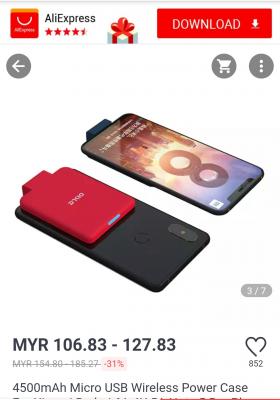
Since my RN4 is not working with the internal battery and if I dont get my mainboard repaired, may be I should get a clip-on power bank like this:
https://www.aliexpress.com/item/4500mAh-Mic...sAbTest=ae803_4

This post has been edited by MGM: Apr 13 2019, 03:22 PM


Attached thumbnail(s)
Attached Image
MGM
post Apr 13 2019, 03:58 PM

10k Club
********
All Stars
18,416 posts

Joined: Oct 2010
QUOTE(zher4883 @ Apr 13 2019, 03:45 PM)
If the motherboard is unable to charge the battery, there's no point to buy this.
*
I tot this external powerbank could be charged directly by charger, need to make sure.

p/s U are right, have to look for something else like a clip-on powerbank which is chargeable externally by charger

This post has been edited by MGM: Apr 13 2019, 04:02 PM
MGM
post Apr 13 2019, 04:05 PM

10k Club
********
All Stars
18,416 posts

Joined: Oct 2010
QUOTE(zher4883 @ Apr 13 2019, 03:45 PM)
If the motherboard is unable to charge the battery, there's no point to buy this.
*
May be these:
https://www.aliexpress.com/i/32894918708.ht....21154d0bhH7YTi

https://www.aliexpress.com/i/32956558317.ht....7ec415b7nLpnag

This post has been edited by MGM: Apr 13 2019, 04:06 PM
MGM
post Apr 13 2019, 08:36 PM

10k Club
********
All Stars
18,416 posts

Joined: Oct 2010
QUOTE(zher4883 @ Apr 13 2019, 06:13 PM)
You can try any kind of powerbank you want but the bottom line is if your phone motherboard won't even accept charge the phone battery, you are just wasting your money buying all these stuff hoping it will work.
*
Currently it works with any normal power bank just that it is messy with the usb cable n ugly, those external battery case looks better. Phone doesn't work with internal battery but works if powered from usb, either direct from charger or power bank.
MGM
post Jul 1 2019, 08:31 AM

10k Club
********
All Stars
18,416 posts

Joined: Oct 2010
QUOTE(devilmaycry9 @ Jul 1 2019, 04:17 AM)
redmi note 5 india = SD625 = single camera
redmi note 5 pro india = redmi note 5 global = SD636 = dual camera

wonder why you not interested in latest redmi note 7? this model more than a year ady
*
RN7 GPS problem?
MGM
post Sep 4 2019, 08:52 PM

10k Club
********
All Stars
18,416 posts

Joined: Oct 2010
My RN3 hang so I pressed on the power button to reboot but now it is stuck at the Mi logo and the powered by Android logo with the 3 moving dots.
Anyone can help?
MGM
post Sep 4 2019, 10:49 PM

10k Club
********
All Stars
18,416 posts

Joined: Oct 2010
QUOTE(abcn1n @ Sep 4 2019, 10:35 PM)
MGM Keep holding down the reboot button until you hear the buzz where it shows its finally working again. I got the mi logo stuck too and rebooting it several times didn't work until I did the above
*
I held down the power button until it buzz and let go, but it still stuck at the Mi logo and Powered by Android logo and 3 dots.
MGM
post Sep 4 2019, 11:19 PM

10k Club
********
All Stars
18,416 posts

Joined: Oct 2010
QUOTE(abcn1n @ Sep 4 2019, 11:03 PM)
I waited several hours before finally holding down the power button for a long time. Did you do that? Maybe wait until the next day and try it. If not, then have to go to service centre already
*
You meant u let it stuck at the Mi logo and Powered by Android logo for several hours before finally holding down the power button for a long time?
MGM
post Sep 5 2019, 12:29 AM

10k Club
********
All Stars
18,416 posts

Joined: Oct 2010
QUOTE(abcn1n @ Sep 4 2019, 11:36 PM)
Yes. I tried to reboot it several times (from the mi logo) initially over a period of 1+ hour. Didn't work. Finally decided to let it be for several hours before deciding to reboot it by holding down the power button for a much longer period. Luckily it worked this time around.

Why don't you just let it be first--drain the battery and try later (if you don't want to go to the service centre and can still wait). Maybe, when battery is dead and you recharge it and start the phone back it will work. Good luck.
*
Can I go into recovery mode and then reboot from there?
Or clear cache while in recovery mode? Would this affect my apps, photos and data?

edit: can't even get into both Fastboot mode(Vol-down + Power) or Recovery mode(Vol-up + Power). When I did this, the logo went off and a 0% battery with a charging connector was displayed.

This post has been edited by MGM: Sep 5 2019, 12:53 AM
MGM
post Dec 25 2019, 03:20 PM

10k Club
********
All Stars
18,416 posts

Joined: Oct 2010
QUOTE(wcypierre @ Dec 25 2019, 07:52 AM)
anyone know the cost of replacing the battery at service center?
*
QUOTE(RioMeni @ Dec 25 2019, 01:56 PM)
nope...do update cause I need a replacement too😁😁😁
*
Call any of their service centers for the quote.


Change to:
| Lo-Fi Version
0.0937sec    0.37    7 queries    GZIP Disabled
Time is now: 9th December 2025 - 04:52 AM