


I couldn't understand chinese whatsoever those words appear to be boxy and I dunno what I had clicked

Anyway, giving my first try to XunLei aka Thunder

xunlei good for bt, tm streamyx cant block the user
|
|
 Jul 17 2007, 03:49 AM Jul 17 2007, 03:49 AM
Return to original view | Post
#1
|
 
Senior Member
7,284 posts Joined: Jan 2003 From: Hong Kong / Malaysia    
|
How to check if I patched the port to 256?
I couldn't understand chinese whatsoever those words appear to be boxy and I dunno what I had clicked Anyway, giving my first try to XunLei aka Thunder |
|
|
|
|
|
Jul 17 2007, 06:30 PM
Return to original view | Post
#2
|
|
Senior Member
7,284 posts Joined: Jan 2003 From: Hong Kong / Malaysia
|
BTW, should I disable the uPNP if I had done portforwarding?
This post has been edited by vearn27: Jul 17 2007, 06:31 PM |
|
|
Jul 19 2007, 03:41 PM
Return to original view | Post
#3
|
|
Senior Member
7,284 posts Joined: Jan 2003 From: Hong Kong / Malaysia
|
QUOTE(HeHeHunter @ Jul 19 2007, 03:09 PM) You should be grateful if you can download fast. I'm getting like 6 ~ 20kB and it's not stable.. up and down, up and down, up and down and sometime down a lot... I had done portforwarding on my Aztech 600E under the 'Custom Rules' in Advanced > Port Forwarding with Thunder's uPnP disabled. Any other thing need to be done? This is my second month I did not BT. How's my translation and the no ads thunder going?   |
|
|
Jul 19 2007, 04:04 PM
Return to original view | Post
#4
|
|
Senior Member
7,284 posts Joined: Jan 2003 From: Hong Kong / Malaysia
|
When I install XunLei aka Thunder... some windows popped up and all displayed in ????? character bcoz I didnt enable the Chinese PRC. However, even thou I can display it, but I couldn't understand chinese also
. So, I just clicked 'X' for all of it except there's one with number 256 and I suppose that to be patching the port from 10 to 256? How to check if I already patched so? |
|
|
Jul 19 2007, 04:51 PM
Return to original view | Post
#5
|
|
Senior Member
7,284 posts Joined: Jan 2003 From: Hong Kong / Malaysia
|
QUOTE(HeHeHunter @ Jul 19 2007, 04:19 PM) get the english translation I already get your translation pack from the links in your siggie, however those popped up windows doesn't translated thou . Some of those windows even popped up during the installation or after the installation is finished. |
|
|
Jul 20 2007, 03:34 AM
Return to original view | Post
#6
|
|
Senior Member
7,284 posts Joined: Jan 2003 From: Hong Kong / Malaysia
|
QUOTE(huattk @ Jul 19 2007, 05:18 PM) When it's enabled, the next time you launch Xunlei you will not see the ??? popup dialog. Oh... then in the screenshot which I had posted... it's stating 256 in the column so my connection limit already changed to 256?This is what the following popups are supposed to say. [attachmentid=263972] XP CUSTOMIZATION TOOL Your max connection is: [ ] | <CHANGE> 256 or higher recommended -------------------------------------------------------------------- [] Use half-open connection check <RETURN TO SETUP> <CLOSE> [attachmentid=263977] Your system has a max connection limit. Changing to 256 or higher might improve download. [] Show this dialog on next launch <CHANGE AUTOMATICALLY> <CHANGE MANUALLY> <CANCEL> --------------------------------------------------------------------- The "??" on the last 2 toolbar icons, the shield and the earth is a real big turnoff. Need to fix that. BTW, I browsed thru START > PRORGRAM FILES > THUNDER and I found this... what is it actually? Attached thumbnail(s) 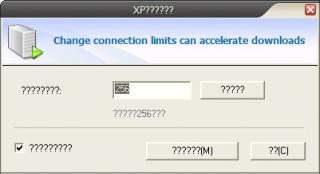

|
|
|
|
|
|
Jul 21 2007, 01:27 PM
Return to original view | Post
#7
|
|
Senior Member
7,284 posts Joined: Jan 2003 From: Hong Kong / Malaysia
|
For his one is a bit obvious, isn't? It's telling that a newer version is available and probably those option is like download and update now, etc. However, I just get the latest from HeHeHunter's blog and updated to latest version. Thanks
 |
|
|
Jul 21 2007, 04:50 PM
Return to original view | Post
#8
|
|
Senior Member
7,284 posts Joined: Jan 2003 From: Hong Kong / Malaysia
|
QUOTE(super macgyver @ Jul 21 2007, 04:34 PM) y not dl from the priginal website? I CAN'T UNDERSTAND chinese words it is only for beta testers ver?  |
|
|
Jul 22 2007, 06:11 PM
Return to original view | Post
#9
|
|
Senior Member
7,284 posts Joined: Jan 2003 From: Hong Kong / Malaysia
|
Anyway, is there is an Option in XunLei aka Thunder to delete the task along with the files? Or we need to remove it manually?
In the right-click menu on the task, what's the '????' option is?  Thanks for helping out bananas like me  Attached thumbnail(s) 
|
|
|
Aug 2 2007, 05:58 PM
Return to original view | Post
#10
|
|
Senior Member
7,284 posts Joined: Jan 2003 From: Hong Kong / Malaysia
|
QUOTE(fujkenasai @ Aug 2 2007, 05:52 PM) How do you resume downloads from bit comet? Do you mean that resume torrent download which started half-way and you wanted to migrate it to XunLei aka Thunder? Pretty simple. Just delete the .bc! extension from the unfinished BitComet download and then open the same torrent file with your Xunlei aka Thunder and then direct the files to be downloaded to the same folder. Then it will do a hash-checking and then pray it will resume from the % it stopped earlier with BitComet |
|
|
Aug 2 2007, 06:13 PM
Return to original view | Post
#11
|
|
Senior Member
7,284 posts Joined: Jan 2003 From: Hong Kong / Malaysia
|
QUOTE(fujkenasai @ Aug 2 2007, 06:07 PM) It does not work that way my file downloads still start from zero%. Well at least it downloads. Hmm... if so, how about changing the extension to Xunlei's extension?  |
|
|
Sep 21 2007, 11:30 PM
Return to original view | Post
#12
|
|
Senior Member
7,284 posts Joined: Jan 2003 From: Hong Kong / Malaysia
|
While I'm using TCP and UDP port 2xxxx... the speed been really terrible for dl... wonder what's the best to pick from range for the TCP and also UDP?
Use default TCP:80 and UDP:15000? |
|
|
Sep 23 2007, 09:19 PM
Return to original view | Post
#13
|
|
Senior Member
7,284 posts Joined: Jan 2003 From: Hong Kong / Malaysia
|
Any recommended range of port for TCP and also UDP?
*I asked earlier but no one cares * |
|
|
|
|
|
Sep 24 2007, 08:31 AM
Return to original view | Post
#14
|
|
Senior Member
7,284 posts Joined: Jan 2003 From: Hong Kong / Malaysia
|
QUOTE(feizaiII @ Sep 23 2007, 09:23 PM) the default one? Most people using the default TCP:80 and UDP:15000? *I edited mine once, so I can't remember the default values *QUOTE(cgha @ Sep 24 2007, 06:18 AM) Set download speed as follows : Isn't we only set our upload limit and download just leave it unlimited? 512 - 10 1MB - 20 2 MB - 40 3MB - 60 TCP/UDP - use default |
|
|
Sep 24 2007, 02:38 PM
Return to original view | Post
#15
|
|
Senior Member
7,284 posts Joined: Jan 2003 From: Hong Kong / Malaysia
|
Now which is the recommended port number?
Previously I main hentam using 27xxx for both TCP and UDP, getting snail-speed with the dl... then when I changed to TCP: 80 and UDP: 15000, the dl increased but not at constant speed... somehow my Internet browser become lagging and sometime couldn't surf at all . So I just wonder which is the best recommended range for the ports... hope all sifus and gurus could help |
|
|
Oct 9 2007, 03:04 PM
Return to original view | Post
#16
|
|
Senior Member
7,284 posts Joined: Jan 2003 From: Hong Kong / Malaysia
|
I wonder if that v5.7.3.389 NoAd Ayu version compatible with the XunLei English Translation Pack 2.0a?
Anyway guys, care to share what port u all been using for the TCP and also UDP? Thanks in advance |
|
|
Oct 9 2007, 03:55 PM
Return to original view | Post
#17
|
|
Senior Member
7,284 posts Joined: Jan 2003 From: Hong Kong / Malaysia
|
QUOTE(linkinpark @ Oct 9 2007, 03:38 PM) Nope many code and string have change for the latest version. Default port 80TCP and 15000UDP work well. I see, so by all mean there is no English language translation pack available for the new version yet? Then perhaps I should just wait before updating my XunLei . Beside TCP:80 and UDP:15000, is there any other available ports which giving decent dl? Just asking in option.Anyway, thanks for ur input. I been asking quite some time in this thread but no one cares to answer me |
|
|
Oct 26 2007, 02:00 AM
Return to original view | Post
#18
|
|
Senior Member
7,284 posts Joined: Jan 2003 From: Hong Kong / Malaysia
|
QUOTE(takercena @ Oct 26 2007, 01:34 AM) I have one question. See picture Errr mate... this thread strictly for Xunlei @ Thunder and not Deluge please... Why i can't get a very good speed even i'm connecting with lot of peer? I think my ratio is high and that's a new torrent. |
|
|
Dec 6 2007, 01:06 PM
Return to original view | Post
#19
|
|
Senior Member
7,284 posts Joined: Jan 2003 From: Hong Kong / Malaysia
|
I updated to the latest version 5.7.5.421 and it seems even terrible that I'm not getting any speed at all
... anyone experiencing the same? |
|
Topic ClosedOptions
|
| Change to: |  0.0214sec 0.0214sec
 0.53 0.53
 7 queries 7 queries
 GZIP Disabled GZIP Disabled
Time is now: 7th December 2025 - 02:05 PM |
 Quote
Quote