Welcome Guest ( Log In | Register )

68 Pages « < 12 13 14 15 16 > » Bottom

Outline · [ Standard ] · Linear+

 Official TP-Link C1200 V1(EU) Firmware is out, Hidden WDS functionality works!, Page 29

views
     
SilentVampire
post Mar 10 2018, 08:42 PM

Networking Enthusiast
*******
Senior Member
5,714 posts

Joined: Mar 2007


QUOTE(Alex9182 @ Mar 9 2018, 09:54 PM)
This 2 days, C1200 self rebooted 3 times, really no good.

have just placed order for Archer C7 V4 at Lazada "EIT Store".

pay RM330 for it, hope it is good.
*
Bro, I did recommend you that router or the Asus RT-AC1300UHP last time. Glad you took my advice.

QUOTE(tritonite @ Mar 10 2018, 08:34 PM)
I'm considering the Archer C7 or C5 as a replacement.

Please let me know if the C7 works out for you.
*
I would recommend the C7 v4 as it is newer than the C5 and price is not too expensive.
tritonite
post Mar 10 2018, 08:47 PM

Casual
***
Junior Member
337 posts

Joined: Feb 2009
QUOTE(SilentVampire @ Mar 10 2018, 08:42 PM)
I would recommend the C7 v4 as it is newer than the C5 and price is not too expensive.
*
I would still like to know if it has good performance without all this issue with disconnections that the C1200 has.

I don't want to spend all that money and have it being less reliable than the original DIR-850?

SilentVampire
post Mar 10 2018, 08:49 PM

Networking Enthusiast
*******
Senior Member
5,714 posts

Joined: Mar 2007


QUOTE(tritonite @ Mar 10 2018, 08:47 PM)
I would still like to know if it has good performance without all this issue with disconnections that the C1200 has.

I don't want to spend all that money and have it being less reliable than the original DIR-850?
*
Bro, it would be better than the C1200 and the DIR-850L that’s for sure. I had the C7 v2 and it was rock solid stable, so I expect C7 v4 would be stable as well.
Alex9182
post Mar 10 2018, 09:09 PM

On my way
****
Senior Member
669 posts

Joined: Sep 2015
QUOTE(tritonite @ Mar 10 2018, 08:47 PM)
I would still like to know if it has good performance without all this issue with disconnections that the C1200 has.

I don't want to spend all that money and have it being less reliable than the original DIR-850?
*
Bro, i have took quite some time looking for a reasonable price and good router,

Archer C7 has many good review all over the world, win quite a number of awards, and recommended by few Sifu here at Lowyat.

unless i get a defective unit, i expect it to perform as it should.

Alex9182
post Mar 10 2018, 09:22 PM

On my way
****
Senior Member
669 posts

Joined: Sep 2015
QUOTE(SilentVampire @ Mar 10 2018, 08:42 PM)
Bro, I did recommend you that router or the Asus RT-AC1300UHP last time. Glad you took my advice.
I would recommend the C7 v4 as it is newer than the C5 and price is not too expensive.
*
Ya ya, i remember your self and Bro Jjuggler also recommend this model.

online, can find many good reviews, bad review are very less for this model.

V4 has integrate 5G and 2.4G into 3 external antenna, hope the performance is better then V2.
rhytion
post Mar 11 2018, 10:25 AM

Casual
***
Junior Member
389 posts

Joined: Oct 2016
From: Kota Kinabalu


Finally got root access after enabled SSH for this router thanks to help from this forum

https://forum.lede-project.org/t/build-for-...-ac1200/2547/44

Now I can enable back Malaysia bands on AU firmware
TSJohnLai
post Mar 11 2018, 10:45 AM

Skeptical Cat
*******
Senior Member
3,669 posts

Joined: Apr 2006
QUOTE(rhytion @ Mar 11 2018, 10:25 AM)
Finally got root access after enabled SSH for this router thanks to help from this forum

https://forum.lede-project.org/t/build-for-...-ac1200/2547/44

Now I can enable back Malaysia bands on AU firmware
*
Would be grateful if you post the step on enabling back Malaysia bands on AU firmware after getting root access.
rhytion
post Mar 11 2018, 01:03 PM

Casual
***
Junior Member
389 posts

Joined: Oct 2016
From: Kota Kinabalu


QUOTE(JohnLai @ Mar 11 2018, 10:45 AM)
Would be grateful if you post the step on enabling back Malaysia bands on AU firmware after getting root access.
*
What I did is I enabled SSH access by following the thread and then root access, make sure to turn off your firewall in case you're running Windows 10 otherwise it won't work. Afterwards you need to edit /etc/config/wireless, and change the two country options from 'DE' to 'MY', for both 2.4GHz and 5GHz. In my case, I have to copy the original file to /tmp before editing it with the default SSH client and then copying it back since in netcat pressing down arrow doesn't seem possible to me with the current /bin/ash.

What I want to do next is try to enable 802.11r FT between these two routers but before that I need to find a way to replace wpad-mini with wpad on that router, as the default filesystem is mounted read-only so I couldn't use opkg to reinstall it.

Lastly, I bricked my router by running

CODE
mtd write C1200.bin linux


to see if I could restore it to old TM firmware and after a reboot it's not booting up properly anymore. It seems like TFTP is not working for me, when I tried to boot it up all the light just flashes for a second then only the WPS LED lights up. I can go into the Web GUI which we normally get after a failed firmware update but it never goes pass 40%, either showing firmware upgrade failed or firmware not compatible. Anyone with similar experiences know how to fix it or will TM consider this as customer's fault?

This post has been edited by rhytion: Mar 11 2018, 01:06 PM
TSJohnLai
post Mar 11 2018, 01:18 PM

Skeptical Cat
*******
Senior Member
3,669 posts

Joined: Apr 2006
QUOTE(rhytion @ Mar 11 2018, 01:03 PM)
Lastly, I bricked my router by running

CODE
mtd write C1200.bin linux


to see if I could restore it to old TM firmware and after a reboot it's not booting up properly anymore. It seems like TFTP is not working for me, when I tried to boot it up all the light just flashes for a second then only the WPS LED lights up. I can go into the Web GUI which we normally get after a failed firmware update but it never goes pass 40%, either showing firmware upgrade failed or firmware not compatible. Anyone with similar experiences know how to fix it or will TM consider this as customer's fault?
*
sweat.gif
..........still under warranty? Then I suggest you to totally brick it using one of the method posted in lede forum thread and go claim warranty from TM.....
I think you just overwrite the uboot safeloader section with wrong stuff.


That aside, does the DE-->MY setting persist after router reboot? hmm.gif


EDIT:About that 40% issue, which firmware did you try? EU or TM?

EDIT2:I think you forgot to cut off the first 0x20200 from TM firmware before mtd write.

TM firmware has boot partition
QUOTE
fwup-ptn factory-boot base 0x01000 size 0x2abc9
fwup-ptn fs-uboot base 0x2bbc9 size 0x2939d
fwup-ptn os-image base 0x54f66 size 0x1d5001
fwup-ptn file-system base 0x229f67 size 0xc6a001
fwup-ptn product-info base 0xe93f68 size 0x00110
fwup-ptn soft-version base 0xe94078 size 0x00059
fwup-ptn extra-para base 0xe940d1 size 0x0000b
fwup-ptn support-list base 0xe940dc size 0x0011c
fwup-ptn profile base 0xe941f8 size 0x022bc
fwup-ptn default-config base 0xe964b4 size 0x09d83
fwup-ptn qos-db base 0xea0237 size 0x32071
fwup-ptn partition-table base 0x00800 size 0x00800
Eu firmware doesn't have boot partition
QUOTE
fwup-ptn fs-uboot base 0x01000 size 0x2939d
fwup-ptn os-image base 0x2a39d size 0x1d8001
fwup-ptn file-system base 0x20239e size 0xc3a001
fwup-ptn product-info base 0xe3c39f size 0x00110
fwup-ptn soft-version base 0xe3c4af size 0x00059
fwup-ptn extra-para base 0xe3c508 size 0x0000b
fwup-ptn support-list base 0xe3c513 size 0x00099
fwup-ptn profile base 0xe3c5ac size 0x02790
fwup-ptn default-config base 0xe3ed3c size 0x07d28
fwup-ptn qos-db base 0xe46a64 size 0x32071
fwup-ptn partition-table base 0x00800 size 0x00800
Can you still ssh to the router? If can, try to cut off the boot partition and mtd write again. But since you already wrote the firmware into the router...well....... sweat.gif

This post has been edited by JohnLai: Mar 11 2018, 01:38 PM

rhytion
post Mar 11 2018, 02:28 PM

Casual
***
Junior Member
389 posts

Joined: Oct 2016
From: Kota Kinabalu


QUOTE(JohnLai @ Mar 11 2018, 01:18 PM)
sweat.gif
..........still under warranty? Then I suggest you to totally brick it using one of the method posted in lede forum thread and go claim warranty from TM.....
I think you just overwrite the uboot safeloader section with wrong stuff.

That aside, does the DE-->MY setting persist after router reboot? hmm.gif
EDIT:About that 40% issue, which firmware did you try? EU or TM?

EDIT2:I think you forgot to cut off the first 0x20200 from TM firmware before mtd write.

TM firmware has boot partition
Eu firmware doesn't have boot partition
Can you still ssh to the router? If can, try to cut off the boot partition and mtd write again. But since you already wrote the firmware into the router...well....... sweat.gif
*
Not really sure if it persists, haven't tried yet. Can't SSH into the router anymore. Tried nearly all firmware from TM and EU and non of them are working sadly. Now waiting for warranty claim from TM.
TSJohnLai
post Mar 11 2018, 10:02 PM

Skeptical Cat
*******
Senior Member
3,669 posts

Joined: Apr 2006
QUOTE(rhytion @ Mar 11 2018, 02:28 PM)
Not really sure if it persists, haven't tried yet. Can't SSH into the router anymore. Tried nearly all firmware from TM and EU and non of them are working sadly. Now waiting for warranty claim from TM.
*
About that editing /etc/config/wireless, was you doing it via VIM or UCI? Do you reload the wifi interface after applying change?
tritonite
post Mar 11 2018, 10:29 PM

Casual
***
Junior Member
337 posts

Joined: Feb 2009
QUOTE(Alex9182 @ Mar 10 2018, 09:22 PM)
Ya ya, i remember your self and Bro Jjuggler also recommend this model.

online, can find many good reviews, bad review are very less for this model.

V4 has integrate 5G and 2.4G into 3 external antenna, hope the performance is better then V2.
*
user posted image

Actually, the 3 external antennae are for the 5 GHz. The 2.4 GHz antennae are internal.


rhytion
post Mar 11 2018, 10:35 PM

Casual
***
Junior Member
389 posts

Joined: Oct 2016
From: Kota Kinabalu


QUOTE(JohnLai @ Mar 11 2018, 10:02 PM)
About that editing /etc/config/wireless, was you doing it via VIM or UCI? Do you reload the wifi interface after applying change?
*
I did it via vim by connecting through an SSH client without root access, I'm using Bitvise personally, if I run vim directly through the netcat one then the arrow keys just won't work. I just ran wifi to reload the interface afterwards and the changes were applied and shown in web interface.

Anyway, just contacted TM for replacement, hopefully I won't get the trashcan.

This post has been edited by rhytion: Mar 11 2018, 10:36 PM
Alex9182
post Mar 11 2018, 10:51 PM

On my way
****
Senior Member
669 posts

Joined: Sep 2015
QUOTE(tritonite @ Mar 11 2018, 10:29 PM)
user posted image

Actually, the 3 external antennae are for the 5 GHz. The 2.4 GHz antennae are internal.
*
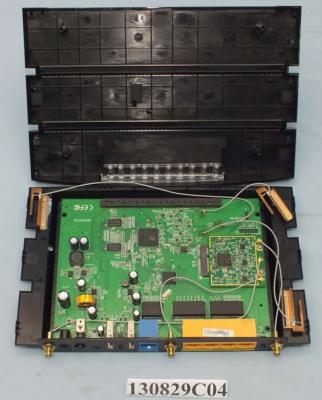
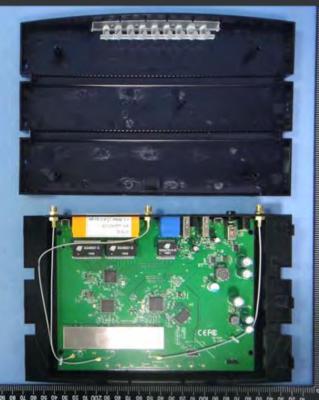
the 6 antenna is V2

see internal picture from FCC file attached, V2 = 6 antenna, V4 = 3 antenna.


Attached thumbnail(s)
Attached Image Attached Image
TSJohnLai
post Mar 11 2018, 11:12 PM

Skeptical Cat
*******
Senior Member
3,669 posts

Joined: Apr 2006
QUOTE(rhytion @ Mar 11 2018, 10:35 PM)
I did it via vim by connecting through an SSH client without root access, I'm using Bitvise personally, if I run vim directly through the netcat one then the arrow keys just won't work. I just ran wifi to reload the interface afterwards and the changes were applied and shown in web interface.

Anyway, just contacted TM for replacement, hopefully I won't get the trashcan.
*
Well, I used UCI to do so. Channel is successfully changed to 165. (verified via Wifi Analyser).
Unfortunately, the setting doesn't persist after reboot.

Reason being the /etc is mounted as ramfs type file system.
user posted image

rclxub.gif


EDIT:

SUCCESS!!!!!!!!!
SETTING PERSISTED!!

user posted image

user posted image
Ignore the CPU usage, I am torrenting a lot of stuff. biggrin.gif

user posted image

EDIT2: Edited the image to remove private info....

This post has been edited by JohnLai: Mar 12 2018, 12:15 AM
MrSpeedy
post Mar 12 2018, 07:20 AM

Casual
***
Junior Member
460 posts

Joined: Jun 2012


» Click to show Spoiler - click again to hide... «

Good job on that.
If you don't mind, can you please explain step-by-step in layman terms?

Extra: Since the previous Beta firmware is the most stable firmware, is it possible to use SSH to modify the annoying 'Beta' background wallpaper?
Then it will solve most of the problems...
TSJohnLai
post Mar 12 2018, 08:34 AM

Skeptical Cat
*******
Senior Member
3,669 posts

Joined: Apr 2006
QUOTE(MrSpeedy @ Mar 12 2018, 07:20 AM)
» Click to show Spoiler - click again to hide... «

Good job on that.
If you don't mind, can you please explain step-by-step in layman terms?

Extra: Since the previous Beta firmware is the most stable firmware, is it possible to use SSH to modify the annoying 'Beta' background wallpaper?
Then it will solve most of the problems...
*
Alamak, how am I suppose to explain step-by-step? Using vim alone through Esc, i (case sensitive), ZZ (case sensitive) to save temporary stuff at 10-usb is troublesome enough. rclxub.gif

I don't use beta firmware....beside, to remove the background, I think one must delete/replace index.1516775402233.html background? It is possible to modify the Beta background wallpaper. However, the setting will not persist after reboot. hmm.gif
lyt25_1234
post Mar 12 2018, 09:04 AM

Regular
******
Senior Member
1,152 posts

Joined: Jul 2011
QUOTE(JohnLai @ Mar 12 2018, 08:34 AM)
Alamak, how am I suppose to explain step-by-step? Using vim alone through Esc, i (case sensitive), ZZ (case sensitive) to save temporary stuff at 10-usb is troublesome enough. rclxub.gif

I don't use beta firmware....beside, to remove the background, I think one must delete/replace index.1516775402233.html background? It is possible to modify the Beta background wallpaper. However, the setting will not persist after reboot. hmm.gif
*
How do you ssh to the router? and what is the login credentials?

Thanks.
TSJohnLai
post Mar 12 2018, 09:07 AM

Skeptical Cat
*******
Senior Member
3,669 posts

Joined: Apr 2006
QUOTE(lyt25_1234 @ Mar 12 2018, 09:04 AM)
How do you ssh to the router? and what is the login credentials?

Thanks.
*
Follow the guide at https://forum.lede-project.org/t/build-for-...-ac1200/2547/47
lyt25_1234
post Mar 12 2018, 09:09 AM

Regular
******
Senior Member
1,152 posts

Joined: Jul 2011
QUOTE(JohnLai @ Mar 12 2018, 09:07 AM)
Thanks! Will do!

68 Pages « < 12 13 14 15 16 > » Top
 

Change to:
| Lo-Fi Version
0.1374sec    0.38    6 queries    GZIP Disabled
Time is now: 10th December 2025 - 06:19 AM