Welcome Guest ( Log In | Register )

68 Pages « < 10 11 12 13 14 > » Bottom

Outline · [ Standard ] · Linear+

 Official TP-Link C1200 V1(EU) Firmware is out, Hidden WDS functionality works!, Page 29

views
     
Jjuggler
post Mar 1 2018, 02:11 PM

Narcissistic Genius
******
Senior Member
1,341 posts

Joined: Dec 2016
At last, i bought this baby. Bought this baby to try out the features. I guess i get the v2. Bought at Mines, Seri Kembangan.

cc: SilentVampire bro.

[attachmentid=9624632]

This post has been edited by Jjuggler: Mar 1 2018, 02:13 PM
SilentVampire
post Mar 1 2018, 02:53 PM

Networking Enthusiast
*******
Senior Member
5,714 posts

Joined: Mar 2007


QUOTE(Jjuggler @ Mar 1 2018, 02:11 PM)
At last, i bought this baby. Bought this baby to try out the features. I guess i get the v2. Bought at Mines, Seri Kembangan.

cc: SilentVampire bro.

[attachmentid=9624632]
*
Definitely the v2. Remember to update to latest firmware, US_170926, and enjoy! Do not enable IPv6 though, as it can be very unstable once you do that, and I tested it briefly with IPv6, and did not like it, and the settings seem to be retained even if you turn IPv6 off, so I just reset it and did not bother with re-enabling IPv6 anymore.
Jjuggler
post Mar 1 2018, 02:57 PM

Narcissistic Genius
******
Senior Member
1,341 posts

Joined: Dec 2016
QUOTE(SilentVampire @ Mar 1 2018, 02:53 PM)
Definitely the v2. Remember to update to latest firmware, US_170926, and enjoy! Do not enable IPv6 though, as it can be very unstable once you do that, and I tested it briefly with IPv6, and did not like it, and the settings seem to be retained even if you turn IPv6 off, so I just reset it and did not bother with re-enabling IPv6 anymore.
*
noted bro. rclxms.gif
Alex9182
post Mar 1 2018, 03:11 PM

On my way
****
Senior Member
669 posts

Joined: Sep 2015
QUOTE(SilentVampire @ Mar 1 2018, 02:53 PM)
Definitely the v2. Remember to update to latest firmware, US_170926, and enjoy! Do not enable IPv6 though, as it can be very unstable once you do that, and I tested it briefly with IPv6, and did not like it, and the settings seem to be retained even if you turn IPv6 off, so I just reset it and did not bother with re-enabling IPv6 anymore.
*
expensive model also very unstable, or it happen to all router if enable IPv6?
SilentVampire
post Mar 1 2018, 03:19 PM

Networking Enthusiast
*******
Senior Member
5,714 posts

Joined: Mar 2007


QUOTE(Alex9182 @ Mar 1 2018, 03:11 PM)
expensive model also very unstable, or it happen to all router if enable IPv6?
*
It has less to do with the router and more to the fact that IPv6 is still very badly optimized for use in Malaysia. IPv4 is stable and no problems with this router and everything else is very satisfactory so far.
Invalid Username
post Mar 1 2018, 04:12 PM

Casual
***
Junior Member
323 posts

Joined: May 2010

is it advisable to install the TM Unifi firmware or the normal EU firmware? Have a TIME router
TSJohnLai
post Mar 1 2018, 11:43 PM

Skeptical Cat
*******
Senior Member
3,669 posts

Joined: Apr 2006
QUOTE(Invalid Username @ Mar 1 2018, 04:12 PM)
is it advisable to install the TM Unifi firmware or the normal EU firmware? Have a TIME router
*
.....Which one is more important for you?

Having option to select more 5ghz wifi channels, but you need to accept TR-069 and @unifi suffix at wifi guest network with TM firmware

Or EU firmware with limited 5ghz wifi channels without TR-069 and annoying @unifi suffix?
Invalid Username
post Mar 1 2018, 11:44 PM

Casual
***
Junior Member
323 posts

Joined: May 2010

QUOTE(JohnLai @ Mar 2 2018, 12:43 AM)
.....Which one is more important for you?

Having option to select more 5ghz wifi channels, but you need to accept TR-069 and @unifi suffix at wifi guest network with TM firmware

Or EU firmware with limited 5ghz wifi channels without TR-069 and annoying @unifi suffix?
*
I’ve installed the TM firmware. What I meant was if it was ok to install the TM firmware as my router is from Time I didn’t know if it would work as usual.
kombeng7
post Mar 2 2018, 12:12 AM

New Member
*
Newbie
41 posts

Joined: Jan 2014
I wanted to update to TM firmware but I accidentally update to EU firmware. How do I setup the router to connect to Unifi?
Alex9182
post Mar 2 2018, 12:39 AM

On my way
****
Senior Member
669 posts

Joined: Sep 2015
QUOTE(kombeng7 @ Mar 2 2018, 12:12 AM)
I wanted to update to TM firmware but I accidentally update to EU firmware. How do I setup the router to connect to Unifi?
*
if Tp-Link brand, watch this link : connect to unifi

This post has been edited by Alex9182: Mar 2 2018, 12:40 AM
kombeng7
post Mar 2 2018, 12:51 AM

New Member
*
Newbie
41 posts

Joined: Jan 2014
QUOTE(Alex9182 @ Mar 2 2018, 12:39 AM)
if Tp-Link brand, watch this link  : connect to unifi
*
Ok done. Thank you.
TSJohnLai
post Mar 2 2018, 01:06 AM

Skeptical Cat
*******
Senior Member
3,669 posts

Joined: Apr 2006
QUOTE(Invalid Username @ Mar 1 2018, 11:44 PM)
I’ve installed the TM firmware. What I meant was if it was ok to install the TM firmware as my router is from Time I didn’t know if it would work as usual.
*
Should be fine.

Beware though....currently, if one flashed EU, can't flash back to MY. sad.gif

TP-Link doesn't respond to my email about how to revert back to MY from EU firmware at all.

Invalid Username
post Mar 2 2018, 01:36 AM

Casual
***
Junior Member
323 posts

Joined: May 2010

QUOTE(JohnLai @ Mar 2 2018, 02:06 AM)
Should be fine.

Beware though....currently, if one flashed EU, can't flash back to MY. sad.gif

TP-Link doesn't respond to my email about how to revert back to MY from EU firmware at all.
*
Yup, that was partly why I chose TM too, even though my 5g is relatively empty
AVFAN
post Mar 2 2018, 02:02 AM

20k VIP Club
*********
All Stars
24,454 posts

Joined: Nov 2010
QUOTE(Alex9182 @ Mar 1 2018, 12:50 AM)
at Asus malaysia site, i see last firmware is "2016/08/11  Version 3.0.0.4.380.2943 ".
at global site, FW dated 30/11/17 is for RT-N12HP B1, can use for malaysia set?
*
i just updated to that B1 firmware, 3004.380.8120.

it's good.

* this is a spare router, not used anymore.
alijoe
post Mar 2 2018, 08:39 AM

Casual
***
Junior Member
376 posts

Joined: Jun 2006
QUOTE(Alex9182 @ Mar 1 2018, 01:31 PM)
ha ha, this router is priced below RM200. why you choose it?

is it cost? functionality/features? brand? stability? aesthetic? Range coverage? speed?

any other models you have in mind?
*
like.i said "budget replacement" dual band router since just wanna use for normal usage less than 6 devices. no point staying with c1200 with non stop reboot. so if this c20 good enough as replacement, i might take it. and yes dont have the high class budget for those expensive models.
Alex9182
post Mar 2 2018, 02:23 PM

On my way
****
Senior Member
669 posts

Joined: Sep 2015
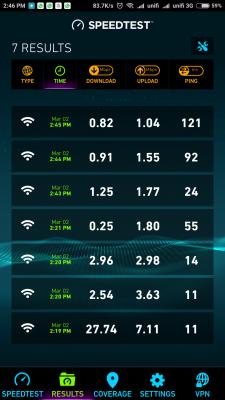
Asus RT-N12HP arrived, setup and update to latest firmware, simple and easy.

However, something is wrong with the WiFi connection even after done factory reset and re-setup.
1). Ping, Download, Upload is abnormally low and in consistent,

2). Wifi range is lower then C1200.

result are the same tested on few devices. maybe i get a defective unit.

Put back Archer C1200, everything back to normal speed

(see attached test result for Asus Vs Tp-Link).

**PS... Note book connected with LAN cable, speed is not effected, (Ping 15ms, Download 32mbps, Upload 10mbps).

This post has been edited by Alex9182: Mar 2 2018, 04:13 PM


Attached thumbnail(s)
Attached Image Attached Image
RoxyGal
post Mar 2 2018, 04:03 PM

٩͡[๏̯͡๏]۶ Im roxygal ٩͡[๏̯͡๏]۶
******
Senior Member
1,031 posts

Joined: Sep 2006
From: ▁▂▃▅▇ ٩͡[๏̯͡๏]۶?


cannot tahan, router frequent reboot. Decided to call TM and ask them change to dlink 850L. Luckily im using high end asus RT as primary
shamsay
post Mar 2 2018, 04:34 PM

On my way
****
Senior Member
606 posts

Joined: Jan 2003
From: Deep Beach


Mine almost 10days without reboot with 1.1.3 Build 20180124 fw.cpu 11-50%, memory 47%
Alex9182
post Mar 2 2018, 05:35 PM

On my way
****
Senior Member
669 posts

Joined: Sep 2015
Any one know why my Asus RT-N12HP has Wifi connection problem?

If no solution, i will return the unit to Lazada on coming Monday for full refund because of defective unit.


rhytion
post Mar 2 2018, 05:42 PM

Casual
***
Junior Member
389 posts

Joined: Oct 2016
From: Kota Kinabalu


Interesting, someone from Malaysia working to add those disabled channels into the AU firmware, after someone gained SSH access to the router. Gonna try them myself as well.

https://forum.lede-project.org/t/build-for-...-ac1200/2547/34

This post has been edited by rhytion: Mar 2 2018, 05:44 PM

68 Pages « < 10 11 12 13 14 > » Top
 

Change to:
| Lo-Fi Version
0.0184sec    0.09    6 queries    GZIP Disabled
Time is now: 7th December 2025 - 07:19 PM