Welcome Guest ( Log In | Register )

Outline · [ Standard ] · Linear+

 C2D E4400 + Asrock 775Dual-VSTA o/c result, for ppl wth limited budget like me..

views
     
mmohdnor
post Apr 30 2007, 11:59 AM

Regular
******
Senior Member
1,021 posts

Joined: Aug 2006
From: Penang Island, Alor Star


yeah, i'm also in the same situation as u AREA51, looking for an upgrade option but with small budget ..

i'm aiming for the e4400/e6420 + asrock 4coredual-vsta/asrock 775dual-vsta ..
so far the only mobo that i know which have both ddr1 & ddr2 and also agp & pcie is asrock

i'll be using it with my ddr400 and 6600gt

AREA51, care to show some benchies and specs of ur new rig?


This post has been edited by mmohdnor: Apr 30 2007, 12:07 PM
mmohdnor
post May 9 2007, 10:41 PM

Regular
******
Senior Member
1,021 posts

Joined: Aug 2006
From: Penang Island, Alor Star


this mobo is no way meant for o/c ... but it does give a bit of room for o/c
i think the primary purpose of this mobo is to 'keep' ur old stuff like ddr1 & agp before moving to ddr2 & pci-e (when u r ready) ..

from website reviews ...this board does seem to hit its limit at ~300mhz fsb

This post has been edited by mmohdnor: May 9 2007, 10:43 PM
mmohdnor
post May 26 2007, 06:42 PM

Regular
******
Senior Member
1,021 posts

Joined: Aug 2006
From: Penang Island, Alor Star


yay! .. got mine for RM195 from Thundermatch
mmohdnor
post May 28 2007, 03:00 PM

Regular
******
Senior Member
1,021 posts

Joined: Aug 2006
From: Penang Island, Alor Star


haha .. should open up a topic on asrock mobo user ... LOL! ..

* strictly for budget user ?? ..haha biggrin.gif


Added on May 31, 2007, 1:02 am

just finished setting up my budget rig ..

preliminary benchies on a C2D e4300 @stock and galaxy 8500ge ddr3 600core/1400mem @stock

3dmark03 : 10603
3dmark05 : 6123

This post has been edited by mmohdnor: May 31 2007, 01:09 AM
mmohdnor
post May 31 2007, 09:41 PM

Regular
******
Senior Member
1,021 posts

Joined: Aug 2006
From: Penang Island, Alor Star


well, yeah i do agree the board is bottlenecked at pcie 4x ...
but this board is meant for budget users anyway ..

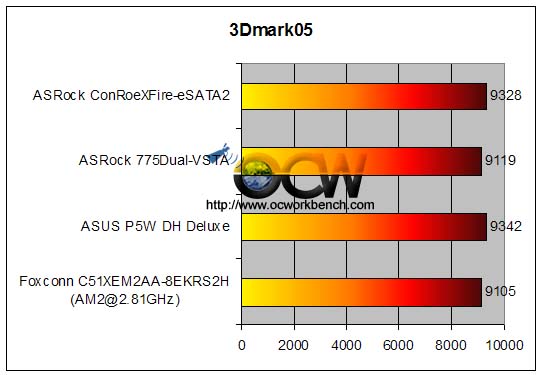
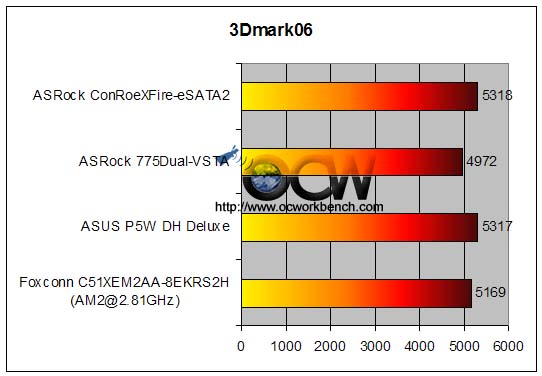
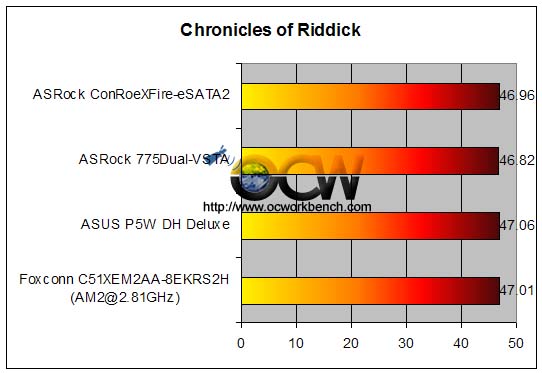
seeing from the OCworkbench review, the performance diff was actually 'negligible' with about 2-10% diff compared to boards with pcie 16x ...
(on page 4 of the review)
http://www.ocworkbench.com/2006/asrock/775Dual-VSTA/b4.htm

Test Setup
VIA PT880 Pro Series
* ASRock 775Dual-VSTA / VIA Hyperion 5.08A
* Intel X6800 Extreme Edition processor
* 2 x 1024 MB Corsair CMX1024A-8500C5 (total 2GB)
* ASUS EN7900GT TOP with Forceware 91.31
* Hitachi 7K80 SATAII HDD
* Windows XP SP2

Intel 975X

* ASUS P5W DH Deluxe / Intel INF 8.0.1.1002
* Intel X6800 Extreme Edition processor
* 2 x 1024 MB Corsair CMX1024A-8500C5 (total 2GB)
* ASUS EN7900GT TOP with Forceware 91.31
* Hitachi 7K80 SATAII HDD
* Windows XP SP2

Intel 945P
* ASRock ConRoeXFire-eSATA2 / Intel INF 8.0.1.1002
* Intel X6800 Extreme Edition processor
* 2 x 1024 MB Corsair CMX1024A-8500C5 (total 2GB)
* ASUS EN7900GT TOP with Forceware 91.31
* Hitachi 7K80 SATAII HDD
* Windows XP SP2

AMD platform
* Foxconn C51XEM2AA-8EKRS2H
* AMD AM2 4000+ o/c to 2.81GHz
* 2 x 1024 MB Corsair CMX1024A-8500C5 (total 2GB)
* ASUS EN7900GT TOP with Forceware 91.31
* Hitachi 7K80 SATAII HDD
* Windows XP SP2

DOOM3 (1600x1200x32)
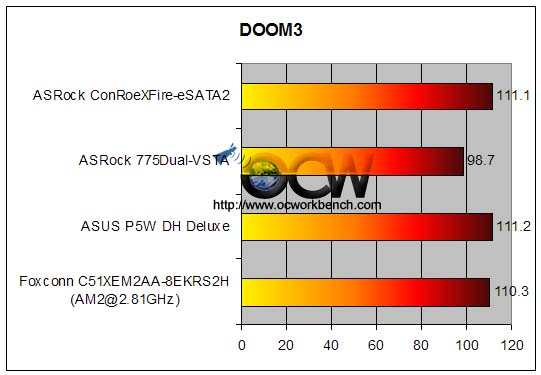
user posted image

3DMark2005 (1024x768x32)
user posted image

3DMark2006 (1280x1024x32)
user posted image

Riddick (1600x1200x32)
user posted image


Added on May 31, 2007, 9:51 pm

here's another review from Legit Reviews regarding this mobo's pcie 4x vs pcie 16x using XFX 7900GTX XXX card

http://www.legitreviews.com/article/377/13/

This post has been edited by mmohdnor: May 31 2007, 10:11 PM

mmohdnor
post Jun 27 2007, 12:00 AM

Regular
******
Senior Member
1,021 posts

Joined: Aug 2006
From: Penang Island, Alor Star


the mobo does have a fsb around 290-300mhz ..

as for mine, i only manage to get it run at 285*9 = 2.565ghz with my e4300

try disabling the "Flexibility Options" ..
i tried that and now my memory is running 1:1 at 295mhz (590mhz)...

i'm using kvr ddr2 667 1gb by the way

some tips from fellow forumers say don't overclock the pcie freq more than 110mhz ..or u'll damage the card ..

This post has been edited by mmohdnor: Jun 27 2007, 12:03 AM
mmohdnor
post Jun 28 2007, 09:16 AM

Regular
******
Senior Member
1,021 posts

Joined: Aug 2006
From: Penang Island, Alor Star


it doesn't say about memory 1:1, 1:2 or 4:5 or what ... but there's an option "Flexibility Options" ...make that disabled.

i cant really point out where the menu is coz i'm at office now.

what is ur current memory speed now ? post ur cpu-z pic here
mmohdnor
post Jun 29 2007, 12:22 AM

Regular
******
Senior Member
1,021 posts

Joined: Aug 2006
From: Penang Island, Alor Star


when u enter the bios, go to :

advanced > chipset configuration > flexibility options (disable it)
i also set my ddr2 667 to be auto

i'm using bios 2.70 by the way

can u give the specs of ur pc and the bios u r using?


Change to:
| Lo-Fi Version
0.0189sec    0.44    7 queries    GZIP Disabled
Time is now: 3rd December 2025 - 01:07 PM