

QUOTE(UnknownH @ Mar 28 2018, 01:19 PM)
Today I just found out RM50 off discount code. 

care to share or PM the RM50 discount code, I wanna order one xiaomiXiaomi Xiaomi Mi A1 - A Pure Stock Android Experience V2, Discussion & Opinion - ANDROID PIE?
|
|
 Mar 30 2018, 11:12 AM Mar 30 2018, 11:12 AM
Return to original view | Post
#1
|
 
Junior Member
239 posts Joined: Oct 2007  
|
QUOTE(UnknownH @ Mar 28 2018, 01:19 PM) Today I just found out RM50 off discount code. care to share or PM the RM50 discount code, I wanna order one xiaomi |
|
|
|
|
|
Apr 5 2018, 01:05 PM
Return to original view | Post
#2
|
|
Junior Member
239 posts Joined: Oct 2007
|
QUOTE(ey3zack @ Apr 4 2018, 05:09 PM) https://www.11street.my/benefit/promotionDe...ayNumber=609018 - here's RM30 or 100 coupon depending on the price of the phone u wanna buy Already bought from LZD with RM25 voucher, price still better than 11Street  |
|
|
Apr 5 2018, 05:25 PM
Return to original view | Post
#3
|
|
Junior Member
239 posts Joined: Oct 2007
|
QUOTE(mizymora @ Apr 5 2018, 05:10 PM) Jz bought new sealed import set black color from Mobile2go for rm666.. good deal right? haha.. n the adapter is EU type, not china set. hehe.. Was tempted to buy Imported unit, but my son's unifi mobile sim card did not work (no 4G) on a China set Redmi 3, so I did not want to take the risk this time. Afterall, usually the Malaysia set can get better resale value when I wanna sell it in future.  |
|
|
Apr 6 2018, 08:59 AM
Return to original view | Post
#4
|
|
Junior Member
239 posts Joined: Oct 2007
|
QUOTE(UnknownH @ Apr 5 2018, 06:48 PM) Really depends on the phone whether it supports the bands in the first place or not. Ya I thought I could change the 4G band using the method I googled around. But it did not work for the Redmi3 somehow (even though on SD616 chipset), so give up and get the Mi A1 instead.My Redmi Note 4(SD) is a China set. Works well with unifi mobile. |
|
|
Apr 6 2018, 09:02 AM
Return to original view | Post
#5
|
|
Junior Member
239 posts Joined: Oct 2007
|
QUOTE(k8zw3ll @ Apr 5 2018, 07:00 PM) Official warranty from xiaomi malaysia? I used the code "LAZAPP10" few days ago, on mobile app. You may try it again.Mind to share the link and coupon code? The link of the phone is https://www.lazada.com.my/products/xiaomi-m...s225960629.html? |
|
|
Apr 6 2018, 03:38 PM
Return to original view | Post
#6
|
|
Junior Member
239 posts Joined: Oct 2007
|
I just realise that we must use combo security like :
Finger print + pin FP + pattern FP + password To unlock or wake up the phone from screen off. Is there a way we can just use Finger print only like Miui ? |
|
|
|
|
|
Apr 6 2018, 05:30 PM
Return to original view | Post
#7
|
|
Junior Member
239 posts Joined: Oct 2007
|
QUOTE(NtgBetterToDo @ Apr 6 2018, 05:09 PM) are you using third party app to lock your screen? something like double tap to lock ? Ya, I do use greenify to "sleep & hibernate" the phone. Each time I touch FP sensor, the system will ask for pattern after I wake up the screen. I should not do that is it ? |
|
|
May 2 2018, 04:15 PM
Return to original view | Post
#8
|
|
Junior Member
239 posts Joined: Oct 2007
|
QUOTE(awiekupo @ May 2 2018, 03:49 PM) Anyone here provide service to install google camera on mi a1? Keep stuck at Bootloder Unlocking... so gonna give up now.. i think i just pay those who can help install.. Before that I got stuck there as well, try to unplug when the phone is still in "fastboot" mode, plug into another USB port of your PC, goto device manager, select the android device to update the drivers from internet automatically. Once that is done, restart the process to install the GCam, it should work then. |
|
|
May 3 2018, 02:30 PM
Return to original view | Post
#9
|
|
Junior Member
239 posts Joined: Oct 2007
|
QUOTE(awiekupo @ May 2 2018, 08:40 PM) many thx bro. owe u big time. I just realised that I can't get the Flash Alarm app (which uses camera flash light as alarm) to work. Not sure that is GCam related.works like charm now! Can anyone who has yet to install GCam help try out ? |
|
|
May 4 2018, 02:50 PM
Return to original view | Post
#10
|
|
Junior Member
239 posts Joined: Oct 2007
|
QUOTE(amdxp @ May 2 2018, 04:15 PM) Before that I got stuck there as well, try to unplug when the phone is still in "fastboot" mode, plug into another USB port of your PC, goto device manager, select the android device to update the drivers from internet automatically. Once that is done, restart the process to install the GCam, it should work then. I found the answer of my own question. No perfect solution though  When we install the GCam using the tools from XDA, it will enable 2 settings (1) camera2pai (2) EIS. And the tool will install one app, which is the pixel2 camera app (GCam). The GCam must have camera2api to work. And all Mi A1 has issue on flashlight alarm or any app or notification app using camera flash light. But it's a must for me to have the flashlight alarm to work coz my wife is having profound deaf, she needs flashlight light to flash so she can wake up. As soon as I disable camera2api, then the flashlight alarm works like a charm. But GCam cannot work. Once enable camera2api, flashlight alarm cannot work, but GCam comes to live. Damn |
|
|
Aug 21 2018, 11:17 AM
Return to original view | Post
#11
|
|
Junior Member
239 posts Joined: Oct 2007
|
Is there any latest firmware update yet ? I dare not update to the July version, coz many complained to have minor issues.
|
|
|
Aug 25 2019, 12:20 PM
Return to original view | Post
#12
|
|
Junior Member
239 posts Joined: Oct 2007
|
QUOTE(VoiVod @ Aug 20 2019, 06:18 PM) I'm still on Mi A1, now totally unusable for waze - unable to get gps fix. I am on a modded MIUI rom with root, after I edit the gps.conf file the GPS locks in few sec. Now running superb ! |
|
|
Aug 30 2019, 10:58 AM
Return to original view | Post
#13
|
|
Junior Member
239 posts Joined: Oct 2007
|
QUOTE(DCXW @ Aug 26 2019, 07:35 AM) I think you meant noise? phone must be rooted, then use root explorer to edit the contend of GPS.conf file. I can even share the edited GPS.conf file here if you want, but you must find a way to replace the existing one.How ? What do you change in conf file ? |
|
|
|
|
|
Aug 30 2019, 10:27 PM
Return to original view | IPv6 | Post
#14
|
|
Junior Member
239 posts Joined: Oct 2007
|
QUOTE(DCXW @ Aug 30 2019, 06:50 PM) Alright sure thing. Do share! This. Explore to get the GPS.conf fileStore under \system\vendor\etc folder This post has been edited by amdxp: Aug 30 2019, 10:29 PM Attached File(s)  gps.zip ( 1.24k )
Number of downloads: 19
gps.zip ( 1.24k )
Number of downloads: 19 |
|
|
Oct 25 2020, 10:21 AM
Return to original view | Post
#15
|
|
Junior Member
239 posts Joined: Oct 2007
|
Still using, with MIUI rom. Slight glitch with the BT switch but all in all almost perfect. Even the GPS for me is perfect.
Quite true about the battery though, seems to be deteriorating but it's expected since the phone is reaching 3 years old. Thinking to change to Mi 10 Lite 5G, global version. |
|
|
Nov 4 2020, 08:19 PM
Return to original view | Post
#16
|
|
Junior Member
239 posts Joined: Oct 2007
|
QUOTE(WiLeKiyO @ Nov 3 2020, 11:05 PM) Why not Mi 10T. I don't like thick and fat phone. And I don't 2ant big battery in my phone. 4000 to 4500mah is good enough.And of course, amoled is a plus point on the mi 10 Lite 5G. Finally, I just bought the phone for RM 1120 which is soooo much cheaper than mi 10T |
|
|
Nov 5 2020, 10:36 AM
Return to original view | Post
#17
|
|
Junior Member
239 posts Joined: Oct 2007
|
QUOTE(fx20 @ Nov 4 2020, 08:52 PM) Mana beli? Shopee (link) https://shopee.com.my/product/73600336/4138688013Right now no more stock for 128GB version. I bought it with 10% coin cash back. See my comment there. 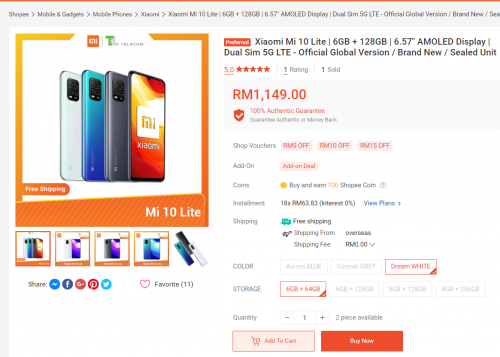 |
| Change to: |  0.0508sec 0.0508sec
 0.84 0.84
 7 queries 7 queries
 GZIP Disabled GZIP Disabled
Time is now: 17th December 2025 - 06:23 AM |
 Quote
Quote