

I hereby present you guys with a video to show that it's of almost no difference with Windows XP's security.

Enjoy~*

And so Windows Vista's reputation is down to the drain again...
This post has been edited by eXPeri3nc3: Apr 25 2007, 10:23 PM
Windows Vista is Safe Enough?, Think Again.
|
|
  Apr 25 2007, 10:22 PM, updated 19y ago Apr 25 2007, 10:22 PM, updated 19y ago
Return to original view | Post
#1
|
 
Senior Member
9,257 posts Joined: Aug 2005 From: Not so sure myself Status: 1+3+3=7   
|
I hereby present you guys with a video to show that it's of almost no difference with Windows XP's security. Enjoy~* And so Windows Vista's reputation is down to the drain again... This post has been edited by eXPeri3nc3: Apr 25 2007, 10:23 PM |
|
|
|
|
|
Apr 26 2007, 02:18 PM
Return to original view | Post
#2
|
|
Senior Member
9,257 posts Joined: Aug 2005 From: Not so sure myself Status: 1+3+3=7
|
Lolz, no problem... Anyway I thought that DEP would have stopped that thing...
 |
|
|
Apr 26 2007, 05:35 PM
Return to original view | Post
#3
|
|
Senior Member
9,257 posts Joined: Aug 2005 From: Not so sure myself Status: 1+3+3=7
|
QUOTE(natakaasd @ Apr 26 2007, 05:34 PM) A Trojan Disabling UAC? Are you sure that is possible? Please do quote source. I want to read on this flaw. (Earnestly, if this happens, UAC is better off being not existent) Ah thanks for the heads up, never came across DEP's article, don't know much about it. DEP can't block Trojans that doesn't attack the computer via Memory Buffer Overflow or anything of that sort. DEP protects the computer from being destabilized or crashing (Which is not often the case with BSODs of XP either  ) )Cheers!   |
|
|
Apr 26 2007, 05:58 PM
Return to original view | Post
#4
|
|
Senior Member
9,257 posts Joined: Aug 2005 From: Not so sure myself Status: 1+3+3=7
|
QUOTE(natakaasd @ Apr 26 2007, 05:42 PM) Extracted from the Integrated Help feature of MS. Read on and Cheers! Does that mean if the detected software is not whitelisted, it'll be shutdown? So one need to manually add it to the exception list? |
|
|
Apr 26 2007, 11:44 PM
Return to original view | Post
#5
|
|
Senior Member
9,257 posts Joined: Aug 2005 From: Not so sure myself Status: 1+3+3=7
|
QUOTE(Hattori @ Apr 26 2007, 11:37 PM) Yes it is possible, but I can't quote a source because it is not something I read and I've seen the possibility of it myself in the "msconfig.msc" section of Vista. Nice addition to the thread.In the msconfig of Vista, under "Tools" section where you have the option to disable UAC. When you select that, you can see the command line that will modify the registry entry to disable UAC on the next reboot in the text box right on the bottom. CODE C:\Windows\System32\cmd.exe /k %windir%\System32\reg.exe ADD HKLM\SOFTWARE\Microsoft\Windows\CurrentVersion\Policies\System /v EnableLUA /t REG_DWORD /d 0 /f 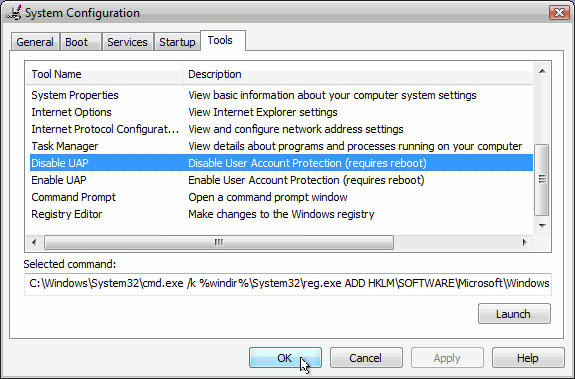 However, I have seen a trojan "hamster huey and the gooey kablooie" firewall that can instantly disable and replace Vista's firewall immediately after clicking the "INNOCENT.EXE" trojan file. It will spoof the firewall functions, and you think your Vista's firewall is active...until you click the double arrow to expand the firewall status in the Security Center and greeted by "Hamster Huey and the Gooey Kablooie firewall" while Vista's original firewall is disabled and set to the second priority selection. So that means as long as the user open a malicious script, Windows Vista is a goner? Sweat  |
|
|
Apr 27 2007, 12:05 AM
Return to original view | Post
#6
|
|
Senior Member
9,257 posts Joined: Aug 2005 From: Not so sure myself Status: 1+3+3=7
|
QUOTE(linkinstreet @ Apr 26 2007, 11:49 PM) And your point is? Does this mean that if you made a malicious script for Linux Kernel or My point is not to discriminate Vista's security, mind you I'm not using it, thus I'm asking that question.Added on April 26, 2007, 11:51 pmBasically this is the same with any OS that has been infected with a malware or worm, and it don't need to be Vista. If a user stupid enough not to install an antivirus and a script blocker, he's not bright enough to use a PC and get mad when it's infected IMO. it's his own doing Also, I had to agree with your second point. If the user basically don't have any decent protection, I got nothing better to say. But, do take note that new malwares do somehow find a way to get into the system undetected. QUOTE(Hattori @ Apr 26 2007, 11:57 PM) The UAC will alert the user of everything that can be run - which is good at first and bad in the long run. I have just the right journal for thisIt will become annoying and then, there will come a time where the user will just unconciously ignore the warning and will keep clicking on the "Allow" button without a second thought. You can see the warning - but your mind will no longer process it and you will straight away click "Allow" on impulse, and when it happens on a malicious script - Boom, your Vista is unprotected or fell back to XP's security level. It is true that Vista is more secure than XP, but users must not be fooled into a false sense of security to think that Vista security feature is so bulletproof that malware cannot get through without the user knowing it. http://proquest.umi.com/pqdweb?index=12&di...&clientId=56115 |
|
|
Apr 28 2007, 03:28 PM
Return to original view | Post
#7
|
|
Senior Member
9,257 posts Joined: Aug 2005 From: Not so sure myself Status: 1+3+3=7
|
QUOTE(pipedream @ Apr 27 2007, 01:09 PM) wait a minute, whats this UAC thingy? i have installed vista on my comp for so long and still no UAC notification popup? Well most of the time it should be a yes.anyway regarding the mallicious scripts, if we install a good anti virus on it, wouldnt it disable the .exe automatically? vista security is not flawless, but if we get other 3rd party anti virus to help protect it more then it will be ok QUOTE(natakaasd @ Apr 27 2007, 08:06 PM) UAC = User Administration Control. (Either this or something of that sort) Ah oh well... Now, now. Cool down chaps.  First, thanks to Hattori for the info on the UAC Disabling Code. Now I understand why you said that UAC can be disabled just like that. If I am NOT mistaken, you can still Alter Registry Data in the HKLM section without being an Admin. Correct me if I am wrong. The restart-only-take-effect Issue has been there all along. If not for it, we can't use KillBox, MoveIt and other Tools. (Note: If you want to know, Google : PendingFileRenameOperations) So, it is a double-edged sword. Many malware also uses this method to make sure they are still alive AND for legitimate programs to run. And IF I am NOT mistaken, There is NO Registry for Linux and MacOS. Thus, they are "safe" from registry based attacks. Correct me if I am wrong too. Agree with linkinstreet on the Stupidity of users. If user stupid, Safest OS becomes the worst one. (It has been quoted over and over again, The Biggest Flaw of Microsoft is The USER Themselves).  Agree with Hattori on the "Accept" issue. In fact, it has been criticised over and over again elsewhere. Cheers!  |
| Change to: |  0.0166sec 0.0166sec
 1.91 1.91
 6 queries 6 queries
 GZIP Disabled GZIP Disabled
Time is now: 23rd December 2025 - 10:32 AM |
 Quote
Quote