Welcome Guest ( Log In | Register )

Outline · [ Standard ] · Linear+

 Mesh VS Extender VS Repeater

views
     
TSFourClover
post Dec 10 2017, 01:53 PM, updated 8y ago

New Member
*
Junior Member
22 posts

Joined: Sep 2016
Good day to all,

After what seemed like forever I've finally convinced TM to have their cables laid and I'll get fibre soon smile.gif

As per title above, I'm looking to cover 5000 sqft worth of usable land and one router's definitely not going to cut it. I've searched a few solutions online and I'm getting results that direct me to Google WiFi, Orbi, AmpliFi, Eero, and Linksys but I'm not sure if they're compatible with UniFi or if they're compatible in Malaysia at all much less the technical jargon that distances their form of transmission whether they're repeaters/extenders/separate nodes.

I'm hoping that there's someone who's had experience in dealing with this since looking up mesh WiFi in N&B section didn't turn up results on the information I'm seeking.

Cheers!


fireballs
post Dec 10 2017, 02:03 PM

10101
*******
Senior Member
5,650 posts

Joined: Mar 2012
post your floor plan here
SilentVampire
post Dec 10 2017, 02:14 PM

Networking Enthusiast
*******
Senior Member
5,714 posts

Joined: Mar 2007


QUOTE(FourClover @ Dec 10 2017, 01:53 PM)
Good day to all,

After what seemed like forever I've finally convinced TM to have their cables laid and I'll get fibre soon smile.gif

As per title above, I'm looking to cover 5000 sqft worth of usable land and one router's definitely not going to cut it. I've searched a few solutions online and I'm getting results that direct me to Google WiFi, Orbi, AmpliFi, Eero, and Linksys but I'm not sure if they're compatible with UniFi or if they're compatible in Malaysia at all much less the technical jargon that distances their form of transmission whether they're repeaters/extenders/separate nodes.

I'm hoping that there's someone who's had experience in dealing with this since looking up mesh WiFi in N&B section didn't turn up results on the information I'm seeking.

Cheers!
*
Mesh WiFi in Malaysia is still at its infancy and it depends on your floor plan, as the mesh WiFi depends on your wireless backhaul. I can say however, that if you want to use mesh WiFi, you will have to find a way for vLAN tagging, as most of the mesh WiFi systems does not support that, which is required for Unifi. Paging bro blacktubi for further clarification. You can see bro backtubi’s website here for reviews on different routers that may suit your purpose better: https://www.blacktubi.com
blacktubi
post Dec 10 2017, 02:25 PM

-
Group Icon
Elite
8,416 posts

Joined: Jul 2008

I would recommend 2 Asus routers since all new Asus routers can do mesh networking and they perform much better.

If you need seamless Unifi compatibility, only Asus Lyra is compatible on a beta firmware that I am testing right now smile.gif

TP-Link Deco Unifi firmware is still WIP.
niakulah
post Dec 11 2017, 11:54 AM

Senior Artisan
******
Senior Member
1,277 posts

Joined: Jun 2012
QUOTE(FourClover @ Dec 10 2017, 01:53 PM)
Good day to all,

After what seemed like forever I've finally convinced TM to have their cables laid and I'll get fibre soon smile.gif

As per title above, I'm looking to cover 5000 sqft worth of usable land and one router's definitely not going to cut it. I've searched a few solutions online and I'm getting results that direct me to Google WiFi, Orbi, AmpliFi, Eero, and Linksys but I'm not sure if they're compatible with UniFi or if they're compatible in Malaysia at all much less the technical jargon that distances their form of transmission whether they're repeaters/extenders/separate nodes.

I'm hoping that there's someone who's had experience in dealing with this since looking up mesh WiFi in N&B section didn't turn up results on the information I'm seeking.

Cheers!
*
I've deployed Cisco mesh before but only as a last resort when the client insisted on not pulling a cable for an extra AP.

What I can tell you is, do not concern yourself about compatibility with Unifi. The Unifi box will remain to do what it needs to, including VLAN tagging. You simply want to replace/upgrade the WIFI portion of your network. And possibly your DHCP server as well.

UNLESS you also want to be able to use HyppTV or the phone line over WiFi, that's when things get complicated.
slaveone
post Dec 11 2017, 11:57 AM

Regular
******
Senior Member
1,231 posts

Joined: Jan 2003
interesting topic
TSFourClover
post Dec 29 2017, 09:36 AM

New Member
*
Junior Member
22 posts

Joined: Sep 2016
Happy holidays and a happy new year to everyone! Many apologies on the extremely late reply, I've been searching around for my floor plan and have only recently found it after digging up some old files.

I do hope I didn't waste your efforts and good intentions.

QUOTE(SilentVampire @ Dec 10 2017, 02:14 PM)
Mesh WiFi in Malaysia is still at its infancy and it depends on your floor plan, as the mesh WiFi depends on your wireless backhaul. I can say however, that if you want to use mesh WiFi, you will have to find a way for vLAN tagging, as most of the mesh WiFi systems does not support that, which is required for Unifi. Paging bro blacktubi for further clarification. You can see bro backtubi’s website here for reviews on different routers that may suit your purpose better: https://www.blacktubi.com
*
QUOTE(blacktubi @ Dec 10 2017, 02:25 PM)
I would recommend 2 Asus routers since all new Asus routers can do mesh networking and they perform much better.

If you need seamless Unifi compatibility, only Asus Lyra is compatible on a beta firmware that I am testing right now smile.gif

TP-Link Deco Unifi firmware is still WIP.
*
Many thanks to SilentVampire for calling blacktubi! I've been looking at your suggestion on using Asus Lyra. Although I'll still be open to other suggestions, it is interesting for me to know that even normal routers have this capability (I'm no expert, unfortunately!). I'll look further into how this can be done since it has compatibility that I require.

QUOTE(niakulah @ Dec 11 2017, 11:54 AM)
I've deployed Cisco mesh before but only as a last resort when the client insisted on not pulling a cable for an extra AP.

What I can tell you is, do not concern yourself about compatibility with Unifi. The Unifi box will remain to do what it needs to, including VLAN tagging. You simply want to replace/upgrade the WIFI portion of your network. And possibly your DHCP server as well.

UNLESS you also want to be able to use HyppTV or the phone line over WiFi, that's when things get complicated.
*
niakulah, I'm currently in focus with upgrading the coverage, but how does one upgrade their DHCP server? Is that problem mitigated or totally avoided if I intend to use the latest routers (Asus Lyra for example)? I foresee myself having issues such as these since I'm in for the Ruby pack that's being offered (on a different topic altogether)

QUOTE(fireballs @ Dec 10 2017, 02:03 PM)
post your floor plan here
*
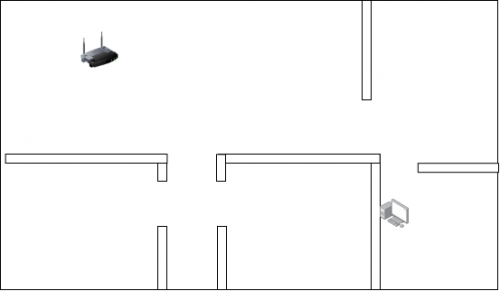
My floor plan is posted in this post as an attachment, do give me your input! I have the floor plan of my ground floor as well but I'm not sure if that's applicable since the first floor shows the rough area size.

Attached Image

Edit: replaced location of attachment id.

This post has been edited by FourClover: Dec 29 2017, 09:37 AM

niakulah
post Dec 29 2017, 10:17 AM

Senior Artisan
******
Senior Member
1,277 posts

Joined: Jun 2012
QUOTE(FourClover @ Dec 29 2017, 09:36 AM)
Happy holidays and a happy new year to everyone! Many apologies on the extremely late reply, I've been searching around for my floor plan and have only recently found it after digging up some old files.

I do hope I didn't waste your efforts and good intentions.
Many thanks to SilentVampire for calling blacktubi! I've been looking at your suggestion on using Asus Lyra. Although I'll still be open to other suggestions, it is interesting for me to know that even normal routers have this capability (I'm no expert, unfortunately!). I'll look further into how this can be done since it has compatibility that I require.
niakulah, I'm currently in focus with upgrading the coverage, but how does one upgrade their DHCP server? Is that problem mitigated or totally avoided if I intend to use the latest routers (Asus Lyra for example)? I foresee myself having issues such as these since I'm in for the Ruby pack that's being offered (on a different topic altogether)
My floor plan is posted in this post as an attachment, do give me your input! I have the floor plan of my ground floor as well but I'm not sure if that's applicable since the first floor shows the rough area size.

Attached Image

Edit: replaced location of attachment id.
*
For example, if you are having a wifi system with multiple SSIDs(Guests? Dedicated 5GHz for certain devices? Home automation network?), you may or may not want to isolate them into separate VLANs/subnets (not to be confused with TM Unifi's Data/IPTV/VOIP VLANs, these are internal network use only and the gateway of all internal VLANs/subnets will eventually go to TM's Data VLAN, or possibly not at all if you don't want those devices to have internet access).

In this scenario, using the DHCP server that comes with TM's devices will not work as they don't support multiple DHCP scopes(on the few devices I have seen from TM).

Sorry but I'm not familiar with Asus routers. My job mostly involves enterprise level equipment and so for home/consumer level equipment, I only know what I personally own.
19 Degree South
post Dec 29 2017, 01:10 PM

Regular
******
Senior Member
1,681 posts

Joined: Oct 2012
The repeater provide only half in speed but better than nothing!
raymond82
post Dec 29 2017, 01:32 PM

Getting Started
**
Junior Member
83 posts

Joined: Jul 2015
look at yr floor plan, i think one ap is more than enough to cover, why bother to add another wifi point

hehe, i juz dun like to sleep with strong wifi

This post has been edited by raymond82: Dec 29 2017, 01:33 PM
19 Degree South
post Dec 29 2017, 01:37 PM

Regular
******
Senior Member
1,681 posts

Joined: Oct 2012
QUOTE(raymond82 @ Dec 29 2017, 01:32 PM)
look at yr floor plan, i think one ap is more than enough to cover, why bother to add another wifi point

hehe, i juz dun like to sleep with strong wifi
*
If one has a thick wooden bedroom door, the signal penetration rate is weak! Happen to me! 5000 sq ft with two floors is quite a large area!
fireballs
post Dec 29 2017, 02:53 PM

10101
*******
Senior Member
5,650 posts

Joined: Mar 2012
form the floor plan, looks like one is enough to cover indoors on first floor.
put in cat6 cable for ground floor and also outdoors.

if you are renovating now, cable is the most reliable way


raymond82
post Dec 30 2017, 12:34 AM

Getting Started
**
Junior Member
83 posts

Joined: Jul 2015
QUOTE(19 Degree South @ Dec 29 2017, 01:37 PM)
If one has a thick wooden bedroom door, the signal  penetration  rate is weak! Happen to me! 5000 sq ft with two floors is quite a large area!
*
wooden door wont decrease wifi much -6dbm
brick wall -12dbm
if fire resistant doors difference story -15dbm


i been working as network engineer for few year, mainly design wireless network for hospitality
did you see any hotel is using mesh/repeater solution....no right? sweat.gif


if you insisting wanna setup a mesh network....i'd suggest go for mikrotik,cheap and reliable


19 Degree South
post Dec 30 2017, 01:08 PM

Regular
******
Senior Member
1,681 posts

Joined: Oct 2012
QUOTE(raymond82 @ Dec 30 2017, 12:34 AM)
wooden door wont decrease wifi much -6dbm
brick wall -12dbm
if fire resistant doors difference story -15dbm
i been working as network engineer for few year, mainly design wireless network for hospitality
did you see any hotel is using mesh/repeater solution....no right? sweat.gif
if you insisting wanna setup a mesh network....i'd suggest go for mikrotik,cheap and reliable
*
OIC! My router is at the ground floor and guessed it's quite a distance for,the signal to travel to the bedroom on the first floor! I am using a range extender now but that doesn't help much! Lol!
Darren
post Dec 30 2017, 01:36 PM

Regular
******
Senior Member
1,324 posts

Joined: Jan 2003
From: Kepong


If all of you are heavy user, then just pull LAN cable from 1st to 2nd to 3rd floor.
Darren
post Dec 30 2017, 01:36 PM

Regular
******
Senior Member
1,324 posts

Joined: Jan 2003
From: Kepong


If all of you are heavy user, then just pull LAN cable from 1st to 2nd to 3rd floor.
Lushtree
post Dec 31 2017, 12:05 PM

Getting Started
**
Junior Member
103 posts

Joined: Aug 2012


i would recommend you try Ruckus AP. Recently i installed a R510 to cover about 6100 sqft in my office, the coverage is very good.


Added:
https://www.ruckuswireless.com/products/acc...s/ruckus-indoor

This post has been edited by Lushtree: Dec 31 2017, 12:06 PM
soonwai
post Dec 31 2017, 08:22 PM


********
All Stars
11,458 posts

Joined: Oct 2007
From: KL


TS, any chance of pulling LAN cables to each floor? If can, use a network of wired APs. It’ll be much more reliable than going fully wireless.
19 Degree South
post Jan 1 2018, 11:19 AM

Regular
******
Senior Member
1,681 posts

Joined: Oct 2012
QUOTE(Lushtree @ Dec 31 2017, 12:05 PM)
i would recommend you try Ruckus AP. Recently i installed a R510 to cover about  6100 sqft in my office, the coverage is very good.
Added:
https://www.ruckuswireless.com/products/acc...s/ruckus-indoor
*
Off space should be ok coz no flooring and usually partition is of chipboard! The challenge is house with floorings and thick walls! But the AP looks good!
raymond82
post Jan 1 2018, 05:35 PM

Getting Started
**
Junior Member
83 posts

Joined: Jul 2015
QUOTE(Lushtree @ Dec 31 2017, 12:05 PM)
i would recommend you try Ruckus AP. Recently i installed a R510 to cover about  6100 sqft in my office, the coverage is very good.
Added:
https://www.ruckuswireless.com/products/acc...s/ruckus-indoor
*
very powerful AP, can support up to 500 connection(without auth), but really expensive drool.gif
introduce another brand, xclaim, subsidiary of ruckus, aiming entry-level enterprise market

This post has been edited by raymond82: Jan 1 2018, 05:40 PM
Lushtree
post Jan 2 2018, 05:19 PM

Getting Started
**
Junior Member
103 posts

Joined: Aug 2012


QUOTE(raymond82 @ Jan 1 2018, 05:35 PM)
very powerful AP, can support up to 500 connection(without auth), but really expensive drool.gif
introduce another brand, xclaim, subsidiary of ruckus, aiming entry-level enterprise market
*
It's true the Ruckus AP will cost more compare to consumer type Wifi router or AP, however it offer extensive signal coverage and greater flexibility, its perfectly fine with large house like 5000+ spft.

The Unleashed version AP can act as a controller, no need to attack to AP controller like Cisco Aironet does.

The XClaim is not the same as Ruckus's BeamFlex, never used before.


jio
post Jan 2 2018, 06:41 PM

Casual
***
Junior Member
383 posts

Joined: May 2005
Ruckus Unleashed AP is a good choice if you have the budget. XClaim is not worth considering as Ruckus R310 is not much different in price than XClaim XI-3. Ruckus BeamFlex and other enterprise AP with similar active directional antenna array is so much better than those omni directional APs in crowded environment. Much better than wasting money on fugly behemoth white elephant tri-band wifi router.


Some rants
» Click to show Spoiler - click again to hide... «

raymond82
post Jan 2 2018, 10:49 PM

Getting Started
**
Junior Member
83 posts

Joined: Jul 2015
QUOTE(jio @ Jan 2 2018, 06:41 PM)
Ruckus Unleashed AP is a good choice if you have the budget. XClaim is not worth considering as Ruckus R310 is not much different in price than XClaim XI-3. Ruckus BeamFlex and other enterprise AP with similar active directional antenna array is so much better than those omni directional APs in crowded environment. Much better than wasting money on fugly behemoth white elephant tri-band wifi router.
Some rants
» Click to show Spoiler - click again to hide... «

*
user posted image
Xclaim Xi-3 249USD

user posted image
Rukus R500 550USD


yes, you point out the true

This post has been edited by raymond82: Jan 2 2018, 11:00 PM
dk999
post Sep 8 2018, 09:02 PM

Casual
***
Junior Member
474 posts

Joined: Jan 2005


Want to tumpang, I have a 3000 sqft office using 2 consumer wifi router as ap.

Currently there are many drop connections the wifi will get disconnected and devices cannot get reconnected.

What's the recommendation to cater to an office setting? I think consumers routers not suitable for such application.

Area is small and unobstructed but about 50 to 100 devices connected. Any idea what hardware needed? Using a good router perhaps? What is recommended.

Used for printer connection n internet usage

This post has been edited by dk999: Sep 8 2018, 09:03 PM
SilentVampire
post Sep 8 2018, 09:24 PM

Networking Enthusiast
*******
Senior Member
5,714 posts

Joined: Mar 2007


QUOTE(dk999 @ Sep 8 2018, 09:02 PM)
Want to tumpang, I have a 3000 sqft office using 2 consumer wifi router as ap.

Currently there are many drop connections the wifi will get disconnected and devices cannot get reconnected.

What's the recommendation to cater to an office setting? I think consumers routers not suitable for such application.

Area is small and unobstructed but about 50 to 100 devices connected. Any idea what hardware needed? Using a good router perhaps? What is recommended.

Used for printer connection n internet usage
*
Of course it can't support, as consumer routers are not powerful enough for too many devices. You need enterprise routers and AP, either Mikrotik or Ubiquiti or Ruckus. Get a networking company to do it if you are unsure. You will want to implement WPA-Enterprise, if possible, with VLAN segmentation, for security reasons.
dk999
post Sep 8 2018, 09:48 PM

Casual
***
Junior Member
474 posts

Joined: Jan 2005


If for low cost? Which is the suggested hardware? Are rm 1-2k routers good enough or should use those business celling ap?

This post has been edited by dk999: Sep 8 2018, 09:51 PM
k town shit
post Nov 7 2020, 12:50 AM

Enthusiast
*****
Junior Member
771 posts

Joined: Jan 2009
QUOTE(FourClover @ Dec 10 2017, 12:53 PM)
Good day to all,

After what seemed like forever I've finally convinced TM to have their cables laid and I'll get fibre soon smile.gif

As per title above, I'm looking to cover 5000 sqft worth of usable land and one router's definitely not going to cut it. I've searched a few solutions online and I'm getting results that direct me to Google WiFi, Orbi, AmpliFi, Eero, and Linksys but I'm not sure if they're compatible with UniFi or if they're compatible in Malaysia at all much less the technical jargon that distances their form of transmission whether they're repeaters/extenders/separate nodes.

I'm hoping that there's someone who's had experience in dealing with this since looking up mesh WiFi in N&B section didn't turn up results on the information I'm seeking.

Cheers!
*
I also have this issue in my house, due to two corner walls between the Router and my room, my wifi signal is kind of weak, I'm also looking for a Mesh rather than Extender, I heard Mesh is better as it doesn't divide the LAN into 2, but the cost of it is expensive.
Have you found the best solution to your house? Could u please recommend one?
pl95077
post Nov 7 2020, 02:11 PM

Getting Started
**
Junior Member
245 posts

Joined: Feb 2010
QUOTE(k town shit @ Nov 7 2020, 01:50 AM)
I also have this issue in my house, due to two corner walls between the Router and my room, my wifi signal is kind of weak, I'm also looking for a Mesh rather than Extender, I heard Mesh is better as it doesn't divide the LAN into 2, but the cost of it is expensive.
Have you found the best solution to your house? Could u please recommend one?
*
Maybe you can share more, such as your house size, broadband speed....
SUSceo684
post Nov 8 2020, 12:02 AM

Component Burner
********
All Stars
11,667 posts

Joined: Jan 2003
From: Klang/Subang


QUOTE(dk999 @ Sep 8 2018, 09:02 PM)
Want to tumpang, I have a 3000 sqft office using 2 consumer wifi router as ap.

Currently there are many drop connections the wifi will get disconnected and devices cannot get reconnected.

What's the recommendation to cater to an office setting? I think consumers routers not suitable for such application.

Area is small and unobstructed but about 50 to 100 devices connected. Any idea what hardware needed? Using a good router perhaps? What is recommended.

Used for printer connection n internet usage
*
One consumer router (intended for home use) is designed for average use of 5-10 devices. More than that it will become overloaded and bog down something like using a kancil to pull a TEU container.

This is way more than the designed usage. Enterprise AP (with the crab legs) comes with better features, 3x3 or 4x4 MIMO and the CPU that is able to cater for all the many simultaneous clients.

Aruba (by HP) will be the minimum standard, Cisco solution is good but costs more.

This post has been edited by ceo684: Nov 8 2020, 12:03 AM
k town shit
post Nov 8 2020, 06:54 PM

Enthusiast
*****
Junior Member
771 posts

Joined: Jan 2009
QUOTE(pl95077 @ Nov 7 2020, 01:11 PM)
Maybe you can share more, such as your house size, broadband speed....
*
I'm using that one from Time Fibre 100 mbps; my Condo is about 1200 sq ft.
My Route is located on the left side of my house, while my working room is on the Right Side of my house, this is a Single Floor

user posted image

I heard that Mesh Network will reduce the Network speed, my friend said this is the downside of choosing Mesh Network, but I'm not sure
I work from home nowadays, sometimes the Signal fall to 30% only, when I'm online meeting, the call quality isn't good
afif92
post Nov 8 2020, 10:39 PM

Casual
***
Junior Member
374 posts

Joined: Mar 2010
QUOTE(k town shit @ Nov 8 2020, 06:54 PM)
I'm using that one from Time Fibre 100 mbps; my Condo is about 1200 sq ft.
My Route is located on the left side of my house, while my working room is on the Right Side of my house, this is a Single Floor

user posted image

I heard that Mesh Network will reduce the Network speed, my friend said this is the downside of choosing Mesh Network, but I'm not sure
I work from home nowadays, sometimes the Signal fall to 30% only, when I'm online meeting, the call quality isn't good
*
But still Mesh is better if don't want to use LAN cable. The configuration like the location of both node and router must be improved to get better speed and latency.
k town shit
post Nov 9 2020, 09:38 PM

Enthusiast
*****
Junior Member
771 posts

Joined: Jan 2009
QUOTE(afif92 @ Nov 8 2020, 09:39 PM)
But still Mesh is better if don't want to use LAN cable. The configuration like the location of both node and router must be improved to get better speed and latency.
*
Will Mesh network reduce the speed (Bandwidth) to my Laptop? Let's say I'm having 100 mbps of internet speed, if my laptop connected to the Mesh Network, I'll only get 50 mbps only... I heard this from my friend, but I'm not sure how true is it
goldfries
post Nov 9 2020, 09:47 PM

40K Club
Group Icon
Forum Admin
44,415 posts

Joined: Jan 2003


QUOTE(k town shit @ Nov 9 2020, 09:38 PM)
Will Mesh network reduce the speed (Bandwidth) to my Laptop? Let's say I'm having 100 mbps of internet speed, if my laptop connected to the Mesh Network, I'll only get 50 mbps only... I heard this from my friend, but I'm not sure how true is it
Can't generalize mesh like that, see the specs also.

TP-Link Deco X60 for example has Wi-Fi 6 and I tested, practically my whole house full speed.

I tried using other cheaper Mesh before, the coverage is good but speed was dismal. Still better relying than sole router when some areas are dead.

afif92
post Nov 10 2020, 11:48 PM

Casual
***
Junior Member
374 posts

Joined: Mar 2010
QUOTE(k town shit @ Nov 9 2020, 09:38 PM)
Will Mesh network reduce the speed (Bandwidth) to my Laptop? Let's say I'm having 100 mbps of internet speed, if my laptop connected to the Mesh Network, I'll only get 50 mbps only... I heard this from my friend, but I'm not sure how true is it
*
if 100Mbps, you can easily max out if mesh wifi have dedicated backhaul. If no backhaul, you also can easily achieved max speed but ensure that not much users connected at that time.

For example, I'm using Asus XT8, if not much user currently using wifi, I can easily achieved 500Mbps just by using AC 2x2 device.

Note: The speedtest speed also affected by different speedtest server. So, you could try a few until satisfied.


Change to:
| Lo-Fi Version
0.0263sec    0.47    6 queries    GZIP Disabled
Time is now: 15th December 2025 - 10:23 AM