QUOTE(Vistatic @ Sep 3 2008, 11:27 AM)
» Click to show Spoiler - click again to hide... «
sigh, another Who-Knows-Everything
I do like your constructive reply, seriously.
1.I did not mention that HDMI convert anything from my statement. I was trying to say High-contain-Data/Big-Size-Data require to have proper constructed 'Lane' to move to and fro output to input and the otherwise. If a HDMI cable is made just to transmit basic video and sound, normally a cheap/free HDMI cable will do the job. Yet, from Blue-Ray disc itself containing so much data, a cheap/free HDMI cable will not be able to accomodate everything from features I had mentioned earlier. Therefore, it's not just a give and take 'raw' information.
As for material use for HDMI construction, not every manufacturer especially free given or cheap HDMI take much of consideration few features such as 75 ohms construction of each cooper use inside, Dielectric injection, Foil-shielding(how many layer), capability to reject EMI/RFI and few more. Even for some cable claim to be 24K Plated connected, but to what extend. I had 'dissected' quite a few of those free/cheap HDMI cables together with expensive cables. The result, those cheap cables only covering the head only but not the shouldering area.
2. Cable will not damage, but how can you guarantee that? Abuse given to the cables such as snapping the cable body rather than the connector, going to in-wall to hide the cable for wall-mounting Flat Screen, and few more will affect the transmission of high-speed data. Only a few HDMI manufacturer in the world introducing "Stress Relief" constraint to avoid conductors to be disconnected from the connector due to hard plug/unplug situation.
3. Talking about networking, I am not that familiar (is this still relating to HDMI? ). Put my arguement into this, 4 cars trying to move fast but squeezing into 1 Lane road. Will those 4 cars/data able to transmit smoothly? Probably, 1 car/data will be left behind. Go figure.
4. This year 2008 ICES already displayed a 2160P TV Samsung 3840 x 2160, DLP manufacturing 240HZ and 2009 ICES will be showing more technologies(hope I'm going Las Vegas). Oh yes, I do know DVI and HDMI works the very same way but in case you don't know, DVI doesnt send audio. *wink.
At first I thought you change your Plasma from 1024x to 1600x, haha, heck no, you were only playing around with computer resolution. LOL. So you only changing only on computer monitor, not from Blue Ray/AV Receiver/Full-HD TV. Hahahaha. Now only I know, probably I can rest my case here as my statement only applies to Blue Ray/AV Receiver/Full-HD TV, nothing to do with computer.
5. Ops, typo error on Master of Bitstream. Suppose to be True HD Audio/ Master Audio running on Bitstream. HDMI today only supports 4.4GB p/s but some applications/hardwares are already on 6.68Gbps. If the mentality that all HDMI are the same, you are already far way behind. The HDMI built yesteryear will not be able to support the tremendous amount of high speed data transmit from the sources to the inputs. No way it will be giving a total 100%. And HDMI is not just about 0 and 1. Only a typical cheap-skate who not willing to spend on Performance cables for their expensive Full HD TV/Receiver/Blu-Ray player will have that kinda thinking. Never ever compromise the need for speed on HDMI cables.
Additional
6. My arguement on HDMI is not meant just to video. It applies to the features of audio, CEC, bit colors, speed-rating, refresh rates and many more.
I serious do recommending you to understand my statements here before you commenting relating to computer monitor, which is not my point of statements at all. Oh yes, some companies do pay good $$ for gettng review. Try do researches into SimPlay Labs website to see which cables had been certified.
I do stand to be corrected.

Epic! lol. ok ill try keep the reply short and sum it up

1. Noted and agree with the first 3 sentences from 1st Para. disagree with the last 2 sentences (ill get to it, relax

) on the 2nd para, i shouldve been more clear with my definition of proper constructed cables.. lemme add in 1 more line to it.. "obeys basic hdmi standards"
2. if they do damage, then they fall from my definition of proper constructed cables
so point 2 is moot
3. if the hdmi cables follow those basic standards, it WILL be able to accommodate those 4 cars. unless the feeder if sending a non-standard bandwidth, then its not the cables fault now is it?
4. noted first para, and i never said dvi sends audio

. for the 2nd para, zoom out, turn left, then zoom in.. u were focusing on the wrong point.. my point was simply, with increased resolution (i.e. increased bandwidth) one didnt have to change dvi cables. n yes like uve pointed out that its a matter of media (bluray/hdtv/etc) but if u look at the cable and what its doing ull see that its essentially doing the same thing, sending signals. eventhough dvi only contains video and not audio, IT still pushes more resolution than the current 1.3 hdmi can support. and sigh, even then u dont hear anyone changing their dvi cable do u?
5. noted ur typo. But i never said all HDMI are the same. I am talking about HDMI Cables. not the HDMI standard. lol pointless angst in between there, now on ur last sentence, as long as it follows a proper construction then u will not be compromising anything but waste
6. noted. but we're talking about the cables. not the standards.
now, sorry for my short reply for 1-6, dont worry, theres more to come
. firstly i do understand what ur saying. u seem like u understand mine. but as i said in no.4, u gotta zoom out and turn left then zoom in again. If you digg my first 2 replies to u, im sure u will fine this line
QUOTE
itll perform the same even up to 15ft distance
comparing monsters to the masses..
now i will post a test done by audioholics.com for different HDMI cables transmitting various signals over various length in their HDMI cables test
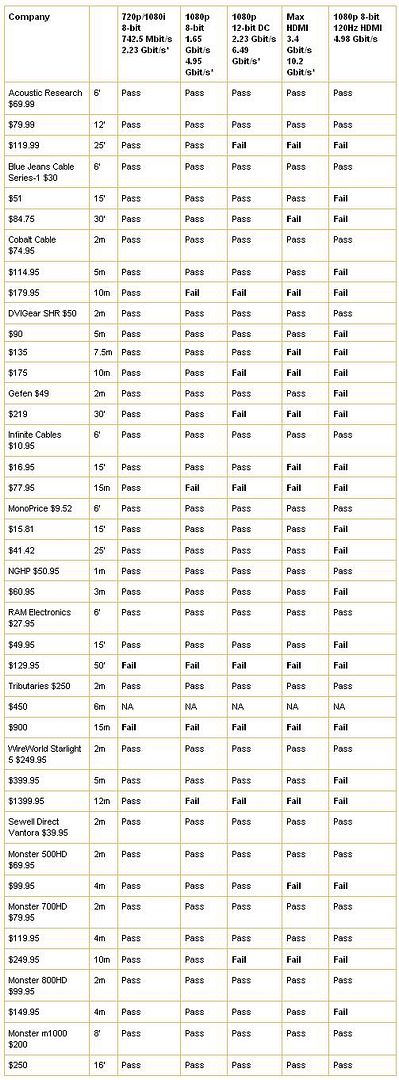
hehe notice that all of them performed the same under short distance?? hehe
A test done by Popularmechanics.com yielded the following
linkThe Results
None of our editors could tell the difference. The fact is, HDMI is digital, meaning you either get the feed or you don’t. High prices and gimmicks like gold-plating don’t affect 1s and 0s. Our advice: Purchase your wiring online for cheap, and use the saved money to upgrade to a larger flat screengo to the link and read what other engineers, tv broadcasters, and other experienced technical guys have to say about it
. real world > test labs ftw
now for another real world test from Gizmodo.
linkwhere they conlcluded the following:
• It never pays to buy a Monster cable first. It doesn't even make sense to buy the "marked down" $50 cable you can buy if you don't want Monster. Go online, order your cables, and wait.
• Even if you're going for the long haul, try a cheaper cable from a reliable vendor first. Monoprice isn't the only one. During this process I've spoken with good people at FireFold, DataPro International, and others, and tested an assortment of discount products, with no noticeable problems. I am confident that, if a vendor has a solid return policy and satisfaction guarantee, you should feel free to buy even a super-long cable from a discount house. In the case of my 50-footer noise, a quick return would have been all that was required.
• Monster has a point about future-proofing. I have no doubt, given our testing, that Monster cables can outperform other cables in video formats that are not yet in use. What does this mean for a consumer?
Does it make sense to spend $300 now on a 50-foot cable, assuming you will spend thousands to upgrade all of your video equipment around it in the next few years? Logic dictates that the answer is no.• The only people who should buy Monster cable are people who light cigars with Benjamins. Fortunately for Monster, there are plenty of those people. They're not even suckers, they are just rich as hell, and want the best. This testing did not prove that Monster is not the best. It just proved that the best is, for the most part, unnecessary.
-----
now.. As an engineer, I'm not against spending good money on cables.. in fact, i just bought bettercables interconnect cable for my sub, and a silly VDH cables for my astro needs... but at least the science makes sense (i.e. cable structure has a impact on signal strength/quality/RFI etc), even if the end result is questionable to some people.
Unfortunately, when you go digital its just not as relevant -'unless' you are going long distances.... So, for your bluray, ps3 etc to a screen <15ft away, please dont spend upwards of 200rm on a cable... bottom line, if ur cheap hdmi cable dont work, then it is merely faulty, just go back and change for a new one
i shall repeat, the premise of my 1st reply was and still is that at distance of < 15ft away, then it does not pay to buy EXPENSIVE MONSTERS
-- Pong
This post has been edited by callmevil: Sep 3 2008, 02:28 PM 

 Aug 19 2008, 10:30 PM


 support this~ digital all the way.. if only my speakers have hdmi in.. then no more hassle of getting out-of-this world priced analogue wires for them.. id rather pay for speakers with built in soundcard+hdmi ins than wires....
 Quote
Quote Read the HDMI warning from the manual.....

 sorry!! lol i tried too~~ i used the simplest sentence structure i could think off edi to keep it as short as possible.. lol fogip me puhleezz


 0.0210sec
 0.41
0.41
 7 queries
 GZIP Disabled