Welcome Guest ( Log In | Register )

Bump Topic Topic Closed RSS Feed

Outline · [ Standard ] · Linear+

OS Epson Dot Matrix Fail Printing, After Latest Windows Update

views
     
TSKeatsan
post Nov 17 2017, 09:32 AM, updated 7y ago

If it ain't broke, don't 6ix it
******
Senior Member
1,218 posts

Joined: Jan 2010
From: Today 06.09 am
UPDATED v3

All affected OS should have it's Windows Update fix released by now


KB4055038Windows 7, 8.1

QUOTE
This update addresses an issue that prevents some Epson SIDM (Dot Matrix) and TM (POS) printers from printing on x86-based and x64-based systems.


Thanks Eventless for informing.

KB4055254Win10 1703 Build 15063.729

QUOTE
Addressed issue that affected some Epson SIDM (Dot Matrix) and TM (POS) printers, which were failing to print on x86-based and x64-based systems. This issue affects KB4048954.


KB4051963Win10 1709 Build 16299.98

QUOTE
Addressed issue that impacted some Epson SIDM (Dot Matrix) and TM (POS) printers, which were failing to print on x86 and x64-based systems. This issue affects KB4048955.


------------------------------------------------------------------------------------------------------------------------------------------------------

My site suddenly receives massive calls informing that users are unable to print to Epson Dot Matrix printers. shakehead.gif

And after a heck load of troubleshooting, and touching stuff, rclxub.gif I found out that this is due to a Windows update. (wtf?)

Printers I can confirm that are not working after the updates are:

Epson LQ-300
Epson LQ-300+ II
Epson LQ310
Epson LX300
Epson LQ590
Epson LQ680C
Epson LQ690C
Epson LQ2180
Epson LQ2190
Epson LQ730K

Issues

Windows Updates have been issued for Windows 7, 8 and 10 and they are all having the same issue. The updates are:

Windows 7 KB4048957
Windows 8 KB4048958
Windows 10 KB4048952, KB4048953, KB4048954, KB4048955

After installing this update, some Epson SIDM and Dot Matrix printers cannot print on x86 and x64-based systems.Microsoft and Epson have determined the cause of the issue and are working on a solution. This problem is not related to the printer driver, so installing current or older print drivers will not resolve the issue. Microsoft will provide an update in an upcoming release.

So far, only these updates are messing the with Epson Printer.

Temporary Solution

To get your printers working again, the quickest way is to remove the offending update. The quickest way is to run the following commands in an elevated command prompt: thumbsup.gif

TAKE NOTE
Win 10 users, please enable system restore before removing KB4048953, KB4048954 or KB4048955. Been getting reports, unable to boot upon reboot. And also, prepare a Win10 ISO to repair in case it fails.

CODE
   wusa /uninstall /kb:4048952 /quiet /warnrestart
   wusa /uninstall /kb:4048953 /quiet /warnrestart
   wusa /uninstall /kb:4048954 /quiet /warnrestart
   wusa /uninstall /kb:4048955 /quiet /warnrestart
   wusa /uninstall /kb:4048957 /quiet /warnrestart
   wusa /uninstall /kb:4048958 /quiet /warnrestart


Edited - Add on Temporarily Prevent Update.


How to temporarily prevent a Windows Update from reinstalling in Windows 10

To temporarily prevent the update from being reinstalled until an updated fix is available, a troubleshooter is available that provides a user interface for hiding and showing Windows Updates and drivers for Windows 10. You can obtain and run the "Show or hide updates" troubleshooter by downloading it from the Microsoft Download Center:

https://support.microsoft.com/en-us/help/31...alling-in-windo

This post has been edited by Keatsan: Dec 21 2017, 02:29 PM
loki
post Nov 17 2017, 09:36 AM

Look at all my stars!!
*******
Senior Member
2,109 posts

Joined: Jan 2003
From: Damansara Damai, PJ


great info. thanks. save us the trouble of troubleshooting... thanks again
TSKeatsan
post Nov 17 2017, 09:38 AM

If it ain't broke, don't 6ix it
******
Senior Member
1,218 posts

Joined: Jan 2010
From: Today 06.09 am
QUOTE(loki @ Nov 17 2017, 09:36 AM)
great info. thanks. save us the trouble of troubleshooting... thanks again
*
Tell me about it. Fire-fighting all PCs and uninstall affected updates. doh.gif
lucifah
post Nov 17 2017, 09:38 AM

St. Fu
Group Icon
Staff
7,948 posts

Joined: Jan 2005
From: Soviet Sarawak


QUOTE(Keatsan @ Nov 17 2017, 09:32 AM)
My site suddenly receives massive calls informing that users are unable to print to Epson Dot Matrix printers.  rclxub.gif

And after a heck load of troubleshooting, and touching stuff,  rclxub.gif I found out that this is due to a Windows update. (wtf?)

Printers I can confirm that are not working after the updates are:

    |Epson LQ-300|
    |Epson LQ-300+ II|
    |Epson LQ310|
    |Epson LX300|
Epson LQ590
Epson LQ680C
Epson LQ690C
    |Epson LQ2180|
    |Epson LQ2190|
    |Epson LQ730K|

Solution

Windows Updates have been issued for Windows 7, 8 and 10 and they are all having the same issue. The updates are:

    |Windows 7| KB4048957 |
    |Windows 8 |KB4048958 |
    |Windows 10 |KB4048952, KB4048953, KB4048954, KB4048955|

After installing this update, some Epson SIDM and Dot Matrix printers cannot print on x86 and x64-based systems.Microsoft and Epson have determined the cause of the issue and are working on a solution. This problem is not related to the printer driver, so installing current or older print drivers will not resolve the issue. Microsoft will provide an update in an upcoming release.

So far, only these updates are messing the with Epson Printer.

To get your printers working again, the quickest way is to remove the offending update. The quickest way is to run the following commands in an elevated command prompt:\  thumbsup.gif

CODE
   wusa /uninstall /kb:4048952 /quiet /warnrestart
   wusa /uninstall /kb:4048953 /quiet /warnrestart
   wusa /uninstall /kb:4048954 /quiet /warnrestart
   wusa /uninstall /kb:4048955 /quiet /warnrestart
   wusa /uninstall /kb:4048957 /quiet /warnrestart
   wusa /uninstall /kb:4048958 /quiet /warnrestart

*
ah, thanks. i also have this stupid problem. god damn win10
TSKeatsan
post Nov 17 2017, 09:40 AM

If it ain't broke, don't 6ix it
******
Senior Member
1,218 posts

Joined: Jan 2010
From: Today 06.09 am
QUOTE(lucifah @ Nov 17 2017, 09:38 AM)
ah, thanks. i also have this stupid problem. god damn win10
*
Hopefully you can stop or hide the updates for now. As for Win10, I believe you can pause windows update. Wait till Microsoft and Epson finish yc, eat cakes, golfing and spa....then only back to drawing board to fix this problem !

/404
lucifah
post Nov 17 2017, 09:42 AM

St. Fu
Group Icon
Staff
7,948 posts

Joined: Jan 2005
From: Soviet Sarawak


so do i need to restart system nao after running the commands?

TSKeatsan
post Nov 17 2017, 09:45 AM

If it ain't broke, don't 6ix it
******
Senior Member
1,218 posts

Joined: Jan 2010
From: Today 06.09 am
QUOTE(lucifah @ Nov 17 2017, 09:42 AM)
so do i need to restart system nao after running the commands?
*
Yeap. Restart it whenever possible.

I added the warn restart in case user is doing stuff with Excel / Words. lol
lucifah
post Nov 17 2017, 09:57 AM

St. Fu
Group Icon
Staff
7,948 posts

Joined: Jan 2005
From: Soviet Sarawak


still uninstalling updates

god damn windows. i thought the previous update just corrupted the driver so i reinstalled driver, also kenot. i changed new usb cable also kenot.

everytime got massive update my epson printer kena
TSKeatsan
post Nov 17 2017, 10:01 AM

If it ain't broke, don't 6ix it
******
Senior Member
1,218 posts

Joined: Jan 2010
From: Today 06.09 am
QUOTE(lucifah @ Nov 17 2017, 09:57 AM)
still uninstalling updates

god damn windows. i thought the previous update just corrupted the driver so i reinstalled driver, also kenot. i changed new usb cable also kenot.

everytime got massive update my epson printer kena
*
Me : Yes, what's up?
User 1 : Printer cannot print !
Me : *walks over*
User 1 : User 2 and 3 also same thing leh!
Me : Unplugs cable, check power, check setting, reinstall driver, check Application settings, check physical printer, check ribbon, check stucked paper......*KNS WHAT HAPPEN WOR*
User 1 : How long will this take? NEED TO PRINT NAUGHHHHWWHWHHHH
Me : ok.
myself379
post Nov 17 2017, 10:25 AM

Paamayim Nekudotayim
****
Senior Member
536 posts

Joined: Jun 2009
From: Earth
I spend my 2 whole day (including nights) just to support why the heck printer dot matrix is not working. Then, the next day the whole HQ dot matrix is not working. But it give me the clues because the affected are Epson. Panasonic is not affected.

Production site can't issue invoices and receipts, caused long queues. Thank you for this post. notworthy.gif

But as I know, Windows 10 home and Windows 8.1 can't disable update. Any one have clue how to solve this?
myself379
post Nov 17 2017, 10:29 AM

Paamayim Nekudotayim
****
Senior Member
536 posts

Joined: Jun 2009
From: Earth
QUOTE(Keatsan @ Nov 17 2017, 10:01 AM)
Me : Yes, what's up?
User 1 : Printer cannot print !
Me : *walks over*
User 1 : User 2 and 3 also same thing leh!
Me : Unplugs cable, check power, check setting, reinstall driver, check Application settings, check physical printer, check ribbon, check stucked paper......*KNS WHAT HAPPEN WOR*
User 1 : How long will this take? NEED TO PRINT NAUGHHHHWWHWHHHH
Me : ok.
*
How you handle the stress boss? When accounts department keep pushing and blaming you while cursing you when you're working on the solution. Worst they sit besides you and keep asking why why why why. How to control these situation boss? Tell them to stfu until we found the solution?? They'll said

"walao so arrogant, think you're boss is it? Think we don't need you ar? They are plenty of IT support out there and our management can hire anytime, you need to count your blessings that you got a job here. Walao leh, waste our time cannot print still got face to complaint"

Wisom please icon_question.gif icon_question.gif
lucifah
post Nov 17 2017, 10:30 AM

St. Fu
Group Icon
Staff
7,948 posts

Joined: Jan 2005
From: Soviet Sarawak


oh yeahhh... tq Keatsan

save me from major headache. my next course would have been buying a new printer liao. i tot i fried the printer mobo

surprisingly, my other terminals which is on win7pro has no probs
myself379
post Nov 17 2017, 10:31 AM

Paamayim Nekudotayim
****
Senior Member
536 posts

Joined: Jun 2009
From: Earth
QUOTE(lucifah @ Nov 17 2017, 10:30 AM)
oh yeahhh... tq Keatsan

save me from major headache. my next course would have been buying a new printer liao. i tot i fried the printer mobo

surprisingly, my other terminals which is on win7pro has no probs
*
Probably the updates haven't reached they yet or it's disabled. Some of my colleague PC can print too.
wata
post Nov 17 2017, 10:37 AM

Getting Started
**
Junior Member
215 posts

Joined: Dec 2009
From: Perak


THANK YOU SO MUCH !!!
lucifah
post Nov 17 2017, 10:40 AM

St. Fu
Group Icon
Staff
7,948 posts

Joined: Jan 2005
From: Soviet Sarawak


QUOTE(myself379 @ Nov 17 2017, 10:31 AM)
Probably the updates haven't reached they yet or it's disabled. Some of my colleague PC can print too.
*
my one got prob is win10pro. gila ini win10. everytime kaciao my printer
TSKeatsan
post Nov 17 2017, 11:03 AM

If it ain't broke, don't 6ix it
******
Senior Member
1,218 posts

Joined: Jan 2010
From: Today 06.09 am
QUOTE(myself379 @ Nov 17 2017, 10:25 AM)
I spend my 2 whole day (including nights) just to support why the heck printer dot matrix is not working. Then, the next day the whole HQ dot matrix is not working. But it give me the clues because the affected are Epson. Panasonic is not affected.

Production site can't issue invoices and receipts, caused long queues. Thank you for this post. notworthy.gif

But as I know, Windows 10 home and Windows 8.1 can't disable update. Any one have clue how to solve this?
*
Win10 and Win8.1 can hold updates. Pause updates if I'm not mistaken for Win10. Win8.1 needs to play around with registry.

QUOTE(myself379 @ Nov 17 2017, 10:29 AM)
How you handle the stress boss? When accounts department keep pushing and blaming you while cursing you when you're working on the solution. Worst they sit besides you and keep asking why why why why. How to control these situation boss? Tell them to stfu until we found the solution?? They'll said

"walao so arrogant, think you're boss is it? Think we don't need you ar? They are plenty of IT support out there and our management can hire anytime, you need to count your blessings that you got a job here. Walao leh, waste our time cannot print still got face to complaint"

Wisom please icon_question.gif icon_question.gif
*
Edited - Those who are always blaming is normal. Because they can shift their problems to you, IT person.
Usually they will ask why and so on, but being professional, you have to explain to them what went wrong. After that, you explain your current plan on how to overcome this.
Always remind them, you lack of manpower as of now because it's ad-hoc. You are doing as best as you can and focus on the current operation.

Just like Virus/Malware attack. It comes anytime and you can only prepare for the worst.

I've got *some* ppl last time telling me in the face, "Eh, not much things to do in IT. I wonder why company pay you so much for so little work". I respond nicely, "Same goes to your health insurance. Why pay monthly premium when you're healthy most of the time?"

QUOTE(lucifah @ Nov 17 2017, 10:30 AM)
oh yeahhh... tq Keatsan

save me from major headache. my next course would have been buying a new printer liao. i tot i fried the printer mobo

surprisingly, my other terminals which is on win7pro has no probs
*
Just one last step before buying new printers. Phew...Lazada also no gooding vouchers. Haha

QUOTE(wata @ Nov 17 2017, 10:37 AM)
THANK YOU SO MUCH !!!
*
You're most welcome

This post has been edited by Keatsan: Nov 17 2017, 11:25 AM
phtee
post Nov 17 2017, 01:51 PM

New Member
*
Newbie
2 posts

Joined: Feb 2007


Guys this is the reply from answers.microsoft.com. https://answers.microsoft.com/en-us/windows...6a-ec5f3b0bbd02
mdzaboy
post Nov 17 2017, 01:55 PM

CuChee MunK KuK
*******
Senior Member
2,061 posts

Joined: Jan 2003
From: Jabaronie to Astaka Status: のあ..?


Thanks for the update guys, whole freaking morning i try to find the problem even tried to do self printing is ok, just cannot print from the windows.
TSKeatsan
post Nov 17 2017, 02:11 PM

If it ain't broke, don't 6ix it
******
Senior Member
1,218 posts

Joined: Jan 2010
From: Today 06.09 am
QUOTE(phtee @ Nov 17 2017, 01:51 PM)
Guys this is the reply from answers.microsoft.com.  https://answers.microsoft.com/en-us/windows...6a-ec5f3b0bbd02
*
Access Denied

You are not authorized to access this page..

Can screenshot show? hmm.gif
phtee
post Nov 17 2017, 03:21 PM

New Member
*
Newbie
2 posts

Joined: Feb 2007


Sorry that you guys can not access the page. Below is the questions and answers that I get:

PINHOOITEE asked on November 15, 2017
Q: Unable to print after Windows update KB4048954

2017-11 Cumulative Update for Windows 10 Version 1703 for x64-based Systems (KB4048954) updated successfully. After the update all my 3 computers were not able to print anything to their dedicated Epson LQ-310 Dot-Matrix printers. Printing Troubleshooter could not identify the problem. With each print command, the print queue folder just don't show any document in print. The printer drivers are the latest version. All 3 machines have Windows 10 version 1703 with OS build of version 15063.674.

By uninstalling update KB4048954, all the machines can print to their respective printers perfectly just like before. What other steps should I take besides keep uninstalling update KB4048954?


Andre Da Costa replied on November 15, 2017
MVP Community Moderator | Article Author

Please try the steps recommended below to uninstall printer software

Press Windows key + X, click Apps & Features or Programs and Features
Select your Epson printer.
Select Uninstall.

Press Windows key + R, type control, hit Enter
Open Devices and Printers.
In the Devices and Printers window look for your Epson Printer. If you see it listed, right-click on it and choose "Delete" or "Remove Device.”

Open up the run command with the "Windows Key + R" key combo.
Type printui.exe /s and click OK.
Click on Drivers tab.
Look for Epson Printer driver. If you see it click on it and click Remove at the bottom.
Select OK.
Select Apply and OK on the Print Server Properties windows.
Close Devices and Printers.

Proceed to reinstall the driver.
Best,
Andre
Windows Insider MVP
MVP-Windows and Devices for IT
twitter/adacosta
groovypost.com


PINHOOITEE replied on November 16, 2017
In reply to Andre Da Costa's post on November 15, 2017

I did every steps that you mentioned but the updated machines still not able to print to Epson LQ-310. The problem seems to be related to this particular printer. When an Epson L210 was attached to the updated machine, the printing function worked normally.


Andre Da Costa replied on November 16, 2017
MVP Community Moderator | Article Author
In reply to PINHOOITEE's post on November 16, 2017

And you downloaded the driver and installed it, right?
https://download.epson-biz.com/modules/dot/inde...

I am wonder if the printer firmware needs an update.

If none of the above work, its probably best you uninstall KB4048954 and block it. Another user reported issues with their Epson printers and Windows 8.1. Removing the update was able to resolve the problem.

Press Windows key + R
Type: appwiz.cpl
Hit Enter
Click View installed updates
Select the recent update
(This is the update you want to uninstall KB4048954)
Right click it then click uninstall.

Try uninstalling the update to see if it restores functionality.

You can also try removing it from the command line:

Open Start, type: CMD
Right click CMD
Click Run as administrator

At the command prompt, type:

wusa /uninstall /kb:kb4041676 /quiet
Best,
Andre
Windows Insider MVP
MVP-Windows and Devices for IT
twitter/adacosta
groovypost.com
TSKeatsan
post Nov 17 2017, 03:32 PM

If it ain't broke, don't 6ix it
******
Senior Member
1,218 posts

Joined: Jan 2010
From: Today 06.09 am
QUOTE(phtee @ Nov 17 2017, 03:21 PM)
Sorry that you guys can not access the page. Below is the questions and answers that I get:

» Click to show Spoiler - click again to hide... «

*
Yes basically, as mentioned in 1st post. Uninstall the update is the only way for now.
wata
post Nov 17 2017, 03:32 PM

Getting Started
**
Junior Member
215 posts

Joined: Dec 2009
From: Perak


any windows 10 user here that fail to boot up windows after uninstall KB4048954 update?

TSKeatsan
post Nov 17 2017, 03:33 PM

If it ain't broke, don't 6ix it
******
Senior Member
1,218 posts

Joined: Jan 2010
From: Today 06.09 am
QUOTE(wata @ Nov 17 2017, 03:32 PM)
any windows 10 user here that fail to boot up windows after uninstall KB4048954 update?
*
Wah? Fail to boot up until what stage? Can describe more ?
wata
post Nov 17 2017, 03:42 PM

Getting Started
**
Junior Member
215 posts

Joined: Dec 2009
From: Perak


QUOTE(Keatsan @ Nov 17 2017, 03:33 PM)
Wah? Fail to boot up until what stage? Can describe more ?
*
keep on diagnosing your pc. i need to do system restore only able to boot up to windows again. alrdy tried 2 times but still the same
TSKeatsan
post Nov 17 2017, 03:53 PM

If it ain't broke, don't 6ix it
******
Senior Member
1,218 posts

Joined: Jan 2010
From: Today 06.09 am
QUOTE(wata @ Nov 17 2017, 03:42 PM)
keep on diagnosing your pc. i need to do system restore only able to boot up to windows again. alrdy tried 2 times but still the same
*
Ah okay. So now the PC still got issue ?
wata
post Nov 17 2017, 03:56 PM

Getting Started
**
Junior Member
215 posts

Joined: Dec 2009
From: Perak


QUOTE(Keatsan @ Nov 17 2017, 03:53 PM)
Ah okay. So now the PC still got issue ?
*
yup. i need to get rid of the new update to use the printer because after i system restore the update is still there
TSKeatsan
post Nov 17 2017, 04:06 PM

If it ain't broke, don't 6ix it
******
Senior Member
1,218 posts

Joined: Jan 2010
From: Today 06.09 am
QUOTE(wata @ Nov 17 2017, 03:56 PM)
yup. i need to get rid of the new update to use the printer because after i system restore the update is still there
*
Just do normal uninstall updates from Windows would do. No need system restore.

Why make it more complicated? Haha.
wata
post Nov 17 2017, 05:06 PM

Getting Started
**
Junior Member
215 posts

Joined: Dec 2009
From: Perak


QUOTE(Keatsan @ Nov 17 2017, 04:06 PM)
Just do normal uninstall updates from Windows would do. No need system restore.

Why make it more complicated? Haha.
*
nono...i mean i need to do system restore to get back in windows if not i cant boot in windows after i uninstall the update

so after the system restore and im able to boot in windows but the update is still there and i cant use the printer

This post has been edited by wata: Nov 17 2017, 05:09 PM
TSKeatsan
post Nov 17 2017, 05:13 PM

If it ain't broke, don't 6ix it
******
Senior Member
1,218 posts

Joined: Jan 2010
From: Today 06.09 am
QUOTE(wata @ Nov 17 2017, 05:06 PM)
nono...i mean i need to do system restore to get back in windows if not i cant boot in windows after i uninstall the update

so after the system restore and im able to boot in windows but the update is still there and i cant use the printer
*
Have you tried to remove it using CMD with Admin rights? Win 7 or 10?

CODE
wusa /uninstall /kb:4048952 /quiet /warnrestart
  wusa /uninstall /kb:4048953 /quiet /warnrestart
  wusa /uninstall /kb:4048954 /quiet /warnrestart
  wusa /uninstall /kb:4048955 /quiet /warnrestart
  wusa /uninstall /kb:4048957 /quiet /warnrestart
  wusa /uninstall /kb:4048958 /quiet /warnrestart

wata
post Nov 17 2017, 05:22 PM

Getting Started
**
Junior Member
215 posts

Joined: Dec 2009
From: Perak


QUOTE(Keatsan @ Nov 17 2017, 05:13 PM)
Have you tried to remove it using CMD with Admin rights? Win 7 or 10?

CODE
wusa /uninstall /kb:4048952 /quiet /warnrestart
  wusa /uninstall /kb:4048953 /quiet /warnrestart
  wusa /uninstall /kb:4048954 /quiet /warnrestart
  wusa /uninstall /kb:4048955 /quiet /warnrestart
  wusa /uninstall /kb:4048957 /quiet /warnrestart
  wusa /uninstall /kb:4048958 /quiet /warnrestart

*
yup..but still the same. win 7 can do it without any problems but win 10 cant. alrdy tried uninstall it from program and features and CMD there but still the same
TSKeatsan
post Nov 17 2017, 05:25 PM

If it ain't broke, don't 6ix it
******
Senior Member
1,218 posts

Joined: Jan 2010
From: Today 06.09 am
QUOTE(wata @ Nov 17 2017, 05:22 PM)
yup..but still the same. win 7 can do it without any problems but win 10 cant. alrdy tried uninstall it from program and features and CMD there but still the same
*
So the updates still there? Are you in SCCM environment?

Try system restore a week before.

This post has been edited by Keatsan: Nov 17 2017, 05:27 PM
wata
post Nov 17 2017, 05:56 PM

Getting Started
**
Junior Member
215 posts

Joined: Dec 2009
From: Perak


QUOTE(Keatsan @ Nov 17 2017, 05:25 PM)
So the updates still there? Are you in SCCM environment?

Try system restore a week before.
*
its all good now after i update my win 10 version to 1709 and then uninstall the update

thanks for your help ya thumbup.gif
csneo
post Nov 17 2017, 05:59 PM

Casual
***
Junior Member
398 posts

Joined: May 2005
really thanks for the post
netmatrix
post Nov 17 2017, 06:13 PM

The machine... it sees everything.
*******
Senior Member
6,734 posts

Joined: Jan 2003
From: Zion


This only affects updates deployed on 15th. Yes it kills epson printers only. Other brands not affected.
darkskies
post Nov 17 2017, 06:23 PM

Look at all my stars!!
*******
Senior Member
2,336 posts

Joined: Nov 2007
From: 特別壱参番対ゴミ人間調査隊大将


Maybe Microsoft is trying to "survey" how many Epson dot matrix users. As far as i know, the number of epson dot matrix users are huged. This is usually used for invoice printing in finance and admin.
The whole finance and admin floor is going to scream at the poor IT guy. The voices of those finance and admin aunty is going to be louder than the sound of thousands in a football stadium when a goal is scored.
laugh.gif
myself379
post Nov 17 2017, 09:00 PM

Paamayim Nekudotayim
****
Senior Member
536 posts

Joined: Jun 2009
From: Earth
QUOTE(Keatsan @ Nov 17 2017, 11:03 AM)
Win10 and Win8.1 can hold updates. Pause updates if I'm not mistaken for Win10. Win8.1 needs to play around with registry.
Edited - Those who are always blaming is normal. Because they can shift their problems to you, IT person.
Usually they will ask why and so on, but being professional, you have to explain to them what went wrong. After that, you explain your current plan on how to overcome this.
Always remind them, you lack of manpower as of now because it's ad-hoc. You are doing as best as you can and focus on the current operation.

Just like Virus/Malware attack. It comes anytime and you can only prepare for the worst.

I've got *some* ppl last time telling me in the face, "Eh, not much things to do in IT. I wonder why company pay you so much for so little work". I respond nicely, "Same goes to your health insurance. Why pay monthly premium when you're healthy most of the time?"
Just one last step before buying new printers. Phew...Lazada also no gooding vouchers. Haha
You're most welcome
*
Thanks for the wisdom! So basically need to tahan only lor, no choice need to force smile regardless. ok boss!

Btw update I've uninstall KB4048954 on Windows 10 Home, and the PC can't start now. Not even in Boot. Called Epson support and they said the method above only sure safe for Windows 7. Windows 8.1 and Window 10 don't have a quick method to do it yet.

Anyone have feedback here?
TSKeatsan
post Nov 17 2017, 09:17 PM

If it ain't broke, don't 6ix it
******
Senior Member
1,218 posts

Joined: Jan 2010
From: Today 06.09 am
QUOTE(myself379 @ Nov 17 2017, 09:00 PM)
Thanks for the wisdom! So basically need to tahan only lor, no choice need to force smile regardless. ok boss!

Btw update I've uninstall KB4048954 on Windows 10 Home, and the PC can't start now. Not even in Boot. Called Epson support and they said the method above only sure safe for Windows 7. Windows 8.1 and Window 10 don't have a quick method to do it yet.

Anyone have feedback here?
*
Perseverance. You'll be fine.

Download latest win10 iso update, and install it. wata did that and it works for him. Probably fix the boot sector.

You can download the Media Tools Creation from Microsoft and create ISO from it.

Create Windows 10 installation media

https://go.microsoft.com/fwlink/?LinkId=691209

This post has been edited by Keatsan: Nov 17 2017, 09:33 PM
Coconut
post Nov 18 2017, 12:09 AM

Regular
******
Senior Member
1,268 posts

Joined: Jan 2003


mine happen on Thursday, tried all sort of way also can't, initially i thought virus attack targeted on Epson printer only biggrin.gif

Search through google and no result come out, then called Epson, they acknowledge got such problem, but no solution !@#%@$%.... in the end found one windows 10 pc can print, temp use that to print first

Finally today epson emailed us to uninstall one of the update, and disable all windows update for now.


TSKeatsan
post Nov 18 2017, 02:09 AM

If it ain't broke, don't 6ix it
******
Senior Member
1,218 posts

Joined: Jan 2010
From: Today 06.09 am
QUOTE(Coconut @ Nov 18 2017, 12:09 AM)
mine happen on Thursday, tried all sort of way also can't, initially i thought virus attack targeted on Epson printer only biggrin.gif

Search through google and no result come out, then called Epson, they acknowledge got such problem, but no solution !@#%@$%.... in the end found one windows 10 pc can print, temp use that to print first

Finally today epson emailed us to uninstall one of the update, and disable all windows update for now.
*
The irony eh. Go through so many SOP troubleshooting just to get trouble from Windows update. Haha!
andrekua2
post Nov 18 2017, 05:02 PM

10k Club
********
All Stars
13,484 posts

Joined: Jan 2012


Fuh... I wished I found this earlier. Spent almost an hour over team viewer helping my uncle fix his printer problem. Previously also fcking windows update reset the default printer. Now totally no response. Msft should just let everyone disable windows update.
andrekua2
post Nov 18 2017, 05:06 PM

10k Club
********
All Stars
13,484 posts

Joined: Jan 2012


QUOTE(darkskies @ Nov 17 2017, 06:23 PM)
Maybe Microsoft is trying to "survey" how many Epson dot matrix users. As far as i know, the number of epson dot matrix users are huged. This is usually used for invoice printing in finance and admin.
The whole finance and admin floor is going to scream at the poor IT guy. The voices of those finance and admin aunty is going to be louder than the sound of thousands in a football stadium when a goal is scored.
laugh.gif
*
Yes, maybe it's time to end dot matrix for good. Really can't stand their sound at times. Maybe someone should come up with heat print head but multiple layers.
sing4G
post Nov 18 2017, 06:25 PM

New Member
*
Newbie
3 posts

Joined: Feb 2014
i get solution to work epson printer
sing4G
post Nov 18 2017, 06:28 PM

New Member
*
Newbie
3 posts

Joined: Feb 2014
use driver epson ESP/P V4 , dont use epson LQ310 driver , then it will work but cannot align
alirio178
post Nov 18 2017, 10:13 PM

New Member
*
Newbie
1 posts

Joined: Nov 2017


Hi, first excume my english,

But you can see this link from microsoft

https://superuser.com/questions/1268813/eps...dows-10/1268931

Here you explain the problem and what do you do


You must uninstall the Windows Update with one of the following KB entries (depending on your version of Windows 10):

KB4048955 (Windows10 Version 1709)

KB4048954 (Windows 10 Version 1703)

KB4048953 (Windows 10 Version 1607)

KB4048952 (Windows 10 Version 1511)

KB4048956 (Windows 10 Version 1507)

KB4048957 (Windows 7)

KB4048958 (Windows 8 and 8.1, Windows Server 2012 R2)


I hope that its can you help

darkskies
post Nov 19 2017, 11:05 AM

Look at all my stars!!
*******
Senior Member
2,336 posts

Joined: Nov 2007
From: 特別壱参番対ゴミ人間調査隊大将


QUOTE(andrekua2 @ Nov 18 2017, 05:06 PM)
Yes, maybe it's time to end dot matrix for good. Really can't stand their sound at times. Maybe someone should come up with heat print head but multiple layers.
*
It is not hard to end dot matrix printers. It all depends on how our silly federal government manages the taxes. Forcing companies to go paperless invoice. Encourage using email or mobile phone e-invoice. Make all relevant deliver order as well be paperless. This will prevent major servicing companies to be delivering only invoice in between their service call to client office. This will also lessen traffics on the road. Save more paper resources. However in malaysia , major companies still playing this kind of mentality. Must see paper invoice then give money. Those invoice collected will stash up their room, giving load of problems to admin to shred up those invoice and throw them away. You know la , ancient chinese mentality still coded into many of this big boss mind. They purposely want you come deliver invoice then add a few task for you do before releasing the payment. Like old chinese saying , pay you few cents and want to use you do everything for them.
TSKeatsan
post Nov 19 2017, 12:08 PM

If it ain't broke, don't 6ix it
******
Senior Member
1,218 posts

Joined: Jan 2010
From: Today 06.09 am
QUOTE(darkskies @ Nov 19 2017, 11:05 AM)
It is not hard to end dot matrix printers. It all depends on how our silly federal government manages the taxes. Forcing companies to go paperless invoice. Encourage using email or mobile phone e-invoice. Make all relevant deliver order as well be paperless. This will prevent major servicing companies to be delivering only invoice in between their service call to client office. This will also lessen traffics on the road. Save more paper resources. However in malaysia , major companies still playing this kind of mentality. Must see paper invoice then give money. Those invoice collected will stash up their room, giving load of problems to admin to shred up those invoice and throw them away. You know la , ancient chinese mentality still coded into many of this big boss mind. They purposely want you come deliver invoice then add a few task for you do before releasing the payment. Like old chinese saying , pay you few cents and want to use you do everything for them.
*
Calm down....Haha.
Look at the bright side, there's always job/task to do. Slowly we're moving to paperless. It'll takes time but least moving the pace
pisces88
post Nov 19 2017, 08:43 PM

Look at all my stars!!
*******
Senior Member
3,971 posts

Joined: Nov 2007


stupid windows update.. lucky found info here, uninstall the update. now ok liao
myself379
post Nov 20 2017, 09:12 AM

Paamayim Nekudotayim
****
Senior Member
536 posts

Joined: Jun 2009
From: Earth
QUOTE(sing4G @ Nov 18 2017, 06:28 PM)
use driver epson ESP/P V4 , dont use epson LQ310 driver , then it will work but cannot align
*
Hi all notworthy.gif

Windows 7 can easily solve the problem by uninstall KB4048957 (walao eh, I can type this out by heart liao; no need copy-and-paste, phobia until like this). But for Windows 10 that I tried, there's an alternative way by using the driver that comes with initial installation of Windows 10.

If you go to Device Manager (you need to "Show Hidden Devices" by going View tab in the Device Manager) and see this EPSON LQ-300+ /II ESC/P-2
Attached Image

Step that I taken,

1) Uninstall and remove all printers in "Devices and Printers" (it's not compulsory to remove other than Epson LQ310 or LQ 590, you can leave other printers alone)

2) Open Device Manager and uninstall the drivers completely.

3) Uninstall the "Root Print Queue" (this will reset all printers)

4) "Scan for hardware changes" and wait for Window 10 auto driver installation

5) If you get Epson ESC/P V4 Class Driver (as long as there's V4), means you're good. Now test print it.

Attached Image

my mouse-handwriting good onot? How many points can give this art? brows.gif

This post has been edited by myself379: Nov 20 2017, 09:13 AM
TSKeatsan
post Nov 20 2017, 09:25 AM

If it ain't broke, don't 6ix it
******
Senior Member
1,218 posts

Joined: Jan 2010
From: Today 06.09 am
QUOTE(myself379 @ Nov 20 2017, 09:12 AM)
Hi all notworthy.gif

Windows 7 can easily solve the problem by uninstall KB4048957 (walao eh, I can type this out by heart liao; no need copy-and-paste, phobia until like this). But for Windows 10 that I tried, there's an alternative way by using the driver that comes with initial installation of Windows 10.

If you go to Device Manager (you need to "Show Hidden Devices" by going View tab in the Device Manager) and see this EPSON LQ-300+ /II ESC/P-2
Attached Image

Step that I taken,

1) Uninstall and remove all printers in "Devices and Printers" (it's not compulsory to remove other than Epson LQ310 or LQ 590, you can leave other printers alone)

2) Open Device Manager and uninstall the drivers completely.

3) Uninstall the "Root Print Queue" (this will reset all printers)

4) "Scan for hardware changes" and wait for Window 10 auto driver installation

5) If you get Epson ESC/P V4 Class Driver (as long as there's V4), means you're good. Now test print it.

Attached Image

my mouse-handwriting good onot? How many points can give this art? brows.gif
*
Thank's for the input myself379.

As for your mouse-writing, gib you * * * * * ....(dot-matrix printing sound)... bzzzzzz

Lucky I had prepare AUI BP-9000E as backup printer....or else certain dept will make noise like the dot-matrix printingggggg rclxs0.gif

This post has been edited by Keatsan: Nov 20 2017, 09:27 AM
myself379
post Nov 20 2017, 09:41 AM

Paamayim Nekudotayim
****
Senior Member
536 posts

Joined: Jun 2009
From: Earth
QUOTE(Keatsan @ Nov 20 2017, 09:25 AM)
Thank's for the input myself379.

As for your mouse-writing, gib you * * * * * ....(dot-matrix printing sound)... bzzzzzz

Lucky I had prepare AUI BP-9000E as backup printer....or else certain dept will make noise like the dot-matrix printingggggg  rclxs0.gif
*
jangan macam tu boss sweat.gif I phobia liao :haha: tq for the stars though tongue.gif:

For some reason if you going to delete the current printing jobs or the system blocked you to on uninstall the printers driver (you need Printing Spool to active before uninstalling any printer drivers). You need to disable the Print Spooler in services.msc

The printing job is located in <your windows installation drive>:\Windows\System32\spool\PRINTERS

Attached Image

When there is no job, it'll be nothing inside; if you got "stuck" job, there will be files inside here and you can delete it (stop the Printing Spool service first; then re-enable the Printing Spool).
jacob
post Nov 20 2017, 11:30 AM

Getting Started
**
Junior Member
101 posts

Joined: Jan 2003
QUOTE(alirio178 @ Nov 18 2017, 10:13 PM)
Hi, first excume my english,

But you can see this link from microsoft

https://superuser.com/questions/1268813/eps...dows-10/1268931

Here you explain the problem and what do you do
You must uninstall the Windows Update with one of the following KB entries (depending on your version of Windows 10):

KB4048955 (Windows10 Version 1709)

KB4048954 (Windows 10 Version 1703)

KB4048953 (Windows 10 Version 1607)

KB4048952 (Windows 10 Version 1511)

KB4048956 (Windows 10 Version 1507)

KB4048957 (Windows 7)

KB4048958 (Windows 8 and 8.1, Windows Server 2012 R2)
I hope that its can you help
*
Thanks bro, anyway to disable it to install back on window 10?
TrialUserXP
post Nov 20 2017, 12:24 PM

Enthusiast
*****
Senior Member
726 posts

Joined: Jan 2003
thank you TS for this info.
mashimarow
post Nov 20 2017, 12:33 PM

Regular
******
Senior Member
1,742 posts

Joined: Aug 2006
From: Selangor


oh my thank you, I had been scratching my head whole week what went wrong!
TheMaGicIan
post Nov 20 2017, 03:51 PM

Getting Started
**
Junior Member
131 posts

Joined: Apr 2016
Now alr can print, but cannot set paper size.
Exp : Custom size.

Any idea?
lonely143
post Nov 20 2017, 08:16 PM

Getting Started
**
Junior Member
168 posts

Joined: Jul 2008


Parking for temporary solution
Eventless
post Nov 22 2017, 09:57 AM

Look at all my stars!!
*******
Senior Member
2,643 posts

Joined: Jan 2003
Microsoft has released new updates to fix the problem of Epson printer not printing after the 2017-11 update. Update your computers now and restart.
https://support.microsoft.com/en-us/help/4055038/november-21-2017-kb4055038

There doesn't seem to be an update for Windows 10 yet.
TSKeatsan
post Nov 22 2017, 11:25 AM

If it ain't broke, don't 6ix it
******
Senior Member
1,218 posts

Joined: Jan 2010
From: Today 06.09 am
QUOTE(Eventless @ Nov 22 2017, 09:57 AM)
Microsoft has released new updates to fix the problem of Epson printer not printing after the 2017-11 update. Update your computers now and restart.
https://support.microsoft.com/en-us/help/4055038/november-21-2017-kb4055038

There doesn't seem to be an update for Windows 10 yet.
*
Thanks bro. Updated 1st page with info.
Eventless
post Nov 22 2017, 11:51 AM

Look at all my stars!!
*******
Senior Member
2,643 posts

Joined: Jan 2003
QUOTE(Keatsan @ Nov 22 2017, 11:25 AM)
Thanks bro. Updated 1st page with info.
*
Windows 8 is also covered by the recent update. Only Win 10 doesn't have the update.
myself379
post Nov 22 2017, 01:48 PM

Paamayim Nekudotayim
****
Senior Member
536 posts

Joined: Jun 2009
From: Earth
QUOTE(Eventless @ Nov 22 2017, 09:57 AM)
Microsoft has released new updates to fix the problem of Epson printer not printing after the 2017-11 update. Update your computers now and restart.
https://support.microsoft.com/en-us/help/4055038/november-21-2017-kb4055038

There doesn't seem to be an update for Windows 10 yet.
*
QUOTE(Eventless @ Nov 22 2017, 11:51 AM)
Windows 8 is also covered by the recent update. Only Win 10 doesn't have the update.
*
wa rclxms.gif thank you boss for your update.

Unfortunately, my company's plant is using Windows 10 Home Premium sweat.gif

and since it's a production type (means even 1 hour halt can contribute millions of $$ losses), they can't afford to wait it (and they did not invest in IT department; so piggy ride HQ's IT department; which in turn, our team from main HQ need to touch it). We can't change the PC since they consider as assets.

So the only way is hentam2 the PC until it print from dot matrix sweat.gif
TSKeatsan
post Nov 22 2017, 02:27 PM

If it ain't broke, don't 6ix it
******
Senior Member
1,218 posts

Joined: Jan 2010
From: Today 06.09 am
QUOTE(Eventless @ Nov 22 2017, 11:51 AM)
Windows 8 is also covered by the recent update. Only Win 10 doesn't have the update.
*
Thanks. Updated info.

QUOTE(myself379 @ Nov 22 2017, 01:48 PM)
wa  rclxms.gif  thank you boss for your update.

Unfortunately, my company's plant is using Windows 10 Home Premium sweat.gif

and since it's a production type (means even 1 hour halt can contribute millions of $$ losses), they can't afford to wait it (and they did not invest in IT department; so piggy ride HQ's IT department; which in turn, our team from main HQ need to touch it). We can't change the PC since they consider as assets.

So the only way is hentam2 the PC until it print from dot matrix sweat.gif
*
Good reason to buy another brand model dot Matrix. Hehehehehehehe
myself379
post Nov 24 2017, 10:35 AM

Paamayim Nekudotayim
****
Senior Member
536 posts

Joined: Jun 2009
From: Earth
QUOTE(Keatsan @ Nov 22 2017, 02:27 PM)
Thanks. Updated info.
Good reason to buy another brand model dot Matrix. Hehehehehehehe
*
That's pretty good idea. Any brand recommended? rclxms.gif
TSKeatsan
post Nov 24 2017, 10:39 AM

If it ain't broke, don't 6ix it
******
Senior Member
1,218 posts

Joined: Jan 2010
From: Today 06.09 am
QUOTE(myself379 @ Nov 24 2017, 10:35 AM)
That's pretty good idea. Any brand recommended? rclxms.gif
*
I am using Seikosha BP-9000 as alternative. brows.gif

Panasonic KX-P1121 as backup for worst case scenario mega_shok.gif
TSKeatsan
post Nov 24 2017, 04:07 PM

If it ain't broke, don't 6ix it
******
Senior Member
1,218 posts

Joined: Jan 2010
From: Today 06.09 am
Update info on pg1
myself379
post Nov 24 2017, 10:35 PM

Paamayim Nekudotayim
****
Senior Member
536 posts

Joined: Jun 2009
From: Earth
QUOTE(Keatsan @ Nov 24 2017, 10:39 AM)
I am using Seikosha BP-9000 as alternative. brows.gif

Panasonic KX-P1121 as backup for worst case scenario  mega_shok.gif
*
wow rclxms.gif

thanks boss notworthy.gif

My company did use Panasonic KX-P1121, though is very old and sometime would "stuck" and need to take out the paper tray and re-align again.
TSKeatsan
post Nov 24 2017, 10:44 PM

If it ain't broke, don't 6ix it
******
Senior Member
1,218 posts

Joined: Jan 2010
From: Today 06.09 am
QUOTE(myself379 @ Nov 24 2017, 10:35 PM)
wow rclxms.gif

thanks boss notworthy.gif

My company did use Panasonic KX-P1121, though is very old and sometime would "stuck" and need to take out the paper tray and re-align again.
*
Panasonic is working well actually. Just slow.
myself379
post Nov 24 2017, 10:58 PM

Paamayim Nekudotayim
****
Senior Member
536 posts

Joined: Jun 2009
From: Earth
QUOTE(Keatsan @ Nov 24 2017, 10:44 PM)
Panasonic is working well actually. Just slow.
*
I see, Seikosha BP-9000 is faster? So Epson is speed then (if not their weakness on Windows Security updates)
TSKeatsan
post Nov 24 2017, 11:08 PM

If it ain't broke, don't 6ix it
******
Senior Member
1,218 posts

Joined: Jan 2010
From: Today 06.09 am
QUOTE(myself379 @ Nov 24 2017, 10:58 PM)
I see, Seikosha BP-9000 is faster? So Epson is speed then (if not their weakness on Windows Security updates)
*
Its a lot faster but a much more expensive price though.
winkiedilwy
post Nov 27 2017, 08:22 PM

Imma farting carrots.
*******
Senior Member
2,343 posts

Joined: Oct 2010
From: Place known for existence of men.


I was one of those who got affected, hand itchy go and update windows.

I was unable to uninstall update, so I had to update to build 1703 and it was fixed.
mashimarow
post Dec 21 2017, 11:57 AM

Regular
******
Senior Member
1,742 posts

Joined: Aug 2006
From: Selangor


still no news on Epson printer update? already delay windows update 30 days, can't keep it hold anymore
Yluxion
post Dec 21 2017, 01:09 PM

On my way
****
Junior Member
543 posts

Joined: Sep 2005
From: Sri Petaling, KL


QUOTE(mashimarow @ Dec 21 2017, 11:57 AM)
still no news on Epson printer update? already delay windows update 30 days, can't keep it hold anymore
*
Window Security Update as of November 30 already solved this issue.

Here's the official log: https://support.microsoft.com/en-my/help/4051963
TSKeatsan
post Dec 21 2017, 02:25 PM

If it ain't broke, don't 6ix it
******
Senior Member
1,218 posts

Joined: Jan 2010
From: Today 06.09 am
QUOTE(mashimarow @ Dec 21 2017, 11:57 AM)
still no news on Epson printer update? already delay windows update 30 days, can't keep it hold anymore
*
Which OS are you using?

Mostly 10 has already fixed it
mashimarow
post Dec 21 2017, 05:43 PM

Regular
******
Senior Member
1,742 posts

Joined: Aug 2006
From: Selangor


QUOTE(Keatsan @ Dec 21 2017, 02:25 PM)
Which OS are you using?

Mostly 10 has already fixed it
*
win10 pro, being hold on update to 1709 from 1703, checked my other PC which already updated, didn't see such patch number

This post has been edited by mashimarow: Dec 21 2017, 05:45 PM
TSKeatsan
post Dec 21 2017, 06:35 PM

If it ain't broke, don't 6ix it
******
Senior Member
1,218 posts

Joined: Jan 2010
From: Today 06.09 am
QUOTE(mashimarow @ Dec 21 2017, 05:43 PM)
win10 pro, being hold on update to 1709 from 1703, checked my other PC which already updated, didn't see such patch number
*
If you've updated to latest windows 10 from 1703 to 1709, it's already built in fix.
myself379
post Dec 21 2017, 08:18 PM

Paamayim Nekudotayim
****
Senior Member
536 posts

Joined: Jun 2009
From: Earth
QUOTE(mashimarow @ Dec 21 2017, 11:57 AM)
still no news on Epson printer update? already delay windows update 30 days, can't keep it hold anymore
*
It's already fixed. notworthy.gif
fms21
post Feb 23 2018, 03:51 PM

Casual
***
Junior Member
471 posts

Joined: Mar 2008


after i download the latest windows 10 update, it happened again..
it show print had been in queue but the process stuck at that level only..
previously, when you print, suddenly printing out of queue..
TSKeatsan
post Feb 23 2018, 07:48 PM

If it ain't broke, don't 6ix it
******
Senior Member
1,218 posts

Joined: Jan 2010
From: Today 06.09 am
QUOTE(fms21 @ Feb 23 2018, 03:51 PM)
after i download the latest windows 10 update, it happened again..
it show print had been in queue but the process stuck at that level only..
previously, when you print, suddenly printing out of queue..
*
Really? Which particular windows 10 KB number? blink.gif
fms21
post Feb 24 2018, 11:30 AM

Casual
***
Junior Member
471 posts

Joined: Mar 2008


QUOTE(Keatsan @ Feb 23 2018, 07:48 PM)
Really? Which particular windows 10 KB number?  blink.gif
*
windows 1709..
printer show in queue but not print at all..

and i need rollback driver to make the printer working..

This post has been edited by fms21: Feb 24 2018, 11:44 AM
TSKeatsan
post Mar 12 2018, 09:20 AM

If it ain't broke, don't 6ix it
******
Senior Member
1,218 posts

Joined: Jan 2010
From: Today 06.09 am
QUOTE(fms21 @ Feb 24 2018, 11:30 AM)
windows 1709..
printer show in queue but not print at all..

and i need rollback driver to make the printer working..
*
Been tested over the weeks, nothing found like your case. Perhaps just bad driver ? sweat.gif
netmatrix
post Apr 13 2018, 02:28 PM

The machine... it sees everything.
*******
Senior Member
6,734 posts

Joined: Jan 2003
From: Zion


Just stumbled into this problem with shared Epson LQ-590 on Windows 10 with latest updates.

With latest Epson 3.0 driver, the shared LQ-590 printer in the host computer cannot be connected by other computers. The printer can only work on the PC it is attached to. Tried a few of these method with no success.

- manual add path \\computername\printername (access denied)
- Manually add printer with ip method (does not work)
- Disable firewall (does not work)

Solution

Locate & download Epson LQ-590 ver 2.0 and it works. The above problem does not affect Windows 7 however.
TSKeatsan
post Apr 13 2018, 07:16 PM

If it ain't broke, don't 6ix it
******
Senior Member
1,218 posts

Joined: Jan 2010
From: Today 06.09 am
QUOTE(netmatrix @ Apr 13 2018, 02:28 PM)
Just stumbled into this problem with shared Epson LQ-590 on Windows 10 with latest updates.

With latest Epson 3.0 driver, the shared LQ-590 printer in the host computer cannot be connected by other computers. The printer can only work on the PC it is attached to. Tried a few of these method with no success.

- manual add path \\computername\printername (access denied)
- Manually add printer with ip method (does not work)
- Disable firewall (does not work)

Solution

Locate & download Epson LQ-590 ver 2.0 and it works. The above problem does not affect Windows 7 however.
*
Interesting problem with latest drivers. I'll try this next week when I'm back to office. Will confirm with you as well.

Updated - I couldn't been able to test since most of the printers are connected to the print server instead of sharing from client to client. Therefore I did not test. sweat.gif

This post has been edited by Keatsan: Apr 17 2018, 09:04 AM
wata
post May 29 2018, 04:23 PM

Getting Started
**
Junior Member
215 posts

Joined: Dec 2009
From: Perak


Anyone here have occur epson LQ-310 cannot be share to other pc on windows 10?
netmatrix
post May 29 2018, 04:34 PM

The machine... it sees everything.
*******
Senior Member
6,734 posts

Joined: Jan 2003
From: Zion


QUOTE(wata @ May 29 2018, 04:23 PM)
Anyone here have occur epson LQ-310 cannot be share to other pc on windows 10?
*
Disable firewall. Enable back. Thats what i did to get mine working again. Seems like every new update causes the sharing with password to be enabled.
wata
post May 29 2018, 04:42 PM

Getting Started
**
Junior Member
215 posts

Joined: Dec 2009
From: Perak


QUOTE(netmatrix @ May 29 2018, 04:34 PM)
Disable firewall. Enable back. Thats what i did to get mine working again. Seems like every new update causes the sharing with password to be enabled.
*
from the windows defender security center? Both of the pc too?
netmatrix
post May 29 2018, 05:08 PM

The machine... it sees everything.
*******
Senior Member
6,734 posts

Joined: Jan 2003
From: Zion


QUOTE(wata @ May 29 2018, 04:42 PM)
from the windows defender security center? Both of the pc too?
*
Yeah. Also check the sharing with password is disabled.
wata
post May 29 2018, 05:21 PM

Getting Started
**
Junior Member
215 posts

Joined: Dec 2009
From: Perak


QUOTE(netmatrix @ May 29 2018, 05:08 PM)
Yeah. Also check the sharing with password is disabled.
*
ok will try it. thanks biggrin.gif
wata
post May 30 2018, 10:17 AM

Getting Started
**
Junior Member
215 posts

Joined: Dec 2009
From: Perak


QUOTE(netmatrix @ May 29 2018, 05:08 PM)
Yeah. Also check the sharing with password is disabled.
*
still not able to connect it. whenever i try to connect it will pop out install driver. after i click install driver will pop out unable to connect it

alrdy tried install manually and connect it still have the same problem
grasie2u83
post May 31 2018, 11:47 AM

New Member
*
Junior Member
20 posts

Joined: Jan 2012
QUOTE(wata @ May 30 2018, 10:17 AM)
still not able to connect it. whenever i try to connect it will pop out install driver. after i click install driver will pop out unable to connect it

alrdy tried install manually and connect it still have the same problem
*
I also facing this problem thru share via win 10. Using epson lq-2180. Needs new driver.
wata
post May 31 2018, 12:32 PM

Getting Started
**
Junior Member
215 posts

Joined: Dec 2009
From: Perak


QUOTE(grasie2u83 @ May 31 2018, 11:47 AM)
I also facing this problem thru share via win 10. Using epson lq-2180. Needs new driver.
*
stupid win 10 keep on new updates and create new problems bangwall.gif shakehead.gif
grasie2u83
post May 31 2018, 12:43 PM

New Member
*
Junior Member
20 posts

Joined: Jan 2012
QUOTE(wata @ May 31 2018, 12:32 PM)
stupid win 10 keep on new updates and create new problems  bangwall.gif  shakehead.gif
*
Solved my problems by, go to the epson lq-2180 printer properties, “Advanced” tab.
Click “New Driver” and click “Windows Update”.
Wait few minutes to fetch new driver from Microsoft.
If you are in luck, hopefully your new driver is available from the manufacturer list with your specific printer model.
wata
post May 31 2018, 03:19 PM

Getting Started
**
Junior Member
215 posts

Joined: Dec 2009
From: Perak


QUOTE(grasie2u83 @ May 31 2018, 12:43 PM)
Solved my problems by, go to the epson lq-2180 printer properties, “Advanced” tab.
Click “New Driver” and click “Windows Update”.
Wait few minutes to fetch new driver from Microsoft.
If you are in luck, hopefully your new driver is available from the manufacturer list with your specific printer model.
*
no luck cry.gif still cant. dont have lq310

btw thanks for the info smile.gif

This post has been edited by wata: May 31 2018, 03:20 PM
Nando's
post Jun 26 2018, 11:19 AM

Casual
***
Junior Member
431 posts

Joined: Dec 2012
From: Kitchen
Hi all, anyone here having installation issue on LP-310?

It shows "Unknown Devices" in device manager, i tried to manually update the driver but it shows "The best driver has been installed".


HaN18
post Oct 8 2019, 07:32 PM

On my way
****
Junior Member
553 posts

Joined: Oct 2009
QUOTE(wata @ May 31 2018, 03:19 PM)
no luck  cry.gif still cant. dont have lq310

btw thanks for the info  smile.gif
*
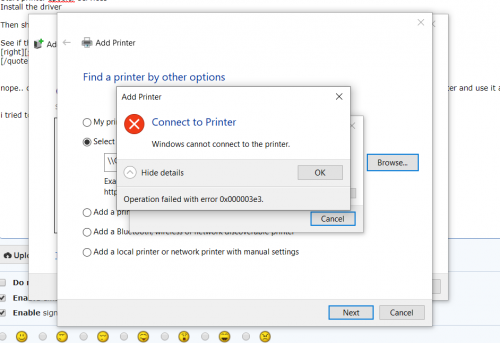
manage to fix it? I have the same problem as you, after windows 10 new update my epson LQ310 fail to share to other PC. Whenever i click update driver it show me error 0x00003e3.
wata
post Oct 8 2019, 10:58 PM

Getting Started
**
Junior Member
215 posts

Joined: Dec 2009
From: Perak


QUOTE(HaN18 @ Oct 8 2019, 07:32 PM)
manage to fix it? I have the same problem as you, after windows 10 new update my epson LQ310 fail to share to other PC. Whenever i click update driver it show me error 0x00003e3.
*
i forget what i did to the pc already. its been quite a long time. sry ya sad.gif
TSKeatsan
post Oct 9 2019, 10:50 AM

If it ain't broke, don't 6ix it
******
Senior Member
1,218 posts

Joined: Jan 2010
From: Today 06.09 am
QUOTE(HaN18 @ Oct 8 2019, 07:32 PM)
manage to fix it? I have the same problem as you, after windows 10 new update my epson LQ310 fail to share to other PC. Whenever i click update driver it show me error 0x00003e3.
*
Have you tried to restart the printer spooler services?

Stop printer spooler services
Uninstall the printer driver
Start printer spooler services
Install the driver

Then share it.

See if this solution works?
HaN18
post Oct 9 2019, 11:20 AM

On my way
****
Junior Member
553 posts

Joined: Oct 2009
QUOTE(wata @ Oct 8 2019, 10:58 PM)
i forget what i did to the pc already. its been quite a long time. sry ya sad.gif
*
haha its ok.. i fixed once last time and now this problem come again.. stupid wndows 10 always give problem when there is an update
TSKeatsan
post Oct 9 2019, 11:23 AM

If it ain't broke, don't 6ix it
******
Senior Member
1,218 posts

Joined: Jan 2010
From: Today 06.09 am
QUOTE(HaN18 @ Oct 9 2019, 11:20 AM)
haha its ok.. i fixed once last time and now this problem come again.. stupid wndows 10 always give problem when there is an update
*
When it comes to LQ310, I always keep the working drivers for Win10. You'll never know what will Microsoft breaks with their each update.

HaN18
post Oct 9 2019, 11:24 AM

On my way
****
Junior Member
553 posts

Joined: Oct 2009
QUOTE(Keatsan @ Oct 9 2019, 10:50 AM)
Have you tried to restart the printer spooler services?

Stop printer spooler services
Uninstall the printer driver
Start printer spooler services
Install the driver

Then share it.

See if this solution works?
*
nope.. cant be done, i tried a lot alternative from google and other forum. and now i have to buy a window xp old computer and use it as print server


i tried to turn off firewall too, but its doesnt work too. it keep showing me this

user posted image

so i tried to use other printer to share with the computer , it work like a charm without any issue, only this EPSON LQ310 doesnt work at all.

This post has been edited by HaN18: Oct 9 2019, 11:45 AM
TSKeatsan
post Oct 9 2019, 06:35 PM

If it ain't broke, don't 6ix it
******
Senior Member
1,218 posts

Joined: Jan 2010
From: Today 06.09 am
QUOTE(HaN18 @ Oct 9 2019, 11:24 AM)
nope.. cant be done, i tried a lot alternative from google and other forum. and now i have to buy a window xp old computer and use it as print server
i tried to turn off firewall too, but its doesnt work too. it keep showing me this

user posted image

so i tried to use other printer to share with the computer , it work like a charm without any issue, only this EPSON LQ310 doesnt work at all.
*
Indeed it's interesting. Found a forum mentioned that disable Trend Micro antivirus and it works.

But for a start, it's most likely some antivirus or any software that replaces Windows application that could interfere with printer driver.

You could actually opt to purchase a cheap printing print server dongle by Tp-link. Google it.

Or alternatively, if your router supports USB printing, that works too as print server.
nocash
post Nov 28 2019, 09:53 AM

New Member
*
Junior Member
46 posts

Joined: Aug 2010
QUOTE(Keatsan @ Nov 17 2017, 09:32 AM)
UPDATED v3

All affected OS should have it's Windows Update fix released by now


KB4055038Windows 7, 8.1
Thanks Eventless for informing.

KB4055254Win10 1703 Build 15063.729
KB4051963Win10 1709 Build 16299.98
------------------------------------------------------------------------------------------------------------------------------------------------------

My site suddenly receives massive calls informing that users are unable to print to Epson Dot Matrix printers.  shakehead.gif

And after a heck load of troubleshooting, and touching stuff,  rclxub.gif I found out that this is due to a Windows update. (wtf?)

Printers I can confirm that are not working after the updates are:

    |Epson LQ-300|
    |Epson LQ-300+ II|
    |Epson LQ310|
    |Epson LX300|
Epson LQ590
Epson LQ680C
Epson LQ690C
    |Epson LQ2180|
    |Epson LQ2190|
    |Epson LQ730K|

Issues

Windows Updates have been issued for Windows 7, 8 and 10 and they are all having the same issue. The updates are:

    |Windows 7| KB4048957 |
    |Windows 8 |KB4048958 |
    |Windows 10 |KB4048952, KB4048953, KB4048954, KB4048955|

After installing this update, some Epson SIDM and Dot Matrix printers cannot print on x86 and x64-based systems.Microsoft and Epson have determined the cause of the issue and are working on a solution. This problem is not related to the printer driver, so installing current or older print drivers will not resolve the issue. Microsoft will provide an update in an upcoming release.

So far, only these updates are messing the with Epson Printer.

Temporary Solution

To get your printers working again, the quickest way is to remove the offending update. The quickest way is to run the following commands in an elevated command prompt:  thumbsup.gif

TAKE NOTE
Win 10 users, please enable system restore before removing KB4048953, KB4048954 or KB4048955. Been getting reports, unable to boot upon reboot. And also, prepare a Win10 ISO to repair in case it fails.

CODE
   wusa /uninstall /kb:4048952 /quiet /warnrestart
   wusa /uninstall /kb:4048953 /quiet /warnrestart
   wusa /uninstall /kb:4048954 /quiet /warnrestart
   wusa /uninstall /kb:4048955 /quiet /warnrestart
   wusa /uninstall /kb:4048957 /quiet /warnrestart
   wusa /uninstall /kb:4048958 /quiet /warnrestart


Edited - Add on Temporarily Prevent Update.


How to temporarily prevent a Windows Update from reinstalling in Windows 10

To temporarily prevent the update from being reinstalled until an updated fix is available, a troubleshooter is available that provides a user interface for hiding and showing Windows Updates and drivers for Windows 10. You can obtain and run the "Show or hide updates" troubleshooter by downloading it from the Microsoft Download Center:

https://support.microsoft.com/en-us/help/31...alling-in-windo
*
there many OS win 10 build 1703 / 1803 / 1809 no those update and still unable to print via Epson, how ? reformat pc ?
TSKeatsan
post Nov 28 2019, 10:12 AM

If it ain't broke, don't 6ix it
******
Senior Member
1,218 posts

Joined: Jan 2010
From: Today 06.09 am
QUOTE(nocash @ Nov 28 2019, 09:53 AM)
there many OS win 10 build 1703 / 1803 / 1809 no those update and still unable to print via Epson, how ? reformat pc ?
*
Have you try to download the latest drivers from Epson website themselves?

I have various dot matrix printers within my organisation using win 10 1803 and 1809 mostly. Don't seems to have issue.

Could you be more specific on what was the issue causing unable to print? Any error code or pop ups or slight hint that could assist in troubleshooting
nocash
post Nov 28 2019, 10:57 AM

New Member
*
Junior Member
46 posts

Joined: Aug 2010
QUOTE(Keatsan @ Nov 28 2019, 10:12 AM)
Have you try to download the latest drivers from Epson website themselves?

I have various dot matrix printers within my organisation using win 10 1803 and 1809 mostly. Don't seems to have issue.

Could you be more specific on what was the issue causing unable to print? Any error code or pop ups or slight hint that could assist in troubleshooting
*
A pc is main via USB, B pc is via network share from A pc which open sharing port... after update every pc that share from network all down...

only USB direct can print.... pls assist

there is no KB which Microsoft ask to remove on those Win 10 version 1703 / 1803 / 1809
TSKeatsan
post Nov 28 2019, 12:28 PM

If it ain't broke, don't 6ix it
******
Senior Member
1,218 posts

Joined: Jan 2010
From: Today 06.09 am
QUOTE(nocash @ Nov 28 2019, 10:57 AM)
A pc is main via USB, B pc is via network share from A pc which open sharing port... after update every pc that share from network all down...

only USB direct can print.... pls assist

there is no KB which Microsoft ask to remove on those Win 10 version 1703 / 1803 / 1809
*
Looks like firewall. Try enable firewall and share the printer setup again. And this issue doesn't seems related to the main topic for this.

It's probably just latest windows update change some security settings that will restrict usage of network sharing printer. You will need to reconfigure
dharya P
post Nov 30 2019, 04:37 PM

New Member
*
Probation
2 posts

Joined: Nov 2019
Good information.
netmatrix
post Nov 30 2019, 06:43 PM

The machine... it sees everything.
*******
Senior Member
6,734 posts

Joined: Jan 2003
From: Zion


QUOTE(nocash @ Nov 28 2019, 10:57 AM)
A pc is main via USB, B pc is via network share from A pc which open sharing port... after update every pc that share from network all down...

only USB direct can print.... pls assist

there is no KB which Microsoft ask to remove on those Win 10 version 1703 / 1803 / 1809
*
If you roll back last windows update, it will work. It seems to affect all Epson brand of dot matrix printers including Epson laser printers. dry.gif dry.gif
Peter_APIIT
post Dec 17 2020, 10:08 AM

Casual
***
Junior Member
364 posts

Joined: Mar 2008


Try buy latest hardware, it may help.
netmatrix
post Apr 19 2022, 10:38 PM

The machine... it sees everything.
*******
Senior Member
6,734 posts

Joined: Jan 2003
From: Zion


QUOTE(Peter_APIIT @ Dec 17 2020, 10:08 AM)
Try buy latest hardware, it may help.
*
No it will not. Epson is notorious for not having driver updates or revisions.Buying a new printer is not a solution when the product is blocked from functioning due to security reasons.
andrekua2
post May 6 2022, 12:36 AM

10k Club
********
All Stars
13,484 posts

Joined: Jan 2012


Is this still a thing in 2022?
I thought they should have fixed it by now, whether its MSFT or Epson.

Topic ClosedOptions
 

Change to:
| Lo-Fi Version
0.0633sec    0.59    6 queries    GZIP Disabled
Time is now: 20th December 2025 - 12:54 AM