Welcome Guest ( Log In | Register )

23 Pages « < 18 19 20 21 22 > » Bottom

Outline · [ Standard ] · Linear+

Guide Review & Setup - Xiaomi DaFang IP Cam

views
     
fiqqq
post Mar 3 2019, 10:59 PM

👀
****
Junior Member
541 posts

Joined: Mar 2009
From: Technically not from Lebanon


QUOTE(yingying213 @ Mar 3 2019, 10:18 AM)
Select "Distortion correction", then the camera time will be sync.

Mine is having problem on night vision, it just all dark if there is no light switch on. Also there is no push notification when motion alarmed.
Not sure is a firmware problem or is a faulty unit I get.
*
Maybe a faulty unit. Are you on the latest firmware?
greyshadow
post Mar 4 2019, 10:52 AM

I bleed it out, Diggin' deeper just to throw it away!
******
Senior Member
1,844 posts

Joined: Jan 2003
From: Kingdom of Sarawak


QUOTE(MX510 @ Dec 23 2018, 06:59 PM)
Hahahaha i don't recommended u use ceiling mount for this model


Use this model can easy mount on the ceiling
*
anyone using this? planning to get one or two for my car porch, does it come with the ceiling mount?

car broken into again! doh.gif
MX510
post Mar 4 2019, 11:27 AM

Love Me Sin Hate Me Sinner
*******
Senior Member
4,038 posts

Joined: Aug 2005
From: Earth


QUOTE(greyshadow @ Mar 4 2019, 10:52 AM)
anyone using this? planning to get one or two for my car porch, does it come with the ceiling mount?

car broken into again! doh.gif
*
You can mount it directly to the wall no need additional mounting

Bought this one not yet mount it to the wall just place on my work table to monitor everyone


laihuhng
post Mar 5 2019, 08:06 AM

On my way
****
Junior Member
603 posts

Joined: Jun 2005


Anyone has this particular problem. I turn off my router at night, but leave the Dafang ON. The next day, when I turn on my router, I can connect to only one of my three Dafangs with Mi Home's app. The other two have to be power off and on again. Then, all three of them able to connect again.
laihuhng
post Mar 5 2019, 08:18 AM

On my way
****
Junior Member
603 posts

Joined: Jun 2005


QUOTE(Marcus_Lee @ Jan 21 2019, 10:41 PM)
Hi Hikashi,

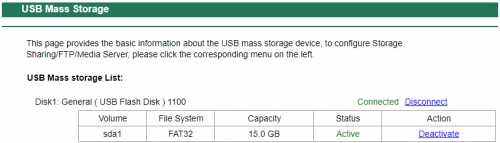
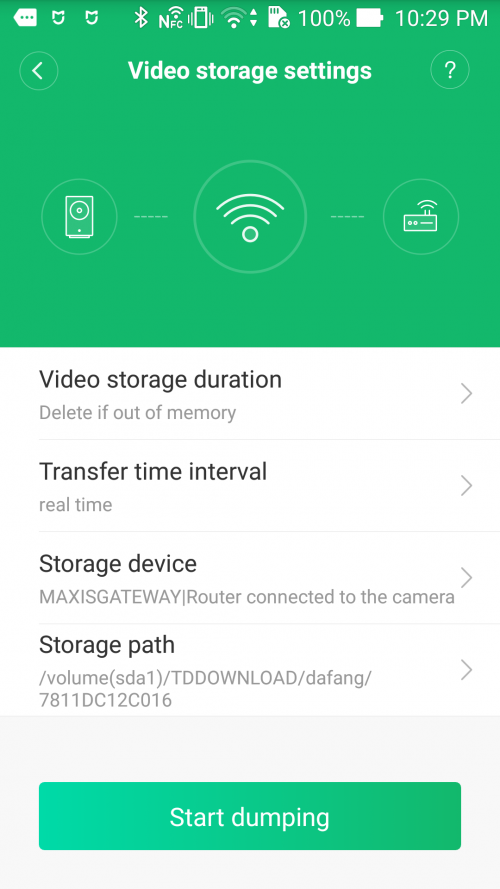
I managed to configure the network drive and FTP with Maxis Home Fibre using slightly different steps following your guide.

The storage device that works is Sandisk Cruzer 16GB FAT32.
I could not get a USB 320GB NTFS, I am not sure if it is due to the max storage limit or NTFS format.
MiHome: 5.4.43
Dafang firmware: 5.5.1.419

user posted image

I notice the following:
It will auto create dafang folder inside TDDOWNLOAD. Although I have created xiaofang folder, but the video dump did not select it and this folder is empty.
My Windows 10 is not able to UNC to the FTP drive with the error message that the router/modem is using SMB1 protocol that is not safe/compatible with Windows 10.
I used ES Explorer on a Android to explore the shared drive via FTP.

After I managed to manually "dump" the videos using MiHome, I can only see 3 videos in the dafang folder, do I have to wait after 8am and 5pm ?

user posted image

Thanks
*
Your USB storage connected to? Your router?
soonwai
post Mar 24 2019, 03:00 AM


********
All Stars
11,458 posts

Joined: Oct 2007
From: KL


Just got both Xiao and Da Fang to play with. Quite impressed with the 2 so far. Very affordable.

I'm getting the same problem with a wrong time stamp on the Dafang which "Distortion Correction" corrects. Xiaofang is OK though.
fishmango
post Apr 2 2019, 12:57 AM

Enthusiast
*****
Senior Member
796 posts

Joined: May 2005


Hi, anyone know can we increase video fps rate to 30? I don't mind to reduce to 720p or 480p.
sHawTY
post Apr 2 2019, 09:40 AM

Frequent Reporter
********
All Stars
14,909 posts

Joined: Jul 2005

QUOTE(laihuhng @ Mar 5 2019, 08:06 AM)
I turn off my router at night
Why do you need to do that?
What line are you using? UniFi? Maxis Fibre? Time Fibre?
laihuhng
post Apr 3 2019, 12:45 PM

On my way
****
Junior Member
603 posts

Joined: Jun 2005


QUOTE(sHawTY @ Apr 2 2019, 09:40 AM)
Why do you need to do that?
What line are you using? UniFi? Maxis Fibre? Time Fibre?
*
Save electricity, LOL tongue.gif

Anyway, I didn't turn off my router since then. Working fine now without problem. Thanks. rclxms.gif
ArthurHew
post Apr 11 2019, 01:38 PM

Getting Started
**
Junior Member
149 posts

Joined: Oct 2012
BTW, Mi apps can connect how many cam at one time?
TSidoblu
post Apr 23 2019, 09:33 AM

stars for sale
********
All Stars
11,308 posts

Joined: Feb 2008
Anyone updated to 5.5.1.421 ?
Is it good?
YAMiDAMi
post Apr 23 2019, 10:24 AM

Getting Started
**
Junior Member
87 posts

Joined: Oct 2016

QUOTE(idoblu @ Apr 23 2019, 09:33 AM)
Anyone updated to 5.5.1.421 ?
Is it good?
*
Don't dare to update all my units. Traveling now so nobody's at home just in case the update failed.
TSidoblu
post Apr 23 2019, 10:29 AM

stars for sale
********
All Stars
11,308 posts

Joined: Feb 2008
QUOTE(YAMiDAMi @ Apr 23 2019, 10:24 AM)
Don't dare to update all my units. Traveling now so nobody's at home just in case the update failed.
*
let us know the outcome when you update one ....thanks
xperiaVuser
post Apr 23 2019, 02:01 PM

Regular
******
Senior Member
1,201 posts

Joined: Jul 2013
'Look back' feature was not working before the update, now it's fine.
calta_xs
post Apr 24 2019, 07:48 AM

Getting Started
**
Junior Member
63 posts

Joined: Nov 2018
user posted image

Hi, what does “Sleep Orientation Rotation” do? And also “定时校准”? I’m using the latest firmware.
TSidoblu
post Apr 24 2019, 08:00 AM

stars for sale
********
All Stars
11,308 posts

Joined: Feb 2008
QUOTE(calta_xs @ Apr 24 2019, 07:48 AM)

Hi, what does “Sleep Orientation Rotation” do? And also “定时校准”? I’m using the latest firmware.
*
Sleep Orientation is to turn the dafang so its facing back when its in sleep mode
That way you can visually tell that the cam is in sleep mode and also to reassure your privacy
your latest firmware is what revision number?
calta_xs
post Apr 24 2019, 10:36 AM

Getting Started
**
Junior Member
63 posts

Joined: Nov 2018
QUOTE(idoblu @ Apr 24 2019, 08:00 AM)
Sleep Orientation is to turn the dafang so its facing back when its in sleep mode
That way you can visually tell that the cam is in sleep mode and also to reassure your privacy
your latest firmware is what revision number?
*
Thanks! It’s 5.5.1.421. What about the part below? It translates to “Timing Calibration” but I have no idea what timing it is for.
TSidoblu
post Apr 25 2019, 06:17 AM

stars for sale
********
All Stars
11,308 posts

Joined: Feb 2008
QUOTE(calta_xs @ Apr 24 2019, 10:36 AM)
Thanks! It’s 5.5.1.421. What about the part below? It translates to “Timing Calibration” but I have no idea what timing it is for.
*
I don’t really know
Maybe it calibrates the PTZ movement at a certain hour every day.
TSidoblu
post May 3 2019, 08:08 AM

stars for sale
********
All Stars
11,308 posts

Joined: Feb 2008
check out this new Yi cam which is quite similar to Dafang -
https://detail.tmall.com/item.htm?id=568813042536

I still cant find it at Shopee though
fishmango
post May 3 2019, 04:07 PM

Enthusiast
*****
Senior Member
796 posts

Joined: May 2005


Dafang IR can be turn off? Anyone know?

23 Pages « < 18 19 20 21 22 > » Top
 

Change to:
| Lo-Fi Version
0.0290sec    0.37    6 queries    GZIP Disabled
Time is now: 8th December 2025 - 06:24 AM