Welcome Guest ( Log In | Register )

26 Pages « < 6 7 8 9 10 > » Bottom

Outline · [ Standard ] · Linear+

 D-Link Malaysia Official Thread

views
     
island
post Sep 23 2018, 06:15 PM

Regular
******
Senior Member
1,731 posts

Joined: Jan 2007


QUOTE(syncomp @ Sep 23 2018, 05:37 PM)
Hi D Link,

My DIR 850L is not functioning. I tried to scan for SSID, both 5 Ghz & 2.4 Ghz was not available. I tried to configure the modem via LAN, but my LAN port doest not detect any connection from this router.
The only light that is ON is the POWER light. But sometimes after I turn it off, the globe icon blinking with orange colour
*
Feel like game over
cho
post Sep 23 2018, 09:55 PM

Casual
***
Junior Member
369 posts

Joined: Sep 2004
From: Kajang


QUOTE(syncomp @ Sep 23 2018, 05:37 PM)
Hi D Link,

My DIR 850L is not functioning. I tried to scan for SSID, both 5 Ghz & 2.4 Ghz was not available. I tried to configure the modem via LAN, but my LAN port doest not detect any connection from this router.
The only light that is ON is the POWER light. But sometimes after I turn it off, the globe icon blinking with orange colour
*
do you manually configured IP address on your PC/Laptop for connection through LAN port?

is your DIR 850L connected to BTU? is yes, how is your BTU LED?

the globe light off means when there is no internet connection


SilentVampire
post Sep 23 2018, 09:57 PM

Networking Enthusiast
*******
Senior Member
5,714 posts

Joined: Mar 2007


QUOTE(syncomp @ Sep 23 2018, 05:37 PM)
Hi D Link,

My DIR 850L is not functioning. I tried to scan for SSID, both 5 Ghz & 2.4 Ghz was not available. I tried to configure the modem via LAN, but my LAN port doest not detect any connection from this router.
The only light that is ON is the POWER light. But sometimes after I turn it off, the globe icon blinking with orange colour
*
Hard reset it. If still not working, get your own one. See the link on my sig for list of compatible routers.
syncomp
post Sep 24 2018, 12:59 PM

Casual
***
Junior Member
498 posts

Joined: Jun 2009


QUOTE(island @ Sep 23 2018, 06:15 PM)
Feel like game over
*
After a day of struggle, that's what I thought too

QUOTE(cho @ Sep 23 2018, 09:55 PM)
do you manually configured IP address on your PC/Laptop for connection through LAN port?

is your DIR 850L connected to BTU? is yes, how is your BTU LED?

the globe light off means when there is no internet connection
*
My LAN Port Cant even detect LAN connection from all 4 of the router port. So, I guess I still not configure anything.

My BTU got no problem. Right now, I am using Archer C5 router for my house. I tried to use my brother D Link 850L Router and I ended up asking you guys whether you guys ever experience like this.

QUOTE(SilentVampire @ Sep 23 2018, 09:57 PM)
Hard reset it. If still not working, get your own one. See the link on my sig for list of compatible routers.
*
Thanks for the link, I've read it, I think this router faulty. Because the router would've shown the SSID signal in the first place, whether or not you configure it right?
SilentVampire
post Sep 24 2018, 01:27 PM

Networking Enthusiast
*******
Senior Member
5,714 posts

Joined: Mar 2007


QUOTE(syncomp @ Sep 24 2018, 12:59 PM)
After a day of struggle, that's what I thought too
My LAN Port Cant even detect LAN connection from all 4 of the router port. So, I guess I still not configure anything.

My BTU got no problem. Right now, I am using Archer C5 router for my house. I tried to use my brother D Link 850L Router and I ended up asking you guys whether you guys ever experience like this.
Thanks for the link, I've read it, I think this router faulty. Because the router would've shown the SSID signal in the first place, whether or not you configure it right?
*
Yes, it is gone. Time to change router to something else better.
Edison83
post Sep 24 2018, 08:25 PM

No Games No Life.
******
Senior Member
1,374 posts

Joined: Jun 2008
From: Red Comet


I would like to share some problem and solution I found to all. My model is DIR-878, may apply to its sibling model.

Problem - getting capped at 200mbps instead of 800mbps download speed. Yup, unifi turbo just rolled at my location.

Solution - Under QoS Setting, remove any device linked to the priority table. My speed was capped even when I put my PC in Highest priority, once I remove it from the list, it can download at 800mbps.

Note - all testing is done in gigabit network with CAT7 cable. No hardware limitation here.

Side note - I need to pay unifi personel (will appear in my bill) that come to my home to check this, cause the problem is caused by my side, not unifi. I have them come with their router and tested running at 800mbps.


On the other story, while setting my router, I use the old IE, everything was ok, except VLAN pages failed to load, no error whatsoever, just a blank (the rest of the menu and logo is still there). Then I use chrome, whenever I try to apply setting, it will ask for my router password and restart the whole procedure again.... however the setting wasn't applied. While using chrome, I can see like few hidden setting on the menu, but unable to access it (this wasn't appear at all at IE nor edge). Lastly, everything when smooth with Microsoft Edge... Any idea how is this happening?

This post has been edited by Edison83: Sep 24 2018, 08:33 PM
jimhorn
post Sep 25 2018, 11:40 AM

Casual
***
Junior Member
407 posts

Joined: Jul 2005


Does anyone know if the latest D-link DIR-842 (Rev C2) router provided by Unifi can flash with diff firmware??

Main concern is to remove the @unifi suffix for the wireless AP so can share with my existing Asus router.
island
post Sep 25 2018, 06:05 PM

Regular
******
Senior Member
1,731 posts

Joined: Jan 2007


QUOTE(Edison83 @ Sep 24 2018, 08:25 PM)
I would like to share some problem and solution I found to all. My model is DIR-878, may apply to its sibling model.

Problem - getting capped at 200mbps instead of 800mbps download speed. Yup, unifi turbo just rolled at my location.

Solution - Under QoS Setting, remove any device linked to the priority table. My speed was capped even when I put my PC in Highest priority, once I remove it from the list, it can download at 800mbps.

Note - all testing is done in gigabit network with CAT7 cable. No hardware limitation here.

Side note - I need to pay unifi personel (will appear in my bill) that come to my home to check this, cause the problem is caused by my side, not unifi. I have them come with their router and tested running at 800mbps.
On the other story, while setting my router, I use the old IE, everything was ok, except VLAN pages failed to load, no error whatsoever, just a blank (the rest of the menu and logo is still there). Then I use chrome, whenever I try to apply setting, it will ask for my router password and restart the whole procedure again.... however the setting wasn't applied. While using chrome, I can see like few hidden setting on the menu, but unable to access it (this wasn't appear at all at IE nor edge). Lastly, everything when smooth with Microsoft Edge... Any idea how is this happening?
*
Hard reset the router, don't restore settings from backup settings files. See how. And save a copy a backup settings too, just incase you can't reconfigures it. And took photo on important things.

island
post Sep 25 2018, 06:08 PM

Regular
******
Senior Member
1,731 posts

Joined: Jan 2007


QUOTE(jimhorn @ Sep 25 2018, 11:40 AM)
Does anyone know if the latest D-link DIR-842 (Rev C2) router provided by Unifi can flash with diff firmware??

Main concern is to remove the @unifi suffix for the wireless AP so can share with my existing Asus router.
*
Feel. No! It's a customized toy's for TM. Just ADSL TM router, flash it, goes crazy 😰
Rovers9
post Sep 25 2018, 09:35 PM

Getting Started
**
Junior Member
145 posts

Joined: Nov 2009


Anyone facing any problem with the QoS engine in the Unifi DIR 842 router?

Was able to save the settings earlier and then it can't anymore. Removed/add client card > Save but no changes
idealhometech
post Sep 25 2018, 10:29 PM

NCS
*****
Senior Member
949 posts

Joined: Oct 2010
From: Yen Lee NCS Enterprise (Seri Kembangan)
Having proble with DLINK DIR-842, always unable to access the configuration page 192.168.0.1
Ping 192.168.0.1 got reply.
After restart the router i can access the page, but after maybe few minute, cannot.


This post has been edited by idealhometech: Sep 26 2018, 09:33 AM
Edison83
post Sep 27 2018, 06:48 PM

No Games No Life.
******
Senior Member
1,374 posts

Joined: Jun 2008
From: Red Comet


QUOTE(Rovers9 @ Sep 25 2018, 09:35 PM)
Anyone facing any problem with the QoS engine in the Unifi DIR 842 router?

Was able to save the settings earlier and then it can't anymore. Removed/add client card > Save but no changes
*
If anything like me, may need try othe browser. Try edge, mine has problem like yours in Chrome.

wirelessbuyer
post Sep 27 2018, 07:18 PM

Casual
***
Junior Member
346 posts

Joined: Jul 2012
QUOTE(idealhometech @ Sep 25 2018, 10:29 PM)
Having proble with DLINK DIR-842, always unable to access the configuration page 192.168.0.1
Ping 192.168.0.1 got reply.
After restart the router i can access the page, but after maybe few minute, cannot.
*
I'm having the same issue last time with my DIR-850L, cant access the web interface after few days and need to restart each time. After update with the latest firmware, then the issue is fixed.

This post has been edited by wirelessbuyer: Sep 27 2018, 07:19 PM
shahie
post Sep 27 2018, 07:23 PM

On my way
****
Junior Member
506 posts

Joined: Feb 2005
Hi

i’m on 300mbps. i have Dir-842 (for first floor) and Dir-882 (ground floor room, connected to BTU) currently. plan to get another Dir-878 for my living room at ground floor. all the router connected via the cat 5e LAN currently. the question here, any huge different in performance between 878 and 882?

This post has been edited by shahie: Sep 27 2018, 07:24 PM
SilentVampire
post Sep 27 2018, 08:08 PM

Networking Enthusiast
*******
Senior Member
5,714 posts

Joined: Mar 2007


QUOTE(shahie @ Sep 27 2018, 07:23 PM)
Hi

i’m on 300mbps. i have Dir-842 (for first floor) and Dir-882 (ground floor room, connected to BTU) currently. plan to get another Dir-878 for my living room at ground floor. all the router connected via the cat 5e LAN currently. the question here, any huge different in performance between 878 and 882?
*
Nope, no difference.
Rovers9
post Sep 27 2018, 08:43 PM

Getting Started
**
Junior Member
145 posts

Joined: Nov 2009


QUOTE(Edison83 @ Sep 27 2018, 06:48 PM)
If anything like me,  may need try othe browser. Try edge, mine has problem like yours in Chrome.
*
tried Edge, Safari
no changes, problem remains the same
Khalid21
post Sep 28 2018, 03:14 PM

Regular
******
Senior Member
1,138 posts

Joined: May 2010
hi Dlink
can test wifi speed using dir 878 for unifi turbo
shahie
post Sep 29 2018, 07:24 AM

On my way
****
Junior Member
506 posts

Joined: Feb 2005
Hi

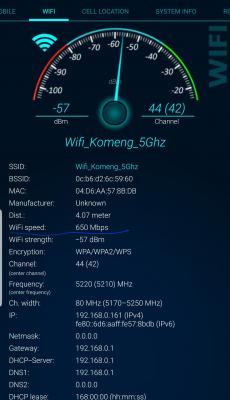
This wifi speed from dir-882, about 4m from the router, average simen wall. package 300mbps. device note 8. average 2 person at home and using the broadband. no torrent and download activity during that speed test. max wifi speed (due to the limitation of the device) is 866mbps. you can see the drop in wifi speed just only on that distance.

This post has been edited by shahie: Sep 29 2018, 07:29 AM


Attached thumbnail(s)
Attached Image Attached Image
island
post Sep 29 2018, 04:30 PM

Regular
******
Senior Member
1,731 posts

Joined: Jan 2007


QUOTE(shahie @ Sep 29 2018, 07:24 AM)
Hi

This wifi speed from dir-882, about 4m from the router, average simen wall. package 300mbps. device note 8. average 2 person at home and using the broadband. no torrent and download activity during that speed test. max wifi speed (due to the limitation of the device) is 866mbps. you can see the drop in wifi speed just only on that distance.
*
You need to set the right configuration for the router WiFi that work for you. Simply, high bandwidth short distance theory. Google it, what's those settings means 😱
shahie
post Sep 29 2018, 04:48 PM

On my way
****
Junior Member
506 posts

Joined: Feb 2005
QUOTE(island @ Sep 29 2018, 04:30 PM)
You need to set the right configuration for the router WiFi that work for you. Simply, high bandwidth short distance theory. Google it, what's those settings means 😱
*
you mean 20/40Mhz bandwidth for 5ghz band? most advise 5ghz only on 80mhz than.

26 Pages « < 6 7 8 9 10 > » Top
 

Change to:
| Lo-Fi Version
0.0181sec    0.27    6 queries    GZIP Disabled
Time is now: 7th December 2025 - 12:22 PM