


I see no eyebag
Personal Trav's snipe & snap with D40, Honda F1 Roadshow, model pic uploaded!
|
|
 Oct 4 2007, 06:11 AM Oct 4 2007, 06:11 AM
Return to original view | Post
#1
|
 
Elite
9,856 posts Joined: Jan 2003 From: Kuala Lumpur, WP  
|
I see no eyebag |
|
|
|
|
|
Oct 4 2007, 09:57 AM
Return to original view | Post
#2
|
|
Elite
9,856 posts Joined: Jan 2003 From: Kuala Lumpur, WP
|
Tell that to Dior, Shisheido, Ck, and etc.
|
|
|
Oct 4 2007, 12:13 PM
Return to original view | Post
#3
|
|
Elite
9,856 posts Joined: Jan 2003 From: Kuala Lumpur, WP
|
The one shinchan quoted is the one I touched up...removed eyebag and some facial imprefection + face smoothing. Not the original unedited picture.
Typical job you'd see done when cosmetics company send the pictures in for retouching job. Whether people like it or not, that's how things are done in the cosmetics industry...there's not that many girls with perfect face out there  I still remember watching shiseido ad and wah lau...the girl with perfect straight hair and perfect face that is fair + smooth and silky... I still remember watching shiseido ad and wah lau...the girl with perfect straight hair and perfect face that is fair + smooth and silky... |
|
|
Oct 4 2007, 12:46 PM
Return to original view | Post
#4
|
|
Elite
9,856 posts Joined: Jan 2003 From: Kuala Lumpur, WP
|
I think for drama...you have not much choice but to resort to foundation + lighting + medical treatment...but for pictures...just make use of the best available touch up resource...photoshop
 Her eye bags is very geng...i think even if u put tons of foundation and overexpose with fill flash a little, it will still be fairly visible. But her face don't seem to have lots of imperfections...just some minor acne scar. btw travis...when u have ur subjects look upwards...please please please use moderate amount of head tilting and eyes rolling. I think a lot of people overlooked this fact and simply have the models roll the eye up until the forehead shows wrinkles. Be specific, delicate, and picky..  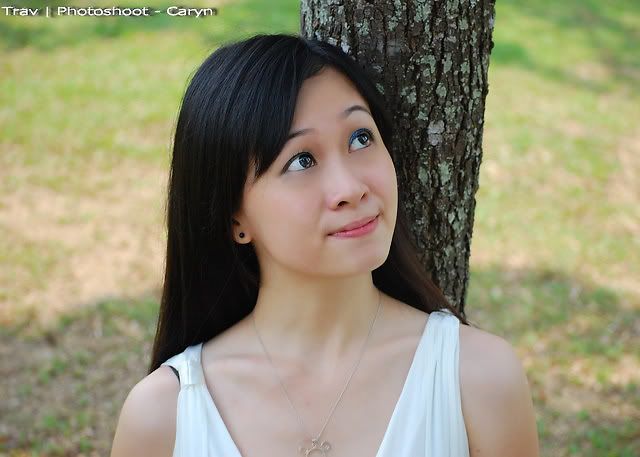 if you wanna create a little bit of eye bag...just use the burn tool and draw it back..you can also mask out the eyebag, and add it back with layer and opacity This post has been edited by AlamakLor: Oct 4 2007, 12:48 PM |
|
|
Oct 4 2007, 12:54 PM
Return to original view | Post
#5
|
|
Elite
9,856 posts Joined: Jan 2003 From: Kuala Lumpur, WP
|
That's exactly the problem...if nobody seen the original...but the "final" copy...everybody will go WAH LAU....damn nice lar...smooth face...but when you've seen it...you will know there's a difference. Clients won't care what kind of things you do to them...as long as the end result brings out the prettiest side of their face, that's all that matters. Almost any companies, besides the newspaper, will not post up original, non-touched up pictures..everything is post processed...just diam diam only. But if the MUA does a fascinating job fixing all the imperfections at the first place...then the final picture is often just some minor corrections without altering the subject.
EDIT: if the touched up picture looks too perfect...no problem nia...in this picture...I added back 30% of her eyebag from the original picture. Simply mask it out, add it back, and set the proper opacity photoshop r0x0r! but please use this accordingly nia..it doesnt turn sh1t into gold though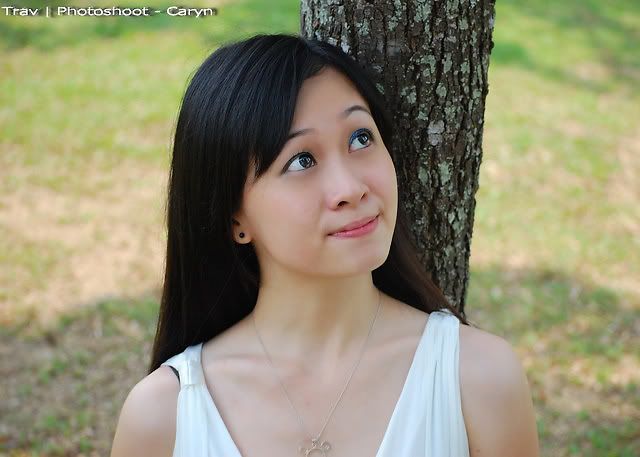 This post has been edited by AlamakLor: Oct 4 2007, 01:00 PM |
|
|
Oct 4 2007, 01:07 PM
Return to original view | Post
#6
|
|
Elite
9,856 posts Joined: Jan 2003 From: Kuala Lumpur, WP
|
I still get the wah lau feel after looking at touched up, then back to original...and this wah lau is not the scream of joy....it's the freaked out scream...the eye bag really geng
 yesterday i was doing some R&D on different technique on facial touch up...and I stumble across this site: http://www.idigitalemotion.com/tutorials/g...awlessskin.html 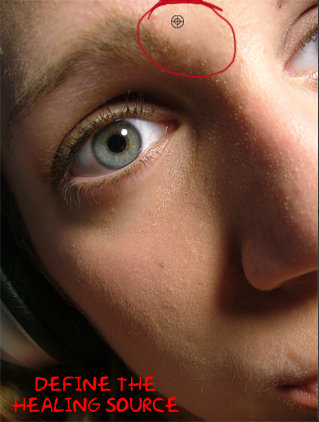 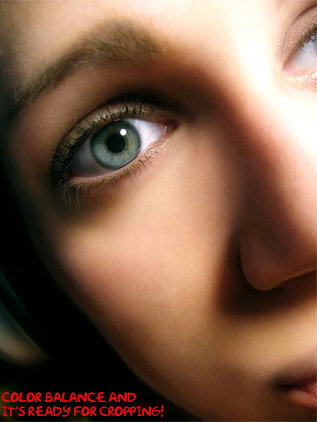 In one way it is really cool...in another...it is freaking overdone....the final picture look like those in final fantasy the spirits within  this is what I call overkill.... this is what I call overkill....In this age...you cannot be illiterate in photoshop, it'd be a handicap. If you are not good with photoshop...better collaborate with some good MUA....or pick up some MU skills yourself.. This post has been edited by AlamakLor: Oct 4 2007, 01:10 PM |
|
|
|
|
|
Oct 4 2007, 01:21 PM
Return to original view | Post
#7
|
|
Elite
9,856 posts Joined: Jan 2003 From: Kuala Lumpur, WP
|
Btw, your exposure is alright for most of the flat lighting situations, sometimes you can expose the background 1 stop lower, then flash fill your subject, that will make it more dramatic. In case you haven't noticed...one of shinchan's killer technique is reflector fill/flash fill (dunno which one he actually use though) besides aligning subjects with chairs lar, walls lar, and all
 Use flash fill whenever you can...especially under harsh lighting condition. Your shots taken at the shaded tent..or whatever they call it...is slightly underexposed...(the subject)...use flash fill...no need to malu because everybody else shooting without flash but you are firing flash! Make flash your best friend...man...I love flash... Use flash fill whenever you can...especially under harsh lighting condition. Your shots taken at the shaded tent..or whatever they call it...is slightly underexposed...(the subject)...use flash fill...no need to malu because everybody else shooting without flash but you are firing flash! Make flash your best friend...man...I love flash... |
|
|
Oct 5 2007, 07:03 AM
Return to original view | Post
#8
|
|
Elite
9,856 posts Joined: Jan 2003 From: Kuala Lumpur, WP
|
um...no...it doesn't really give us the sense of it being in a warm day...it looks like the WB is off. I was gonna ask if you forgot to change your WB back to AWB since you tested out with flash WB previously.
You can deliberately make the picture look warm if there is a fireplace, candle light, indoor, and etc. But when you are outdoor in a grassy area...you will never get that kind of lighting in real life. You definitely can mess with WB to create different kind of lighting. Many people like to use fluorescence WB when shooting pond/lake in the dawn with fog...which makes the scene looks blue and cold. If you shoot with more than 1 flash, you can also use color correcting gel to isolate background/correct color cast from certain reflective material. Google CTO/CTB/CTG filter. |
|
|
Oct 6 2007, 06:38 PM
Return to original view | Post
#9
|
|
Elite
9,856 posts Joined: Jan 2003 From: Kuala Lumpur, WP
|
The vios is called toyota yaris here....looks like crap imho...Id never buy a car like that. You know what they should launch in msia? nissan altima coupe 2008....now that's the car I'm about to buy
|
|
|
Nov 2 2007, 11:27 PM
Return to original view | Post
#10
|
|
Elite
9,856 posts Joined: Jan 2003 From: Kuala Lumpur, WP
|
Please don't shoot in vivid mode when there's people in the frame. They always end up with very reddish skin tone. If you want the background to be vivid but the subject to have moderate tone, shoot with a CPL. I only shoot in moderate saturation, other settings can be found in my profile.
Bout your Stephanie series, the exposure between the background and the subject is a little too much...the subject has too much flash on it. Usually it is fine during sunset but eh.....it was a sh1tty day anyway so not really your fault I guess.  If you have to shoot in overcast day like that...shoot in B&W. If you have to shoot in overcast day like that...shoot in B&W.One very important thing that photographers should know is checking ahead of the weather condition. If it's gonna rain/overcast day....cancel your appointment or go indoor, find a better time to shoot. If it's really sunny, make sure you bring your flash/reflector out. This post has been edited by AlamakLor: Nov 2 2007, 11:29 PM |
|
Topic ClosedOptions
|
| Change to: |  0.0310sec 0.0310sec
 0.23 0.23
 7 queries 7 queries
 GZIP Disabled GZIP Disabled
Time is now: 7th December 2025 - 04:34 AM |
 Quote
Quote