Welcome Guest ( Log In | Register )

Outline · [ Standard ] · Linear+

 Official Honda Civic 10th Gen Owner/Fans Club V7, 10th Gen Dream Machine

views
     
tampin
post Oct 15 2017, 02:36 PM

New Member
*
Newbie
4 posts

Joined: May 2013
Been bothered by the rattle noise from the dashboard for too many months. Initially wanted to send to SC to get it fix, but then heard they will dismantle the whole dashboard and take few days to find the issue and get it fix, so decided to DIY.

Google around and found out there were 2 main causes of the rattle noise
1. The cover under the steering wheel is loose, i.e. not firmly attach
2. The driver side cover of the dashboard is loose

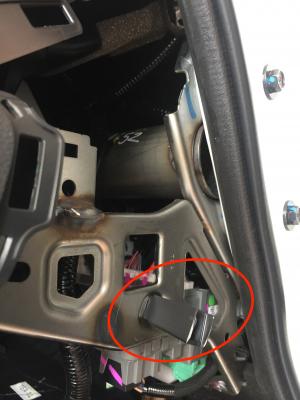
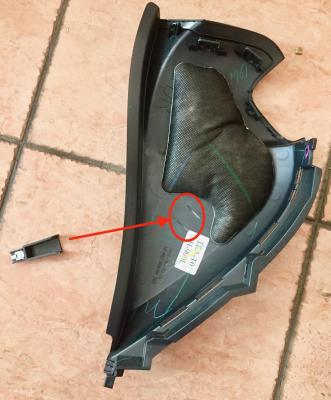
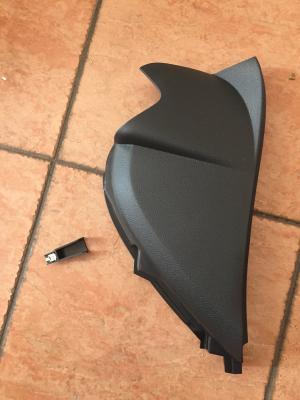
Mine issue is due to #2. After open up the cover, I discovered the clip pin is broken and therefore it constantly hit the cover (rattle noise) when the car going thru uneven road. I removed the clip pin and since then no more rattle noise rclxms.gif

Attached Image
Attached Image
Attached Image

tampin
post Oct 18 2017, 02:03 PM

New Member
*
Newbie
4 posts

Joined: May 2013
QUOTE(skyloon @ Oct 18 2017, 12:33 PM)
Bro, may i know how you open up the cover?
*
1st need to use a bit of force to detach the cover under the steering whee which is clipped to the dashboard. Then you remove the side cover (the one with the broken pin clip) by using a philip type screwdriver to remove 2 screws. Hope this helps.
tampin
post Dec 25 2017, 11:03 AM

New Member
*
Newbie
4 posts

Joined: May 2013
Hi all,

Have a question about Siri-Eyes-Free (SEF) and Voice-Recognition-System (VRS).

I'm using iPhone and is connected via bluetooth (Honda handsfree link). Whenever I press the [Talk] button on steering, it always enable Siri Eyes Free. How do I active the VRS?

Based on the Civic User Guide (page 29x), it stated that to enable VRS - press and release [Talk] button... I tried numerous times and just not able to active VRS. It always active SEF. I even tried the other method, i.e. press & hold [Talk] button.. but it's just the same that it activates SEF.

I even deleted the HU bluetooth connection to iPhone and tried the above methods. But when press [Talk] button (either press release or press-hold), the HU will ask for bluetooth connection. Without one, it will not proceed further.

Anyone know what's the trick to enable the VRS or SEF?
Thanks.
tampin
post Dec 25 2017, 12:21 PM

New Member
*
Newbie
4 posts

Joined: May 2013
QUOTE(isr25 @ Dec 25 2017, 11:44 AM)
Sorry, what’s the difference between the 2?
*
SEF is basically iPhone Siri, with that you can ask Siri about weather, time, go Home (Apple Map), create event, send SMS, make call, etc . All these commands are related to iPhone capabilities.

VRS is basically commands for HU such as turn on radio, active Navigation (Garmin app) and go home, etc.

The function of SEF & VRS is to keep our eyes on the road while driving, yet able to safely operate iPhone & HU.
tampin
post Dec 25 2017, 12:31 PM

New Member
*
Newbie
4 posts

Joined: May 2013
QUOTE(celciuz @ Dec 25 2017, 11:48 AM)
The moment you connect bluetooth, it is activating Siri to do the tasks isn't it? Call etc etc?
*
Connected via BT means Siri is now available, but not necessarily is the only one option when [Talk] button is pressed.

BAsed on the user guide - page 29x, we have the option to either activate SEF or VRS. But I only once able to get VRS and the rest of the tries we’re always SEF, even after I rebooted HU & iPhone the result is the same.
tampin
post Sep 7 2018, 09:47 AM

New Member
*
Newbie
4 posts

Joined: May 2013
QUOTE(Redundant @ Sep 7 2018, 08:34 AM)
Don't get why the new RFID needs to be sticked outside the car... The reason why tint would kill off our existing smart tag signal is because it's based on infra red which our tint is filtering out...

But RFID is based on radio frequency! It's suppose to work behind tints! Like our keyless remote or autogate remotes! Or at least work like the RFID in my office basement car park where I don't even have to wind down my 3M crystalline tinted window to scan my card smile.gif
*
Most of car window tints in the market consist of metal and therefore they're not "friendly" to RFID, portable GPS (Garmin, Papago, etc) and mobile phone reception. You are lucky because 3M crystalline tint is metal-free rclxms.gif
3M Crystalline tint

You can request your RFID to be placed on your front wind screen, just tell them your tint is metal-free and doesn't cause issue with RFID. cool2.gif
tampin
post Sep 7 2018, 10:44 AM

New Member
*
Newbie
4 posts

Joined: May 2013
QUOTE(KnightSports @ Sep 7 2018, 10:13 AM)
Most tints are now ceramic based. So, it does not interfere as much.

At least most of the top brands that claim they are nano ceramic tints.
*
Many entry level and mid level tints might not be privileged to be ceramic based + metal-free.

This post has been edited by tampin: Sep 7 2018, 10:55 AM


Change to:
| Lo-Fi Version
0.4948sec    0.29    7 queries    GZIP Disabled
Time is now: 7th December 2025 - 11:33 PM