Outline ·
[ Standard ] ·
Linear+
MacOS X Show Off Your Desktop - MacOS X only, Wallpaper , icons , themes , etc
|
stryfox
|
 Apr 19 2009, 11:03 PM Apr 19 2009, 11:03 PM
|

|
just realised that actually is worth it to take 24-inch instead of 20-inch since i already spent already RM230 to buy two 2G RAM to upgrade to 4G. for another difference of around RM700++ would get better 24-inch and double the HD...well, too late already.
|
|
|
|
|
|
IvanKang
|
Apr 19 2009, 11:42 PM
|
Getting Started

|
QUOTE(diners @ Apr 19 2009, 09:24 AM) the thing on the top left is what software? izit adium? if it is, it looks cool. last time i did dl-ed adium, but it sucks. maybe i've not changed the preference yet =/ hey... how do u actually make the "lady gaga" thing.. its the music player right? what software? izit called bowtie? Yeah I'm using bowtie for the "Lady Gaga" thingy. It links up with your itunes. The theme for it is Typographic Blur. plus its free! |
|
|
|
|
|
diners
|
Apr 20 2009, 08:04 PM
|
|
|
QUOTE(IvanKang @ Apr 19 2009, 11:42 PM) Yeah I'm using bowtie for the "Lady Gaga" thingy. It links up with your itunes. The theme for it is Typographic Blur. plus its free! thx.. but i can't google typographic blur's theme... can't find it =( |
|
|
|
|
|
achew
|
Apr 21 2009, 02:59 AM
|
|
|
|
|
|
|
|
|
IvanKang
|
Apr 21 2009, 06:17 PM
|
Getting Started
|
QUOTE(diners @ Apr 20 2009, 08:04 PM) thx.. but i can't google typographic blur's theme... can't find it =( Maybe this will help you. Heres the link to the "typographic blue" theme. Enjoy http://macthemes2.net/forum/viewtopic.php?id=16790940 |
|
|
|
|
|
diners
|
Apr 22 2009, 08:25 AM
|
|
|
QUOTE(IvanKang @ Apr 21 2009, 06:17 PM) Maybe this will help you. Heres the link to the "typographic blue" theme. Enjoy http://macthemes2.net/forum/viewtopic.php?id=16790940QUOTE(achew @ Apr 21 2009, 02:59 AM) thanks u both guys...  |
|
|
|
|
|
n20nine
|
Apr 22 2009, 09:09 AM
|
|
|
thanks achew  |
|
|
|
|
|
cRazYee
|
Apr 23 2009, 09:38 AM
|
|
|
this thread makes me remember
once i screen cap mac os x desktop, then post to MAC wannabie thread, everyone start asking me how i make my desktop 'SO MAC'
hahaa
|
|
|
|
|
|
bizkutrai
|
Apr 23 2009, 10:46 AM
|
Getting Started
|
QUOTE(cRazYee @ Apr 23 2009, 09:38 AM) this thread makes me remember once i screen cap mac os x desktop, then post to MAC wannabie thread, everyone start asking me how i make my desktop 'SO MAC' hahaa LOL So people think that there are NO real Mac, only a look ALIKE MAC desktop? that's hilarious |
|
|
|
|
|
linkinfive
|
Apr 26 2009, 02:34 PM
|
Getting Started
|
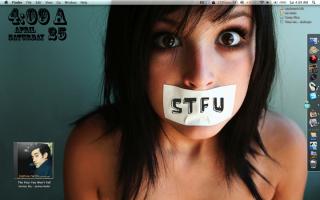
bjonbjonbjon whats that calendar on the top left of your screen?
|
|
|
|
|
|
cRazYee
|
Apr 27 2009, 11:05 AM
|
|
|
like a brand PUNK ROCK in uk, that celender
|
|
|
|
|
|
bjonbjonbjon
|
Apr 27 2009, 01:19 PM
|
Getting Started
|
I did the time with geektool, can search it on google. The font i used is rosewell i think.
|
|
|
|
|
|
takezhiro
|
Apr 27 2009, 11:09 PM
|
Getting Started
|
current desktop  :D  |
|
|
|
|
|
hawnauk
|
Apr 29 2009, 11:23 AM
|
Getting Started
|
I installed an Aqua 3D screen saver on my iMac however not really like it, may I know how to uninstall it?
|
|
|
|
|
|
bjonbjonbjon
|
Apr 29 2009, 09:18 PM
|
Getting Started
|
QUOTE(hawnauk @ Apr 29 2009, 11:23 AM) I installed an Aqua 3D screen saver on my iMac however not really like it, may I know how to uninstall it? Delete the .saver file from /Library/Screen Savers/ or use AppZapper (it's a pretty neat program). Edit: The location could be /Users/username/Library/Screen Savers/ if the saver is installed to "Your user only." |
|
|
|
|




 Quote
Quote




 0.0217sec
 0.59
0.59
 6 queries
 GZIP Disabled