Outline ·
[ Standard ] ·
Linear+
Any recommended android box for Astro Go?
|
Mickey C
|
 Nov 1 2019, 05:47 PM Nov 1 2019, 05:47 PM
|

|
QUOTE(amirul hafizz @ May 30 2019, 08:52 AM) this model can't used AOTG b'coz the box already rooted from original box. before u buy android box, u need read first bout the box. yes, the box used android 9.0 but already rooted. Hi, TX6, allwinner H6, this box rooted or un-rooted??????? TQ |
|
|
|
|
|
Mickey C
|
Nov 3 2019, 06:27 PM
|
|
|
QUOTE(AVFAN @ Nov 2 2019, 10:38 AM) it's not quite that la... for the experienced, curious and with the tools, it's not something that cannot be dealt with. but for newbies, it's always better to get an unrooted box or a box that can be unrooted easily. rather than risk it not able to do this n that, risk bricking it. I'm very new in this tv box... so i'll go for the unrooted box for safety....  |
|
|
|
|
|
Mickey C
|
Nov 21 2019, 08:17 PM
|
|
|
QUOTE(AVFAN @ Nov 1 2019, 07:31 PM)  those, i confirm correct - good for astro go and unifi playtv. becos i have n use them all the time. Boss, is that any way to link unifi hypptv into android tv box.... ???? if i want to watch hypptv channel i no need switch on hypptv decoder, i straight away can watch it in my tv box... I just bought my first tv box.... very exciting.. TQ |
|
|
|
|
|
Mickey C
|
Jan 2 2020, 05:46 PM
|
|
|
to AVFAN and all the sifu,, i really have some problem with my X96 max, i don't know what happen with my tv box, i also don't know who play the tv box.. after i switch on the tv box, the UI is gone, and replaced with this, (photo attachment) i press back so many times but not working, i really don't know what to do.. any sifu can help or u want to check the unit, no problem i can send the unit to you, i from KL, u can PM me... TQ Attached thumbnail(s)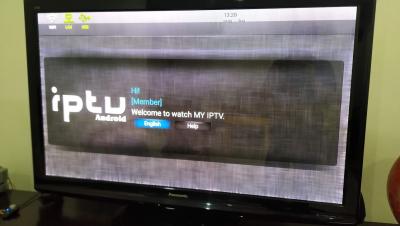
|
|
|
|
|
|
Mickey C
|
Jan 17 2020, 05:09 PM
|
|
|
QUOTE(puchongite @ Jan 2 2020, 08:28 PM) Boot to recovery and choose factory reset. The reset button is usually in the AV port. Remove power, find a toothpick ( non-metal ) poke into it, press hold, and insert back power. That will put you in recovery. Usually IR won't work, you need an air mouse with dongle. TQVM.... now back in action.. |
|
|
|
|



 Quote
Quote
 0.0609sec
 0.34
0.34
 7 queries
 GZIP Disabled