

 Jul 26 2019, 11:01 AM


QUOTE(JayceOoi @ Sep 1 2017, 01:01 PM)
Installation
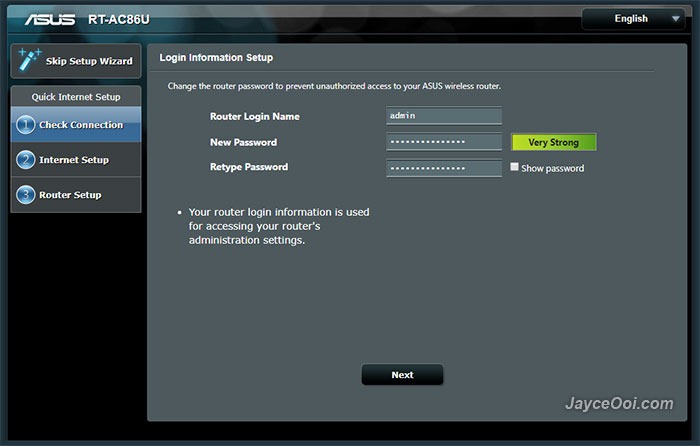
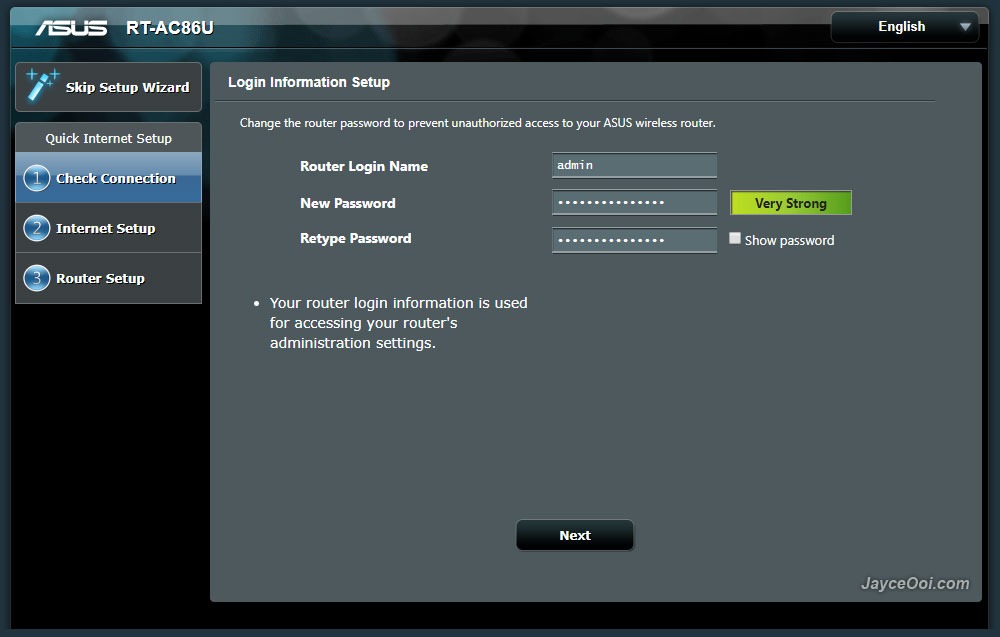
Mine is China version as you know. Therefore, the web interface is in Chinese by default. No worry, you can select the language that you prefer. ASUS Router firmware is loaded with multiple languages for all the users in the world. There are English, Japanese, and a lot more Europe countries' languages that I don't know. As for installation, it is pretty straight forward. Basically, you need to connect cable/DSL modem Internet cable to WAN port. Setup router login name and password. Then Internet setup. Follow by router configuration - network name (SSID) and password for both 2.4GHz and 5GHz. That's it. You can start using ASUS RT-AC86U wireless router to access Internet now.
Software
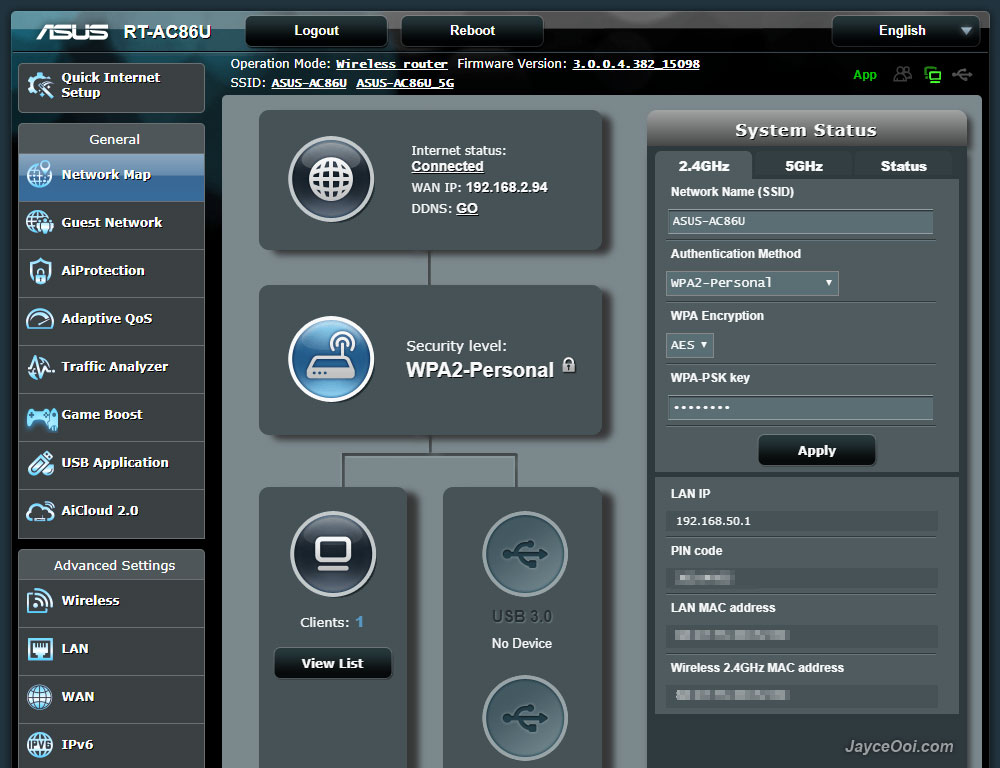
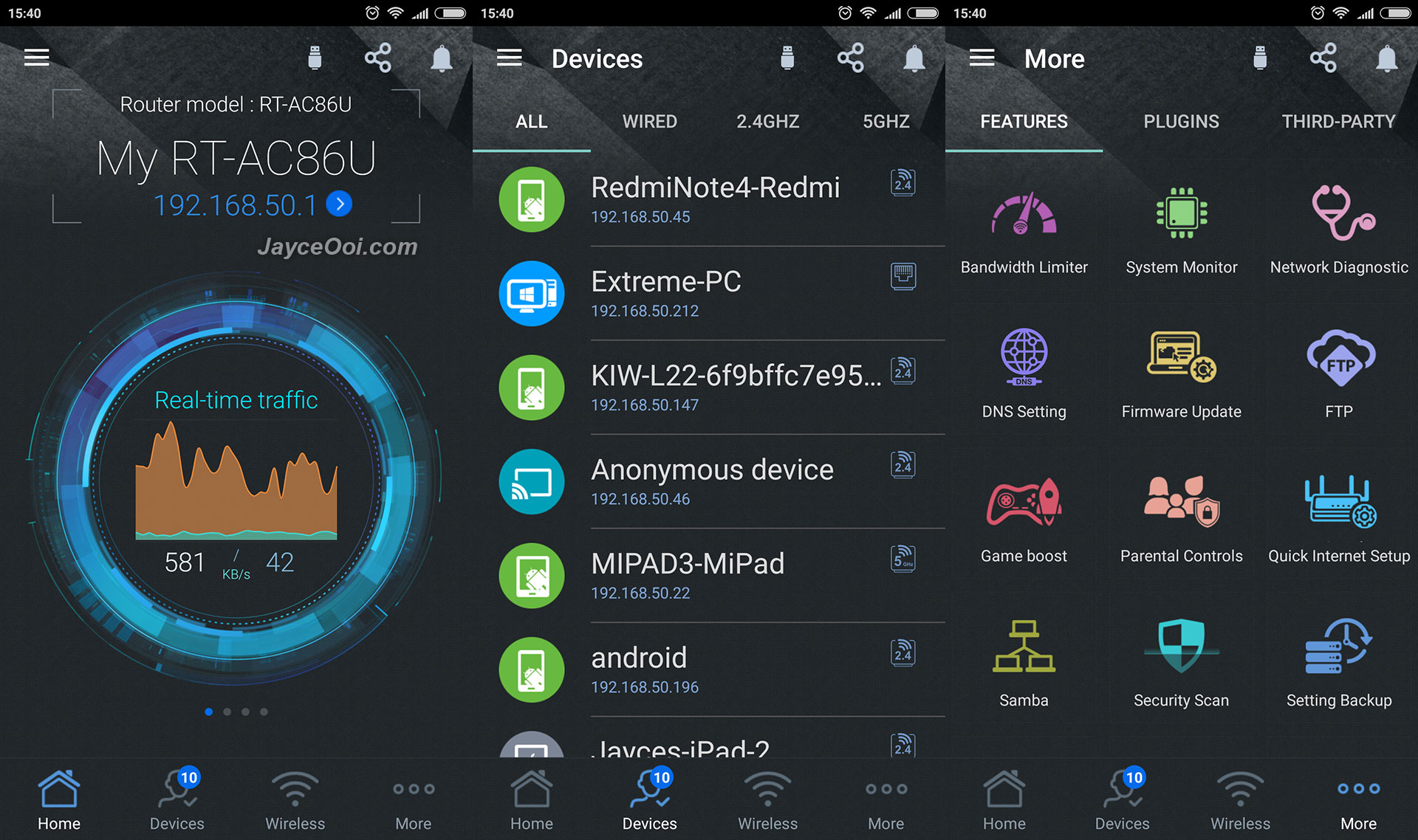
ASUS wireless router's web and mobile interfaces are the same among these 2 routers. Yup, not a stranger to me since I am using it for the past 3 years. Not an IT expert, no worry, you can start using ASUS RT-AC86U after completed installation setup. However, if you want to get all the features out of it, this is the place that you need to spend time on. By the way, do download and read the online user manual in order to know all of the functions. As usual, ASUSWRT user interface has more stuffs and details than the mobile app - ASUS Router. In short, mobile app covers the essential stuffs while web interface has all including the advanced stuffs.
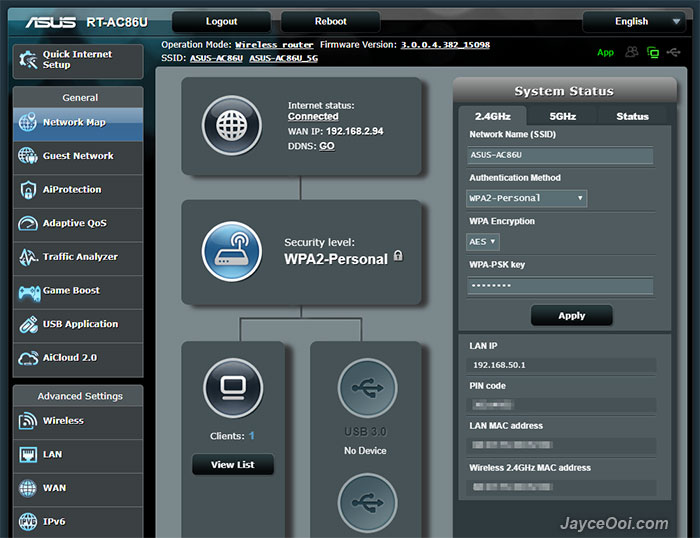
ASUS RT-AC86U Wi-Fi Router is loaded with lot of goodies and useful features. There are AiProtection with Trend Micro, Adaptive QoS, Traffic Analyzer, Game Boost (WTFast - Gamers Private Network_, USB applications like AiDisk, UPnP, iTunes, FTP, Samba, 4G modem, Android phone as a USB modem, Apple Time Machine, Download Master for BT torrent files and AiCloud 2.0. Advanced settings like IPv6, VPN and firewall can be setup as well. Can't cover all of them one by one in details here. So do check them out at ASUS Website. By the way, IPTV is supported. A great news for Malaysia users' with Maxis, UniFi and Singaporeans with Singtel and M1.

Performance Result
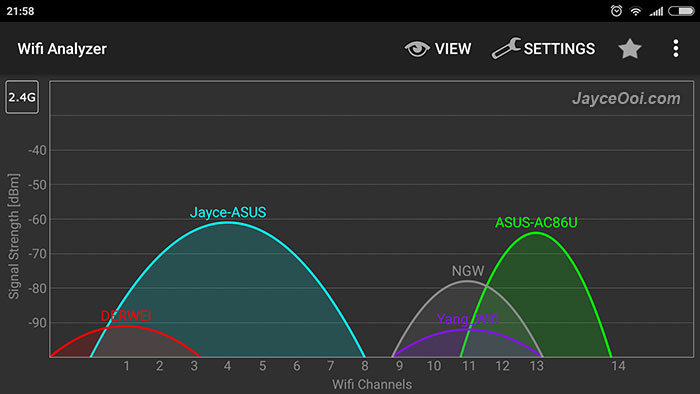
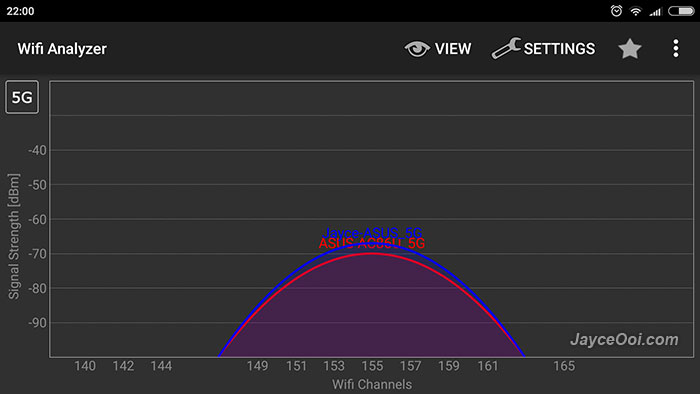
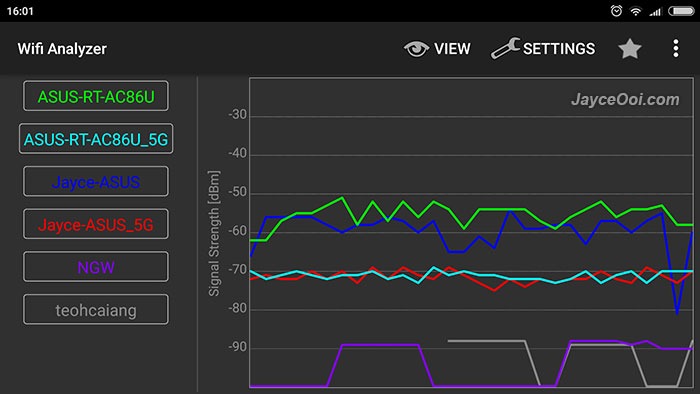
Err... Wireless range is not better / on par than existing ASUS RT-AC68U? Yes, that's the case for the new ASUS RT-AC86U Wi-Fi Router. Run lot of tests on different locations, both 2.4GHz and 5GHz wireless range does a bit shorter than previous one. Little bit disappointed no doubt with 4 dBm shorter. As usual, both of them are placed at the same spot on 1st floor. And screenshots below were taken while I was on ground floor. Note - Jayce-ASUS == RT-AC68U. Anyhow, it still can cover whole double storey house easily with 2.4GHz. 5GHz good for half the coverage as usual.
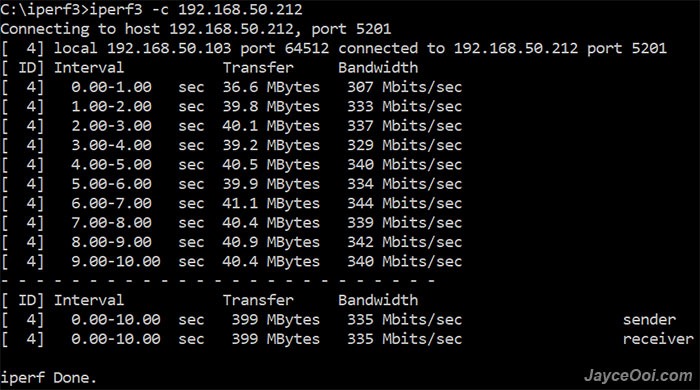
On the bright side, ASUS RT-AC86U has better wireless transfer rate ~ around 20 Mbit/s more than RT-AC68U based on iPerf3 tests. Yes even with shorter range, RT-AC86U has more throughput at the same location. That's great as long as it is within wireless coverage range. Therefore, on actual usage, RT-AC86U does perform slightly better no doubt. As for LAN, it performs at maximum speed that my devices support @ 960 Mbit/s.
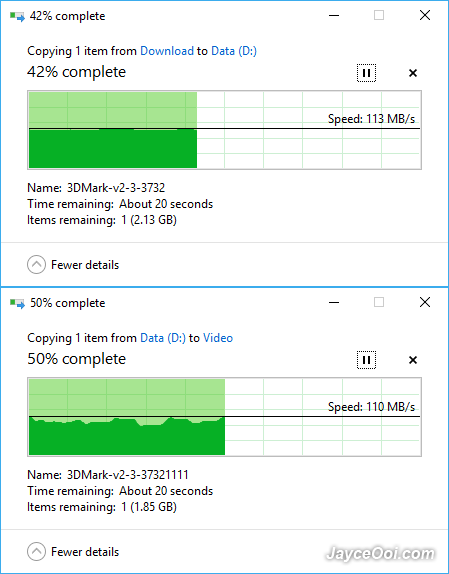
You can throw away your network-attached storage (NAS) now. Yes, just plug in a normal USB 3.0 hard drive will do. You will get NAS alike performance with ASUS RT-AC86U. Constant reading at 110MB/s and more than 100MB/s while writing. A huge improvement when compere to RT-AC68U with around 40MB/s only. Of course, that's the result from LAN connection. Wireless transfer will be limited by wireless devices themselves.
ASUS RT-AC86U supports Wireless router, repeater, Access Point (AP) and media bridge modes. And lot of other useful features that I mentioned previously. Overall, RT-AC86U does performs faster with new 1.8 GHz dual-core processor, more RAM and storage. I hate to reboot previous RT-AC68U router when applying settings as it needs take around 2 minutes plus to do so. Guess what? RT-AC86U does it within 40 seconds. Serving 10+ devices smoothly with MU-MIMO support are piece of cake for it. Does not slow down at all when someone is transferring file to/fro USB hard drive. Yes, I am getting the lowest latency on online games like Mobile Legend thanks to Adaptive QoS. WTFast will improve more when your games are supported.
Anyway, all of these issues will be fixed ASUS for sure. Why? RT-AC68U is still getting firmware upgrade on improvements until now. RT-AC86U will get the same treatment as well. Furthermore, it will be getting Asuswrt-merlin custom firmware anytime soon too.
Update – Above issue had been solved on ASUS RT-AC86U Firmware version 3.0.0.4.382.16466. Stable for everyday use as I am using it now. Sometime, its wireless range performance is slightly better than RT-AC68U.
Advantages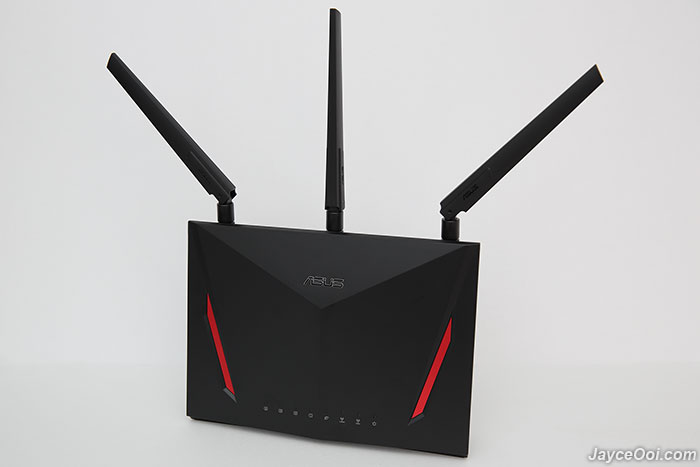
Conclusion
ASUS RT-AC86U is a feature-packed advanced wireless router with excellent performance no doubt. Enjoy 4×4 MU-MIMO 802.11ac and NAS alike 110MB/s transfer rate. Great wireless range that suitable for both home and office. Don’t forget that it is loaded with lot of useful features too. Worry free with 3 years warranty. Interested? More information can be found at ASUS Website.
P/S – ASUS RT-AC86U is my current wireless router at home now. Highly recommended!

would this be better than TP - Link which provided by Unifi ?Mine is China version as you know. Therefore, the web interface is in Chinese by default. No worry, you can select the language that you prefer. ASUS Router firmware is loaded with multiple languages for all the users in the world. There are English, Japanese, and a lot more Europe countries' languages that I don't know. As for installation, it is pretty straight forward. Basically, you need to connect cable/DSL modem Internet cable to WAN port. Setup router login name and password. Then Internet setup. Follow by router configuration - network name (SSID) and password for both 2.4GHz and 5GHz. That's it. You can start using ASUS RT-AC86U wireless router to access Internet now.
Software
ASUS wireless router's web and mobile interfaces are the same among these 2 routers. Yup, not a stranger to me since I am using it for the past 3 years. Not an IT expert, no worry, you can start using ASUS RT-AC86U after completed installation setup. However, if you want to get all the features out of it, this is the place that you need to spend time on. By the way, do download and read the online user manual in order to know all of the functions. As usual, ASUSWRT user interface has more stuffs and details than the mobile app - ASUS Router. In short, mobile app covers the essential stuffs while web interface has all including the advanced stuffs.
ASUS RT-AC86U Wi-Fi Router is loaded with lot of goodies and useful features. There are AiProtection with Trend Micro, Adaptive QoS, Traffic Analyzer, Game Boost (WTFast - Gamers Private Network_, USB applications like AiDisk, UPnP, iTunes, FTP, Samba, 4G modem, Android phone as a USB modem, Apple Time Machine, Download Master for BT torrent files and AiCloud 2.0. Advanced settings like IPv6, VPN and firewall can be setup as well. Can't cover all of them one by one in details here. So do check them out at ASUS Website. By the way, IPTV is supported. A great news for Malaysia users' with Maxis, UniFi and Singaporeans with Singtel and M1.
Performance Result
Err... Wireless range is not better / on par than existing ASUS RT-AC68U? Yes, that's the case for the new ASUS RT-AC86U Wi-Fi Router. Run lot of tests on different locations, both 2.4GHz and 5GHz wireless range does a bit shorter than previous one. Little bit disappointed no doubt with 4 dBm shorter. As usual, both of them are placed at the same spot on 1st floor. And screenshots below were taken while I was on ground floor. Note - Jayce-ASUS == RT-AC68U. Anyhow, it still can cover whole double storey house easily with 2.4GHz. 5GHz good for half the coverage as usual.
On the bright side, ASUS RT-AC86U has better wireless transfer rate ~ around 20 Mbit/s more than RT-AC68U based on iPerf3 tests. Yes even with shorter range, RT-AC86U has more throughput at the same location. That's great as long as it is within wireless coverage range. Therefore, on actual usage, RT-AC86U does perform slightly better no doubt. As for LAN, it performs at maximum speed that my devices support @ 960 Mbit/s.
You can throw away your network-attached storage (NAS) now. Yes, just plug in a normal USB 3.0 hard drive will do. You will get NAS alike performance with ASUS RT-AC86U. Constant reading at 110MB/s and more than 100MB/s while writing. A huge improvement when compere to RT-AC68U with around 40MB/s only. Of course, that's the result from LAN connection. Wireless transfer will be limited by wireless devices themselves.
ASUS RT-AC86U supports Wireless router, repeater, Access Point (AP) and media bridge modes. And lot of other useful features that I mentioned previously. Overall, RT-AC86U does performs faster with new 1.8 GHz dual-core processor, more RAM and storage. I hate to reboot previous RT-AC68U router when applying settings as it needs take around 2 minutes plus to do so. Guess what? RT-AC86U does it within 40 seconds. Serving 10+ devices smoothly with MU-MIMO support are piece of cake for it. Does not slow down at all when someone is transferring file to/fro USB hard drive. Yes, I am getting the lowest latency on online games like Mobile Legend thanks to Adaptive QoS. WTFast will improve more when your games are supported.
Anyway, all of these issues will be fixed ASUS for sure. Why? RT-AC68U is still getting firmware upgrade on improvements until now. RT-AC86U will get the same treatment as well. Furthermore, it will be getting Asuswrt-merlin custom firmware anytime soon too.
Update – Above issue had been solved on ASUS RT-AC86U Firmware version 3.0.0.4.382.16466. Stable for everyday use as I am using it now. Sometime, its wireless range performance is slightly better than RT-AC68U.
Advantages
- 4×4 MU-MIMO 802.11ac
- Support up to 2900Mbps & Gigabit Ethernet
- 110MB/s USB 3.0 HDD transfer speed
- Packed with lot features
- Built-in download manager
- Top-notch build quality
- Multiple languages support
- 3 years warranty
- None from me
Conclusion
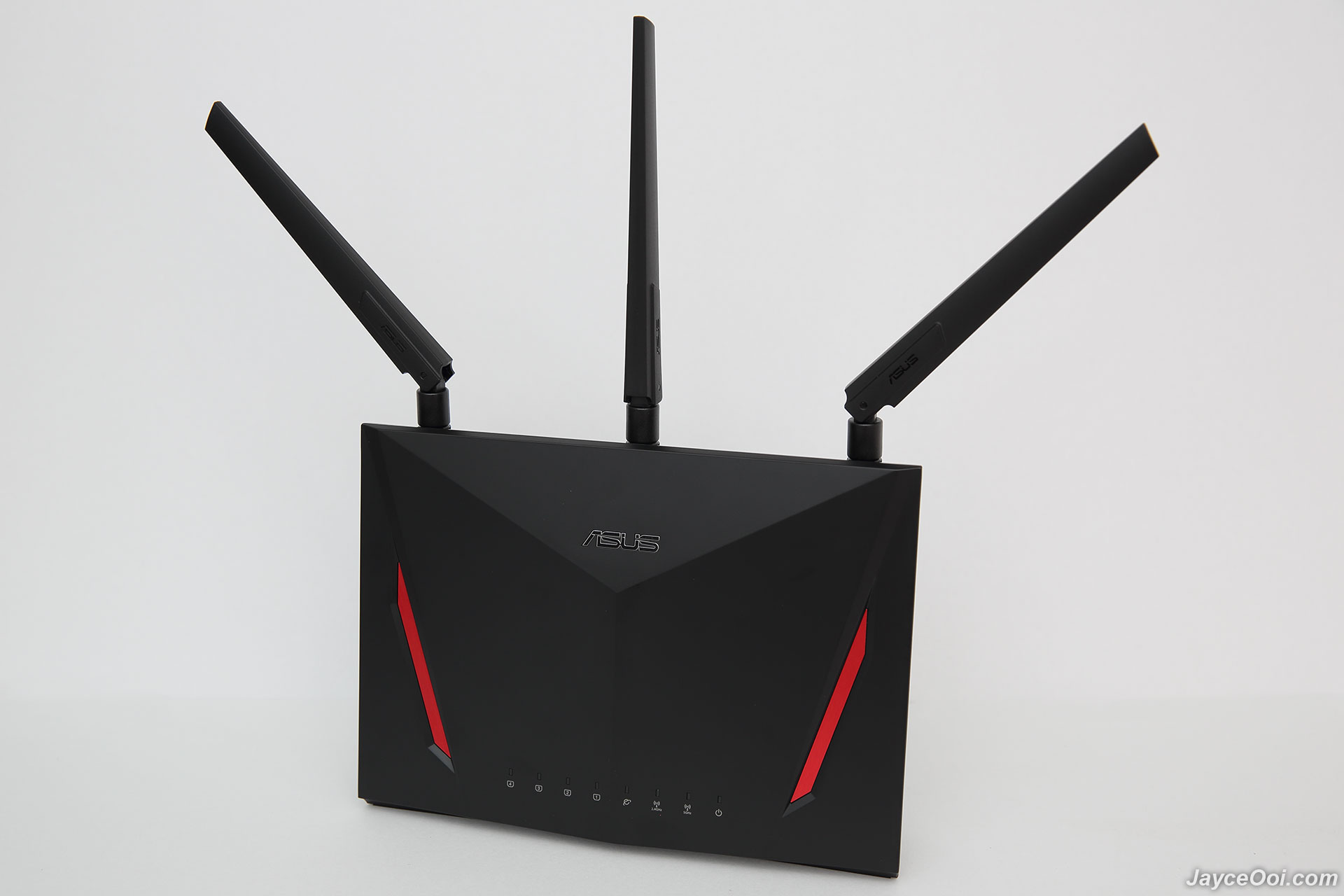
ASUS RT-AC86U is a feature-packed advanced wireless router with excellent performance no doubt. Enjoy 4×4 MU-MIMO 802.11ac and NAS alike 110MB/s transfer rate. Great wireless range that suitable for both home and office. Don’t forget that it is loaded with lot of useful features too. Worry free with 3 years warranty. Interested? More information can be found at ASUS Website.
P/S – ASUS RT-AC86U is my current wireless router at home now. Highly recommended!
 Quote
Quote


 0.0405sec
 0.38
0.38
 7 queries
 GZIP Disabled