

 Jul 22 2020, 11:15 PM


Hi guys, need some advice for the setting of GT-AC5300. Currently I'm using Unifi 800Mb.
Router Firware version : 3.0.0.4.384_81974-gb2967e4
Cable used from Modem to Router : Cat 7
I've tested the the internet speed using LAN cable directly with my laptop and manage to obtain full Download and Upload speed.
However when I tried to speedtest using my device as below :
1. Laptop with Wirelss AC-9560 160mhz
2. Samsung Galaxy Note 10 Plus
In 5Ghz mode, the fastest speed I can get is,
1. If stand directly in front of the router, max is D : 140~150Mbps U : 100Mbps.
2. On 2nd floor, D : 100~110Mbps U : 60~70Mbps only.
Previously before few firmware updates, if standing in front of the router to test with the same devices, can easily hit appx D : 500Mbps and 2nd floor can get ard D : 250~300Mbps...
Hopefully some experts here can enlighten me with a better setting for this GT-AC5300 so that I can fully optimize the speed and performance of this great router with my Unifi 800Mb~
Million thanks in advance~
Review ASUS RT-AC86U, Feature-packed advanced wireless router
 Quote
Quote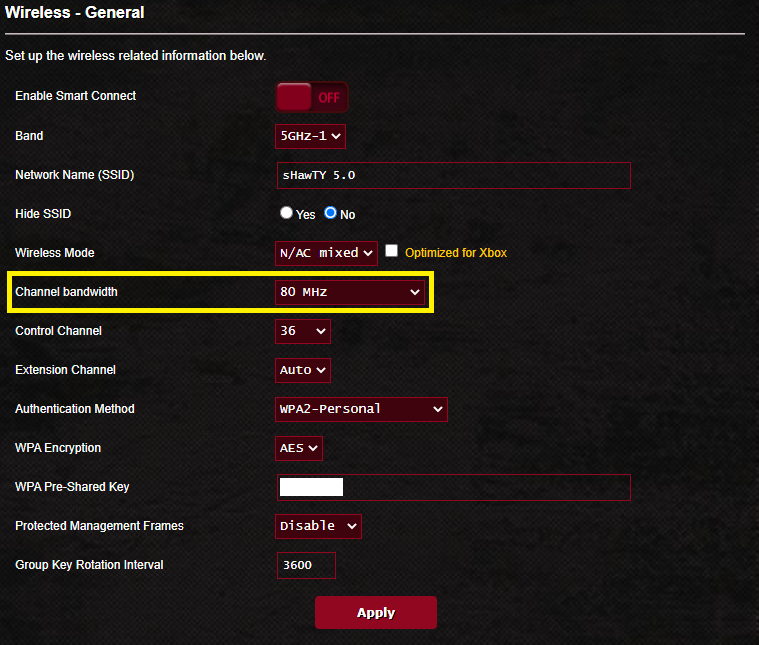


 0.0153sec
 0.48
0.48
 7 queries
 GZIP Disabled