Welcome Guest ( Log In | Register )

54 Pages « < 22 23 24 25 26 > » Bottom

Outline · [ Standard ] · Linear+

Review ASUS RT-AC86U, Feature-packed advanced wireless router

views
     
peguin78
post Nov 27 2018, 12:41 PM

Getting Started
**
Junior Member
162 posts

Joined: Sep 2008


My AC86U is on auto reboot on Fridays. I do notice that the Power LED blinks a few times or even switch off once the unit rebooted although the other LEDs stay lit. It takes a few seconds for all the LEDs to be on. Not sure your problem is related though
thamch
post Nov 28 2018, 09:10 AM

Getting Started
**
Junior Member
271 posts

Joined: Sep 2004


QUOTE(coo|dude @ Nov 26 2018, 09:26 AM)
Hi, I know this thread is all about AC86U, but I just want to "tumpang" this thread considering the lively and responsiveness this thread has been.

I have an AC5300 unit - just wondering:
1. Are there better antennas out there to increase the range? Or is there a setting to do this? I saw a power saving feature to decrease the range though but nothing on increasing it.
2. Any "accessories" for this beast? Is a cooling fan really needed? Is it noisy?
*
1. I'm using stock antenna. What kind of problem that you are facing?

2. Just mod a 12v 120mm computer fan and plug it to 5V USB port on the router. It will be near zero noise.
coo|dude
post Nov 28 2018, 09:14 AM

Cool By The Pool!
******
Senior Member
1,064 posts

Joined: Oct 2008


QUOTE(thamch @ Nov 28 2018, 09:10 AM)
1. I'm using stock antenna. What kind of problem that you are facing?

2. Just mod a 12v 120mm computer fan and plug it to 5V USB port on the router. It will be near zero noise.
*
No problem, just thought of extending the range so that my far kitchen signal is stronger..

Wouldn't the modded fan be causing more harm, i.e. blowing dust into the router?
thamch
post Nov 29 2018, 10:10 PM

Getting Started
**
Junior Member
271 posts

Joined: Sep 2004


QUOTE(coo|dude @ Nov 28 2018, 09:14 AM)
No problem, just thought of extending the range so that my far kitchen signal is stronger..

Wouldn't the modded fan be causing more harm, i.e. blowing dust into the router?
*
My fan is blowing out instead of blowing into the router.
CKKwan
post Dec 1 2018, 08:08 AM

Enthusiast
*****
Senior Member
886 posts

Joined: Dec 2004
How can I shutdown this router properly without logging into the WebUI?

I am afraid of damaging to the HDD attached.

naturalfool
post Dec 1 2018, 09:07 PM

Getting Started
**
Junior Member
232 posts

Joined: Dec 2015
Guys, I looking for my email that tells me my PPPoE username and password but cannot find. Found an email with the username and password for Telekom IPTV only. Is the password the same for PPPoE?

I livechat with TM and was told they need to reset my password and I will get new password by sms within 24 hrs but before I get the password, will not have internet...dang it
ppfoong
post Dec 3 2018, 10:33 PM

On my way
****
Junior Member
555 posts

Joined: Jun 2008
QUOTE(naturalfool @ Dec 1 2018, 09:07 PM)
Guys, I looking for my email that tells me my PPPoE username and password but cannot find. Found an email with the username and password for Telekom IPTV only.  Is the password the same for PPPoE?

I livechat with TM and was told they need to reset my password and I will get new password by sms within 24 hrs but before I get the password, will not have internet...dang it
*
Your username should be username@unifi
Your password will be the same if it has not been changed before.


naturalfool
post Dec 3 2018, 10:47 PM

Getting Started
**
Junior Member
232 posts

Joined: Dec 2015
QUOTE(ppfoong @ Dec 3 2018, 10:33 PM)
Your username should be username@unifi
Your password will be the same if it has not been changed before.
*
Sorry...same with what sweat.gif ? The IPTV password?

I've never changed the password. Dunno how.

This post has been edited by naturalfool: Dec 3 2018, 10:59 PM
soultaker
post Dec 4 2018, 01:58 AM

Regular
******
Senior Member
1,323 posts

Joined: Jan 2003
From: Unknown


QUOTE(naturalfool @ Dec 3 2018, 10:47 PM)
Sorry...same with what  sweat.gif ? The IPTV password?

I've never changed the password. Dunno how.
*
no, it's different. which router from TM are you using before this? if you are using dlink dir 850l, you can get the pppoe password by login into the router.
naturalfool
post Dec 4 2018, 07:05 PM

Getting Started
**
Junior Member
232 posts

Joined: Dec 2015
QUOTE(soultaker @ Dec 4 2018, 01:58 AM)
no, it's different. which router from TM are you using before this? if you are using dlink dir 850l, you can get the pppoe password by login into the router.
*
Using the TRG212M ...anyway to get it from the router itself?

Or my one and only alternative is to get TM to reset and enjoy the downtime.
soultaker
post Dec 5 2018, 03:18 AM

Regular
******
Senior Member
1,323 posts

Joined: Jan 2003
From: Unknown


QUOTE(naturalfool @ Dec 4 2018, 07:05 PM)
Using the TRG212M ...anyway to get it from the router itself?

Or my one and only alternative is to get TM to reset and enjoy the downtime.
*
I'm not sure if this method will work but you can try..

https://forum.lowyat.net/topic/3974921/all

btw, if you need to get the pppoe password from TM, do contact them via twitter. some forumer mentioned he was able to get the password quicker rather than using SMS method.
naturalfool
post Dec 5 2018, 09:45 AM

Getting Started
**
Junior Member
232 posts

Joined: Dec 2015
QUOTE(soultaker @ Dec 5 2018, 03:18 AM)
I'm not sure if this method will work but you can try..

https://forum.lowyat.net/topic/3974921/all

btw, if you need to get the pppoe password from TM, do contact them via twitter. some forumer mentioned he was able to get the password quicker rather than using SMS method.
*
Thanks for taking the time to reply. I've gone the the thread previously but I just don't understand the terms. I did try to inspect the source at a few places but couldn't find anything that looks like the password. Looks like I will just have to get it from TM.
PsychoJoe
post Dec 5 2018, 02:55 PM

Casual
***
Junior Member
334 posts

Joined: Dec 2008
My RT-AC86U is just over a year old (from Gearbest). Last week, it started hanging (Internet lost, unable to connect to the admin page even via Ethernet), fixed via power cycle only to crash again a random time later. The logs were not clear.

Thinking it was a bad flash, I tried updating the firmware again etc but no dice. Finally when I tried Merlin FW as a last resort, the temperature page alerted me that the router CPU was running extremely hot (99 degrees C!) and I finally noticed in the log that the CPU shut itself down due to thermal throttling. I'm not sure why I never noticed the line in the logs earlier (could be a line that Merlin FW added).

Communicating with Gearbest for RMA has been a bit frustrating (because of the language barrier) but they finally offered me 3 options:

1. Return the item to China at my own cost for free repair (which doesn't sound like RMA - it's not clear whether I'll be getting a new device or a refurbished one).
2. Keep the dud and get USD 30 credit in the Gearbest Wallet.
3. Keep the dud and buy a replacement from them at a "special" price of USD 150.

It's obviously a hardware problem (I have no idea what failed to trigger this series of events - I was running stock previously), but some comments seem to indicate the RT-AC86U has heat issues which means I may encounter it again.

I'm wondering whether installing those fans from Lazada that someone linked would make the dud usable, in which case it might make sense not to go for option 1.

I'm interested in what my fellow AC86U forumers think, especially those who have gone for RMA before, what was your experience etc?

This post has been edited by PsychoJoe: Dec 5 2018, 10:49 PM
Verblassen
post Dec 9 2018, 03:26 AM

Getting Started
**
Junior Member
87 posts

Joined: Feb 2013
From: Wilayah Persekutuan, KL


QUOTE(PsychoJoe @ Dec 5 2018, 02:55 PM)
My RT-AC86U is just over a year old (from Gearbest). Last week, it started hanging (Internet lost, unable to connect to the admin page even via Ethernet), fixed via power cycle only to crash again a random time later. The logs were not clear.

Thinking it was a bad flash, I tried updating the firmware again etc but no dice. Finally when I tried Merlin FW as a last resort, the temperature page alerted me that the router CPU was running extremely hot (99 degrees C!) and I finally noticed in the log that the CPU shut itself down due to thermal throttling. I'm not sure why I never noticed the line in the logs earlier (could be a line that Merlin FW added).

Communicating with Gearbest for RMA has been a bit frustrating (because of the language barrier) but they finally offered me 3 options:

1. Return the item to China at my own cost for free repair (which doesn't sound like RMA - it's not clear whether I'll be getting a new device or a refurbished one).
2. Keep the dud and get USD 30 credit in the Gearbest Wallet.
3. Keep the dud and buy a replacement from them at a "special" price of USD 150.

It's obviously a hardware problem (I have no idea what failed to trigger this series of events - I was running stock previously), but some comments seem to indicate the RT-AC86U has heat issues which means I may encounter it again.

I'm wondering whether installing those fans from Lazada that someone linked would make the dud usable, in which case it might make sense not to go for option 1.

I'm interested in what my fellow AC86U forumers think, especially those who have gone for RMA before, what was your experience etc?
*
I hope your RMA goes smoothly and hopefully yours is an isolated case. I just got my AC-86U yesterday from Taobao.
I'm a non-Chinese speaker so I had to use Chrome's auto translate to buy.

Verblassen
post Dec 9 2018, 03:32 AM

Getting Started
**
Junior Member
87 posts

Joined: Feb 2013
From: Wilayah Persekutuan, KL


[quote=JayceOoi,Sep 1 2017, 12:01 PM]
Installation
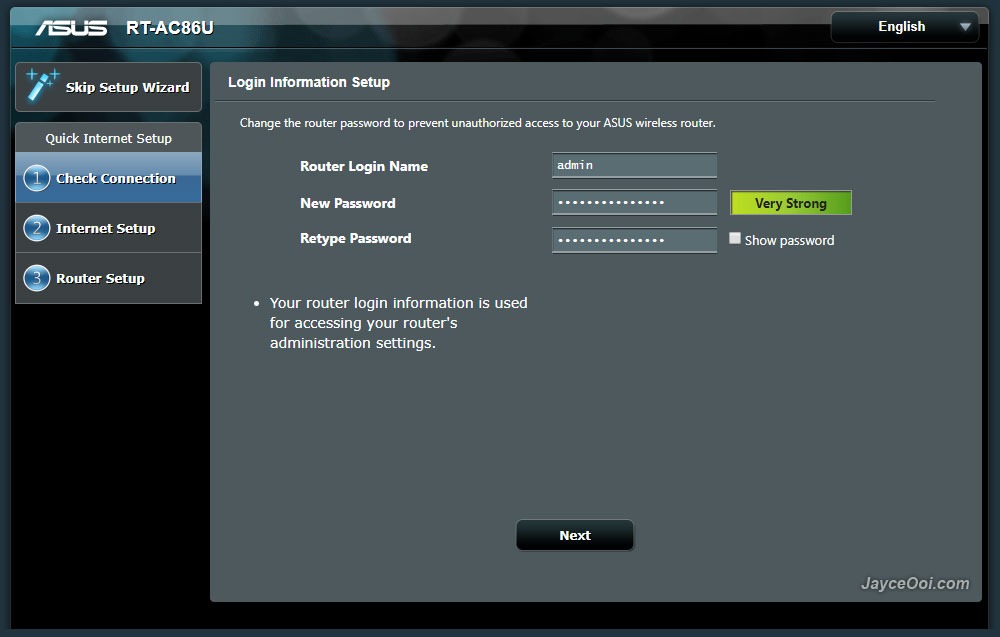
Mine is China version as you know. Therefore, the web interface is in Chinese by default. No worry, you can select the language that you prefer. ASUS Router firmware is loaded with multiple languages for all the users in the world. There are English, Japanese, and a lot more Europe countries' languages that I don't know. As for installation, it is pretty straight forward. Basically, you need to connect cable/DSL modem Internet cable to WAN port. Setup router login name and password. Then Internet setup. Follow by router configuration - network name (SSID) and password for both 2.4GHz and 5GHz. That's it. You can start using ASUS RT-AC86U wireless router to access Internet now.

user posted image


@JayceOoi I bought an AC-86U from Taobao and I didn't get this screen when I was setting up my router though. It was more of a full screen wizard and I had to go through a couple of preliminiary settings in Chinese before getting the option to switch to English under the router's main screen.
Wonder if my set up is something new? No screenshots unfortunately hmm.gif

TSJayceOoi
post Dec 9 2018, 10:18 AM

Pro Blogger
*******
Senior Member
2,741 posts

Joined: Jan 2007
[quote=Verblassen,Dec 9 2018, 03:32 AM]
[quote=JayceOoi,Sep 1 2017, 12:01 PM]
Installation
Mine is China version as you know. Therefore, the web interface is in Chinese by default. No worry, you can select the language that you prefer. ASUS Router firmware is loaded with multiple languages for all the users in the world. There are English, Japanese, and a lot more Europe countries' languages that I don't know. As for installation, it is pretty straight forward. Basically, you need to connect cable/DSL modem Internet cable to WAN port. Setup router login name and password. Then Internet setup. Follow by router configuration - network name (SSID) and password for both 2.4GHz and 5GHz. That's it. You can start using ASUS RT-AC86U wireless router to access Internet now.

user posted image
@JayceOoi I bought an AC-86U from Taobao and I didn't get this screen when I was setting up my router though. It was more of a full screen wizard and I had to go through a couple of preliminiary settings in Chinese before getting the option to switch to English under the router's main screen.
Wonder if my set up is something new? No screenshots unfortunately hmm.gif
*

[/quote]
That's the latest Asus firmware. Faced it now too. Mine is oldest one during review last year.
Verblassen
post Dec 9 2018, 10:40 AM

Getting Started
**
Junior Member
87 posts

Joined: Feb 2013
From: Wilayah Persekutuan, KL


QUOTE(JayceOoi @ Dec 9 2018, 10:18 AM)
That's the latest Asus firmware. Faced it now too. Mine is oldest one during review last year.
*
Ah.. that would explain it. The older screen was much better though. You could actually go in and change the language immediately.

I had to just "skip" through the steps until I got to my main settings page before changing it to English. After that I had to open the wizard and double check haha.

Kind of counter intuitive if you ask me doh.gif
PsychoJoe
post Dec 10 2018, 12:56 AM

Casual
***
Junior Member
334 posts

Joined: Dec 2008
QUOTE(Verblassen @ Dec 9 2018, 03:26 AM)
I hope your RMA goes smoothly and hopefully yours is an isolated case. I just got my AC-86U yesterday from Taobao.
I'm a non-Chinese speaker so I had to use Chrome's auto translate to buy.
*
Decided to go buy the fan and go for the wallet credit. Didn't trust the RMA process could fix the issue (whatever the cause) and didn't want to risk buying another dud. Assuming the wallet credit doesn't expire (it shouldn't) I can wait until the hardware stabilizes before I fork out for another.
Verblassen
post Dec 10 2018, 08:27 AM

Getting Started
**
Junior Member
87 posts

Joined: Feb 2013
From: Wilayah Persekutuan, KL


QUOTE(PsychoJoe @ Dec 10 2018, 12:56 AM)
Decided to go buy the fan and go for the wallet credit. Didn't trust the RMA process could fix the issue (whatever the cause) and didn't want to risk buying another dud. Assuming the wallet credit doesn't expire (it shouldn't) I can wait until the hardware stabilizes before I fork out for another.
*
Yeah. Heard the fans really help. I think if you put both in a pull configuration to suck the hot air out it should be fine.
peguin78
post Dec 10 2018, 09:46 PM

Getting Started
**
Junior Member
162 posts

Joined: Sep 2008


Now its' my turn...sad.gif

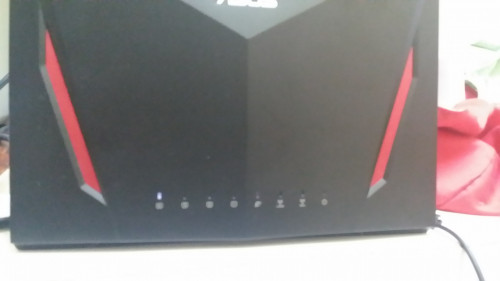
My AC86U suddenly died. Only the LAN 4 led lighted up. Cant access the home page etc. I tried to reset but unsuccessful. Any ideas guys?


user posted image

54 Pages « < 22 23 24 25 26 > » Top
 

Change to:
| Lo-Fi Version
0.0178sec    0.66    6 queries    GZIP Disabled
Time is now: 2nd December 2025 - 01:04 PM